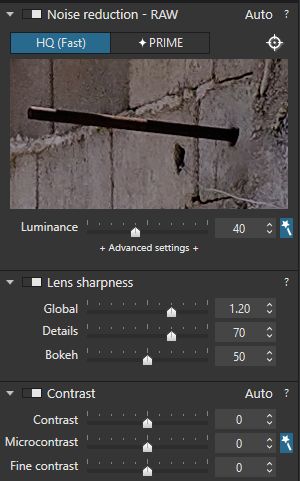
Hi, I have a question. I was looking at some video on YouTube were the maker of the video shows the features of dxo photolab.
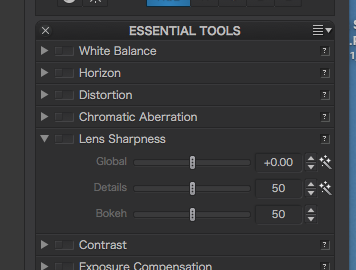
In the video it shows a Magic Wand in the lens sharpness tool. There seems to be one for sharpness and for detail. I know you need a camara/lens profile for the lens sharpness tool to work. But the strange thing is that I do not have this Magic wand in the tool. Not with any of the profiles. My software is up to date and it is running on a Windows machine. Is this a mac only feature or do I need to turn this on somewhere?
Actually, we never had a ‘magic’ wand for Lens Sharpness on Win as it there is no need in it. And I explain why: there is no auto correction for Lens sharpness and Lens sharpness settings have default values which are always the same. In the meantime, the magic wand is displayed only for the settings with “Auto” corrections.
So it’s rather a question why it is on Mac.
Coming back to Lens sharpness you can just double click on any slider to have the default values back.
Thanks all for the answers. @sgospodarenko, thank you for you,re kind reply. It leaves me a bit confused so just so I get it right, correct me if I am wrong;
there is no automatic correction for lens sharpening on Win or Mac, this explaines why the lens sharpness is always on the same default setting no matter what lens I used;
the wand symbol in the Mac software has no function, hence you’re comment (so its rather a question why it is on Mac). Probably a good question then for the developpers
The thing that confused me is why is there is an option for lens sharpness and an unsharp mask option? Sharpening needs to be done manualy zooming to 100% no matter what body and lens combination I use and if there is a profile for it or not.
There must be something I missed. The lens sharpness tool must do something with the body and lens profile. This because when you used a non supported lens the Lens sharpness tool is not available. Could you be so kind to verify the above or clarify while correcting me?
@JimScott.
Thank you Jim. Those are the wand symbols I mean. What do they do for you if you? Can you use them or are they just symbols with no function? And if you can use them, do they change any of the settings?
When I click the wand icon(s) the value is set to its default.
The curious thing here - along the lines why is it there on the Mac - You will note in my screen shot that both “Global” and “Details” have the wand but “bokeh” does not… clearly a deliberate set-up, not an oversight.
Yes, that’s true. And I’ll raise the question to Mac developers about it (as it’s really of no use for this correction).
Well, actually Lens Sharpness is available only for the images with the supported lenses while Unsharp mask allows to correct any image. As for the zooming: most of the Details corrections are rather heavy for processing so these corrections are applied at any zooming but you can see the result only if you zoom more than 75% (and you have a notification text about it beside the name of the palette).
Yes, that’s true. You can even notice that unless you download a lens module your image has default corrections with Unsharp mask activated, but as soon as you download it the corrections get based on the lens and Unsharp mask gets disabled while Lens sharpness appears in the palettes and it’s enabled.