Is it possible when using Photolab 7, to aggregate the numbers of photos taken with a particular lens. I am seeking to find out which of my lenses I prefer, and which I seldom used.
Just use the search and enter the focal length.
The problem is thst for primes he may have multiple lenses with the same focal length and any images captured with zooms at that focal length will also be included. If he’s using zoom lenses it won’t work at all If he wants to see all of the images captured by a specific lens. He doesn’t indicate what types or how many lenses he’s comparing. He apparently wants a way to uniquely identify all the images taken by a specific lens, e.g., a search for the lens model name., which I don’t believe is possible.
Mark
It is. I just tested this (LensModel field).
Okay. That’s terrific. So he should be able to get exactly what he wants.
Mark
Example:
exiftool -csv -LensModel *.NEF|awk -F, “BEGIN{getline}{t[$2]++}END{for(l in t)printf(\”% 6u %s\n\“,t[l],l)}”|sort /r
That’s for Windows with exiftool and awk installed and NEF raw files. You may also use -Lens or -LensID (seems to be the best choice for NEFs) instead of -LensModel.
Draig should just use a metadata viewer to determine how each lens is registered in the metadata. Beware : the Lens field displayed by PL when using the Image Properties command doesn’t show exactly the contents of the LensModel metadata field.
For example, for my Fuji zoom, I see “XF18-55mmF2.8-4 R LM OIS” in my metadata viewer and “Fujinon XF 18-55mm F2.8-4 R LM OIS (RAW)” in the Image Properties pop-up in DPL. So, if I do a search with “XF 18-55”, no image is found while searching for “XF18-55” gives the expected result.
“Fujinon XF 18-55mm F2.8-4 R LM OIS (RAW)” is merely the name of the DPL module for that lens.
You may also try sql on the DPL photos database, which has some limitations as pointed out by @Pat91 above:
select Lens,count(Lens) from Metadatas where isRaw = 1 group by Lens order by count(Lens) desc;
EDIT: Seems to be unreliable in my case (some lenses not reported). Maybe SQL is wrong. To get lens statistics for NEF files in the current and all subdirectories, one also may use
exiftool -csv -LensID -r . -ext NEF|awk -F, “!/^SourceFile/{t[$2]++}END{for(l in t)printf(\”% 6u %s\n\“,t[l],l)}”|sort /r
and wait patiently… When copying from forum, fix the double quotes.
External to Photolab, if you’re a Windows user and if you have jpegs of your photos:
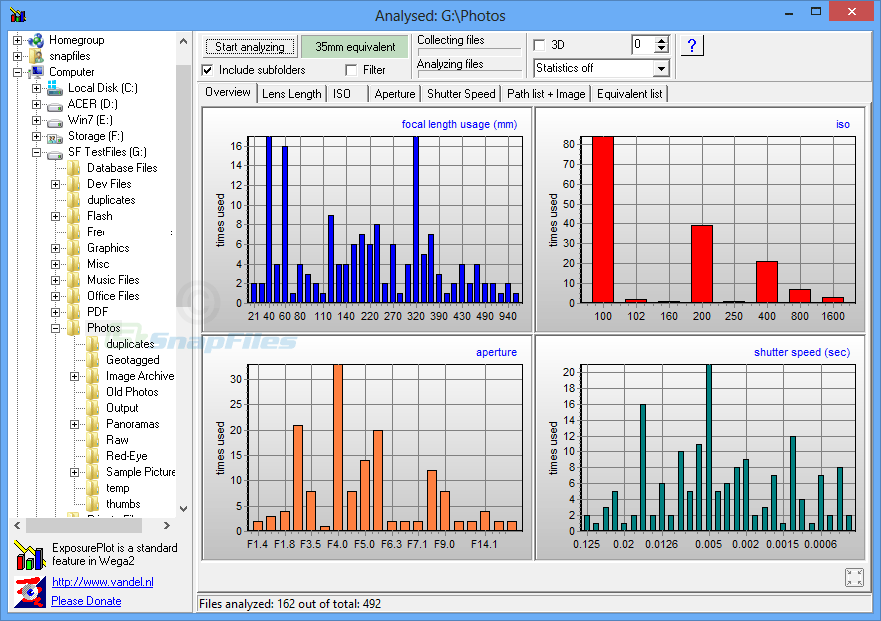
The freeware program ExposurePlot, though pretty old, is worth trying. Among other functions you can create a graph showing focal length usage. Quite interesting to see if you’re using a zoom lens throughout it’s range or mainly one end or the other (or both).
Where is there a search option in Photolab?
I used the ‘search images’ and after some playing about with the lens identity, acceptable to photolab, I did indeed come up with the number of photos taken with that particular lens. So thank you for your help.
Photolab’s image management is definitely not very robust. I use a full asset management tool called Photo Supreme to compliment my use of PL. The amount of info available in Photo Supreme is amazing. If DXO could add more management capabilities (and not require a subscription) I would consider using PL only. But PS is so good DXO would truly have to blow me away.
And if you are a professional you’ll may soon be out of a job (depending on your specialization - and maybe not) because you will be replaced by AI softwares which will come up with more proposals than you in matter of seconds, and at a ridiculously low price, using your work without any compensation.
Adobe should not be considered as an alternative. Other places would be better.
Hello,
Simply enter the name of the lens, as it is named in the metadata, in the search field. The result will display the photos taken with this lens, and their number.