I am learning post processing and I am trialling DXO Photolab 9 and I need to upgrade my computer. I went to a computer shop with the Specs from DXO and the guy sold me a
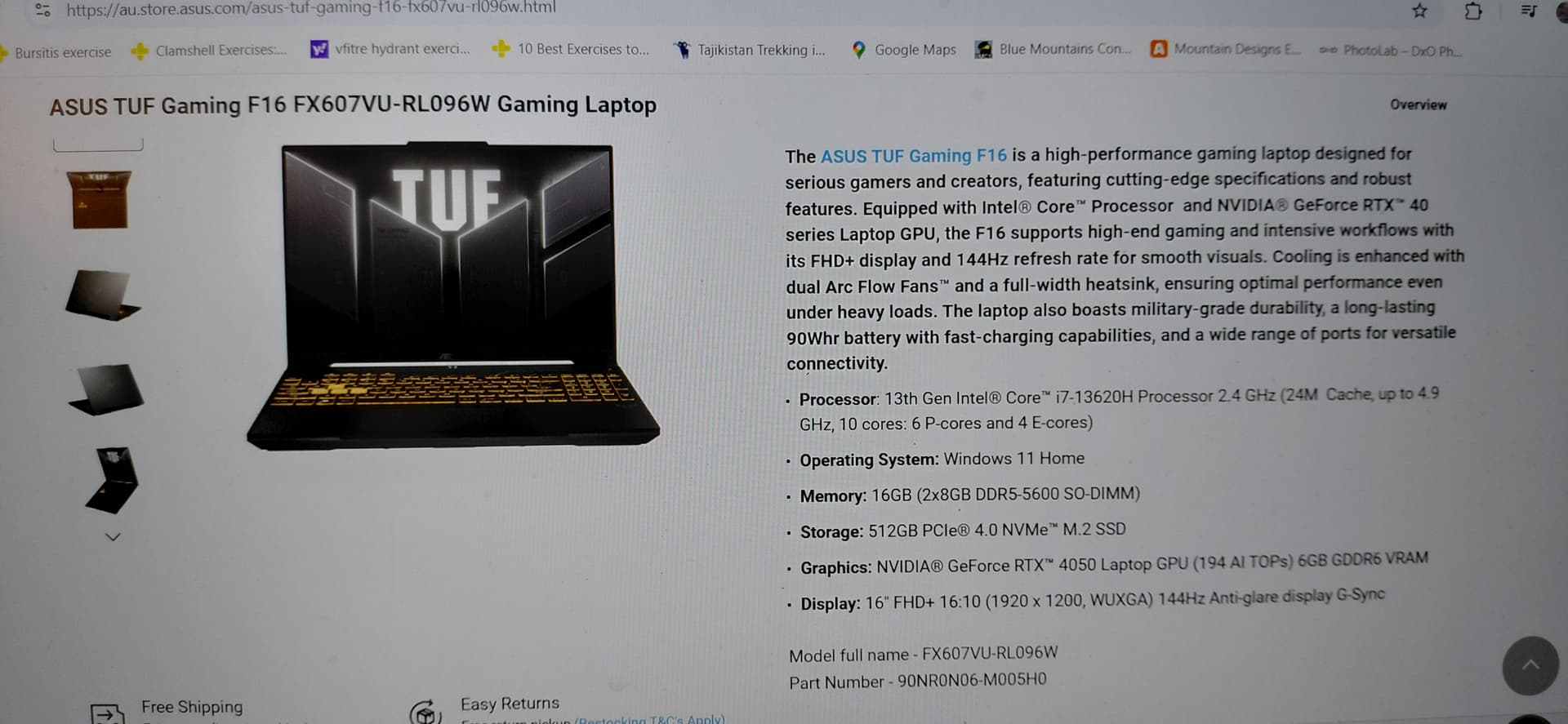
ASUS TUF Gaming F16 FX607vu-RL096W laptop.
We looked at the specs for a while and he assured me this is more than sufficient.
Now I have gone home with my new laptop and I realise that the DXO specs ask for Intel Core ULTRA 7 165H but the ASUS is a Intel Core i7 ( not ULTRA)
Is the laptop good enough to run the DXO program with AI masking. I am all stressed out now but I can return it as I haven’t
opened the box yet.
I am just a beginner of PP and won’t do big badges at a time, but I want to use the AI masking tool.
Any advice if this computer is capable of running DXO PL 9.
I have attached a photo with ASUS specs
I appreciate any advice, thank you
(Personally, I wouldn’t work on a laptop.) – However, since you are going to spend on a new device and haven’t yet decided, orient yourself towards the specifications recommended for PL9 and not the lower ones.
The only real issue I see on the PC above anyway, is that it has only 6 GB of VRAM. Way too little to use the AI masking tool, from the opinions on the forum (8 GB suggested, and 12 GB much better). The CPU on the other hand is absolutely fine.
@NathalieVerellen , your pc seems to meet the min. requirements and should be quite usable for a while. As noted above, more VRAM is desirable for heavy lifting. First steps should easily be possible though.
Whether you‘ll use the pc or have it replaced by something more powerful and costly is a matter of choice and budget…and entirely your decision,
Despite what @Lucabeer says about the quantity of VRAM, the specs of your ASUS laptop are very similar to those of my Lenovo laptop (Core i7 [not Ultra] CPU, 16 GB RAM, 1 TB SSD, RTX 4050 GPU with 6 GB VRAM) and my Lenovo laptop runs PL9 just fine. Having said that, PL9 crashes if I try to use any of the preset AI masks (for Sky, Subject, etc), but from what I read on this forum that’s fairly normal for most users of PL9.
I would endorse what @Wolfgang and @Lucabeer say about not using a laptop for photo editing. The limitation is the monitor panel.
a) the size of the panel will mean you feel you are working in a cramped space.
b) the accuracy of the colours the panel can render. Yours should be OK though, a search implies the Asus TUF Gaming F16 can display 100% of the sRGB gamut.
You can always buy a larger monitor and hook it up to the laptop to get some higher resolution. I assume that Windows supports extra monitors at higher resolution.
I can’t talk to the specifications of the laptop (I use a Mac). If you have doubts I would suggest returning it while you are able to, and get something closer to what you originally intended.
I have been using a laptop for PL for many years and my old laptop with older GPU runs PL9 just fine as long as I don’t use predefined AI masks which even causes my brand new laptop to crash.
My laptops are 16” and support P3 colour. It is very important to have a calibrated screen for editing.
@NathalieVerellen take note of this. If your screen is not calibrated and profiled you can’t be sure that the colours you see on screen are accurate. While that might not matter if your pictures are only ever viewed on your screen, it will matter if you want print your pictures.
Thank you, I will keep the laptop and when our old one needs replaced I can upgrade then once I know how far I want to take this editing process. Thanks for your advice, I will look into calibrating the screen, maybe with an seperate screen.