Hi. Over the years I have built a large set of keywords in Adobe Lightroom, which is built as a hierarchy and contains hundreds of keywords that are associated with my images. After switching to Photolab 7, I have continued to use Adobe Bridge to put keywords and structure on images. But I find that Bridge is cumbersome to use and in addition it shows my images as soft. I want to just use Photolab, but when I read metadata from the file I get a crazy chaos of keywords that are not at all where they should be. Is there a solution to this? Can I load my set of keywords and link the images back up?
Hi,
You mean your keywords are not hierarchical ?
Did you configure Bridge so that they are ?
Welcome to the forum @SturlaMalmer
Lightroom and PhotoLab have different levels of keywording capabilities.
Going to and fro between two products has the best chance to mess up things, but some of it can be fixed. I’d recommend to test PL keywording for a while with a set of copies rather than with your “prod” images files. PhotoLab’s database tends to fall apart if files are moved, copied, renamed etc. by anything other than PhotoLab.
PL can easily replace LrC for editing, is easy to use too, but managing assets is a mixed bag.
Important when using PhotoLab as a DAM
- Edit metadata in one app and one app only (single point of control)
- Never move anything with something else than PL
- Make sure that settings sidecars (.dop files) are r/w automatically (default settings)
- Know that exchanging metadata with xmp isn’t 100% safe and true.
- Search and read posts dealing with DAM, metadata, keywords etc.
- Backup the DB regularly from PL’s menu
Cleaning up the metadata mess (as far as possible)
- Separate files that have been changed in PhotoLab only
- Quit PhotoLab and rename the database files (find location in forum posts)
- With Lightroom, save xmp for all files (Lr Library can run as free app)
- Open PL and select the root folder of your photo collection
- Make PL re-index the complete photo collection and wait until done
- Verify that keyword list shows what you expect.
→ Yes: back up the database, use PL only from there on.
→ No: Take a break and report back with more detail
As you seem to be interested in a stable asset management, you’d probably best stick to the Lightroom Library Module for that part of your workflow. You can still use PhotoLab for the non-DAM editing of images. PL is much better suited for easy edits than as a DAM.
1 Like
There is a reason why I maintain Lightroom to manage my photos even though I use PhotoLab to edit them. Others here use dedicated tools like Photo Mechanic.
PhotoLab’s keyword system is arguably feature rich (more so in recent versions) but it is not at all efficient.
I, too, have a massive hierarchy of keywords in Lightroom. Last time I exported it to a text file it came out at 4,773 lines long. I routinely add 7-10 keywords per image, sometimes more, on my aircraft shots, and slightly less on my bird shots. Yet this takes me only seconds per image.
In my view, if you want “horse, mountain, beach” then use PhotoLab’s native support. If you want something more complex, use a separate tool and, as already mentioned, just leave the keywords alone in PhotoLab.
2 Likes
In Adobe Bridge they are as they should be, grouped in hierarchies, but I can’t get this into PL.
But does Bridge export keywords as a hierarchy ?
Most software has this option.
Thanks, i try LrC 
I think so, but not sure. I’m not very technical so I’m struggling a bit to get this working, any help would be greatly appreciated. Will try to see if there is a setting there for export.
You can share a file so we can try.
The one way to get Adobe keywords into PhotoLab is through what Adobe writes to XMP in files or .xmp sidecars. In order for PL to “import” these keywords, PL must be told to “read” metadata from files. This is only possible through the respective menu item or by updating Adobe XMP metadata, e.g. by telling Lightroom (and supposedly Bridge) to save to XMP manually and all files. PL should then notice that metadata has changed and offers an option to import the changes.
I know this works with Lightroom, but I haven’t been using Bridge for too long in order to know what it writes to xmp.
In Lightroom’s xmp sidecars, the following two sections can be found:
   <dc:subject>
    <rdf:Bag>
     <rdf:li>Branch</rdf:li>
     <rdf:li>Leaf</rdf:li>
     <rdf:li>Root</rdf:li>
     <rdf:li>Stem</rdf:li>
     <rdf:li>Tree</rdf:li>
    </rdf:Bag>
   </dc:subject>

...

   <lr:weightedFlatSubject>
    <rdf:Bag>
     <rdf:li>Leaf</rdf:li>
     <rdf:li>Branch</rdf:li>
     <rdf:li>Stem</rdf:li>
     <rdf:li>Root</rdf:li>
     <rdf:li>Tree</rdf:li>
    </rdf:Bag>
   </lr:weightedFlatSubject>
   <lr:hierarchicalSubject>
    <rdf:Bag>
     <rdf:li>Tree|Root|Stem|Branch|Leaf</rdf:li>
    </rdf:Bag>
   </lr:hierarchicalSubject>
After PL’s reading of metadata, they can be found in the keyword list tool in the Library module:
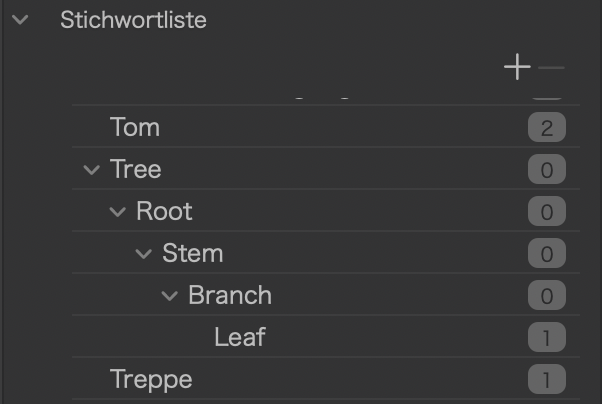
@SturlaMalmer , you can check an xmp sidecar for such entries or might be able to attach a .xmp file written by Bridge to your (next) post. We can then see what data is handed over.
I may not have understood but I believe that the keywords are imported into PL but not the hierarchy.
PL imports hierarchies as we can see in the example in my last post. Somehow, the hierarchies were lost in the OP’s transports. That’s unfortunate, but can be fixed by re-writing XMP (with a decently current version of app) and read from files by an equally recent version of PL, PL 7 should be good though.
PL has not always been able to handle (hierarchical) keywords and some of the issues of the OP might have been caused by an early version of PL. Again, this can be fixed as described above…unless Adobe Bridge suppresses hierarchies or is set to do so.
@SturlaMalmer check your Bridge settings. they might suppress hierarchical keywords.
Also let us know which versions of Bridge, Lightroom and PL you used and used to have or still have. Development goes on and versions play a role in enabling things.
I just did a test with Bridge and PL8 and no problems, the hierarchy is respected.
On the other hand, during my first tests the keywords were found in another parent keyword without this one being in the xmp.
But after, no worries, in PL I don’t even need to reread the metadata, the update is automatic and in the second the change is made in Bridge.
Indeed, if PL is set to automatically sync metadata.
I keep this in its default “off” setting and must therefore do things manually. More effort, but more control too. And as Lightroom is my asset manager, I don’t want any other app to mess with my keywords. DxO does not provide a means to separate read and write of metadata as a setting like for settings sidecars. Therefore IBM (inherently better manually)

I have given up on transferring my comprehensive hierartical keyword system from LrC til PL9
I have made the same hierarchy as projects.
There is probably a better way, but I just haven’t found it 
…and maybe it’s a good idea too. Managing keywords in more than one app will probably wreck both app’s keywording over time.
In case one wants to drop Lightroom Classic for PhotoLab, there is at least one way to get it done, provided that Lightroom is the app that managed ALL keywords so far. If keywords have been added in Lr and PL, consolidation is getting a little bit more complicated though.
As @Joanna usually says: SPOC (single point of control)
You could explicitly use SPOCK (single point to control keywords)

I’m sure I’ve said it in this forum many times already, but will repeat it in the context of this thread.
I add my keywords (very efficiently) in LR. Because my camera natively shoots DNG files, LR writes the keywords directly into the files themselves (and I’ve never corrupted one yet). While PL can see these keywords, it does not properly deal with the hierarchy. (I end up with just the leaf keyword and not the ones above it.)
So, when I export my ‘final’ JPEG from PL, I then export small (thumbnail sized) images from LR (which have zero editing on them) and with a little scripting and automation, the keywords are copied out of the LR JPEG and into the PL JPEG (then the LR ones are deleted).
It sounds like a bit of a faff, and it is, but it’s reliable and repeatable. Yes, I have to find and export the same images in LR that I’ve processed in PL, but the end result is when I upload the JPEGs to Flickr, I get the full set of keywords there automatically.
I also use a plugin in LR that enables me to associate the LR images to their Flickr counterparts and can automatically update keywords (and other metadata like GPS) if I change my keywords in some way.
If anyone wants any detail of any part of this, just ask. I’m happy to share scripts and the like.
I also mark the processed photos with a green colour in LR which, usefully, shows up in PL as a cross check.
Not fully the topic, but i think worth to mention: few SQL stuff in the forum for list all Keywords in PL (with various aspects), and Keyword import + Keyword+Photo link SQL script. The latter is for flat (non-hierarchy) import, but i think possible to modify to handle.
You and I have discussed this before, but I just want to repeat something for those who were not party to those discussions.
The safest SPOD method of assigning keywords to RAW files is to write them directly to the RAW files. I use ExifTool, which is totally reliable and can write both hierarchical and non-hierarchical keywords in a form that can be universally readable, in the same way that DNG files can be written to.
Unfortunately, from what I can gather, Lr refuses to write directly to RAW files, preferring to use XMP sidecar files instead.
Here is an example of the keyword metadata from a Nikon NEF file…
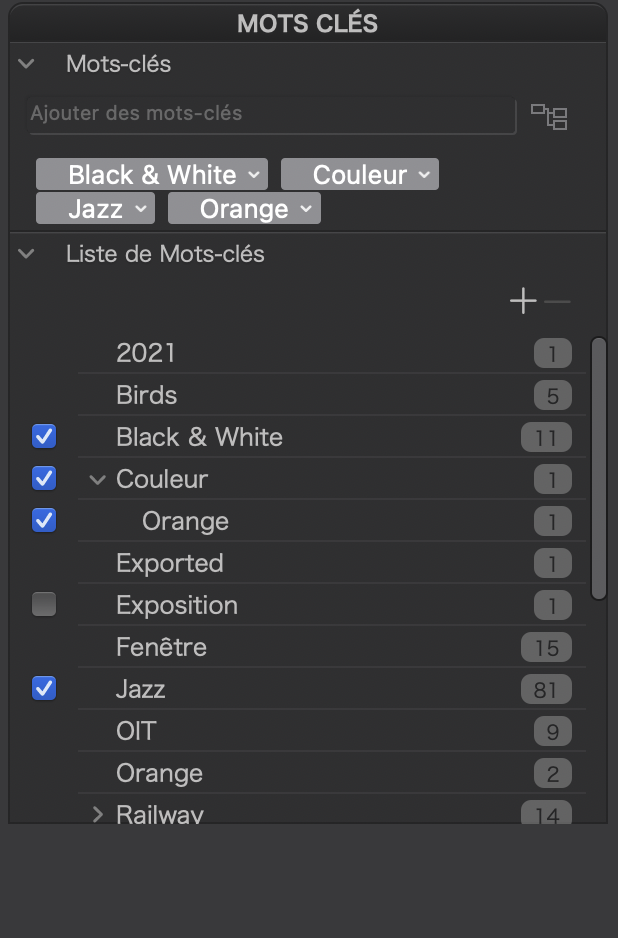
[XMP]           Subject                         : Black & White, Jazz, Couleur, Orange
[XMP]           Hierarchical Subject            : Couleur, Couleur|Orange
[XMP]           Hierarchical Keywords 1         : Couleur, Couleur
[XMP]           Hierarchical Keywords 2         : Orange
This is readable and searchable from a multitude of different DAMs.
When you read the metadata from PL, you get the following…
1 Like