Something refreshing from me - NOT a complaint about PhotoLab performance!
I am however having some trouble with this image (and those like it) which - when exported - have significant banding in the more blurred areas of the image (especially the lower left and right, in the example below).
It’s been a long while since I’ve run up against something like this.
There’s a little banding in DxO before I export but it’s much more acceptable - then in the exported JPEG it’s kinda hideous.
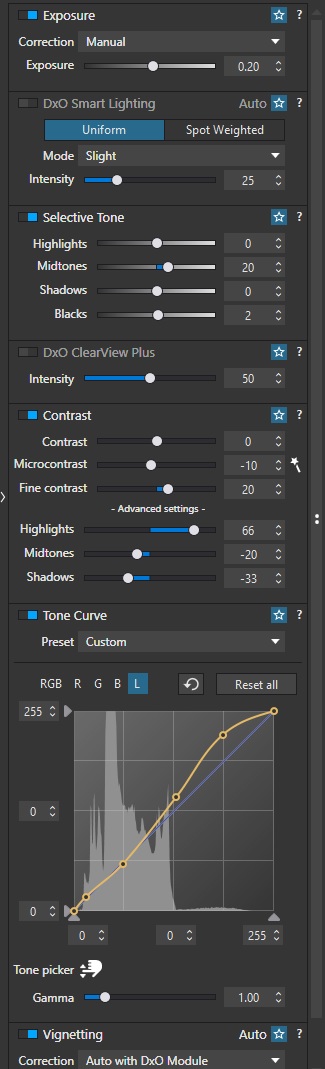
Good points… I’ve not got any Clearview going on in those areas but I am doing things with the Tone Curve and selectively increasing the Blacks a little:
I also put a gradient filter in, coming from the bottom and also the top, with some heavy negative Microcontrast (actually in an effort to reduce that banding, though it doesn’t seem to have worked).
Huh, I’m not quite sure why but I’ve made some progress of my own:
The major banding was happening because I applied a circular lens blur filter with the centre (of course) on the Mercedes logo. Turning this off helped a lot, but there was still banding.
Applying a film grain in the FX panel pretty much negates the banding, without significantly obvious grain introduced into the image!
It looks strange indeed, because Blacks=+2 is usually not enough to bring posterization. Blacks positive corrections can add a lot of “microcontrast” resulting in banding, especially on DeepPRIME-smoothed images (seen it on some of my images). Banding would be seen in deep shadows (only), but your upper left corner looks OK, so it looks really strange to me.
Not sure about gradient filter – never used it.
Not sure what you mean. Creative Vignetting?
Maybe you’ve also used some Premium LUTs, which are “rich” of banding issues (on “artistic” purpose, that is)?
Some DCP profiles can also result in banding.
JPEG is a limited colour space so very subtle gradients would be subject to banding. Of course in the editor, you have a much wider colour space to work with.
The usual method of dealing with banding (in general, not PhotoLab-specific) is to use dithering, which you effectively did by adding film grain.



 )
)