How can I edit a photo to be black and white but keep one specific color the same for example black and white photo but all blue in the the photo or select portions will remain blue?
For a start, you cannot use the B&W version of Color/B&W Rendering - 'cos that does mono only.
I suggest trying something like this …
-
Set Color/B&W Rendering to its colour-rendering pipe-line.
-
Switch to Local Adjustments mode
-
Use the Hue Mask to select the colour that you wish to keep in the image
-
Invert the resulting mask - so that now, all hues/colours except the colour you wish to keep are selected.
-
Via the HSL panel, move the Saturation slide all the way to the left (-100) - - so that, now, only your selected colour is not desaturated.
-
You may need to adjust the Hue-sliders (in the Hue Mask’s Options panel) to get precisely the range of colours that you wish to keep.
John M
Here’s an example of my approach:
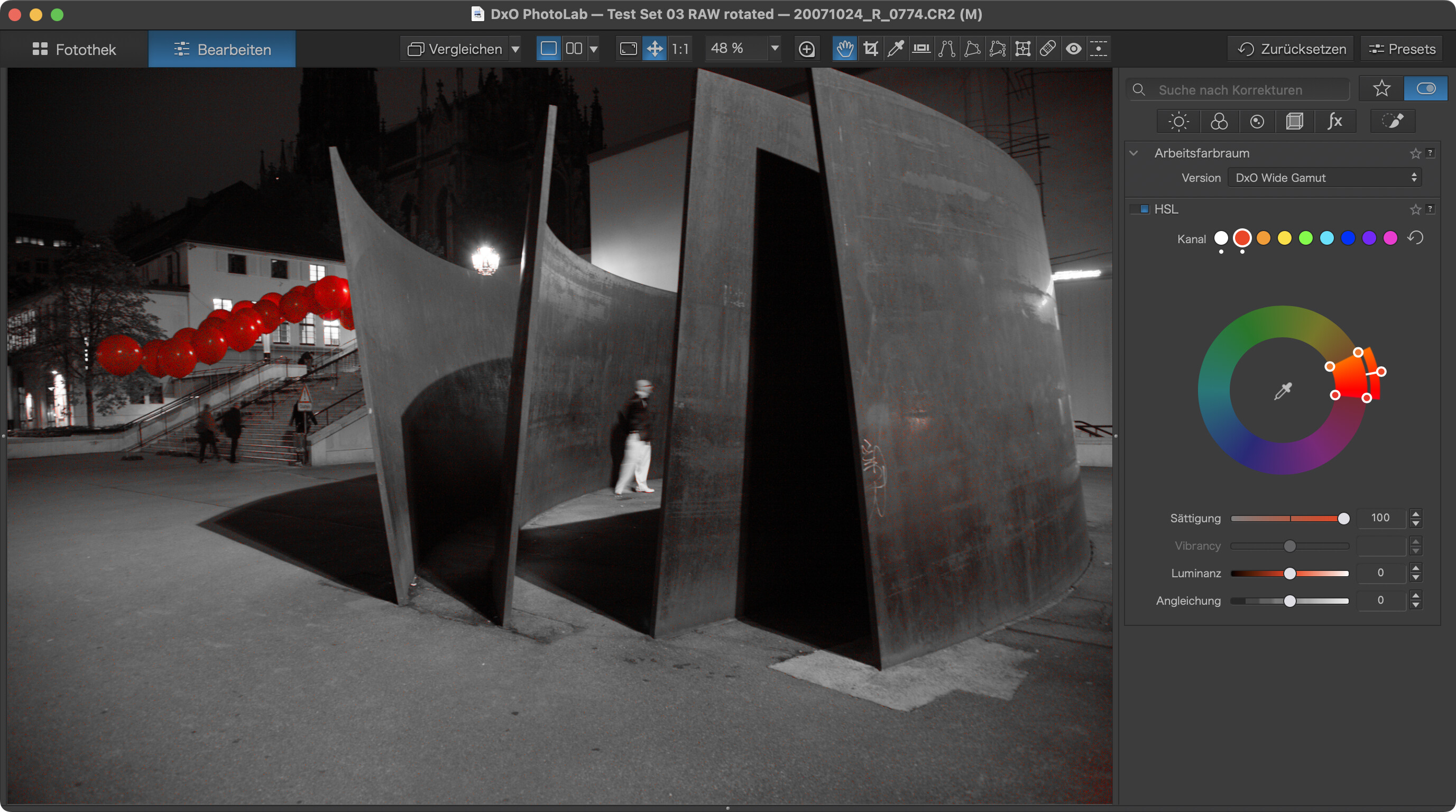
- Desaturate complete image with the HSL tool (white button)
- Bring back e.g. red using the red button
- Tune width and position of the ring segment. (I usually change the outer ring to ± complementary colour for better differentiation while adjusting)
- Fix residual parts with a local adjustment. Paint over the balloons, invert mask, desaturate. (not done and shown above)
It’s basically what @John-M describes, but the other way 'round
Variations: If you want blue balloons, turn the outer ring to blue.
Note that some images are easier to treat than others.