I’m still a little surprised that PhotoLab’s supposed behavior was considered a bug in the first post.
As stated several times, the camera is well supported by DxO, and has been for a long time. The simple fact that an image is displayed is proof that it is supported.
Clearly, the lens used, although it’s unclear which one from the screenshots, does indeed have a DxO module. The display of the Lens Sharpness Optimization settings is proof of this. If the lens didn’t have a module or wasn’t recognized, these settings wouldn’t be displayed.
And finally, it’s obvious to anyone who noticed it in the posts above that the settings are inactive, judging by the screenshots. Intentional or involuntary deactivation, or choice of the “No corrections” preset?
I don’t think he was trolling us. I believe he was likely annoyed, insulted, or embarrassed by some of the responses, or possibly realized the problem was the result of user error.
With regard to demonstrating the existence of the bug, there have been a number of less sophisticated PhotoLab users over the years who have had difficulty articulating or providing visual evidence of a bug they felt they had encountered. Often they try comparing what they are seeing in PhotoLab with other software that works completely differently, still expecting identical results,
@mwsilvers - totally agree with your conclusion. There are a few odd responses above and an experienced DXO user would not have asked these.
I have been a DPP user for many years and have recommended it to many a friend who can’t afford DXO or Adobe (yep - shoot me now) Anyway, the one thing about DPP is it brings in the RAW file and renders the display using the JPeg output that you would see at the back of the viewfinder. Therefore, it will be sharper and more vibrant than the original RAW seen in DXO.
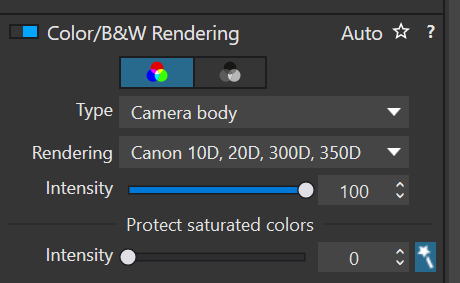
@thetaX1 - if you set DXO defaults to adjust the RAW with sharpness, and the colour rendering to Camera Body and then pick the R7 as the rendering you may find the two pictures start to align closer to what you have put up here. Give it a try and see how you get on. It will be trial and error as the two software work differently and you may find DPP may have made other slight adjustments in the background.
It’s not that I didn’t want to reply. The forum just blocked me as a “new user.” Those few posts already triggered the limit, so I would’ve had to wait 24 hours before I could continue.
Good thing I didn’t post it, I would’ve missed the crucial point.
I honestly didn’t realize that DPP displays the RAW preview by internally converting it to a JPEG – including all the enhancements that are already applied in-camera.
PL momentarily (for a very short time) displays the JPG that’s embedded within the RAW file - to give the user something to look at (!) whilst it’s applying any preset that has been specified (in Edit\Preferences) to be applied to all newly encountered images.
Then, once the preset has been applied, you will see the results of the corrections included in the preset.
In the Screenshot you provided (here) it’s clear that NONE of your corrections are in “activated” mode … So, none of them will have been applied to your image.
It’s not necessary to go to all the trouble of setting Type = Camera Body, and then selecting one’s specific camera body from the drop-down Rendering list …
PL will do this for you, automatically.
– Select Type = Generic Rendering
– PL will assign the DxO Camera Profile for the body used to capture the image.
There’s that thing with RAW developer apps and the respective “No Correction” presets or “nothing has been applied”.
Each of these apps have their ways to render data from the camera’s sensor. Most apps try to get looks close to the one of OOC jpeg images. Nevertheless, looks differ from app to app. Only the manufacturer can produce looks close to identical to OOC images because they know all the “secret ingredients”. Other apps have to make do with trial and error or machine trained algorithms … unless they have access the OEM recipes which are usually kept secret by most manufacturers. Canon seems to be specially keen on keeping their recipes secret as does the Coca Cola Company
Now, if we can see that all panels in PhotoLab’s sidebar are unchecked, we can know that nothing has been applied … except the things that DxO chose to set as PhotoLab’s default rendering. The position of a slider in a passive panel does not necessarily mean that the slider’s setting is active in the default rendering, but it means that the setting will be applied if we activate the panel. It also means that the tool will assume that setting if we reset an image or select a previous step in the “advanced history” protocol.
Using multiple apps is easy enough, but if we try to produce identically looking output, things get complicated. Imo it’s easier to use the apps for their respective capabilities and - for peace of mind - to NOT compare results to each other, but to our own idea of how we want the output to look. Then, we can learn to use the app that makes a specific task easier.
 Anyway, the one thing about DPP is it brings in the RAW file and renders the display using the JPeg output that you would see at the back of the viewfinder. Therefore, it will be sharper and more vibrant than the original RAW seen in DXO.