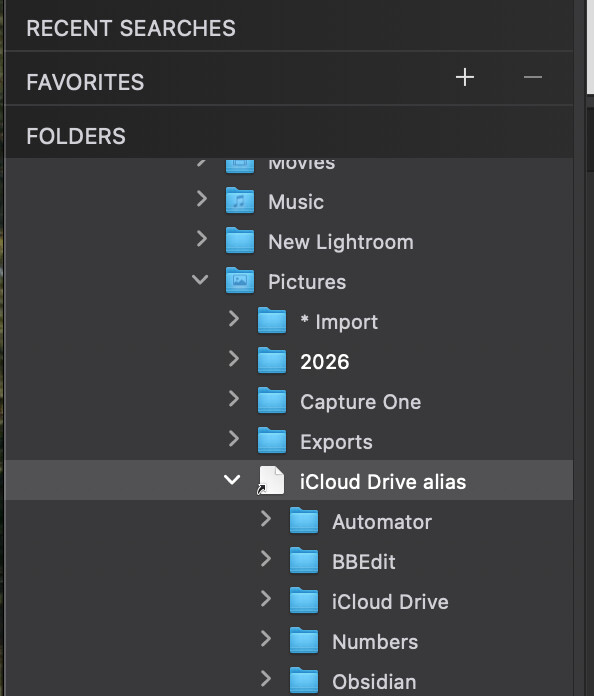
Does anyone know the current status in PL9 regarding access to folders in iCloud Drive? I found some old posts that talked about “available in the sidebar of Finder” being a requirement. I have two such folders but cannot see either in PL9.
Possibly separately, the user guide talks about the Folders section thus:
Does anyone know what “drives and folders shared with macOS” actually means? Mine is empty but… I don’t even understand those words.
If I click the “+” icon in Favorites in PL9 I can navigate to my iCloud folder and add it there. From then on it appears in Favorites in PL9.
Drives would be anything you have plugged in, I believe. Like an SSD or the like.
I have a NAS and those have network shares, which act like drives in Finder, but really it’s just a folder on the network drive. Those “shares,” as they are called, when connected in Finder, show in the Shared section of the browser in PL9.
Ahhh! I happened to be looking after I had been using my laptop away from my desk. Because macOS cannot seem to handle holding onto the shares when switching between Ethernet and wifi, I always eject them before going portable. I hadn’t re-mounted any since. Now I do that, I see them there.
If you set iCloud to keep local copies, you can find and edit images in your user account’s Library/iCloud folder.
I had tried it a whiiile ago and it worked. Didn’t watch for sidecars though.
You could try it and you’d be able to edit, locally, files in iCloud. Once connected, the stuff should sync back to iCloud. Again, please test if it works in your environment too.
Not sure if you’re experiencing the exact same thing to me, but sounds pretty similar…the only way I could even get PL9 to see my iCloud folder was to make the folder containing my photos a “favorite” in my finder window first in Tahoe 26. The folders palette in PL9 still wouldn’t (couldn’t) see it, but by using the “+” in PL9 Favorites, it became available.
That being said though, the folder view in PL9 doesn’t update if I add anything to the iCloud folder. It’s like it only has a snapshot. I have to quit & restart PL9 to make it see any changes. The same applies to sending & returning anything from Nik Collection. It’s putting sidecars and .tif files there, but no indications in the software that anything has happened.
I’ve had a support case going with DxO since the beginning of January. I finally gave up and just moved my workflow onto my hard drive. I manually copy and paste into the iCloud folder for the offsite part of my 3-2-1 backup. Not ideal, but it works.
Probably doesn’t directly answer your question(s), but it may give you some indication that PL9 & iCloud have some issues to work out. I’ve found similar posts dating back a few years.
Yeah, as per above, it never shows up in the main Folders list, but when you add a Favourite, it pops up the standard macOS Finder picker so you can easily add any folder in iCloud Drive that way.
This is my hope. I’m thinking of getting a second Mac soon and I was wondering if this could work. There’s still the issue of the database, I guess. I wouldn’t be using the second Mac a lot for photo work so hopefully it wouldn’t become a big mess.
One thing you can do, if you want to have iCloud Drive appear in your folders section of PL9, is to navigate to your user Library folder ~/Library/ and then make an alias of iCloud Drive from there (right click → Make Alias)
Then move that Alias to, say, your Pictures folder, and voila: