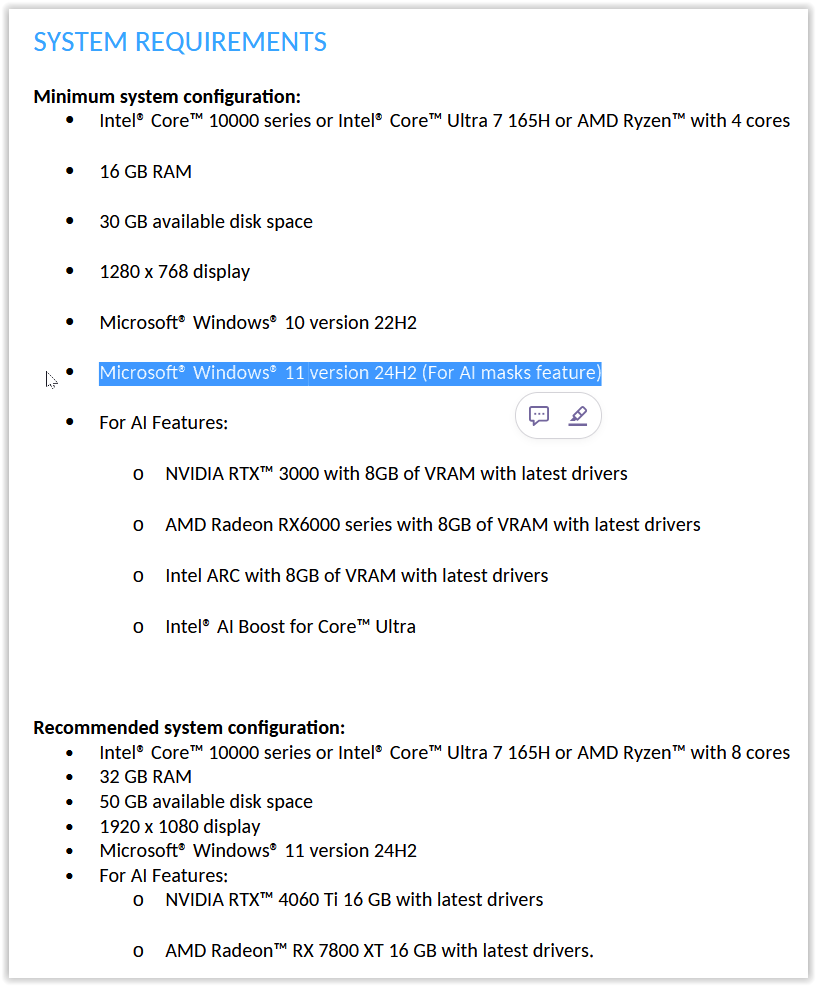
I’m still on Windows 10 with ESU updates because my installation won’t update and Microsoft is too stupid to fix it. Besides, I’m sick of updating to Windows 11.
Now I’ve found out that DxO requires Windows 11 to work.
DXO, listen up: I’m done with all this nonsense about AI masks, and I’m certainly not going to have to buy a new computer now—especially with hardware prices as high as they are—just because of the AI hype.
Ah… PL10 does work with Windows 10? AI masks included?
mwsilvers
(Mark - New Jersey, USA, Win10, RTX 4060, PL9, FP8, VP5, Nikon Zf )
4
Who told you that Photolab 10 will not run on Windows 10? That is incorrect. I am running PhotoLab 10 on my 2016 Windows 10 machine with an i-6700 processor and 24 GB of ram. A year or two ago I updated my machine with a 750 watt power supply, an Nvidia RTX4060 graphics card, and a 2 TB WD Black SSD but it is still running Windows 10 22H2. Not only does it run PL 10, but it runs it well. I have no problems with applying AI masks, and exports are fast, around 10 to 12 seconds. While overall it runs things more slowly than a state of the art Windows 11 machine, it still works surprisingly well.
Have you tried downloading the PhotoLab 10 free trial and testing it yourself on your Windows 10 machine? If you don’t have a quality graphics card that will definitely affect performance especially for AI masks and exports, and if your processor is less powerful then mine, and/or you have less ram, overall performance will likely be noticeably slower than on my machine. However, PhotoLab 10 most definitely works on Windows 10 machines.
Mark
mwsilvers
(Mark - New Jersey, USA, Win10, RTX 4060, PL9, FP8, VP5, Nikon Zf )
5
I tried the very first demo version, and the KI masks weren’t working back then. In the PL10_release-note_win_EN.pdf, it was stated that KI masks are only supported starting with Windows 11. So I gave up.
Based on your feedback, I installed the latest version of PL10 (10.1.1) and found that the KI masks now work with the latest version of Windows 10. On top of that, the restriction to Windows 11 has been removed in the latest version of PL10_release-note_win_EN.pdf. Windows 11 is now just a recommendation, along with more expensive hardware.
I wouldn’t have thought that DxO would lift the restriction after all.
That’s great, and thank you.
mwsilvers
(Mark - New Jersey, USA, Win10, RTX 4060, PL9, FP8, VP5, Nikon Zf )
7
You are quite welcome. Despite any documentation you may have seen there was never any Windows 10 restriction that had to be lifted. It worked perfectly fine on my machine in every respect on Day 1 of its release.
If you’re having any problems with using AI masks then it’s most likely due to hardware limitations of your PC - especially the capability of your GPU.
And by the way, exactly one year ago I updated a very similar machine (6700K) to Windows 11 even if not officially supported. And it has been running beautifully since then!
mwsilvers
(Mark - New Jersey, USA, Win10, RTX 4060, PL9, FP8, VP5, Nikon Zf )
13
Yes, I know that can been done, I have had other Windows 10 machines upgraded to Windows 11. However, it only gives you access to limited Windows 11 updates going forward, not all of them. so it is still a short term solution.
I will probably have a new Windows 11 machine built by next summer including the 750 watt power supply, the RTX 4060 and the 2 TB WD Black SSD which I installed in my current computer around 18 months ago. My wife and I have two identically configured Windows 10 machines so I will do one at a time with the second machine serving as a backup until the first is built and fully configured,