New to DxO. I have just installed PhotoLab 9 trial version. I cannot view or edit HEIC images, iPhone 8. Installed DxO Module för iPhone 8.
I get a message:
“”
Windows needs additional codec before in can open HEIF images. Please follow the step by-step-guide on our website
“”
Link leads to nothing useful, tells me that there are “no support of HEIC at the moment” for iPhone 8 with DxO PhotoLab 2.0.0 !?
I don’t understand. On the same computer my photo viewer, ACDSee Free, can view HEIC images and my ACDSee Photo Studio Ultimate 2026 can both see and edit HEIC images.
What am I missing?
That their HEIF support is very very limited. It can supposedly load HEIF files from a few select modern iPhones and not much else, even if they use the same encoding.
All versions of Photolab - except v9 - only support JPEG images taken by iPhones. Photolab 9 supports HEIC images taken by recent iPhones (15 and 16 as far as I know).
According to this, DxO supports iPhone4 to -X.
More about format- and device support can be found in support.dxo.com. e.g.
DxO PhotoLab 9 introduces DxO AI Masks for precise selections, local adjustments for DeepPRIME denoising and sharpening, an improved workflow with powerful batch renaming, support for iPhone and iPad photos (HEIC/HEIF and ProRAW), as well as full integration of DeepPRIME XD3 for Fujifilm X-Trans files, including the 5th generation, and much more.
For more detailed information please refer to our webpages and release notes.
Some pages need an update!
There’s more to this, folks! Read the error message carefully. Windows has a plug-in codec available from the Microsoft Store that adds OS-level support of the HEIC and HEIF image formats. It appears that PhotoLab is relying a bit on that, but DxO hasn’t updated its online documentation sufficiently. Install the codec using the Microsoft Store and the error might go away.
1 Like
Danke!
I actually read and speak a little German.
That was the page where I selected iPhone 8 and then it told me that HEIC was not supported.
Greetings from Sweden.
Sorry to hear that.
Thanks for the information.
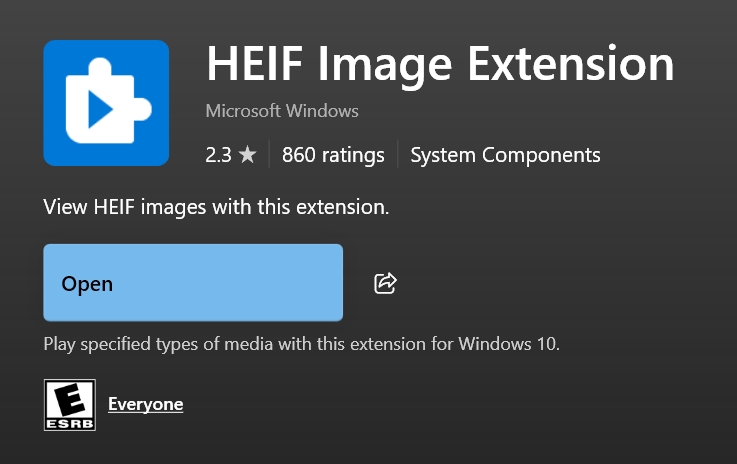
When I had a pronlem with another program using the MS App I did a sesrvh gotvit and 2 were in PL 9 but the MS app easnt there and my isyue was sorted the the other ptogram by installing from ms store. But thst probably wouldnt dort out PL9
UPDATE!
I did RTFM, including right here.
The easiest way to find the correct Microsoft app was to try to open a HEIC image in Microsoft Photos (!?). It then suggested a direct link to the correct Microsoft App. Cost me $1…
Thanks everyone!!!
Long time PhotoLab customer. Just bought the upgrade to PhotoLab 9 specifically for HEIC/HEIF support, as mentioned in the DxO Marketing materials for DxO PhotoLab 9.
However, on Windows, the HEIF files that I have were still not being opened.
So, went here and paid another $1 for this extension: HEVC Video Extensions - Download and install on Windows | Microsoft Store
The files now show up in the Dxo PhotoLab 9 library, Windows, and can be processed. It’s frustrating that this process and this dependency on spending another $1 is NOT DOCUMENTED anywhere in support pages on the DxO website.
It’s not the money, to be clear, it’s the lack of customer understanding.
DxO Team: fix this, please. Document the process instead of killing the old support page that gets redirected to a useless page that touts HEIC/HEIF compatibility but doesn’t specifiy that it does not work “out of the box” and you actually have to pay Microsoft for an extension first.
1 Like
But it isn’t DxO’s fault if the OS hasn’t been updated to cope with a given file format. It has long been Microsoft’s policy to leave it up to the user to look after that sort of thing. Unlike Apple, who tend to give that kind of stuff as part of their free OS upgrades
Agreed that part of this is a Microsoft issue, and MS should provide this file support out of the box for free.
What I’m pointing out as DxOs fault is something they do have control over: support documentation. Their product pages clearly say PhotoLab 9 supports HEIC/HEIF files, but then they leave it to the user to figure out how to actually get it to work with all the extra steps.
1 Like
Googl AI gives a link to a free MS HEIC app dowload. I have another program that neeed it to disply HEIC but they pointed users at where/how to get it unlike DXO. The last bit if the puzzle was enabling ms paint to use the app. Butbits all in the Google AI stuff
Hi,
I purchased the HEIF Video (HEVC) extension from the Microsoft Store. The HEIF Image Extension was free, and now I’m able to view .HIF pictures in Windows. However, nothing shows up in PL9. Dragging the .HIF file into PL9 doesn’t work either.
Has anyone had success with this?
I’m using a Swedish Win 11 installation that might be an issue ??
Best regards, Thomas / SWE