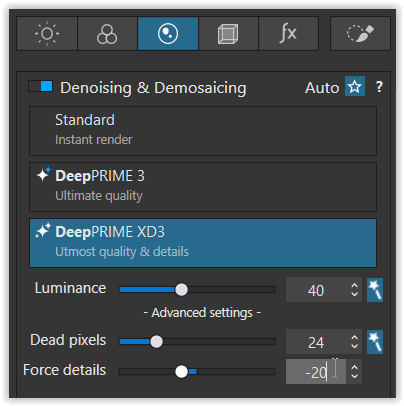
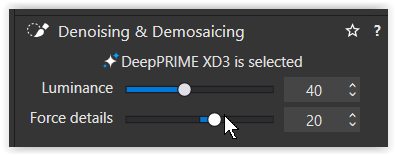
How do you decide on the amount of luminance when using DeepPrimeXD?
I’m curious because I haven’t worked out this. The auto-setting stays at 40 no matter what ISO the image has. I’d sort of take 40 as the basic setting and increase it with higher ISO’s.
Thank you both for your replies. I processed some samples, with luminance 40, and luminance 40 plus force details -20 from an average ISO image and from an ISO3200 image I was working on anyway. Both taken last night with my Canon 5D Mark III.
I opened them in PaintShopPro and on all images cropped to the same section of 500x500 pixels consisting of human skin, hair, clothes and a copper musical instrument to compare them.
On the average ISO image no difference could be seen between luminance 40 and 55. Reducing force details had the effect of smoothing skin as with the micro contrast slider but a the cost of less detail in the hair.
With the ISO3200 image I could not see any degradation when processing at luminance40 as opposed to about 70. That was amazing! It wasn’t a noisy image though.
I don’t know where I got that idea from using a higher luminance value with a higher ISO by default but it’s not needed at least in my limited test case.
The less the better. The defaults are turned ridiculously high, into plastic picture category.
Real world recommendation: somewhere between 0 and 12 is enough for all but the absurdly noisiest images. Even 0 makes a huge difference. These levels retain most of the texture in a photo, leaving a light grain.
Another advantage of lower DeepPrime settings is that one can take a pass on adding synthetic grain later. The less damage to a photo as possible, the better. Removing all the grain to add grain destroys image quality to no purpose.
Just because the software can, doesn’t mean you should.
I agree that the defaults are far too high. I don’t believe I’ve ever need to set luminance to 40. If my images are well lit, I tend to set a luminance of 2 or 4. If less well lit, say high ISO at an indoor gig, I’ll go to 8 or occasionally 12 and use the Loupe tool to judge. Rarely do I need to set it higher. Sometimes I do add back in some grain when all else is done, but more ofter I retain a little noise.
I did another test with an image from my Nikon camera changing the Luminance from 0 to 40 with increases of 10 but nothing to see again. Not even at 250% zoom.
Stenis
(Sten-Åke Sändh (Sony, Win 11, PL 6, CO 16, PM Plus 6, XnView))
8
Defaults might be too high in general BUT strangely enough thera are occations when even a blue sky can contain surprisingly much noise that needs to be handled too.
Most likely, that would be because DxO’s NR algorithm didn’t find anything that warranted any “treatment” … It’s a nuanced process; it doesn’t simply apply identical corrections to each and every image.
The problem is that we prefer a small amount of noise (grain), even when the real subject is absolutely smooth.
It’s a question of taste, nothing to do with reality.
Just do this test: a still-life, not much light, 2 photographs, one at 100 ISO and one at high ISO (3200, 6400… depending on your gear). The right value for luminance is the one that gives you the same results, not the result you prefer.
Sorry 25600 night rodeo worst case scenario for noise different approach background 60 subject 30 luminance. Still plastic looking but cowboys dont mind they want good images not perfect
It is very plasticky looking. It would look a lot more like a “real image”, i.e. a photograph were there to be a reasonable amount of native grain. Different camera companies offer different grain in their noise. Nikon is a best case scenario. Canon from the 5D III and 5DS era was the opposite. Unpleasant large grain with huge chroma noise. Sony leaned in the Nikon direction (same hardware but different processing). Not sure what the current status is.
But if you were shooting Nikon, and you left more of the native noise in, the image would retain texture yet not look noisy.
I do a lot of bird photography so need to try and keep feather detail, only use Pure Raw 6 but think the results would be the same, I normally start at 15% on Luminosity for images under 1000 iso over that I increase by +10 until the image looks right.
How do I decide? A: When the image looks right. I prefer some luminance noise over lacquered looks and usually stay below default…but my landing pad depends on the image.
I also lower it from the default to 20 or less normally i do macro and wildlife at ISO 400 to 3200, but occasionally band photography at high ISO sometimes at maximum even then find around 30 is about right
The funny thing is that when us photographers say an image looks plasticky we assume that everyone sees it like that, but I strongly suspect that the generations that have grown up with smart phone photography probably are totally fine with plastic looking high ISO photos because they tend to only shoot with smart phones and that is what they deliver. Whereas we like the look of a little bit of grain because we view something reminiscent of film as more “natural”, they have much less familiarity with film photography and for them they are not looking for any grain. Of course there are exceptions, I am not saying all youngsters want this, but I think it is a minority who are familiar with film and who reject the clean but plasticky look that the baked in NR gives on a smart phone. So I do wonder if those of us who like to retain a bit of noise and grain might be a dying breed.
It is not necessarily about the absence of noise (not to be confused with film grain), but primarily about the lack of fine detail – and this is precisely where DeepPrime XD3 excels when it comes to recovering detail.
And, of course, you can (and should) adjust the level to suit the specific subject.
I have to admit it’s not-at-all clear (IMO) what settings are optimal for what situations, or what a good starting point is either.
At least with colour and exposure we can see immediate results to tweaks that seem meaningful, but with the NR module (for me at least) it’s so much guess work or assuming it’s just set up right. It’s not something I’ll immediately clock as “ah! I had that set wrong…”