I am not sure if I am missing something but surely there is a simple delete button to get rid of a preset I made that I no longer use in DXO Photo Lab 2. If someone could help please?
Presets are there :
Presets – %LocalAppData%\DxO\DxO PhotoLab 2\Presets
Delete the preset you want.
Click on the triangle in the upper righthand corner of the “Presets” tool…
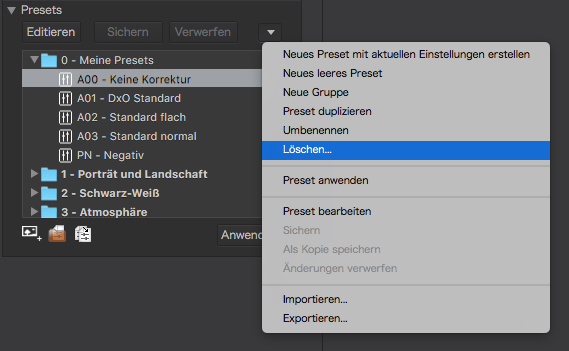
Note: Screenshot from “Elite” edition of DPL v2 (on Mac)
Thank you both, as I thought just me not looking properly.
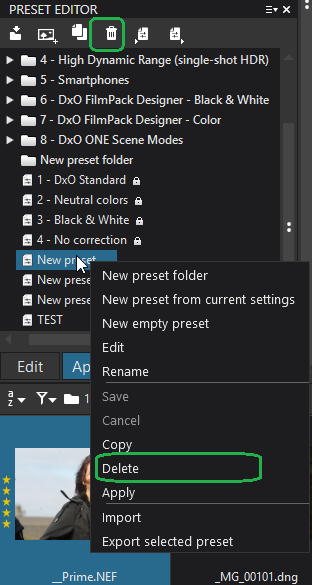
I’ve just found out how to do this on the Mac. Haha!
And would you share it ? I use 9.4 already and there is NO option at all, no right click, no deletion symbol, just nothing to delete a self created preset. I run the latest sequoia macOS
I have organized my presets like …
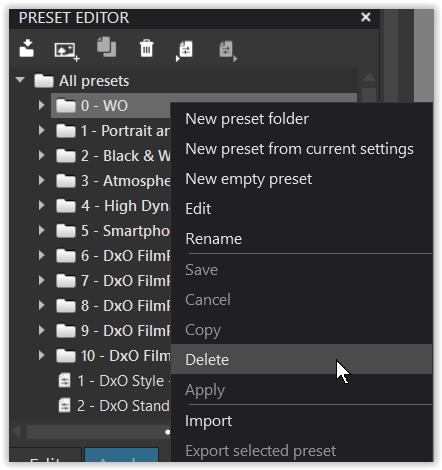
and can right click in the “context menu” to delete the folder / the single custom preset.
Don’t you have this in your version / Mac?
On the off chance… the delete functions are in the “Preset Editor” Palette, not the regular Preset selection window.
Should be able to right-click on any preset and delete.
1 Like