I opened 9 this morning on my laptop and some images shown in the folder wouldn’t load. Tried another folder and again some were OK but others just not loading. Did a repair install and works OK again. I never had to do a repair install of PL before so interested if others have had to as well. In doing it one thing that crossed my mind is with the old install programs everything is there with the new where nearly everything is downloaded how far back will DXO keep all the versions on there server to allow downloading, all or just the latest of a version? I am thinking of some here who are using old versions, will in the future versions like 8 on still be installable as older ones are now with the lack of the full installer held locally?
You need to keep them yourself.
DxO support staff have sometimes enabled individual users to download previous versions.
Downloading and storing them is recommended instead of always and only doing in-app updates.
Depending on how and what one backs up, searching for an older installer can be successful at times.
I have kept installers on a fairly regular basis starting with PhotoLab 6. That’s about 50 GB for 64 installers. I keep them on the internal drive of my Mac. They reside on a separate volume - and have time machine backups.
I can recommend something like this
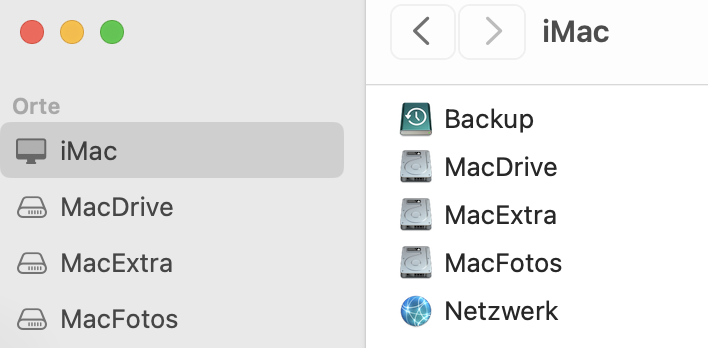
MacDrive is for macOS and all the regular files (documents, music etc.)
MacExtra is my SW archive hosting installers, config backups etc.
MacFotos … no need to explain
This setup allows to easily add a volume, clone MacDrive onto it and upgrade it, e.g. for the upcoming macOS Tahoe. Easily done in an hour without the need to duplicate the MacFotos archive.
My point is what we have now is an installer which downloads most of the program. The older ones contained all the program just needed activating after installing.Its worth keeping the current installers but different versions will be dependant on DXO keeping every version download parts on there servers
Will they?
I’m fairly sure that DxO has all the installers stowed away safely.
Users can access the most recent versions only.
If you have no copy of the installer you need, get in touch with DxO support, explain your case and submit a proof of purchase (e.g. a screenshot of your shop account page) and I hope that they’ll handle the request in due time.
We’ve seen posts complaining about slow and reluctant reactions and bad news travels fast, but I’m fairly confident that you’ll get the help. Just don’t hold your breath.
Sorry I am not making my self clear. I have the current installers but they download most of the program not containing all of it
So are are dependant on DXO servers holding all the doeload parts. My point is how long will they keep all the download parts over the comming years. Now with old versions you have all the install now you do not
okay…but that seems strange to me. What’s the size of the installer you got?
All the installers I have are full installers. The current Mac build weighs 1.74 GB.
This is windows and most of the install is dowloaded every time since late v8.
Yes, I downloaded the PL9 installer for Windows, It’s a setup file with only 360 MB.
Don’t waste any more time, contact DxO Support.
https://support.dxo.com/hc/en-us/requests/new