Photolab needs a global exposure slider that applies to all photos. I want to adjust about 200 photos to be just a bit lighter or darker, so I need a global slider that adjusts the individual exposure settings of all photos by that global value. Is this something you’re planning?
Simply select all your photos in the film strip and adjust the exposure. This will apply to all selected photos.
Does that scale the individual photos’ values? I think that’s what @tomgadd is asking for.
So if you have five photos with exposures of +.24, +.16, +.50, +1, and -0.25…
…adjusting the exposure globally by +0.25 would make each of the above: +.49, +.41, +.75, +.1.25, and 0.
…rather than overwriting the values of all of the above to simply be +0.25.
Sounds like it requires an Exposure Compensation function.
In the DOP file, its covered by ExposureBias, so it would just need to read the DOP file for each image then add/decrease that amount and save it.
Overrides = {
ExposureActive = true,
ExposureBias = 0.40000000000000002,
ProfileGainMapIntensity = 0,
SelectiveTonalControlActive = true,
ToneCurveActive = true,
},
Yes. Load any photo into PhotoLab without applying a custom preset and the Exposure adjustment starts at zero, regardless of what was done in camera.
What do you mean with “that does not override individual exposure settings”?
George
I understand that, but what I’m not clear on is whether OP wants to edit individual photos (so they have 200 photos with custom settings) then adjust every single one by e.g. +0.25 exposure that adds on to whatever the existing amount is (which might not be zero).
…rather than adjusting every single one by e.g. +0.25 and having them all become 0.25 universally.
Here’s an example:
Seven photos have been individually adjusted using the exposure slider. The first photo is set to +0.77, the second to -0.3, the third to +0.87, and so on. I don’t use Smart Lighting very often because it brightens too many areas unintentionally, making the image look unnaturally exposed.
Ultimately, all seven photos are still a tad too dark or too bright. So that I don’t have to adjust each individual photo by a specific value, I need a global exposure slider that, regardless of the individual settings, changes all selected photos by only the global exposure value.
The individual settings—that is, +0.77, the second at -0.3, the third at +0.87, and so on—should not be changed.
Here’s the problem: If I select all seven photos and adjust the exposure slider, the individual values are overwritten and all set to the same value.
Ah, I understand. I’ve changed your topic to a feature request. Anyone who wants this feature to be added to PhotoLab should vote at the top of the topic by selecting the blue Vote button. That includes you, the original poster. Hope that helps.
NOT to shot down your request, but I doubt it’s realistic. 
What I just tried (as an idea): As long as you haven’t used the Tone Curve, select all the images you want to edit and reduce the midtones a bit. It might not be the most elegant solution, but it should work for now.
I wonder some similar when i describe the “mask values” sync! Can be a nice feature.
I can imagine some improvement on that, like: “shift values”. Example (mockup) screen:
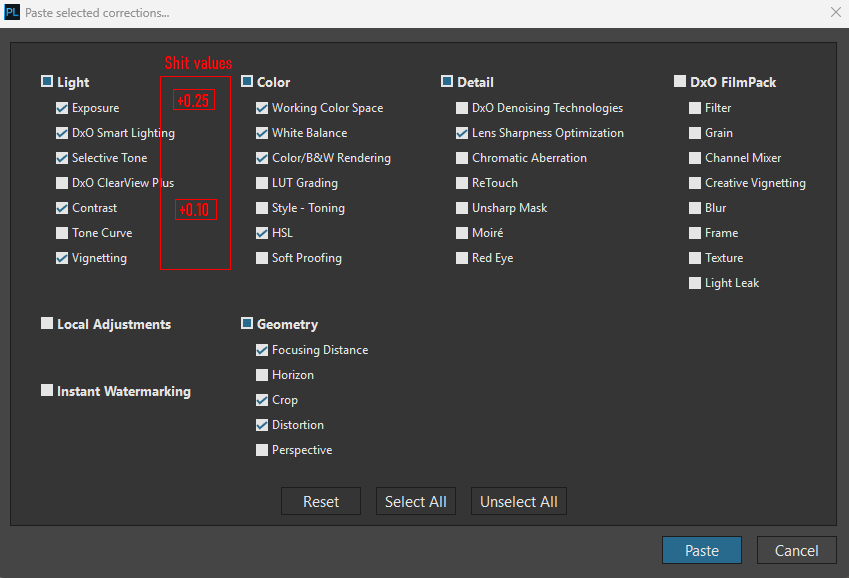
Logic: IF value is not null (empty), than it SHIFT for the existing value… (existing value + shift value). IF its null (empty), than simple copy of Global value.
However, its seems “easy” for single entity like Exposure, may a goes bit on other entity, like: White Balance → it 2 value: Temp/Tint. Or Contrast can be 6 value:
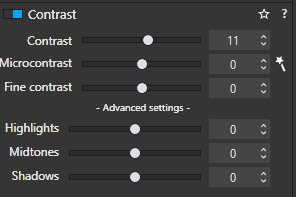
But yeah, i think in real world this type of “shift” used mainly for single value like Exposure.
May a workaround can be a “full image” mask, and the mask has +0.25 exposure, like:
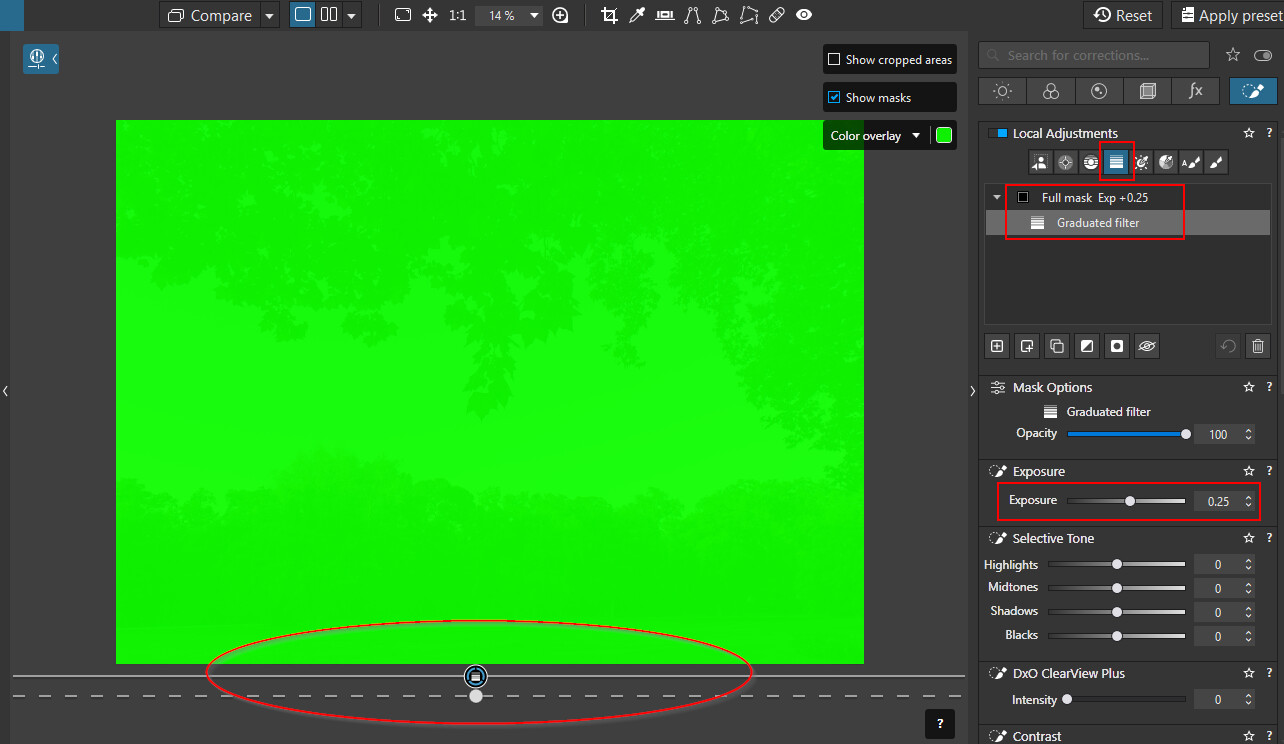

Adding or subtracting a “delta” from the respective exposures can’t be done with the exposure slider in PL9. This tool simply apply the displayed value to all selected images. So, if images already had changed exposures, all the respective values will be replaced and all individual settings will be ironed over.
In order to change exposure in the sense of an independent compensation, @andras.csore ‘s proposal can be used add/subtract the required delta.
Other than that, other tools can be used, e.g. the selective tones or the tone curve. Several ways can be taken with the tone curve like shifting the white- or black-point inwards or bulging the RGB curve up or down manually or by changing the gamma value. All of these can be combined too.
If the images react according to wish, I’d create a preset for the add/subtract “feature” and make it a partial preset. Consult the manual for instructions on how to create full and/or partial presets.
I can certainly see value is automating some of the exposure basics like being able to normalise the maximum and minimum exposure points across a range of images (so you’re setting the upper white and lower black point universally, and any curves scale to match the new min/max points).
It’d save a lot of time in ensuring that every shot in a selection/album has the same overall brightness and darkness without needing to copy/paste between images.
I believe (although it’s been a while) that Lightroom has something like this - some way of averaging or normalising exposure within a set.
If you edit late at night with lights turned off, you will probably want to make exposure corrections in the morning. But even then, some would require +0.3, some +0.5. It’s better to start edits with not too bright monitor and good ambient lighting. I don’t find this request of any practical value and prefer the current way, but that’s just my private opinion.
Normal the exposure correction is an absolute correction, Wanted is a relative correction. Relative to the present correction.
George
Yes, exactly the the situation (for me at least, but i think its not uncommon) in most of the cases, especially in weekdays. At night (after my standard job, what is not photography) i have like 3-4 hour to do the post-production (editing) of the photos, but morning (daytime) i have may a 30 minute only (due standard job). Go thru on 135 photos, all has some (2-5) AI masks, in SLOW computer → no way to go thru under 30 minute. But with “shifting”, done under like 30 sec to few minute.
I don’t find this request of any practical value and prefer the current way, but that’s just my private opinion.
See previously. It has some practical value. And existing (current way) behaviour (see my proposed mockup previously) still works.
I find Smart Lighting is best used in ‘Spot Weighted’ mode, not in its default ‘Uniform’ mode. In Spot Weighted mode, use the Tool to draw rectangles around the areas you want affected, typically the brightest and darkest parts of the image.