Its long ben a problem that the uninstaller for programs is very poor. You need to use an uninataller jprogram. Revco uninstaller finds and cleans out an enormous amount of junk
DXO should give an option to remove or not data bases along with all the other stuff. If you are going to reinstall you.may whant to keep it all but there should be an option to cleare it all out
There is a reason these directories are not removed when uninstalling - these are user settings which will be reused if you reinstall, thereby restoring your settings.
Agreed they shouldn’t just be removed without user agreement, but the fact they are never removed nor even referenced by DxO anywhere is also wrong.
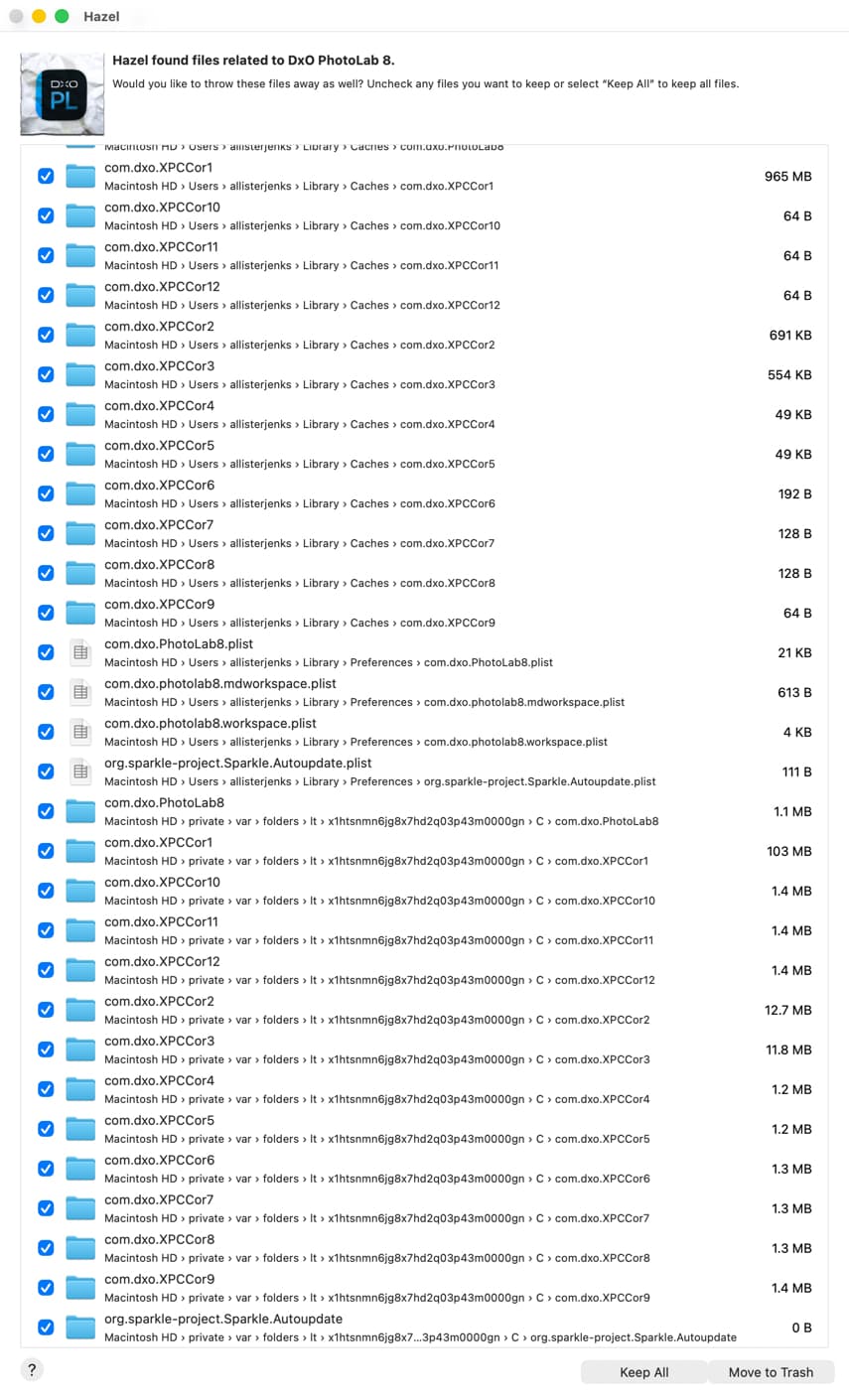
The same problem exists on the Mac, where the official “uninstall” is to drag the application to the Trash/Bin. Fortunately, I have an app, Hazel, which watches for applications being deleted like this and (somehow) ferrets out related directories, offering me the option to also delete these.
For a complete clean-out, I usually do the following on my Macs, but it should also work with Windows. Note that there is more to do, but I’m posting about a way to search that has helped in my case.
find items, the names of which start with “com.dxo”
find items, the names of which start with “dxo”
find items, the names of which contain “dxo”
find items, the names of which contain “photolab”
and so on
The first searches help to find many, if not most, items (files and folders) and to see “where things are”. Note the locations, it can help you later. Pay attention to names that might be shortened product names like “dprv”.
Care should be taken to not remove files from other apps (e.g. camera profiles in Adobe software) or system and other items that have random names that might contain “dxo”. Some of that is located in hidden folders, but they can also contain traces of dxo apps.
The last round is devoted to finding specific items, should they still exist. These searches are for e.g. “efex”, “sharp” etc., also because searching for “nik” will deliver all things Nikon.
On Mac, I could use the CLI “find” command, but due to its complexity, I prefer to work with Apps offering a gui. I use “EasyFind” and “Find Any File” in such cases. Check out what Windows has to offer in this area.
As my 9 is stable with how I use it and my laptop doesn’t have a big SSD I have taken 8 off now. After it was uninstalled the Revco uninstalled a very large amount log attached. Fear on past experience every version of PL leaves that amount of junk behind as every year I get the same amount of stuff Revco removes. This year it was over 800Mb multiply that by the many years many customers have been just using the program poor DXO uninstall and! I would point out I regularly delete the data base as I use a DAM
My fear has always been removing “old” stuff that is, in fact, still used by the latest installed version.
I have (possibly inaccurate) memories around the 4-5-6 timeframe that some of the hidden folders had names that did not include any version number. Lately, everything that Hazel has offered up has had a version number in it.
And on that note, I think it is time to remove PL8. I don’t think I’ve used it more than once since installing 9, and that only for a quick comparison regarding a conversation in these forums.
I used 8 for a few months and a mixture of improved graphics drivers. DXO making improvements towards how the program should have been when it was published in a beta state and learning what’s safe to use means I haven’t used 8 for some time. It helps not using the database so I can’t lose projects and DAM. Revco uninstaller is very good now, you can check everything it finds and if unsure not delete things. But with PL it’s never done anything that’s effected programs being left out removed masses of rubish the DXO uninstallers should give you the option of removing
Just deleted PL 6, 7 and 8. No issues that I can see. Interesting point: I thought I’d already uninstalled these (via Windows Add/Remove Programs), but I can’t prove it now.
Also using macOS computers, I’ve done many crazy things like trashing these files, They simply come back when PL is used again. The number of XPCCor?? items depends on how many parallel exports one uses. Sparkle also returns upon using PL.
Whether these items also exist on Windows, I don’t know.
I had already raised a ticket with support so waited to see what they say.
The short version is not to delete anything that doesn’t explicitly say PhotoLab 8, although they said it was “optional” to delete the cache ones. A claim was made that deleting the others may affect PL9.
If reinstalling isn’t too much of a chore, I’d go “scorched earth” with it and delete absolutely everything related to DxO software that you don’t want to keep (presets etc.) then install only the latest version.
That ought to ensure that - for now - only what’s installed fresh (and works with that version) is what remains on your system.
It’s only the thought of wasted space that was bugging me. I don’t need to find small amounts and so “out of sight out of mind” will do. I deleted the PL8-specific ones and have left the rest.
According to my experience with tabula rasa approaches, it’s okay to delete whatever DxO and reinstall the wanted app again, no matter if it’s an older or current version.
Caution: Adobe and other apps have items for the DxO One camera (RIP) and my approach is to always leave these items alone.