Hello,
The brightness masks no longer work for me in Film Pack 7.
No mask is displayed. No matter what brightness range I choose. As a result, changes to controls have no effect.
Does anyone know the problem?
I have the problem in version 7.20.0 build 18 and version 7.21.0 build 20.
@Herbert7 I don’t use FilmPack as a stand alone app so I’m not sure of the full version number but as I’ve just installed PL9.5, the version of FP7 I can use within PL will be the latest version of FP7.
In that context, I cannot recreate the problem you describe, i.e. for me the luminosity mask works as expected.
This implies the issue presented itself after updating to 7.20.0 build 18 and forward, but you did not have the issue prior. Is that correct?
Do you have a backup of the previous version/build that you can restore and see if the issue resolves when you do so?
Yes, there is a problem … initially not showing the mask.
After adding / deleting something with the brush tool it gets visible.
@DxO_Support-Team please take note
Well there you go, not an isolated incident.
Don’t forget to to submit a bug report to DxO!
I have installed an older version. Version 7.12. Build 2. The brightness mask works here.
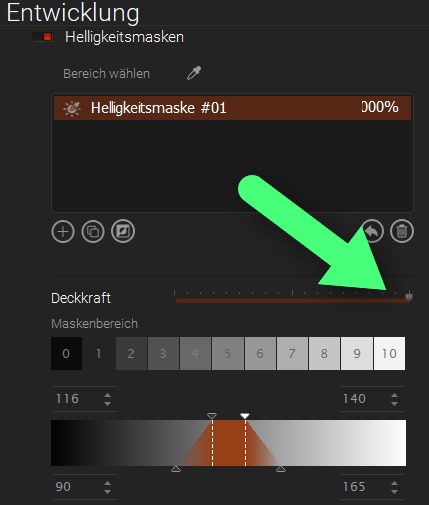
Yes, this mask appears as soon as I use the brush. But that’s not the point. Additionally, the mask disappears (and doesn’t come back) as soon as I change the mask’s opacity slider.
I reported it to support.
… well, I don’t see that here. But anyway, the mask isn’t working as it should.
Today I installed the new update (7.22.0 Build 23), expecting the luminance masks to work again.
But no, the luminance masks still don’t work. Support hasn’t responded to my inquiry from weeks ago.
It doesn’t work here too!
.
Yes, there is a problem … initially not showing the mask.
After adding / deleting something with the brush tool it gets visible.
@DxO_Support-Team please take note
Yes, when you make a brush stroke you can “activate” the luminance mask. If you press the settings in the luminance mask (brightness, etc.) and then press the opacity control (I often do this to adjust the opacity of the settings), the luminance mask and all settings are gone again. And then they can no longer be activated again using the brush trick.
@all What are your experiences with support?
No one from support contacts me anymore (including inquiries). I don’t know that.
How do you go about contacting support?
I have found that if I email them directly to the support email address, I never receive a reply.
If I use the online form – “Send a Request” toward the bottom of the linked page – I always receive a reply, usually within 24 hours.