Hello,
The brightness masks no longer work for me in Film Pack 7.
No mask is displayed. No matter what brightness range I choose. As a result, changes to controls have no effect.
Does anyone know the problem?
I have the problem in version 7.20.0 build 18 and version 7.21.0 build 20.
@Herbert7 I don’t use FilmPack as a stand alone app so I’m not sure of the full version number but as I’ve just installed PL9.5, the version of FP7 I can use within PL will be the latest version of FP7.
In that context, I cannot recreate the problem you describe, i.e. for me the luminosity mask works as expected.
This implies the issue presented itself after updating to 7.20.0 build 18 and forward, but you did not have the issue prior. Is that correct?
Do you have a backup of the previous version/build that you can restore and see if the issue resolves when you do so?
Yes, there is a problem … initially not showing the mask.
After adding / deleting something with the brush tool it gets visible.
@DxO_Support-Team please take note
Well there you go, not an isolated incident.
Don’t forget to to submit a bug report to DxO!
I have installed an older version. Version 7.12. Build 2. The brightness mask works here.
Yes, this mask appears as soon as I use the brush. But that’s not the point. Additionally, the mask disappears (and doesn’t come back) as soon as I change the mask’s opacity slider.
I reported it to support.
… well, I don’t see that here. But anyway, the mask isn’t working as it should.
Today I installed the new update (7.22.0 Build 23), expecting the luminance masks to work again.
But no, the luminance masks still don’t work. Support hasn’t responded to my inquiry from weeks ago.
It doesn’t work here too!
.
Yes, there is a problem … initially not showing the mask.
After adding / deleting something with the brush tool it gets visible.
@DxO_Support-Team please take note
Yes, when you make a brush stroke you can “activate” the luminance mask. If you press the settings in the luminance mask (brightness, etc.) and then press the opacity control (I often do this to adjust the opacity of the settings), the luminance mask and all settings are gone again. And then they can no longer be activated again using the brush trick.
@all What are your experiences with support?
No one from support contacts me anymore (including inquiries). I don’t know that.
How do you go about contacting support?
I have found that if I email them directly to the support email address, I never receive a reply.
If I use the online form – “Send a Request” toward the bottom of the linked page – I always receive a reply, usually within 24 hours.
The latest version of FP 7.23 seems to have solved the problem now
(reported 10.04. - 09.05.)
@Wolfgang
Thanks for the tip.
With update 7.23 the luminance mask now works again. But the Luminaz mask opacity control doesn’t work.
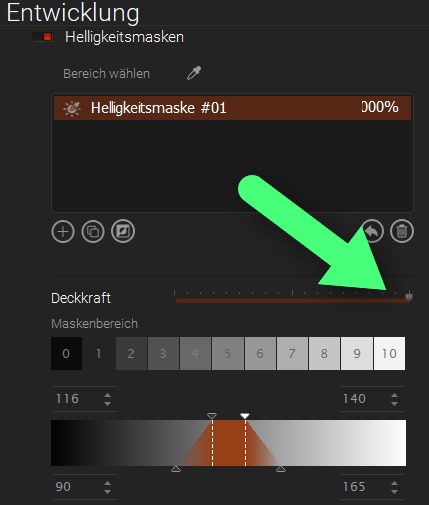
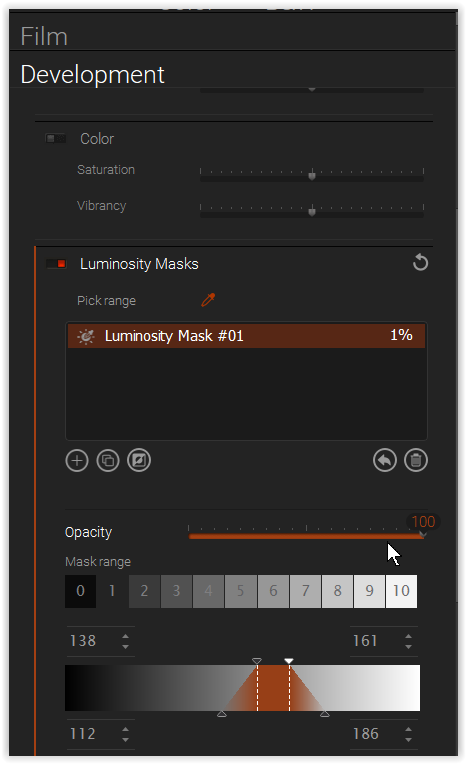
If I reduce the opacity of the luminance mask using the opacity slider (a value of 1% is enough, i.e. from 100% to 99%), the luminance mask disappears. And in the window where the various luminance masks (brightness mask #1 etc.) are displayed, when the opacity slider is set to 99%, the window shows 1%.
I often use the opacity slider. But this one doesn’t work.
These problems did not exist in older versions of FP7. Everything worked for me then.
You are right! – I had quickly checked but not that opacity slider, which currently only works like a ON / OFF ( → you can reset it to 100% opacity with the curved arrow ).
After some back-and-forth (request #639367), I received the following response on May 8:
Hello,
To ensure that your request receives the most appropriate attention, we have now escalated it to one of our developers, who is a product specialist, for an in-depth review.
The analysis is still ongoing on our side.
We will reach out again as soon as we are in a position to provide you with an update. Please do not respond to this ticket, as it will be removed from the expert’s queue.
Thank you for your understanding.Kind regards,
Riley - DxO Labs Support Team
So perhaps you should wait a while longer before venturing back into DxO.
If I ever use FP7 Standalone, it is as a PS or AP plugin … but rarely.
Btw, I find it pretty stupid not to have a hotkey (such as < M >) to toggle the mask overlay on and off, but instead have to go all the way down with the mouse and check the corresponding setting there.
Today’s update to FilmPack 7.24 did nothing to fix the faulty opacity slider.
My support request #639367 has NOT been solved yet.
.
I noticed, that I can “revive” the Luminosity Mask using Reset selected mask, but all adjustments for that mask are lost – so, no solution.
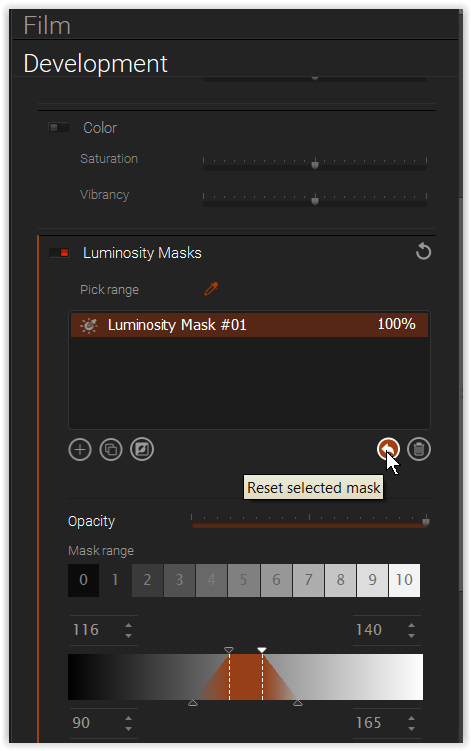
@Wolfgang Thanks for the tip.
I also installed the new version (7.24).
The same for me as for you. As soon as I reduce the opacity control of the luminaz mask (it goes from 100% to 99%), the entire luminaz mask is gone and the opacity jumps from 100 to 1% (when changing from 100 to 99%.
I reported this to support weeks ago (with the release of 7.23.
But nothing. No feedback.
I’m just glad Nik 9 works for me.
Hooray, the problem with the opacity control was finally resolved in FP 7.25!
Thanks for the tip,
Yes, the opacity slider now works in version 7.25.
Very good.
Question about film pack?
I tested the Luminaz masks extensively in version 7.25.
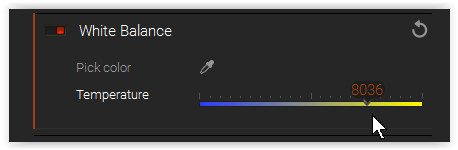
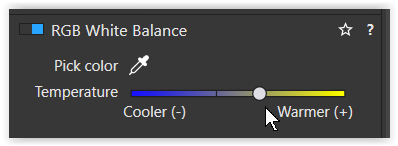
I noticed that when I created a luminance mask, the white balance section only worked with RAW#s (I’ve never done it before, so I only noticed it now). It is the same in previous build too.
Isn’t it the case with Photolab that functions that only work in Raw (such as color tint in the white balance area) can only be selected in Raw?
If this is the case, why can the white balance in the luminance masks be selected (and the controls changed) in NOT raw files if these have no effect at all?
DxO introduced the Luminance mask in FP 7; since then, it has also been available in PL as a plugin.
However, the Luminance mask’s white balance setting is available only for RAW files – whether in the standalone version of FP 7 or as a PL plugin.
For RGB files you can use the general WB setting
- FP 7 standalone
- PL 9