Just being curious.
I tried to look for the differences between exposure correction of a RAW and a JPG.
Normal exposure correction was only for RAW files. I think, not sure, it was based on the sensor values that got multiplied.
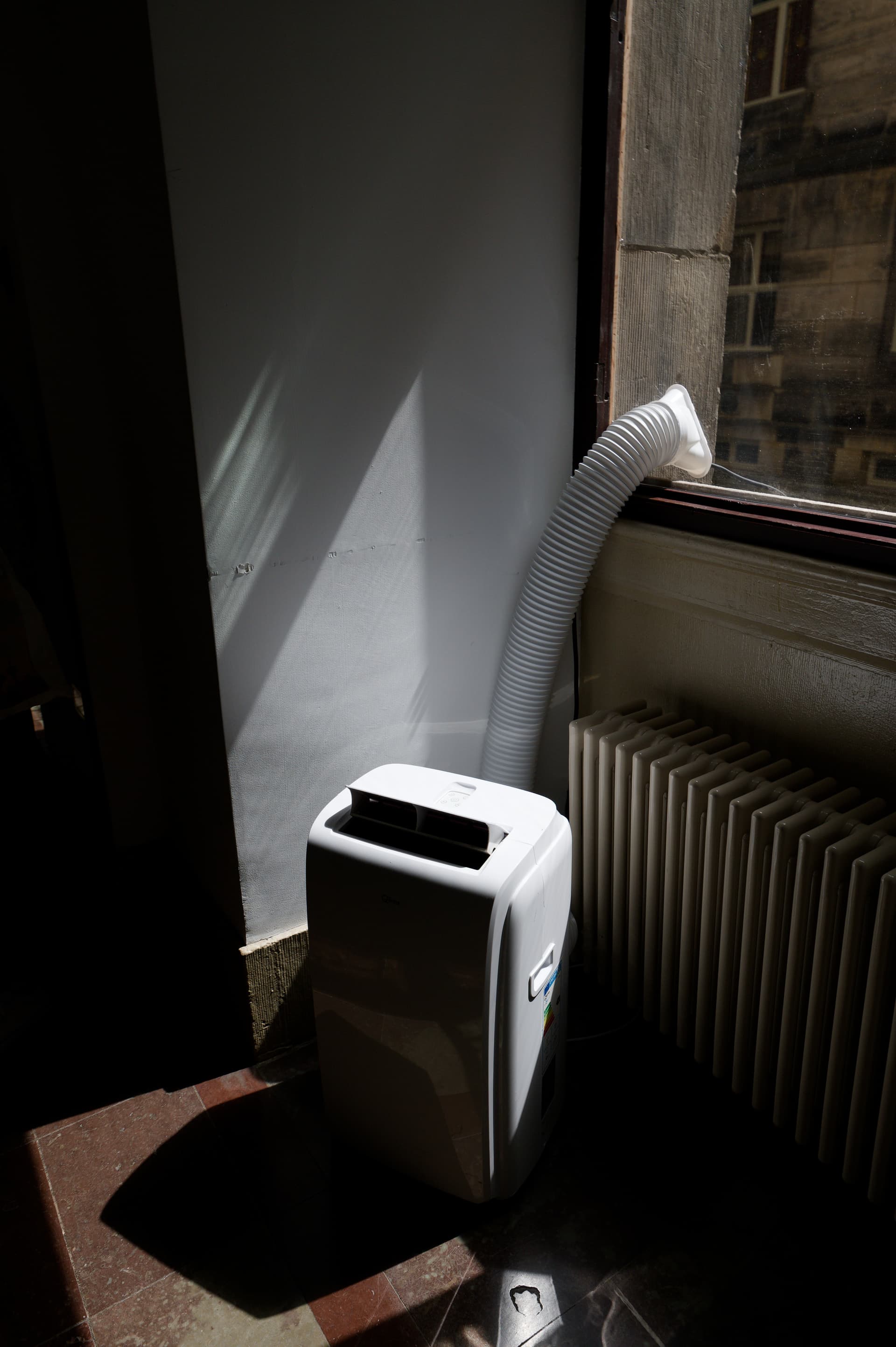
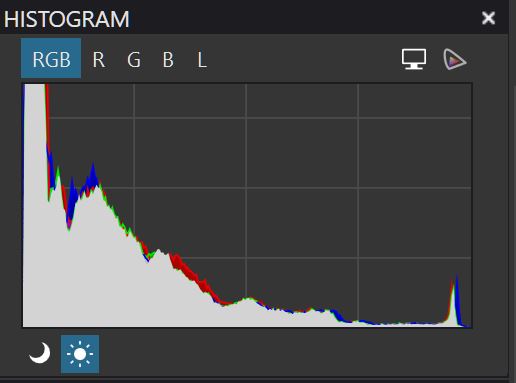
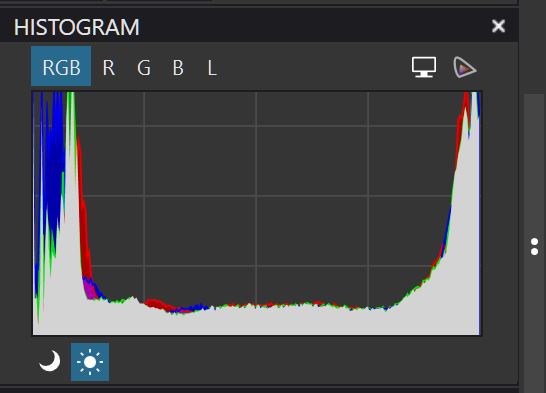
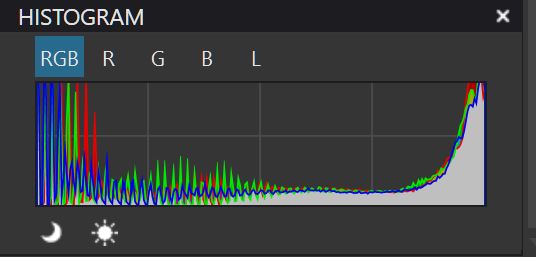
I show you an image and its histogram of the original, RAW EC=+4 and JPG EC=+4.
RAW files have a range of possible values of e.g. 16’000 while JPEG has 256 only.
From RAW to JPEG, some of the lower values are ignored/cut in order to prevent noisy shadows. This means that JPEG can range from 0 to 256 while RAWs often range from e.g. 2000 to 12’000, Raising exposure in post by one stop translates into ranges of 0 to 512 and because jpegs don’t go that high, some clipping occurs while X times zero remains zero. Therefore, shadows can look unchanged in jpegs.
Bit depth has only a meaning when editing, well up to let’s above 8 bit. A larger bit depth prevents posterization. You can replace the bit values for a percentage. Then it’s independent from the bit depth.
I opened the last one in PL4.
Files contain r, g and b values as absolute numbers, not percentages. Using percentages does therefore not change the possible values that a pixel can adopt.
Depending on image properties (as witnessed by the histogram) and how an app changes exposure, different effects can appear. Some of it depends on colour space and related gamma curve.
Other than that, PL’s histograms have changed between versions and what they show depends on how the pixel values are handled. Also, histograms will look different in different apps.
Try the tonecurve for exposure compensation by shifting the corners inwards and play with the gamma value. Doing this can reveal other interesting ways and results of EC.
As absolute numbers within a range. Absolute number/maximum is the percentage. I think Rawdigger is using that by example. I don’t have Rawdigger. RawTherapee does.
I’m using the EC function in PL for all of them. I don’t think color space and gamma curve does have an influence that can explain the differences. It’s also the same picture.
The subject is the different result when using EC on a RAW file or a JPG file.
What I think is that EC can’t be used on a non-RAW file. I always thought it was greyed out when using a non-raw file.
There was a change years ago affecting auto-correction of exposure. But the user guide makes it clear that exposure correction should work regardless of file type (RAW or RGB). This looks like a bug to me - but there might be a technical explanation involving lost image detail in the JPEG.
Look at the behaviour of the histogram when moving the EC from left to right. Compare that behaviour between the raw and the jpg. It’s different. PL uses different routines when dealing with a raw or jpg. But the result with a jpg is just wrong. In my eyes.
Played some more and with other pictures.
EC on a jpg acts like setting the tone curve to a range from 0 to somewhere 80. Compared to EC+4.
No exposure correction at all.
Good idea, it helps to see what PL does when its tools are used.
I also just tested PL9 against a low light, but fully dynamic image and found similar changes in the histogram as you get. The same happens when I test in Lightroom although its histogram looks different.
Histograms are not showing bare facts but statistics that are set up differently in different apps or versions thereof. Vertical and horizontal scales can be linear, logarithmic or anything that suits the ideas of the designers. Therefore, looks can be mellow or rough, ragged or smooth - everything goes while adhering to the basic idea of what a histogram should do.
But moving a slider fast from min to max and watching the histogram can give you an idea of what’s going on.
No reaction on my conclusion in the last post?
PL uses different routines when dealing with a raw or jpg. But the result with a jpg is just wrong
If so, my answer is: Maybe and whether jpeg processing is “wrong” or not, depends on expectations. My take is that results look different depending on which app exported the image and therefore requires different customising before export.