I use a Olympus OMD MKIII Camera, I noticed after applying PureRAW to my RAW image, now shows information on Focus Distance value, before on RAW the Focus Distance is no available, how PureRAW 6 add focus distance value, wonder how is estimated or created? I can tell value is about accurate, but I want to understand why original RAW file does not have any Focus Distance shown.
What program are you seeing the Focus Distance shown in?
Focus distance can occasionally not be written to files. Maybe the lens was somewhere in between focus distance steps or for other reasons. In such cases, DxO applies a default focus distance which then gets added to exported files.
PhotoLab hints at missing FD metadata by enabling the respective tool, with PR, there seems to be no such indication - and I haven’t looked for it either.
While PL allows FD to be set when FD isn’t reported by the file, RP seems to have no such provision. This can lead to less than optimal corrections of optical flaws. DxO’s default correction settings prevent worst possible results though.
I use Lightroom to see all metadata, RAW file shows no FD value, but after processing it with DXO FD value shows. I’m curious why
Thanks for your input, is weird for me PL will guess a value or add a value per default, the first time I noticed this I tested multiple RAW files and none of them have FD value, but after DXO runs the files now shows FD value metadata, I’m confused why FD value is added to the processed file, perhaps a software bug, camera issues on RAW metadata
Focus distance is part of the exif created by the camera, if the lens knows the focus distance. There’re many values in that exif that are not shown in PL, PR or other programs. It’s just the choice of the programmer/DxO. Where do you see the focus distance appear?
George
That’s what they do as far as I can see it in PhotoLab.
I have cameras that don’t report focal distance from newer lenses. If I want PL to correct them perfectly, I have to set FD (and FL) manually.
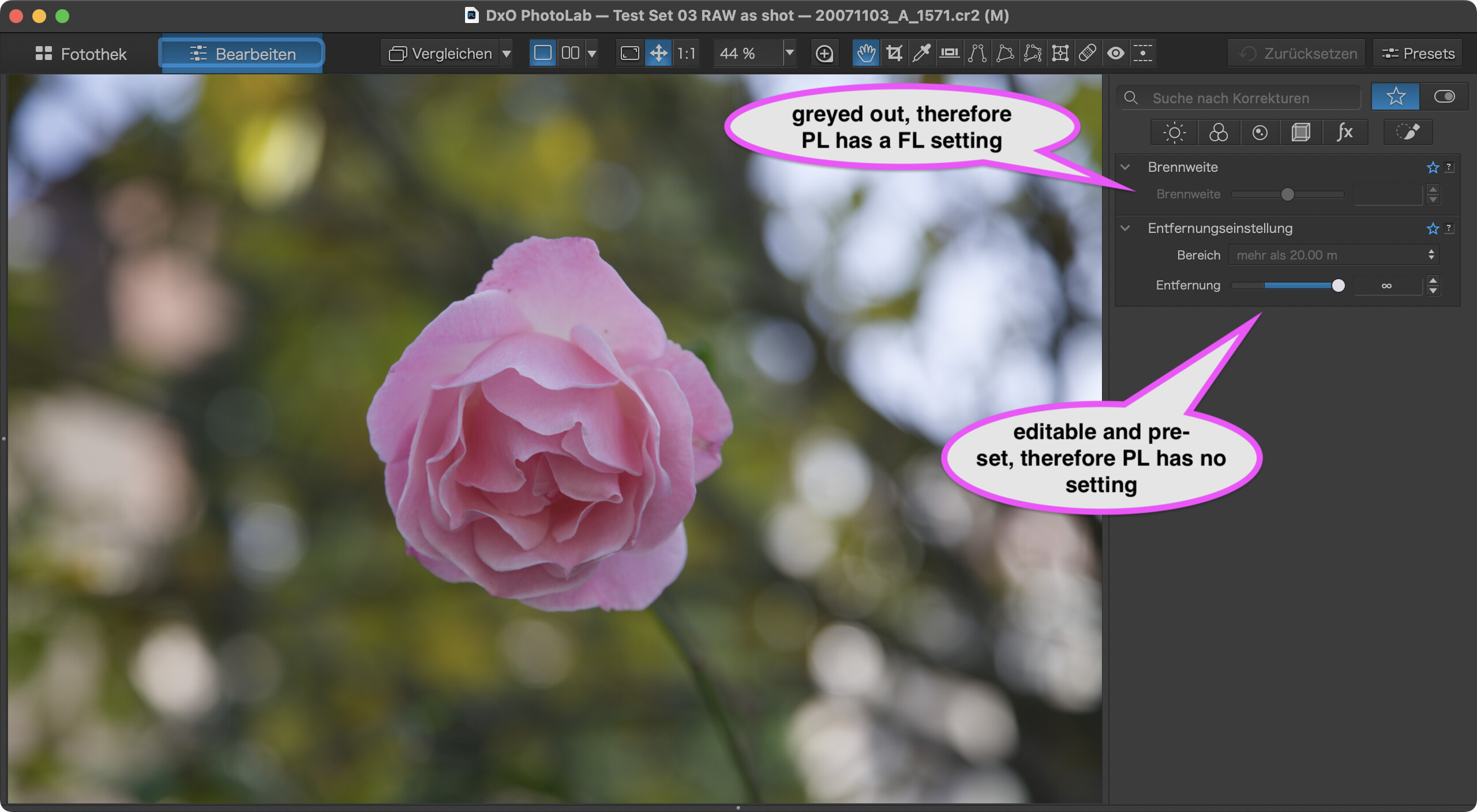
Note that the preset (more than 20m) is definitely wrong, the photo is clearly a close-up. For best corrections, I d’need to pull the slider to the left, but that’s unimportant in this take.
When you look at the presets in the box above the slider, you can see that the modules might work with steps/ranges rather than continuously. One of the ranges does the least harm, so that’s probably the preset. Suppose that PureRAW has similar tech.
UPDATE: Checked the file and found that original metadata listed FD to be “unknown”, but there was some Canon VRD metadata suggesting that FD was 100%. I suppose that this triggered PL to set FD to infinite…provided that PL is actually reading and using Canon VRD tags.
Canon VRD was written by Canon’s DPP which I had used before switching to Lightroom. As of now, there seems to be no way to remove Canon VRD entries.
Thank you for samples, make sense, I’m now trying to find stand alone EXIF reader app to understand if Olympus issues or Lightroom
thank you again
you can try RawDigger
1 Like
George
1 Like
I use ExifTool natively, i.e. via command line.
This is an update, as I suspected should be a software bug in Lightroom that not able to shows Focus Distance from Olympus raw and maybe other cameras, I was using Focus tracker and a new lens, I followed recommendation to use RawDigger and its amazing tool, the original RAW file has all focus information, steps, zoom and distance, so PureRaw 6, writes back the file from raw about focus distance after processing it without guessing or changing it, exactly as was on the raw, the final processed file DNG show on Lightroom the FD correctly. Thank you all for the help, I’m happy to see PurRAW is not making up this value magically, but merely a Lightroom software bug
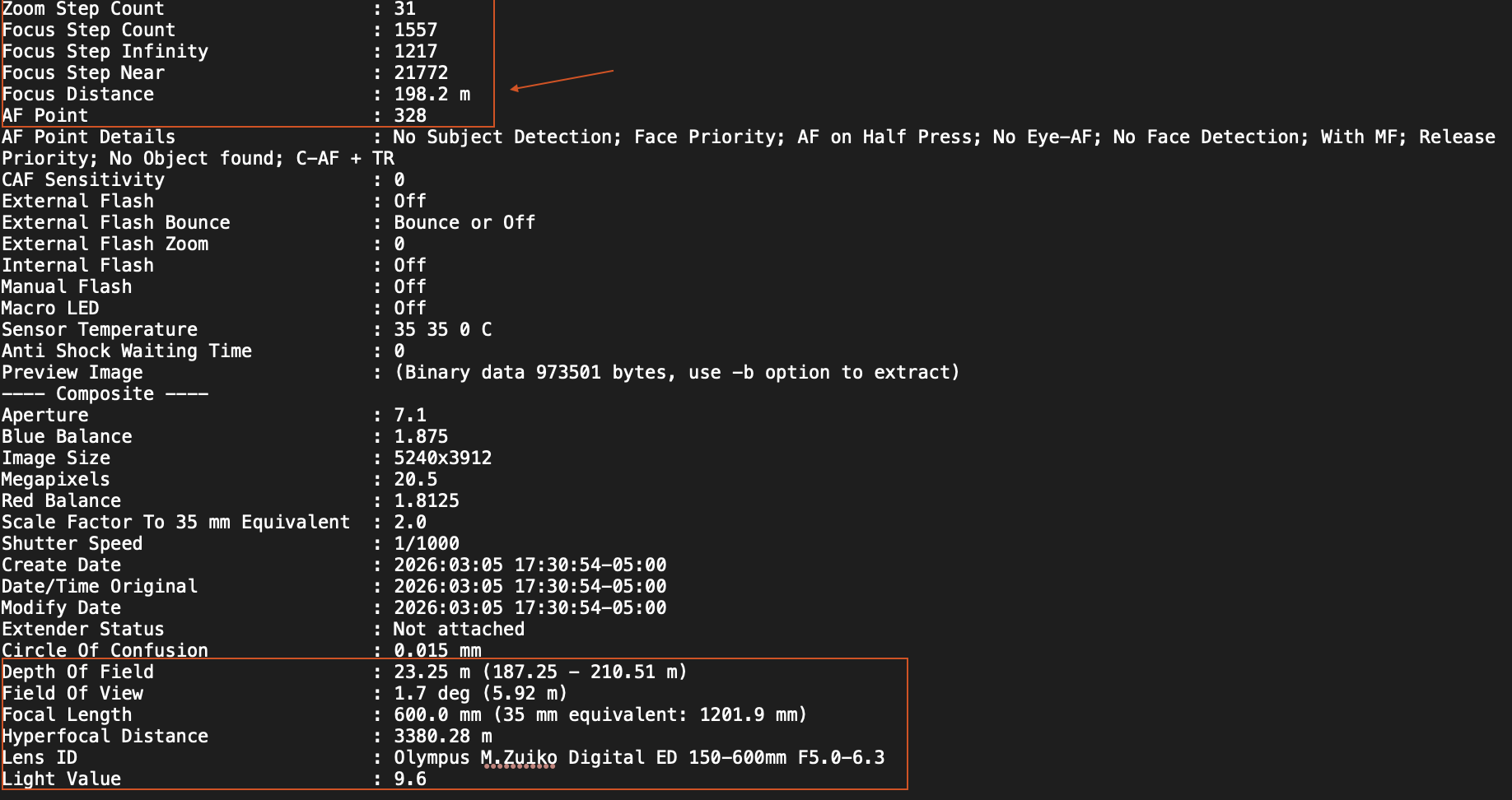
RawDigger uses Exiftool.
But it doesn’t explain next.
George
The data I pasted above from RAWDigger is for the original RAW file, the issue is that Lightroom cannot show it.
You’re meaning the original raw file and he created dng file? Two different files. But both contain the fd values.
George
Personally I just came here to say, I’ve noticed that the processed files have different focus distance values. Is that intentional?
I have a Nikon Z8 and the focal distance in the metadata for the DNG and NEF files are the same
Please welcome to the forum.
What was the input, the processor, and the output?
It’s not clear what you mean. EXIF and TIFF/EP “standards” define the ‘SubjectDistance’ tag (37382, 0x9206), but it isn’t set in my Nikon cameras raws or jpegs. The ‘FocusDistance’ tag name seems to be invented by Phil Harvey, the author of exiftool, as a common name for various tags used by camera makers in their Makernotes for that purpose. For example, Nikon uses uses tag 78 (0x6e), Olympus uses tag 0x305, while Canon has sevaral flavors in their makernotes, and so on. The values can be very approximate, depending on lens/camera/firmware combination.
Note also that Makernotes may be over the 64KB limit for jpeg field size, so for Nikon Z8 (which makernotes can exceed 64KB, mostly due to large ShootingInfo, being OK for TIFFs but not for jpegs) PhotoLab stripped makernotes completely from JPG output, thus stripping the focus distance info, even if EXIF output was enabled (didn’t check with PL9.6, maybe some selected elements get exported now?).
Please correct me, if I got it wrong about the origin of ‘FocusDistance’ name.
That doesn’t surprise me. Exiftool has to use different names for the same value. That will be a mess.
George
IIRC I processed using distortion correct and sharpening, with X3D. For the DxO processed file, Lightroom’s own corrections were disabled (but enabled on the other one).
Here’s the difference in EXIF data between the two (lines with a - representing removals, while + denotes an added line).
You’ll notice these two key differences:
- Original ApproximateFocusDistance value is 0.38, processed is 0.37.
- Upon processing a new field called SubjectDistance with a value of 0.37 is created.
- Original DOF field is
0.02 m (0.37 - 0.39 m)whereas processed is0.02 m (0.36 - 0.38 m).
If you’d like to see the files, I uploaded them here.