DxO PureRAW 5 BUG - JPG color profile NOT sRGB, but Adobe RGB

PR convert to JPG in colorprofile Adobe RGB NOT sRGB, which is the standard for JPG, giving wrong colors on WEB and PC without using profile aware applications. Counter productive to the idea of using PR in batch mode for quick transformation of Raw files to useful JPG files.

At least give the possibility to select which colorprofile to use for JPG output.
You are referring to PL, NOT PureRAW. Unfortunately it is not possible to select profile/color space in PureRAW.

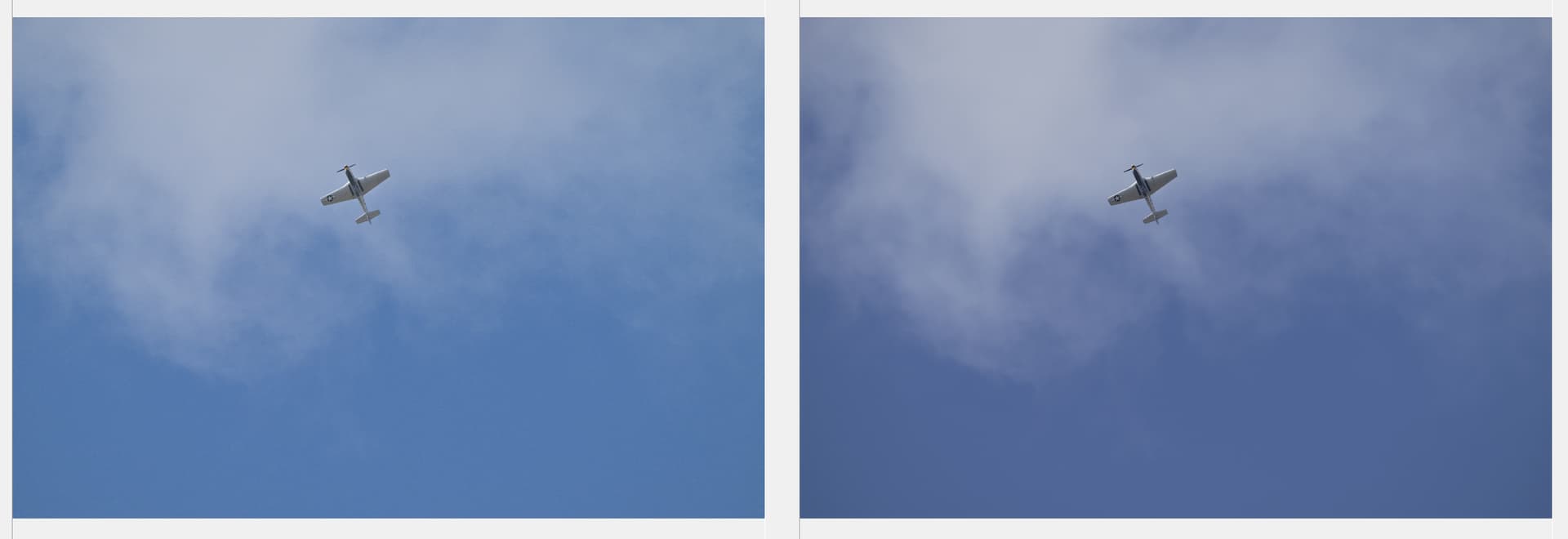
Here you see an example of the same image, left coming from camera JPG, and right from DxO PureRAW 5:

Metadata

Left:
Format : JPEG
Width : 8 256 pixels
Height : 5 504 pixels
Color space : YUV
Chroma subsampling : 4:2:2
Bit depth : 8 bits
Compression mode : Lossy
Stream size : 21.0 MiB (96%)
Color primaries : BT.709
Transfer characteristics : sRGB/sYCC

Right:
Format : JPEG
Width : 8 256 pixels
Height : 5 504 pixels
Color space : YUV
Chroma subsampling : 4:4:4
Bit depth : 8 bits
Compression mode : Lossy
Stream size : 3.99 MiB (100%)
ColorSpace_ICC : RGB
colour_primaries_ICC_Description : Adobe RGB (1998)

Report your findings to DxO via this page:
https://support.dxo.com/hc/en-us/requests/new