I’ve been using this program for a long time and haven’t experienced any major performance issues until
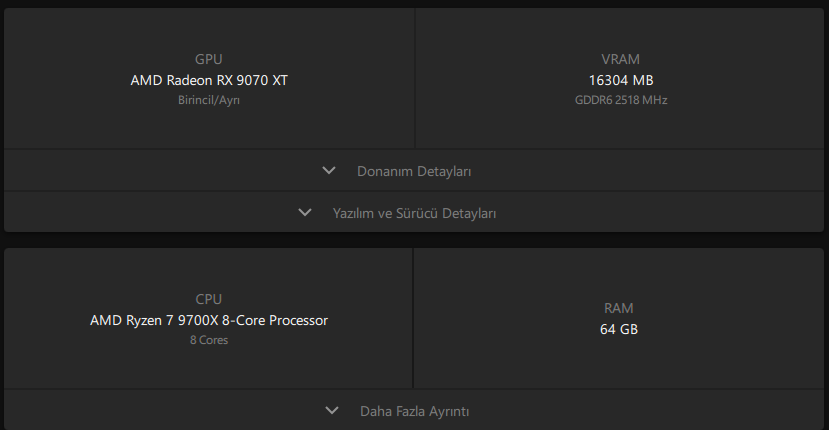
now. I started encountering problems after updating my computer components and trying to use DxO PhotoLab again. Firstly, I can’t select my graphics card in the settings. Only my processor is visible, which causes the program to run slowly when previewing and exporting photos take a very long time. My system specifications are attached. I’ve never had problems with any graphics card from Nvidia RTX 1050 to 3070, but I started seeing these problems after upgrading my graphics card to AMD. How can I fix this problem?
I don’t know if it will help, but maybe you could try to reinstall PL At least that’s what I would have done. Remove your current installation and install again from a new download.
Strange, your PC should be well within necessary specifications. The only help I can offer is to send a message to support at DxO: Submit a request – Help center
I contacted DxO’s support and am still waiting for a response. It’s been almost a week and I haven’t received a reply. I hope they can resolve my issue.
Sorry for your situation. Probably something you already have done but perhaps try to check if your GPU drivers from AMD is up to date. I would have tried to reinstall them anyway if I was in your situation.
Do you have other software that use the GPU that works fine?
Did you contact them using the support form on the support website or did you directly email their support email address?
I ask because I once tried directly emailing them and I never got a single response. But when I use the support form on their website, I usually get at least a “we got your request and we’re looking into it” reply from them no later than 48 hours (of business days) later.
You can try backing up the DxO folders from c:\Users[your_user]\AppData\Local and Roaming. Then delete these folders. You will lose the database and program settings, of course. Then run DxO PhotoLab (you may also need to reinstall the program). Make sure you have the latest Adrenalin drivers. The current version is 26.2.2. I use a similar configuration and it works quickly.
When I contacted their support , they said they would look into it. They even sent me a link to a diagnostic program and told me to download and run it. I did everything they said. I’ve been waiting for a response from them for about 5 days now.
I’ve already tried this method, but it didn’t solve the problem. I think the current version of DxO PhotoLab isn’t compatible with Radeon 9000 series graphics cards. I’m waiting for new updates.
If you haven’t already done so, try removing and reinstalling your Radeon card - and make sure that all power connections are attached and secure. Then run a diagnostic tool such as Furmark or whatever works best these days to make sure that the card is working correctly with the OS.
I just solved my problem by chance. I checked the settings to see if running DxO PhotoLab in compatibility mode would solve the issue. I found that the program was automatically running in compatibility mode. Turning off compatibility mode solved the problem. The program now recognizes my graphics card without any issues. Previously, processing a photo took about 1.30 minutes, but now it finishes in 3-4 seconds.
 Then run DxO PhotoLab (you may also need to reinstall the program). Make sure you have the latest Adrenalin drivers. The current version is 26.2.2. I use a similar configuration and it works quickly.