I am preparing a switch from Adobe to Dxo, bought Photolab 9 with all extensions, but as for now I cannot finish one image. Freeze on windows 11, and my pc is very powerful
Welcome (and FYI: This is a community forum; fellow users can try and help but you’re not contacting DxO here).
Can you say a bit more about your PC specs and what was happening when the program froze?
Is it freezing on startup or during an edit (if so; what else is going on)?
Any error messages?
Where are your images stored while this is happening?
Did you try the trial version of PhotoLab before this? Did it work?
Is anything else running in the background?
What camera files are you trying to edit (assuming you get the program open and browse to a location where they’re stored)…
I’d check GPU drivers
Please give full specs of you PC, in particular for the graphics card in it. Once we know those details we will be able to give advice.
When I open Photolab, everything seems fine, althought loading takes a couple of minutes. When I leave my PC as is, for having a snack e.g., and start back working on an edit, the program is frozen. I have to restart and lose all my work.
My PC: Windows 11
AMD Ryzen 9 3900X
4095MB NVIDIA GeForce RTX 2070 SUPER (MSI)
128GB Dual-Channel DDR4 @ 1596MHz
Gigabyte Technology Co., Ltd. X570 AORUS ELITE (AM4) motherboard
NVIDIA Studio Driver 610.62
Monitors: CG2700X (3840x2160@60Hz)
LG ULTRAWIDE (5120x2160@72Hz)
BM320 (3840x2160@60Hz)
There’s the problem. Only 4GB VRAM is below the minimum spec for PL9, see here:
https://support.dxo.com/hc/en-us/articles/4406558299537-System-requirements-for-DxO-PhotoLab
Ok, any suggestions for a well suited graphic card?
NVIDIA GeForce RTX 5070 Ti 16GB? Better?
Much better.
There’s a long thread on GPUs suitable (or not) for PhotoLab here: Choosing a GPU for DxO Photolab: the answer? - #139 by andras.csore
Skip towards the bottom for a handy chart illustrating price/performance value of various modern and slightly older cards available today. The RTX 5070 TI and AMD 9070 are both very strong contenders right now. If you can afford it, nVidia slightly edges out the competition in computational performance.
Yes, a RTX 5070Ti 16GB would be more than OK. If that turns out to be too pricey, I have a RTX 5070 12GB and have no problems with PL9.
While the graphics card might be the problem, unless he was actively using AI masks on his images and/or exporting them to DeepPRIME, the cause of his freezing problem may be unrelated.
Mark
While the graphics card might be the problem
OP seems to have the funds and can indulge themselves in the better GPU in any case
Strange. AFAIK all RTX 2070 versions had 8GB of VRAM. That should be just enough for PL9 with DP and AI stuff, assuming no other GPU greedy software is running in parallel. Maybe 100+ mpx raws would require more (?).
Maybe it’s NVIDIA driver issue in multi-monitor setup?
I would check Win EventLog and look for PL crash dumps.
Maybe, but I still wouldn’t suggest a generous outlay of cash for a new card without a bit more investigation.
Mark
I think the same as Mark. May GPU, may not. More details on your things are welcome. I think the ‘PL just freeze even i do nothing’ type of problems are rare (if any, i see similar in the forum a few (may 1 or 2) times, in early PL9 release, and user may not do more investigation on that)
I have a few idea, suggestion for testing (to rule ot things). Just baby steps, etc.
- What is the message? I guess its the ‘Application not responding’. No worries, if this message come up, not necessary means the application not works, may just busy.
- How long you wait (if its say ‘not responding’), 5 sec? 1 minute? 5 minute?
- Make sure all other apps closed. This days, near all application use some GPU acceleration, etc. Even youtube playback in browsers, etc. So, no Photoshop, no browsers, etc.
- If overclocked (CPU, GPU), may try to bring down to standard level. However, i think it has low probability until extrem OC.
- What the photo you try? 100mpx Fuji? Etc. Try with smaller photos.
- Where the photos? I suggest to try in local drive (and not NAS, etc.)
- How many photos in the folder you work/try? We ‘test it’ in the forum with like 1000 photo in the folder, and apply some preset on that - may takes many-many minutes (may 20-30+), and under that time PL "not responding’).
- May try with one (1) monitor only (smallest, 60Hz, and dont forget to reboot). Not because of PL, but may GPU stuffs works a bit different.
- Make sure, in the Preferences/Display the the ‘DeepPrimeRendering’ is turned off.
- You does AI masing (Aut-Brush is also AI)? Try without masks (restart PL). Especially without any AI mask.
- Preferences/Performance: set ‘AI acceleration’ to ‘CPU’ (to rule out GPU) for testin(temporary) (dont forgot to restart PL)
- May disable only for temporary Antivirus and similars.
- Its happen if you DONT does ANY Export (previously)?
- Its happen during Export?
- You use ‘Loupe’ before?
If the things above not helps to figure out, i suggest to go thru some ‘baby steps’ tests (rester PL in most of the steps):
- 1 photo in the folder, in local drive. No adjustment at all. And just wait the ‘snack’ time, what’s happen.
- 1 photo in the folder, in local drive (just 1 photo, not 1000 photo). Some basic adjustment (Exposure, Geometry, etc.). NO mask at all. NO export. And just wait the ‘snack’ time, what’s happen.
- 10 photo in the folder, in local drive. Some basic adjustment (Exposure, Geometry, etc.) in all. NO mask at all. NO export. And just wait the ‘snack’ time, what’s happen (snackwait)
- Zoom to 1:1 to on the photo, and snacwait. Yes, event zooming also use some GPU VRAM amount.
- Try to Export 1 (one photo), with NO Noise reduction (NR). Snackwait
- Try to Export 1 (one photo), with DP3 (and not DP3 XD) Noise reduction (NR). Snackwait
- Try to Export 1 (one photo), with DP3 XD Noise reduction (NR). Snackwait
- Add 1 (one) Mask to the photo. NOT AI mask, just like a Control Point, with some basic adjustment (Exposure). Snackwait
- Add 1 (one) Mask to one photo. NOT AI mask, just like a Control Point, with some basic adjustment (Exposure). And try to Export with DP3 NR (and NOT with DP3 XD). Snackwait
- In the Preferences/Performance set AI acceleration to ‘CPU’, restart PL. Snackwait.
- In the Preferences/Performance set AI acceleration switch back to GPU. Restart PL. Snackwait.
- In the Preferences/Performance set ML acceleration to ‘Compatibility’. Restart PL. Snackwait.
- In the Preferences/Performance set ML acceleration to ‘Max performance’. Restart PL. Snackwait.
Its may sound a lot ‘baby step’, but i think in the reality its not too much time/effort.
May also worth to check in Task Monitor the ‘Performance’ to see CPU, GPU data. May GPU dedicated memory graph can be interesting. Example:
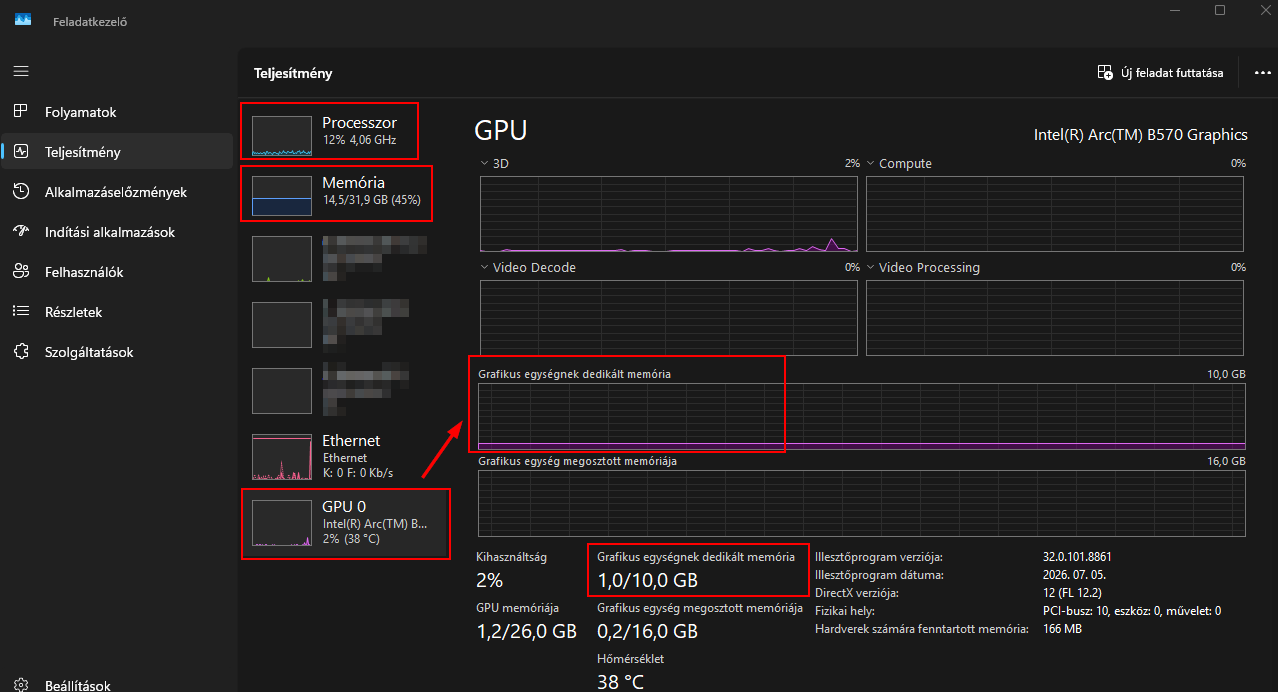
p.s.: edited due some misspelling, clarity, and bc my very bad english.
Thanks for the quick and excellent information, I have to go to the pc shop. It seems that after all I need abetter card for deepprime.
Anyone knows the difference between 5070 Ti and 5080?
But concerning my issue:
It is true that the relation between freeze and card is unsure, since I was not using deepprime, I was learning the interface, opening images and doing basic adjustments. It is however correct that it might be related to the card, since my images are 200 MB at start.
I will go thru all suggestions, and keep you updated.
Thanks again for all the support.
While you will benefit from a faster card, it is still far from clear that your current freezing issue is a direct result of your current graphics card. If you do purchase a card both the 5070 ti and 5080 would serve you well. Both are expensive and the RTX 5080 is much more expensive than the 5070 ti. For the specific use of improved processing in PhotoLab the relatively small additional processing power of the RTX 5080 over the RTX 5070ti may not be cost effective.
Before purchasing either of these two cards, or any other new cards, insure that they will physically fit in your current computer, that your current power supply is appropriate, that the spacing, fans and heatsinks in you box are sufficient to keep these cards running cool. Unless you are already computer savvy about these things get assistance before purchasing,
Matk
Thanks for the tip, I will go for the 5070 ti, which also fits in my case.
You may check GPU Database | TechPowerUp and GeForce RTX 50 Series Graphics Cards | NVIDIA , the Specs section (all above for desktop versions).
I’m quite happy with RTX 4070 for 45mpx Bayer raws editing (Nikon Z8) using 4K monitor and I would consider 5080 as overshoot, but that depends on your gear and type of work.
For some types of video editing it might be a different story.
Insufficient power supply or cooling are quite common issues with NVIDIA. Some non-typical settings may also cause problems (e.g. G-sync, HDR, …).
Just keep in mind there is a very good possibility that it won’t resolve your freezing issue.
Mark
So far the latest update seems to be working for me. RTX 3060Ti 8 GB. I did have one strange event though after installing in that my display was shifted to the right. I shut down and then restarted and that seem to fix the problem. Also, updated the latest driver 610.74