Just upgraded from Photolab 8 from V8.9.0.662 to V8.10.0.667 to find that new version crashes when Loop selection made - Photolab closes, Black screen on windows 11 with Icons missing and win 11 re-boot required.
Re-installed to previous version and everthing ok.
This is exactly the same problems that I encountered with the trial version of PL9 - accessing loop caused crash, as did selecting full screen hi-res previews. ( I also got errors that others report with PL9 with regards to masks)
Seems very strange that the latest PL8 upgrade now fails in a similar manner? Something that DxO have introduced from PL9 ??
Anyone having similar problems with V8.10.0.667?
I’ve not experienced any problems at all with PL8 on my previous laptop, or my current Azus zenbook - Asus intel i9 Ultra 32Gb Ram Intel Arc 140T 8Gb VRAM -16GB shared- Intel® AI Boost for Core™ Ultra
Pardon, what ‘loop selection’ means exactly?
Perhaps he is actually referring to the DeepPRIME loupe. available while editing an image n PL 8.
Mark
Correction - sorry - for “Loop” see “Deep Prime Loupe”
Just received this response From DxO who I emailed with regards the problems I am Experiencing
NoReply DxO
We are unable to respond to requests sent to this email address.
Most of the answers are accessible from the support section ( https://support.dxo.com/hc/en ).
If you have any questions or comments, you can reach us at any time via our contact form ( https://support.dxo.com/hc/en/requests/new ).
I have used the link for tech support from my DxO account - can’t find any other email for tech support - does anyone know how I can contact DxO tech support?
You might like to try https://support.dxo.com/hc/en-us/
I had no problems with PL8 and the Loupe, but upgraded my old PC.
Loupe use the NR type what you set in the ‘Denoising’ section.
May try the to check thru NR types: Standard, Prime, Deeprime, DP3, DP XD2.
May only in the case of DP XD2s raise issues.
That is an interesting problem. I am on this site every day and review every single post. I don’t recall anyone else reporting this issue.
Mark
I have V8.10.0.667 on a Win 10 laptop and haven’t had a problem with the Loupe and DeepPrime 3 or XD/XD2s.
But could it be related to " Intel Arc 140T 8Gb VRAM -16GB shared- Intel® AI Boost for Core™ Ultra".
How many other PhotoLab users have that particular GPU?
Loupe with DP3 use like + 1.5GB of GPU VRAM
Also good to know if its happen after when you run export with DP before, or previously export not used before.
I can image constellations like (you can try):
- Manual AI mask + NR: DP3 + Loupe + and previously NO Export at all-> Loupe works
- Manual AI mask + NR: DP3 + Loupe + and previously Export → Loupe not works
- Manual AI mask + NR: DP3 + NO Loupe + Export → Export works
p.s: also can be a good idea to quit other applications like web browsers. Foe example: for me Opera web browser in Youtube playback also use like 0.4GB of GPU VRAM.
p.s: as @mwsilvers mentioned: i not see in the forum cases like: “Photolab closes, Black screen on windows 11 with Icons missing and win 11 re-boot required.” Seems may related with Intel GPU driver? At least its seems. Other: under Win11 key combination: Windows+Ctrl+Shift+B does the display driver restart (screen flickering a bit and froze for a little) - with that you may not need to does full Win11 restart
Hi Andras - thanks for your observations, but you quote usage of AI masks - The problem that I am having is with the latest update to PL 8 (V8.10.0.66) not with PL9.
I have tried the 30 day trial of PL9, where I had the same issue that I am now experiencing with latest PL8 update, along with all of the other reported issues with AI masking and slow processing sppeeds - I gave up on PL9 for the time being after my 30 days expired.
The crash I experienced with PL8 V8.10.0.667 occured regardless of the denoising selected - crashed every single time Loupe selected.
I have now rolled back to Photolab 8 V8.9.0.662 and everthing works perfectly, leading me to wonder what DxO have done with the V8.10 version to mimic the crash I experienced when testing out PL 9 ??
I really don’t think that the upgrade to PL8.10 has any benefits to me looking at the release notes, and my 12 month support for PL8 ends in a couple of week in any case,l so for now, I will stick with PL8 V8.9.0.662 - it does everthing that I need and works flawlessly on my machine.
I have now successfully raised a tech query with DxO on this so I will wait to see what they say - I will probably ask them to give me an extended trial of PL9 to use at some time in the future when hopefully DxO may have ironed out the problems that users are experiencing with PL9 - my machine should be well within the min specs quoted at present for PL9
Ohhh, my pardon!  This days near all about PL9 vs GPU VRAM and i just try to help manys i can ->and i rush… Sorry.
May few thing to try → may helps for DxO support guys to rule ot a few thing
- If ‘Denoising’ turned off totally?
- in ‘CPU only’ mode its also happen? As in ‘CPU only’ mode everything expected to work (at least if you has like 32GB of system memory)
No worries Andras - I tried the latest PL8 update with CPU mode only, no difference - didn’t try it with denoise totally turned off couldn’t really see the point - Just seems really strange to me that whatever DxO have altered with regards graphics on this update replicates the same problem I experienced with the PL9 trial - have they used some code from PL9?
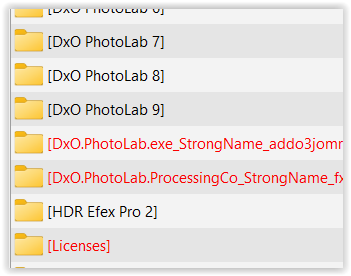
Please check that you have uninstalled (and removed) everything from your PL9 trial.
e.g.
c:\Users\ xyz \AppData\Local\DxO\DxO PhotoLab 9
as well within
Thanks for the Info Wolfgang - I had already removed everthing as you suggested from PL9 trial - Was your response in relation to being able to access an additional trial version of PL9?
This I don’t know / ever tried. - It was to remove stuff that might “misguide” your PL installation.
Thanks Wolfgang - Just been in communications with DxO tech support with regards to my ticket - I have asked if they could allow me another V9 trial in the future if they can fix it - and I will report back here with anything that arrises from my ticket 