Hello.
Every time i select the AI local settings i get this error message . I have just buy the PL9 update for this feature and it does not work , painfull. The PL8 version did work perfectly well on my computer and no version update is available. I would like to know if somebody could help me. I am almost ready to ask for a refund to DXO…
Didn’t you test it beforehand? – There are countless reports and complaints in this forum.
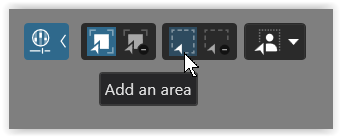
Some find it helpful not to use the predefined AI modules from the list, but instead to use “Add to Selection” or “Add an area”.
What GPU and driver version you are using?
Updating nvidia driver to 581.57 helped to reduce significantly these errors in my case. Btw, one may expect new nvidia studio driver this week.
What do you mean by that?
PL 9.2 update came together with PL 8.10, PL 7.18, not to mention FP 8.1, FP 7.18, FP 6.33, VP 5.8, VP 4.28, PR 5.5, PR 4.14, PR 3.24.
No i did not test before , having read that the last version was ok . the version that was sold to me is the V9.2.0build524 and it seems it is the latest. For me the error message occurs as soon as i select the AI local tool so i can not even choose a module …
Oops, sounds like GPU compatibility problem, VRAM too small (just guessing).
1 Like
Hello Wlodek.
I have 2 gpu in my Laptop : Nvidia Geforce GTX1660 Ti and Intel(R) UHD Graphics
I check “let windows decide which one to use” for PL9 application.
The processor is Intel(R) Core™ i7-10750H CPU @ 2.60GHz (2.59 GHz
there is 16go RAM available and 64 Go Diskspace
The Os is Windows 11 25H2
the only thing that looks strange to me is the version of the nvidia pilote that is 442.94 and shows Windos 10 as the actual OS ??
It seems that even though your laptop may have been fine with the laptop nVidia GTX 1660Ti it fails with PL9 ?
This from the release notes…
Release Notes Version 9.0.2 Microsoft® Windows® Minimum system configuration:
• Intel® Core™ 10000 series or Intel® Core™ Ultra 7 165H or AMD Ryzen™ with 4 cores
• 8 GB RAM (16 GB RAM for AI Mask)
• 30 GB available disk space
• 1280 x 768 display
• Microsoft® Windows® 10 version 22H2 or 11 version 22H2 (64-bit)
• For DeepPRIME 3, DeepPRIME XD3 X-Trans, and AI Mask:
o NVIDIA RTX™ with 6GB of VRAM with latest drivers
o AMD Radeon RX6000 series with 6GB of VRAM with latest drivers
o Intel ARC with 8GB of VRAM with latest drivers
o Intel® AI Boost for Core™ Ultra Recommended system configuration:
• Intel® Core™ 10000 series or Intel® Core™ Ultra 7 165H or AMD Ryzen™ with 8 cores
• 32 GB RAM
• 50 GB available disk space
• 1920 x 1080 display
• Microsoft® Windows® 11 version 24H2 (64-bit)
• For DeepPRIME 3, DeepPRIME XD3 X-Trans, and AI Mask:
o NVIDIA RTX™ 3070 with latest drivers with 8GB of VRAM
o AMD Radeon™ RX 6700 with latest drivers with 8GB of VRAM
Compared to v8.9
Release Notes Version 8.9 Microsoft® Windows® Minimum system configuration:
● Intel® Core™ or AMD Ryzen™ with 4 cores
● 8 GB RAM
● 4 GB available disk space
● 1280 x 768 display
● Microsoft® Windows® 10 version 22H2 or 11 version 22H2 (64-bit)
● For DeepPRIME, DeepPRIME 3, DeepPRIME XD, DeepPRIME XD2s and DeepPRIME XD3 X-Trans Beta:
o Nvidia RTX™ with 4GB of VRAM with latest drivers
o Nvidia GTX™ with 8GB of VRAM with latest drivers
o AMD Radeon RX6000 series with 4GB of VRAM with latest drivers
o Intel ARC with 8GB of VRAM with latest drivers Recommended system configuration:
● Intel® Core™ processor or AMD Ryzen™ with 8 cores
● 16 GB RAM
● 4 GB available disk space
● 1920 x 1080 display
● Microsoft® Windows® 10 version 22H2 or 11 version 22H2 (64-bit)
● For DeepPRIME, DeepPRIME 3, DeepPRIME XD, DeepPRIME XD2s and DeepPRIME XD3 X-Trans Beta:
o NVIDIA RTX™ 2080, AMD Radeon™ RX 6700 with latest drivers with 8GB of VRAM
Whether there is a workaround for your situation is the question.
Your nVidia driver is older and perhaps if possible needs updating as PL relies on the GPU and the driver improvements as they are developed.
Oh, and FWIW I always trial the new versions just t be sure I like the newest fucntions and keep all the installers.
Maybe you have GTX1060 Ti version with only 3 GB VRAM on board?
You may check that from the command line using nvidia-smi , which is supplied with the driver (at least in current versions). Btw, the sysinfo program sometimes displays incorrect info. Sample nvidia-smi output:
C:> nvidia-smi
±----------------------------------------------------------------------------------------+
| NVIDIA-SMI 581.57 Driver Version: 581.57 CUDA Version: 13.0 |
±----------------------------------------±-----------------------±---------------------+
| GPU Name Driver-Model | Bus-Id Disp.A | Volatile Uncorr. ECC |
| Fan Temp Perf Pwr:Usage/Cap | Memory-Usage | GPU-Util Compute M. |
| | | MIG M. |
|=========================================+========================+======================|
| 0 NVIDIA GeForce RTX 4070 WDDM | 00000000:01:00.0 On | N/A |
| 0% 43C P8 10W / 215W | 998MiB / 12282MiB | 5% Default |
| | | N/A |
±----------------------------------------±-----------------------±---------------------+
EDIT: Have a look also at “%APPLOCALDATA%\DxO\DxO PhotoLab 9\Logs\DxO.PhotoLab.txt” for possible clues and GPU config as PL sees it.
Just selecting the AI local tool causes huge VRAM allocation (GPU on board memory), which probably fails in your case.
1 Like
Hello thank you for your messages . I have updated my nvidia driver that i did not did for years !!..
Now the version is 32.0.15.8157 dated to 09/10/2025.
And … it works ! The AI is available with all the modules …
BUT!.. Now i can not export my raw files in a jpeg format.
A red exclamation point is showed and i got the message “internal error” if i point the mouse on it…
And worse : it happens with all the files wether there is a local correction or not … Maybe i could start another subject with that new and unexpected problem ?
I don’t think you need to start another topic. As I recall, there are already at least two recently-started topics about that problem, not being able to export to JPEG. Just search the forum and join in one of those discussions.
Yes, that’s the last working version 581.57 (if it supports your GPU).
In PL → Performance check for the export handlers
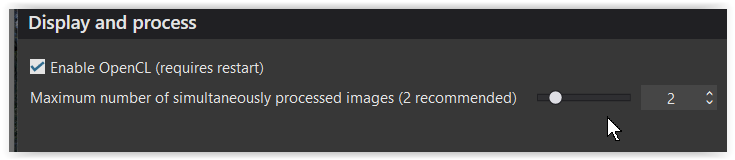
and retry when set to " 1 " (after restart).
Wonderful! I will not have to start a new subject because all things are going well now : i can export all the files corrected or not and it takes a very little time (faster than in PL8 version) .
Thank you everyone.
Have good times with phototlab 9!
1 Like
Hello again. I still had fails while exporting after having corrected about 10 pictures. What works for me is emptying the cache and restart PL9. Extend the capacity of the cache memory is also a good move. …