I have notice that if I do modifications in Lightroom before exporting to Pureraw Plug-in, all the post treatment is not showed when the photo is loaded in Pureraw. When it comes back in LR, the post treatment reappear and is applied. This make me think that in the end, it does not matter if some work is done in LR before exporting to PR since when the RAW file is loaded in PR, it does not come with LR modifications (we don’t see the option to load the image with lightroom modification like when using Denoise). Can someone confirm me if this is the case ?
Sincerely,
The clue is in the name. PureRAW. DxO’s Module technology works on RAW files. If you perform edits in LR first, then you’re no longer giving a RAW file to PureRAW and many of its capabilties are then unavailable — principally, lens sharpness optimisation and DeepPRIME (all variants) noise reduction.
I have slightly misread your initial post. The explanation remains the same.
PureRAW is expecting RAW files as input. As such, the DxO-provided plugin is almost certainly just passing the original RAW files with no attempt to consider what has been done in LR. Doing anything else doesn’t make sense.
The LR edits are not baked into the original file, just recorded in a database to be “replayed” when you display, re-edit, export the image. So DxO just pass over that original file.
You may be able to copy your edits from the LR original to the copy returned by PureRAW. Not sure how some adjustments would be handled, though.
One has to turn off lens corrections , NR and sharpening in LR since these are done by PR, apart from that edits done in LR are reapplied to the file created by PR on reimport. This is by design. From the documentation-
“What you have to avoid in Lightroom Classic
On the other hand, because the following corrections have already been applied by DxO PureRAW, you should not use the following tools:
Lens corrections: Do not combine DxO and Adobe optical corrections.
Noise Reduction and AI Noise Reduction: This may smooth out details and thus counteract the action of DxO DeepPRIME technology and denoising tools.
Sharpness (in the Develop module and Output Sharpening when exporting): Use sparingly as DxO PureRAW has already optimized sharpness”
Edit image in LrC set to NOT save xmp, which is a default in the catalog settings
Process image in PuR and save it to LrC
→ returned image has none of the LrC edits
Test 2:
Edit image in LrC set to SAVE xmp (modified the catalog setting)
Process image in PuR and save it to LrC
→ returned image has some of the LrC edits
LrC seems to apply to images exported by PuR what it finds in xmp sidecars.
I never dug deeper because I don’t edit images ahead of PuR processing. If that is your way, please check what you get and write about it here. Please be specific because results might depend on the format of the PuR’ed exports.
Caveat: Depending on how LrC is set, new images cane get some initial treatment. This treatment can interfere with settings baked into PuR exports. Notably, all lens corrections need to be checked carefully (falloff, CA, distortion).
DxO magic? No, it’s Lightroom that did it when I tested for it. Again, long time ago and things might have changed. Test and see what you get with your set of apps.
Because PR is receiving the raw file, as it was originally, before you edited it. It is processed by PR and returned to Lightroom, which then applies the edits made by you in Lightroom. to the TIFF or DNG returned by PR.
I usually do the PR conversion before any edits in Lightroom.
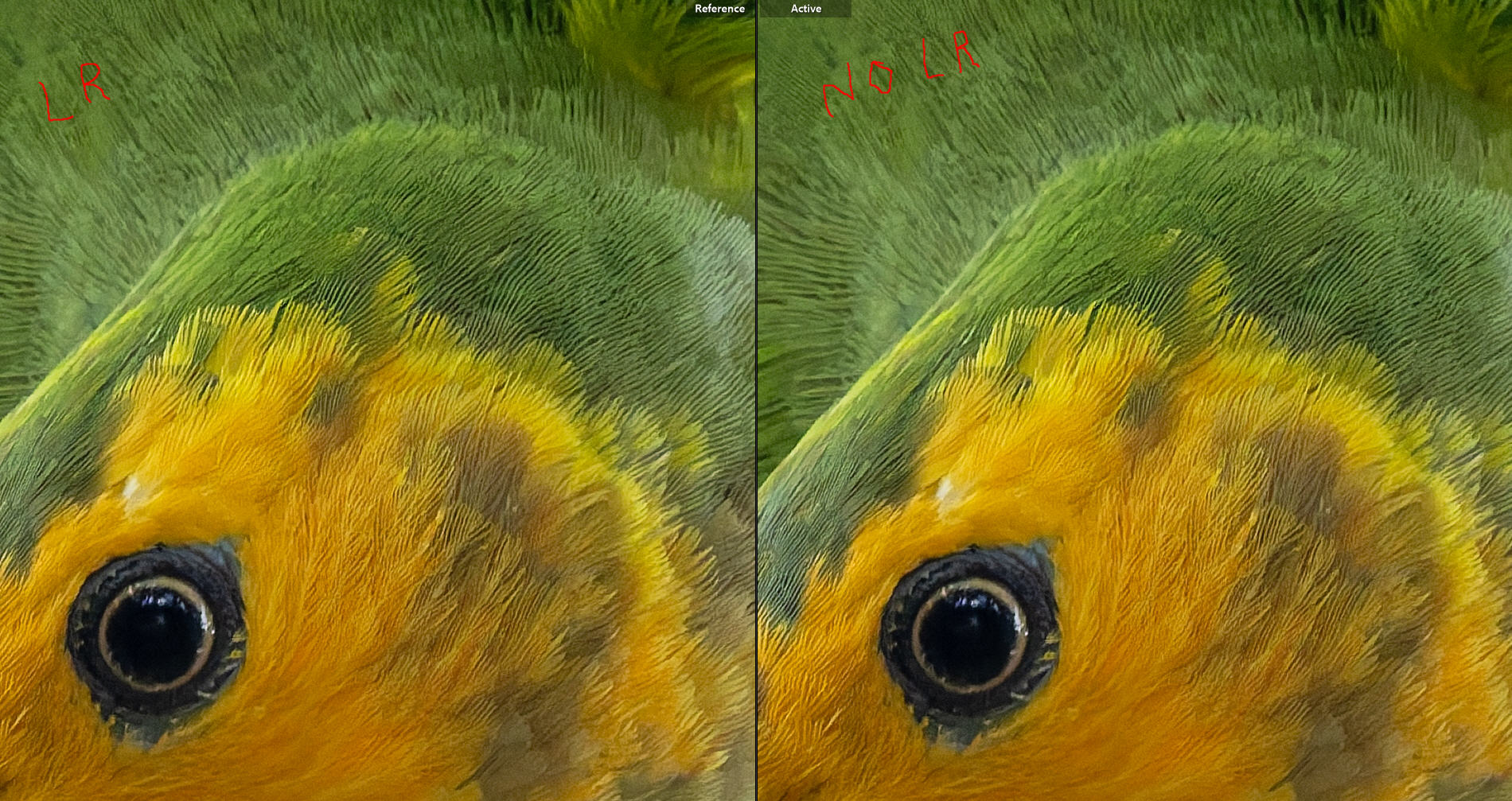
I have just made a comparison test. RAW file to PR with no edit then edited in LR. The other file, edited in LR before sending to PR. When I compare the two result at 100% magnification, I don’t see any difference between both picture. I have made sure to not apply noise reduction, lens correction and no sharpness on both picture before editing. So this confirm the info publish by zkarj that making Lightroom modifications prior to sending to PR does not affect quality as long as we avoid what Jeff holdgate mention.
Just made a comparison test and it don’t seem to matter if Lightroom modifications are done before sending the file to PR. The edited part are not applied when importing in Pureraw as you mentionned. I did make sure to not apply lens correction, shaprness and denoise in lightroom before. Thanks for taking time to answer, it was very helpfull and instructive.
You and the others didn’t understand my question. You should see a difference: in the noise.
Make a picture with a lot of noise, high iso, and try it again. Second, what file name do you see in the window when the file is send back?
I just tested this, and with xml off in catalogue settings, the edits made in Lightroom prior to processing with PR were still applied when the processed file was imported.
I did understand your question Georges and the answer is that I don’t see any impact while comparing both images. The tested image was taken at ISO 4000 and a little bit under expose so it was a good sample. Here is a screen capture of the images compare, on the left side with LR modification priori to send it to PR at 100% magnification. On the right side, sent in PR then edited with the same modifications in Lightroom after. I did not apply any lens modification, sharpness and denoise in LR for both images. I did turn off lens correction in PR has it seem to induce some problems with some the lens I use with my OM-1 system which has built-in lens profil applied.
Still no good.
There’re 2 questions. 1)what image are you viewing and 2) did the second image come from PR.
1). You must see that in LR. The image you’re viewing at that moment must be mentioned somewhere by name.
2). Take or select an image with a lot of noise. Noise is most visible in the dark areas. Use high iso and/or long shutter time. In your example there’s no visible noise, not for me anyway.
As others have stated, when exporting a raw rile to PR (or PL), any edits made to the file in LR will not be recognized by PR. Any and all changes are contained in the XMP file. However, when exporting back to LR, whatever import instructions that have been specified in ‘LR Preferences’ will be applied to the resulting DNG file. Personally, I have created a preset that zeros out all settings on any imported file, which includes files exported back to LR from PR (or PL0).