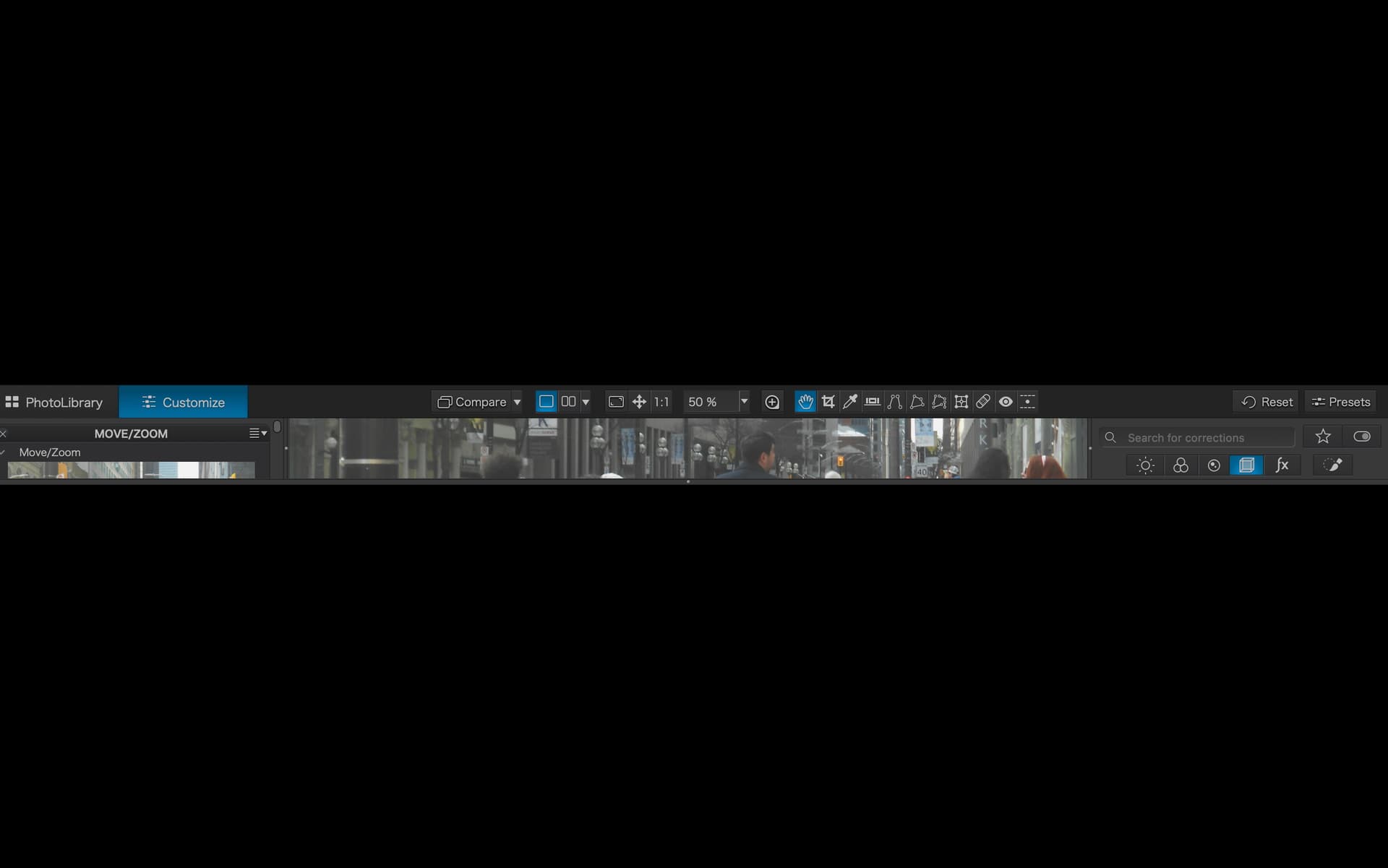
On my MacBook Pro M1, PhotoLab 8 does not display properly when I toggle the left info screen. This issue started about 4- 5 months ago.
The attached images show how the PL8 main display window resizes in odd ways. The window cannot be dragged into usable proportions. This happens whenever I toggle the left screen in editing mode. If I close the left panel the PL8 app display returns the other panels to normal sizes and I can use the program again.
Anyone else have this issue or can suggestion how to correct the problem?
Thanks for the suggestion. I have filed a bug report with DXO.
BTW. The biggest impact on my workflow has been trying to see the histogram. It is by default set into the left panel when in image edit mode. I now keep the histogram as a free floating panel object. This avoids the resize issues whenever the left panel is toggled. Not ideal - but it works until they can sort out the issue.
I would like the histogram to be part of the right sided panel at the top but can’t figure out how to do it. I can only get it over there as a floating panel which I do not like. Am I missing something simple?
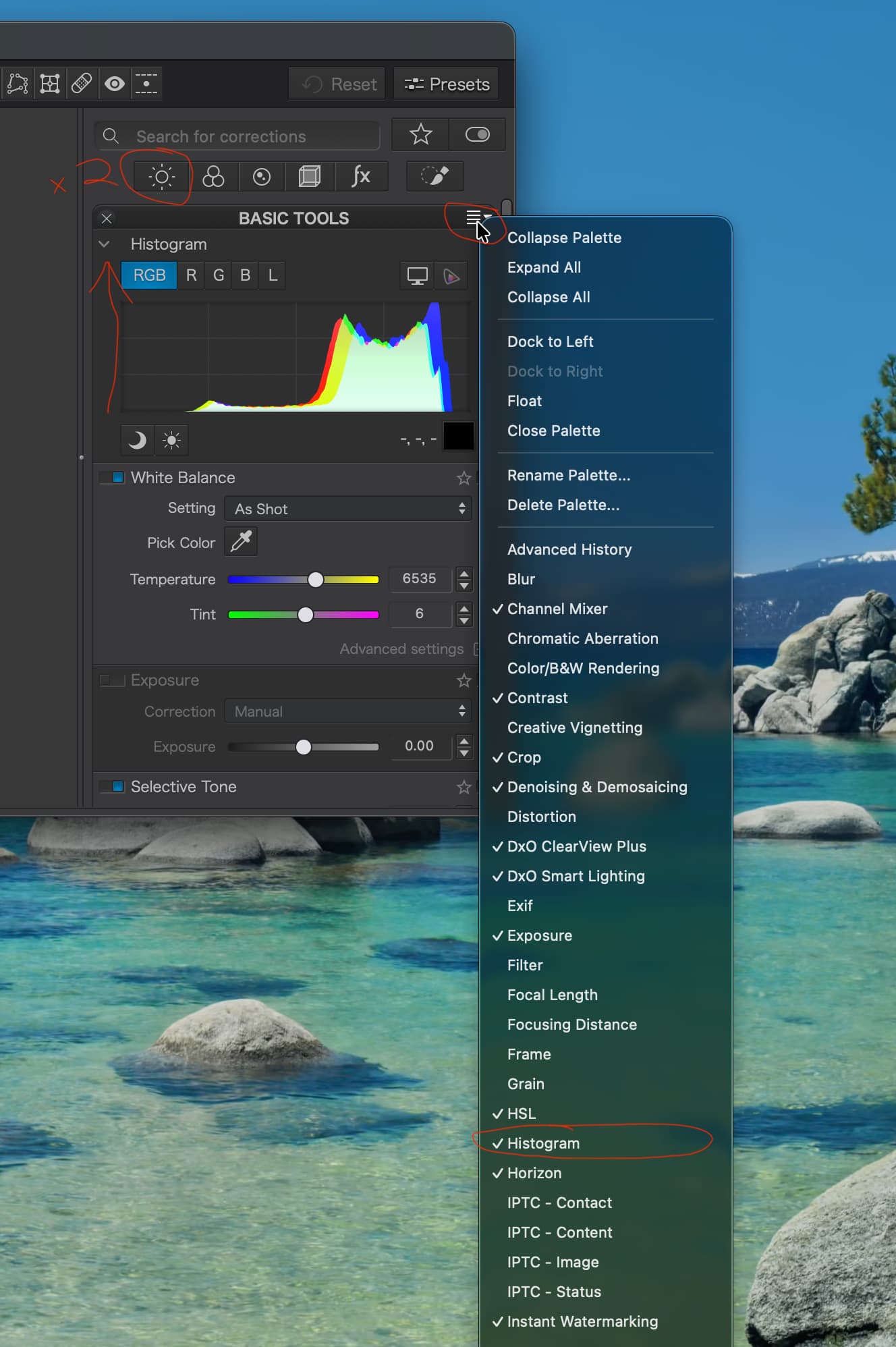
You can get the historgram to display on the right panel with a few clicks. Though it does not immediately seem intuitive. Here is how you do it.
When in the PL Image Editing mode = ‘Customize’ button is blue and your file is displayed for editing. Look over to the right panel.
On the right panel, Click x2 on any of the icons shown just below ‘Search for Corrections’. I clicked on the sun icon ‘i.e. light’. The 1st click on the sun icon shows the PhotoLab pre-assigned tool group for ‘light’ tools. A 2nd click on the same sun icon button (i.e. light) and the right panel now displays a collapsed tool panels. There should now be a heading saying ‘BASIC TOOLS’
Click on the little triangle to the right side of the word ‘BASIC TOOLS’.
Now you’ll see a list of items in a menu. Scroll down the menu and click on Histogram.
Click on the word ‘BASIC TOOLS’ to expand the stack and see all of the tools included. At the bottom of the displayed toolboxes you will find your histogram.
You can drag the histogram toolbox to the top of the “BASIC TOOLS’ stack .
Now the right panel stack looks similar to the NIK tool positions with a prominent histogram at the top right.
You can use this approach to customize and reorder the tool list to suite your needs. It seems a little odd but makes sense once you go through it. The histogram should remain persistent at the top of the ‘BASIC TOOLS’ stack anytime you x2 click on one of the preset tool groups - like the sun icon.
I heard back from DxO a few days ago, but forgot to update here.
They said, of course, to re-install PhotoLab and see if the issue continues
Given that I am on macOS, “re-installing” Photolab does next to nothing–since that just involves trashing the self-contained App and then putting it back with a new download–so I’m absolutely certain that won’t fix anything. But, so that I can say “I tried,” I will.
Check your System → Full Disk Access for your PhotoLab app. A re-install did not work for me but turning on Full Disk Access for PhotoLab 8.app worked as soon as I restarted PL8.
I had previously given PL8 Full Disk Access but something in the macOS or an upgrade had toggled the PL8 app setting back to the default OFF position.
Resetting System → Full Disk Access to OFF by default is probably a good security feature but a pain when you want a functional app.
Was the problem “always-on” for you? Or was it intermittent?
For me the issue only presented itself maybe once every 2 weeks. So it’s hard to know what, if anything, actually fixes it, until many weeks have passed.
Before giving PL8 Full Disk Access, the window resize problem consistently occurred in the full-screen display mode and when I had PL8 open in a reasonably large floating windows.
At times, I could toggle the left panel when the app was displayed in a small floating window but for all functional purposes toggling the left screen created the odd display geometries demonstrated in my first message.
If you can set the app to Full-screen mode and the left panel toggle works then you should be good.
If this problem happens again - especially after an OS or app upgrade, I’ll first look to see if the Full Disk Access switch was turned off. That switch turning off during system changes seems to be the likely culprit on my machine.
If I have any situation where the problem re-occurs I’ll be sure to share that with the forum and with DXO as a bug report.
This still happens in PhotoLab 9.7.0 on macOS Tahoe 26.4 running on a MBP 14” M1.
Window resizing started misbehaving when I started DxO PhotoLab with just the internal monitor and then connected an external one. The window height on the external monitor would not increase past the height suspiciously similar to that of the internal monitor. I suspect there’s some sophisticated internal window sizing logic in PhotoLab that doesn’t handle monitor configuration change properly.
Restarting the app while keeping the external monitor connected fixed the issue, but as a new user this is not a great first impression. Instead of focusing on my photos, I had to spend a good chunk of my evening troubleshooting PhotoLab. Not impressed.
This is the first app I encountered in my 10+ years of using macOS that has this kind of problem, even Inkscape running on top of ported X11 didn’t have any problems like that. I’m quite curious what happened. Window resizing behavior is provided by the macOS SDK for free, as a developer one really has get out one’s way to manage to break it.
Recently, I have had the display issue re-occur a couple of times. Switching on the Systems | Disk Access option for PhotoLab made a big difference but has not entirely solved the issue.
That is a seriously weird bug. And is still alive and well in 9.8 and MacOS 26.5.
I can’t say for sure, but the problem may have appeared after the update from 26.4 to 26.5 for me. I turned full disk access back off and the problem has stayed away.
Thanks for the fix. If I notice it comes back on its own or when the next patch drops I’ll leave a note here and send in a ticket.
I was searching for this forum topic the other day because, while the issue never fully went away, it recently started back up a lot more. I very frequently turn the left panel off/on while editing (I created a keyboard shortcut for it, so it’s quite easy).
It seems to become an issue the longer the app remains open.
Still haven’t figured out any exact steps to reproduce except just leaving the app open for a long while.
I re-opened my tech support issue, so let’s see if they can dig in and find the cause this time…
By the way, after some screen recordings, troubleshooting etc., DxO support have finally said this to me:
Thank you for your patience while we continued collaborating with our development team regarding the issue you reported.
After further investigation, we can confirm that our development team has already identified the cause of the issue, and a fix is currently being prepared for inclusion in one of the upcoming PhotoLab updates. While we are not yet able to provide an exact release date, the correction is coming soon in the next updates.
We truly appreciate the time you took to report this behavior and your cooperation throughout the investigation process. Your feedback helps us continue improving DxO PhotoLab for the entire community.
Please keep your application updated so you can benefit from the fix as soon as it becomes available.