Using a digital camera and a copying setup, I am starting to process some old film images. It is simple enough to invert the tone curve and set a bunch of presets for different exposures, Kodachrome, B&W, etc. But in the folder I have the original jpg image, which is a negative in the case of film, and when selecting an appropriate preset a DXO file is created with a .dop. What would be some of the options to delete the original negative image and just work with the new .dop file to save space?
Welcome to the forum @Dungeness
Wait before you start sawing the branch you sit on…
The .dop file is a settings sidecar file. It contains the settings you applied to your image. And it has to be where PhotoLab put it. If you delete the image file, you throw away your food, but keep the recipe so to speak. Keep all files for now.
Sidecars can be switched off in PhotoLab’s settings/preferences, but I suggest you don’t do that right now. Consider buying some external SSD instead.
1 Like
Now I understand. But I have another question. Some of my film images are portrait. When I use the rotate tool, they do rotate, but the images don’t stay and revert back sideways. Any idea how to make the rotate stick? Thanks.
In PhotoLab you need (to activate) the FilmPack Viewpoint PlugIn.
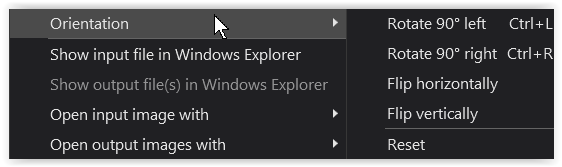
see → Digital imaging of Slides, Color and B&W Images - #9 by Wolfgang
Really!?
You do need ViewPoint to flip images but I always thought simple rotation is part of ‘core’ PL, i.e. that feature is not part of FilmPack.
So with DXO Photolab 7 and Filmpack I can’t keep images flipped? Geez. That really sucks. Does DXO know this?
You might like to read → https://support.dxo.com/hc/en-us/articles/6759602523421-Why-do-I-need-DxO-ViewPoint-if-I-already-have-DxO-PhotoLab
and → https://support.dxo.com/hc/en-us/articles/6759919046045-Are-Perspective-Tools-available-in-DxO-PhotoLab about the changes concerning the Perspective tools.
@Dungeness it depends what you mean by flipped. Rotating landscape to portrait or vice versa can be done in PL but to flip left to right / right to left (mirror image) requires activation of ViewPoint and that costs money.
At least that’s my understanding. I’ve had both VP and FP for too long to remember what extra features they unlock in PL.
Sorry, I meant ViewPoint.
but I always thought simple rotation is part of ‘core’ PL, i.e. that feature is not part of FilmPack.
I just looked up the PL3 manual – the first version I’ve used – and in the list of hotkeys …

So, you are absolutely right.
@Dungeness to summarise:
-
Ignore any references in this topic to needing FilmPack to rotate or flip images.
-
If you rotate an image in PL, either using the hot keys (ctrl+l or ctrl+r) or via the menu options (in Image | Orientation), that choice should persist within PL. You won’t see that change outside of PL because PL is non-destructive, i.e. the change of orientation is just written to PL’s db and the .dop sidecar (if you have enabled sidecars). To bake in the change, you need to export the image from PL.
-
If you want to flip horizontally or vertically then you need to buy an activation key for ViewPoint. Yes, lots and lots of users gripe about that but it’s the way DxO market PL so you have to decide whether or not, for you, this and the other features it unlocks merits the cost. You can of course flip images outside of PL using other software.
…or use my (not so secret) workaround and edit the orientation in the .dop file.
(look for details by searching the forum)
1 Like
It appears I might be dealing with a bug. First, I am talking about rotation, not flipping. The reason for my post is that I rotated some images, and then went back to look and they were rotated back to original. Then yesterday, I opened some images of some film I did with my camera, and they all opened upside down. They were “scanned” correctly, but opened inverted. I used the (command R) to rotate them correctly, closed DXO, then opened them again and so far, they have stayed correctly oriented. Weird.
You evidently forced the app to save your changes. Give it a little more time to save next time.
In any case, “Rotate” seems to be working for you now. 
PhotoLab tracks edits in its database and exports the edits to the settings sidecar (.dop files). Export to .dop is asynchronous and can happen whenever PL thinks it’s time to do so. On my Macs, it’s usually within a second or two.
A wild guess could be that you quit PL while some sidecars still had their “old” entries and that this discrepancy between DB and DOP might have caused the issue. If you manage to reproduce the issue, it’s best to inform DxO Support about it with a ticket that you can create on support.dxo.com.
1 Like