CPU recommendation please

Hi there I am Ollie and new to the forum. Not new to PL thought.

I have an i7-9700 with a RTX 3060 using PL7 and have no problems with my RAW files from my Pentax/Ricoh cameras . They have 20 to 24 megapixel.

I can work with the compressed RAWs of my new Fuji camera (40 megapixel). It’s a slow, but it works . With PL9 I felt it was a little better (not sure), but the evaluation period just ran out. I want to wait a couple of weeks bevore upgrading to PL9.

But anyhow, I retiere next month and want to make good use of may last paycheck. (And my stepmother could use my old PC, hers is ancient).

I have seen the recommendation from DXO:
"Intel® Core™ 10000 series or Intel® Core™ Ultra 7 165H or AMD Ryzen™ with 8 cores
"
But do I rather go Intel or Ryzen? (please nor recommendations for Apple)
Witch CPU platform gives me the better performance?
What specific CPU should I buy?

I will keep my RTX 3060 for the moment and might upgrade in the future.

Any own experience that you would share?

Maybe the Ryzen 7 9800X3D?
But I have no idea, If PL9 makes use of the X3D feature.
The Computer is mainly for DXO and generall use. I don’t play computergames and do not need features that only support games.

Or maybe the Intel Ultra 7 265k?

or something different?

Greetings from Germany

Welcome to the forum!

You will find that the GPU will have the biggest impact on performance. Any modern CPU will be fine but invest in the latest GPU you can afford.

Be aware that people (myself included) have issues with the AI Making in PL9 so I would suggest an GPU with at least 8gb of memory.

Thanks for the input Keith.

I know that the GPU has a huge impact on performance and I will upgrade the one I have, if needed (but would like to use it in the new computer for the beginning) .
Same goes for my fast m.2 SSD with 4TB (an all the RAWs on it)

What I really like to know, is what kind of CPU I should consider?
Intel or AMD? With or without AI capability?

The graphicscard I have at the moment is working quit fine. Didn’t have any issues with the PL9 demo and Ai mask or DeepPrime.

Just the initial loading of the files and the handling of the sliders is getting less fluid with the bigger (and compressed) Raws of the 40mp x-Trans sensor.

My Graphicscard is a
MSI Ventus 3x Geforce RTX 3060 with 12GB of GDDR6

The Graphic card’s GPU is used primarily for raw demosaicing exports in PL 9. A new option has been added to PL 9 to view the results of DeepPRIME in real time at any zoom level over the full edit window. I don’t know whether the GPU is also used to speed up screen refresh when this feature is turned on. If money is tight, your existing graphics card may still serve you well in a newer and faster machine. You might also want to consider an RTX 5070 or RTX 5070ti as a replacement for it.

Mark

I started to look into that a few days ago and found that in order to steg up from my 3060 Ti with 8GB is would need to upgrade the power supply to. The one I have is on 500 Watt and is seen as a little weak for the 5070-series. That made at least me convinced to buy a new computer later this year. I have a gaming computer: Acer Predator P03-640 from 2022, i7-12700F 2.1Ghz with Nvidia Geforce RTX 3060 Ti. This is not just because of Photolab´s increased system resource demands but also to be able to run some 12b models locally with iMatch. That is also about securing future a bit.

My Ti-card is around 30% faster than yours Ollie and both are alright and will support all the new features except the new premade AI-masks. That means you will probably not be able to use the new premade AI-maskig models in the menus BUT you will be fine using the other freehand masking method where you just point and click select the targets. That works very well and will not stop you from doing whatever you need with your pictures. So, if you are alright with that limitation, until DXO optimizes the AI-models, I don´t think you will need to do any panic upgrades.

I can honestly say that using the freehand method is both faster and gives me a better and more efficient work flow so even with a new faster computer with twice the VRAM, I will probably normally stick with the in many ways smarter and more efficient freehand method.

1 Like

Thanks everybody.

I know that my Graphic Card is neither the youngest nor the fastest and I am pretty sure I will upgrade it in the near future. But for now it’s what I want to use.

My problem, at the moment is, that I am unable to determin which CPU (the main procesor, not the GPU) is good for PL9.

I don’t want to spend money on the fastest and latest and I do not want to buy a to weak one.

So, my first problem is: which CPU?
AMD or Intel? And which specific prozessor.

I especially would like to know if DXO makes use of the “Neural Processing Unit (NPU) for AI tasks” in the Core Ultra 7 or if there is something similar in the AMD world.
( I thought the Ryzen 7 9800X3D does. Seems that I was wrong)

After that I will think about mainboard, casing, power supply, cooler/fans, memory, system SSD, and so on.

A graphics card replacement is the easiest part. Chosing the wrong CPU manufacturer/wrong mainboard, I feel, is more difficult to straighten out.

@Stenis: it’s not a panic upgrade, it’s just something I want. And I have time on my side, so no rush.

@mwsilvers:

Yes, I was looking into those. But I am not in the mood right now to think about a different Graphics Card. After all the trouble with my former Radeon 590, I am just happy, the my 3060 works with every export. With the Radeon 9 out of 10 times deep prime crashed.

So I will “observe” the user remarks regarding Graphic Cards before I buy one.

I think Keith already gave you the answer. It will not be your CPU that will be your bottle neck with Photolab but the GPU.

You can use Cinebench R23 to compare the CPUs:

Your Intel i7 9700 scores 8540 in the multi-core performance test, which is roughly equivalent to the minimum requirements for Photolab 9.
The AMD 9800X3D scores 23,334 and the Intel Core Ultra 7 265k scores 36,309 in the Cinebench R23 multi-core test.
This could be a significant improvement.

Thanks everybody

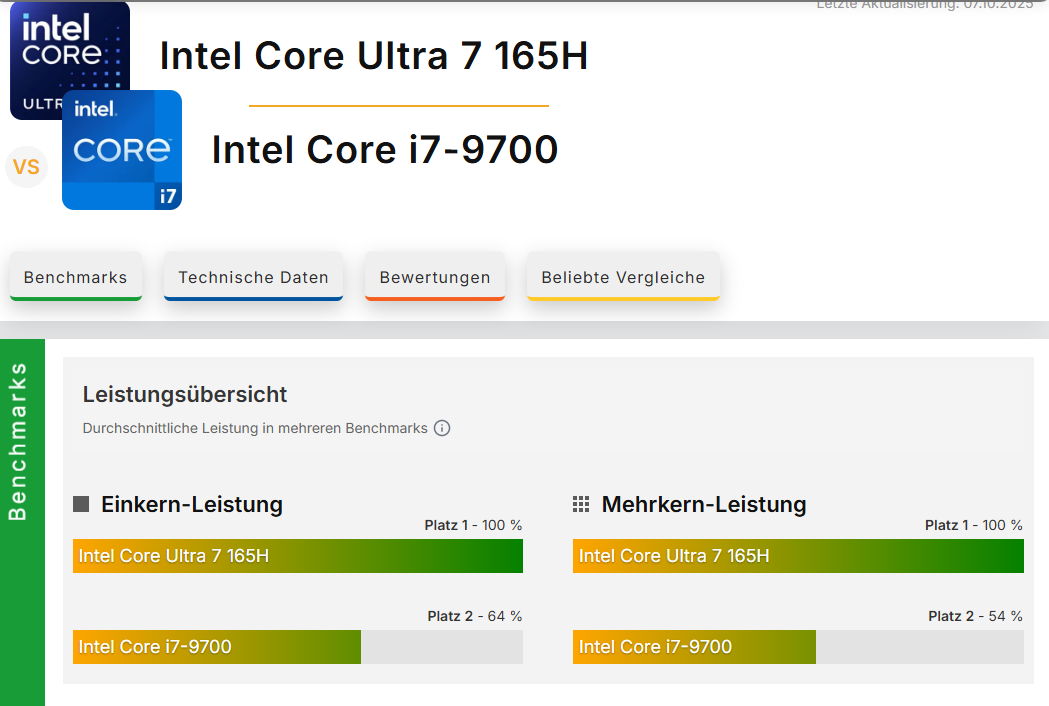
I actually think it is below the minimum requirements.
At least that’s how I read the comaprison on cinebench (Many thanks for this link :slight_smile: )

Einkern= Singlecore / Mehrkern=Multicore

So, the Ultra 7 gives even a little more bang for a lower price than the Ryzen?
285€ vs 435€ ? Single Core is a little better also.

Sounds very good to me. At the moment the Ultra 7 would be my favorite.

Does anybody has ideas about that?