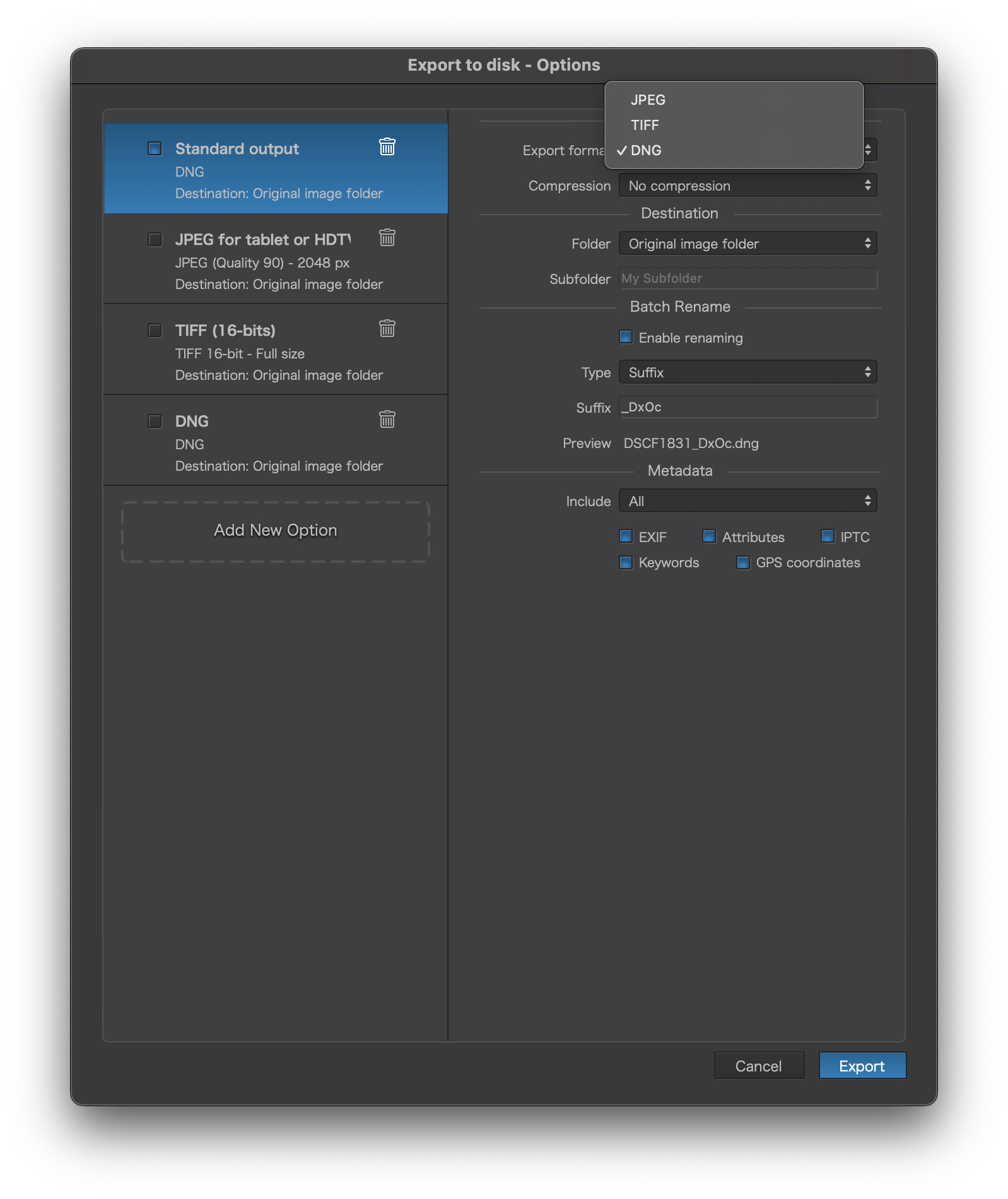
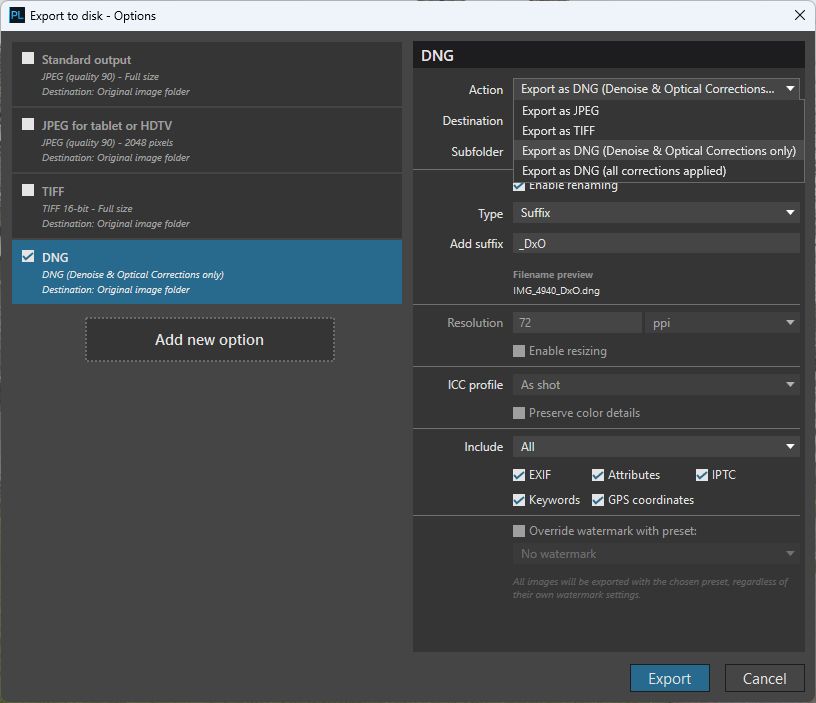
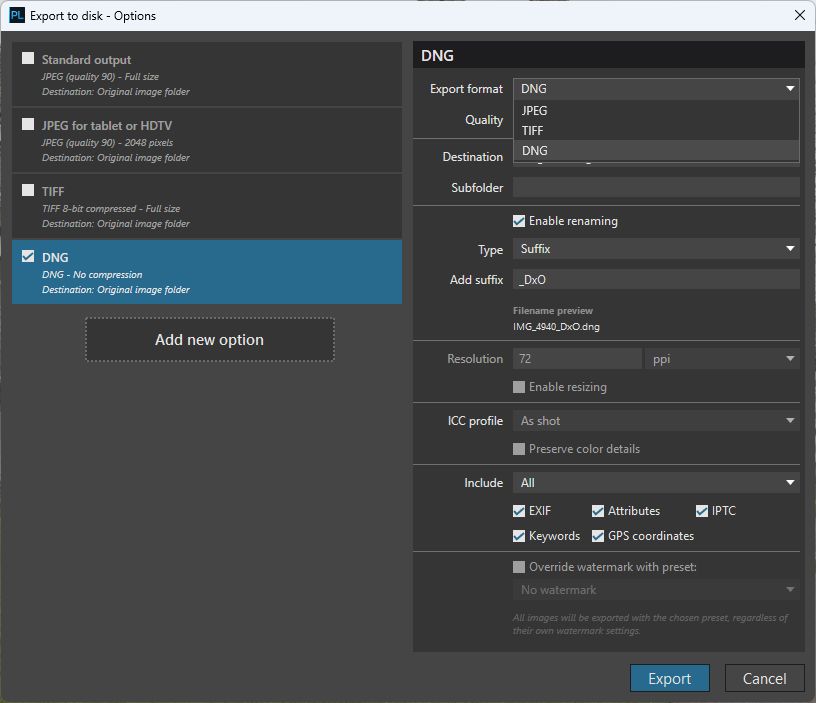
And when I export using that, none of my adjustments are included with the DNG. It looks like perhaps the optical corrections are applied, but not any of my creative adjustments.
Unless I’m missing something, I don’t see any option whatsoever to include these.
Is everyone else seeing the same thing? What bout Windows users?
From PL9.6 release notes, DNG section:
" Applied corrections include: Denoise, Retouch, Reshape, Optical Corrections (Lens Softness, Vignetting, Distortion, Chromatic Aberrations), Perspective, Horizon, Crop, and Red Eyes.
"
The output is a Linear DNG intended for further processing, e.g. in Lightroom or Photoshop, like for PR6.
On a related note, the compression method used here appears to be lossy JPEG XL. A 31 MB DNG test file from my Ricoh GR iiix was compressed at export to just 21 MB vs 98 MB with no compression. This significant level of compression indicates lossy rather than lossless compression.
So yes, the Windows version is behaving as you see on your Mac. There is now only one choice for DNG export, which applies the corrections as detailed in the release notes.
Just checked PL9.6 linear DNG high-fidelity output from Z8 RAW (14-bit lossless NEF). The JPEG XL settings for compressing the main image look just like in PR6.0:
JXLDistance = 0.01 (float) (shown by exiftool as 0.00999999977648258)
Value of 0.0 means lossless compression, while values greater than 0.0 means lossy compression. Represents the Butteraugli perceptual distance metric, defining how much visual degradation is allowed. Value 0.01 seems to be minimal non-zero allowed in DNG 1.7.1 SDK.
JXLEffort = 3
Values range from 1 (low) to 9 (high).
JXLDecodeSpeed = 4
Values range from 1 (slow) to 4 (fast).
Holy crap! Not only is this “feature” useless to me, it’s actually a giant step backward. What I really wanted was to be able to export a finished lossy-compressed DNG with user-specified pixel dimensions that I could archive, and from which I could generate full- and reduced-resolution JPEGs for delivery to clients. Now, I don’t even have the option of exporting uncompressed DNGs with all adjustments?!?! WTF???
I was hoping for the compressed DNG to have the option for all adjustments applied because that seemed somewhat useful to me. Otherwise yes, I’ve never actually utilized the DNG export option.
This is indeed a very strange phenomenon. In PL9.5, when exporting DNG files, you could choose between “Optical Correction Only” or “All Corrections.” Now, in PL9.6, there’s only one option when exporting DNG files, and it seems only “Optical Correction” can be exported. The previously selected “All Corrections” option cannot be exported as DNG format; it only works when exporting to TIFF or JPEG format, which is somewhat incomprehensible.
Although I don’t use DNGs, I find it strange too. What I would also like is to have an option for lossless JPEG XL compression plus support for this format by Nik (it works with the current Capture One). That would allow for smaller intermediate files. But maybe current DNGs, just slightly lossy, are good enough for that purpose (with JPEG XL lossy compression it’s good to check shadows). I don’t think DxO will add JPEG XL compression option to RGB TIFF outputs.
I personally strongly recommend that PL 9.6 retain the option to freely choose between “All Corrections” or “Optical Corrections Only” when exporting DNG files, just like PL 9.5. This feature is extremely important for a photographer.
Earnestly request and hope that the DxO team will restore this feature.
I don’t actually understand the use case for DNG output that is not met by other formats. If you’re just using PhotoLab to ‘clean up’ the images before processing elsewhere — that’s what PureRAW solves.
The only times I export as anything other than JPEG is for performing extra work that PL cannot do, such as upscaling or motion blur correction in Topaz products. In those cases I want a nearly-finished file, so TIFF does the job.
As others have commented elsewhere, compressed DNG isn’t even that well supported. I’d say their expected use case is PhotoLab → Lightroom (or equivalent), though even that is odd. I’ve done that, but only because I already owned PL and didn’t see the point in paying for PureRAW.
I personally plan to convert a bunch of older RAW files to DNG 1.7 compressed (this “high fidelity DNG” format) to save up space and because I expect the quality will be good enough for archival while remaining flexible enough if I want to edit some of those old photos.
I don’t really care if this conversion is done in PureRAW, PhotoLab, Adobe DNG Converter or some other software. Ultimately the tech I’m interested in here is DNG 1.7 with JPEG XL compression. But one advantage of doing it with DxO products is that their demosaicing algorithm is better than Camera RAW/DNG Converter, so the end result should be a bit better that way. That’s something that has kept me away from using DNG Converter before, but with PureRAW/PhotoLab the benefit/risk calculus is finally worth it for me.
Doing this kind of conversion in PhotoLab rather than PureRAW is maybe a bit odd from a theoretical purity point of view, but like yourself and others I do own a license for PhotoLab 9 and don’t feel the need to also buy PureRAW just for that. So we’re all being pragmatic here. Not sure why your own pragmatism is leaving you confused. ^^
Absolutely shocked by the loss of this functionality (export DNG with all corrections applied, no compression needed for this option), which is essential for my use case.
Contacted the support. The person replying was not even aware of this!
The person relied on the user guide, which is last updated September 2025.
What is going on here? Who decided to remove this essential function and why?
Only option remaining reverting back to version 9.5? Longing for the support to get me the installer for this version.
Some things to note: if PhotoLab isn’t behaving as described in this FAQ article, then a bug report needs to be submitted to DxO via support.dxo.com. Also, there have been many complaints about DxO-generated linear DNG exported images not rendering correctly in other software. The color space concern mentioned in the article might be one reason for that. (I’m speculating.)