Comparison: TIFF vs Linear DNG

Posting here since it’s not specific to DxO products, though it’s relevant to PhotoLab and PureRAW.

I often read that a linear DNG — the kind of DNG that PureRAW and PhotoLab can export — is “just a 16-bit TIFF in a DNG wrapper”, and I was wondering how true that could be.

In a recent YouTube live in French, DxO product manager Fabrizio Dei Tos-Navalesi said that TIFF and Linear DNG are quite different when it comes to the color space and white balance, and he calls Linear DNG a “half-RAW format”.

I still wanted to learn more and test the claim that a 16-bit TIFF and a Linear DNG would give you the same editing latitude.

Reading the Wikipedia page on TIFF didn’t elucidate much, because TIFF is an old frankenformat which can host different types of data and metadata, and different TIFF features can be standard, standard but not widely supported, or proprietary to specific software. And apparently DNG is based on TIFF/EP, an extension of a subset of TIFF for digital photography.

Okay, so that doesn’t help me much. So after that I did a simple test in PhotoLab 9.6:

  • Pick a RAW photo (a Fujifilm X100S RAF)
  • Disable all corrections except denoising and lens corrections
  • Export it as a 16-bit TIFF
  • Export it as a linear DNG (high fidelity, aka with JPEG XL compression, though uncompressed should perform virtually the same)
  • Compare in another app that supports both formats, here I picked Pixelmator Pro on macOS

My first test showed only minor differences in colors and contrast. Pushing the shadows and bringing back the highlights looked similar for both images.

So maybe the claim that those Linear DNGs and 16-bit TIFF are equivalent was mostly correct, outside of color space nuances? But I still had my doubts.

So I picked a different image, one that was significantly underexposed (it’s a photo from under an overpass, where the scene outside the overpass is correctly exposed and anything under the overpass is almost pitch black).

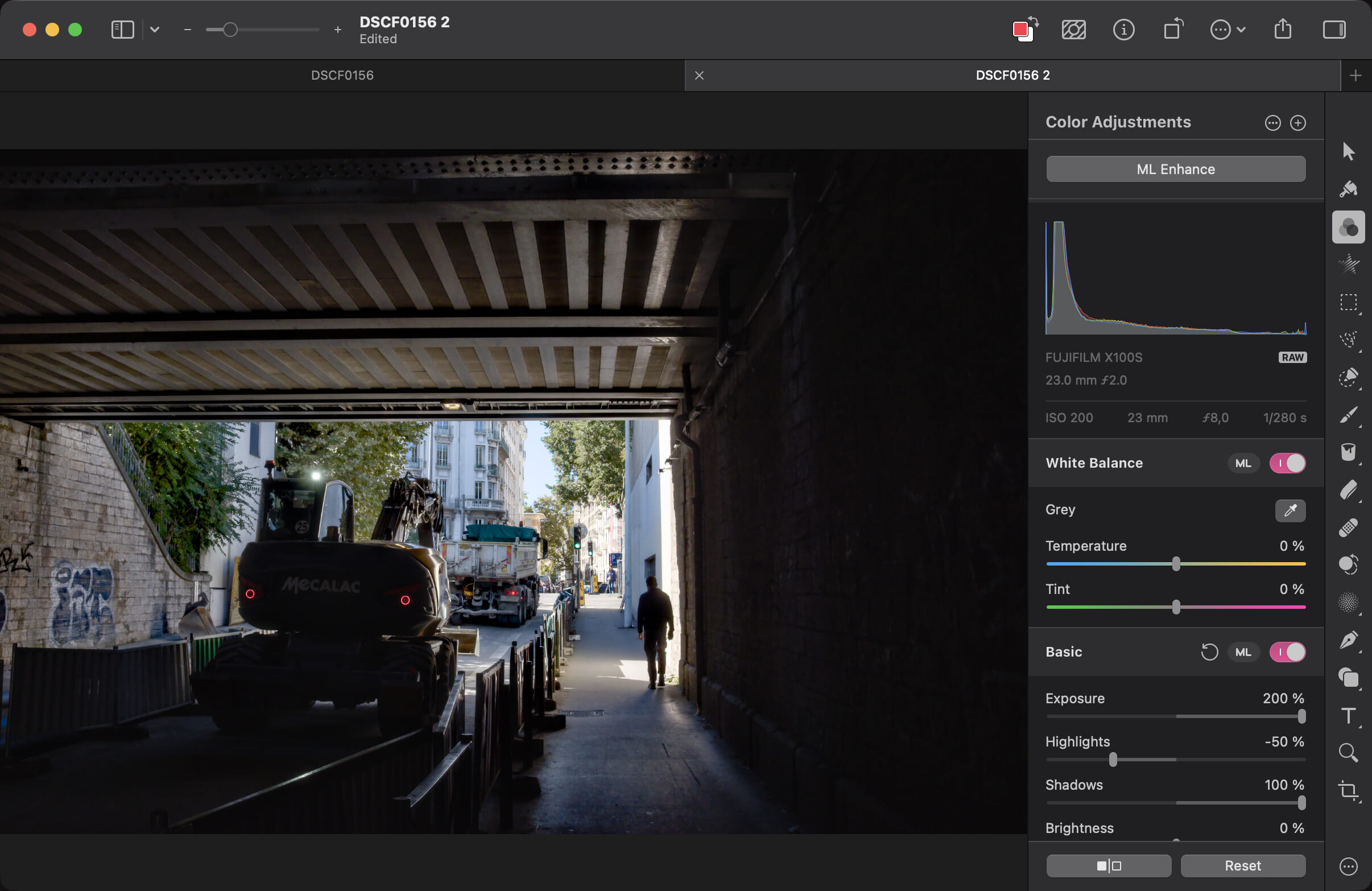
And there, pushing the exposure and the shadows and bringing back the highlights showed big differences between the two formats.

Edit: after further testing in different software, the dynamic range difference between the two formats seem minor or non-existent. In theory, they might exist in even more extreme scenarios, but not in this particular test with very dark shadows.

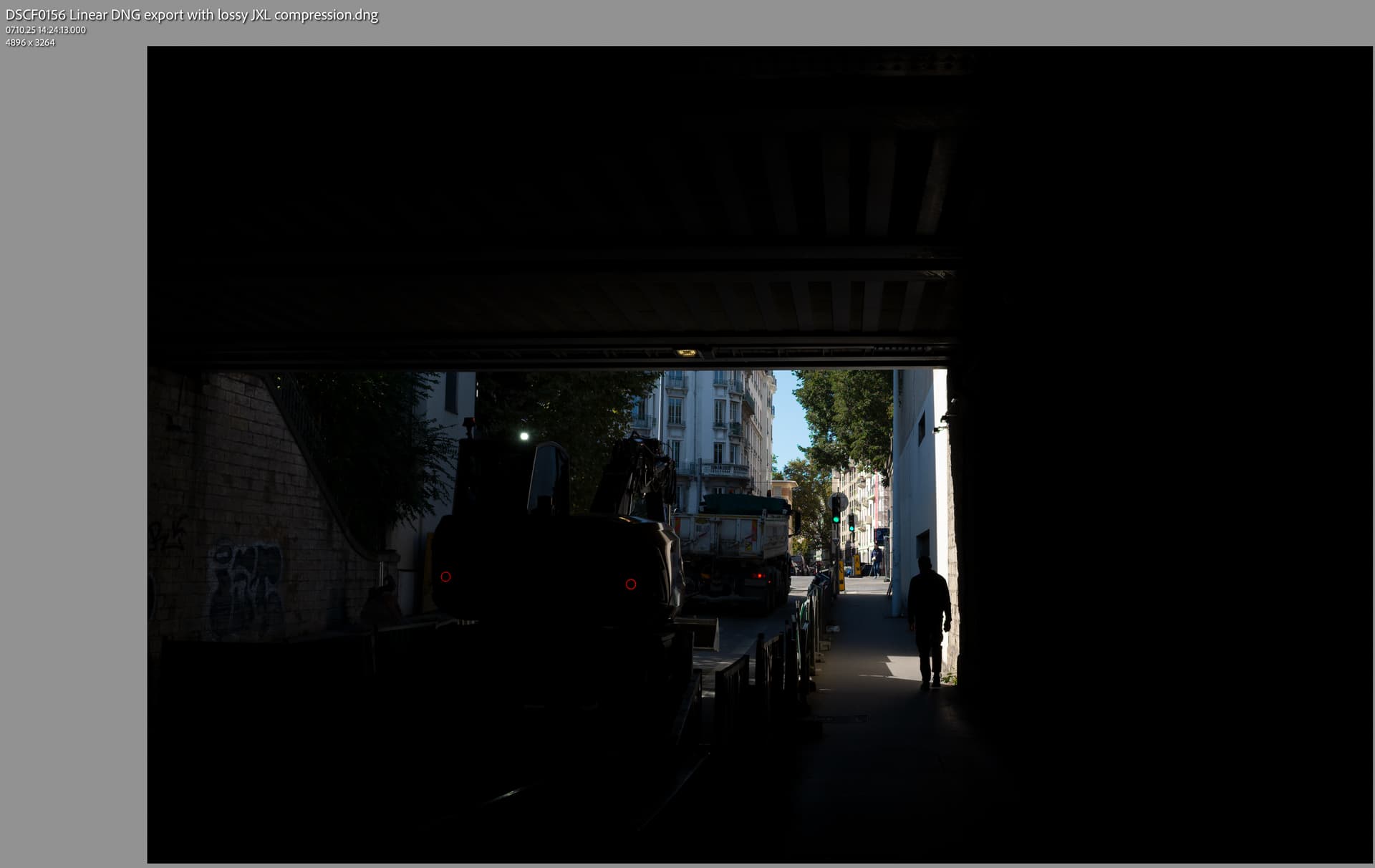
Here’s the Linear DNG, looking like what I expect from a “RAW” image where I’m pushing the exposure and shadows:
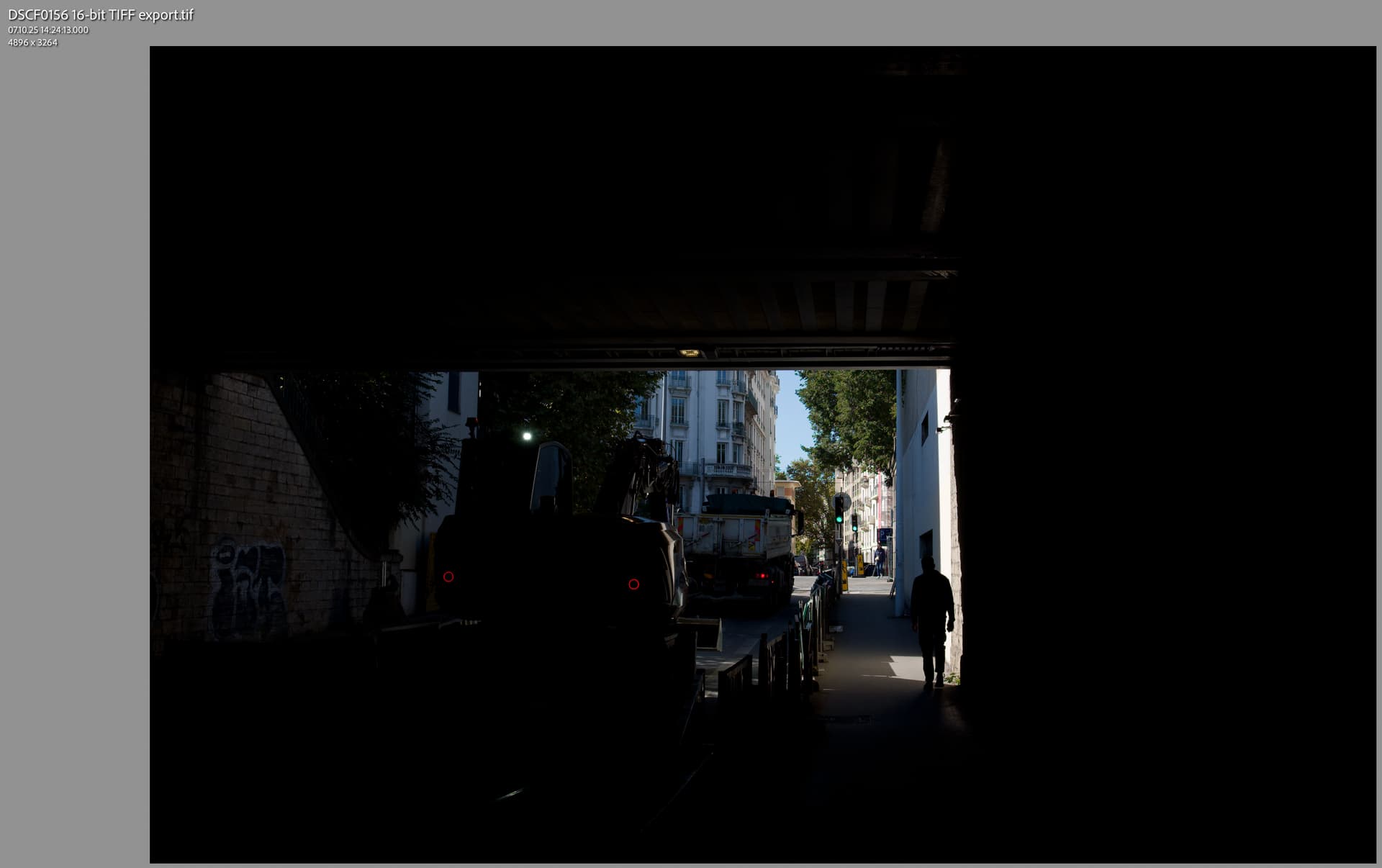
And here is the 16-bit TIFF:
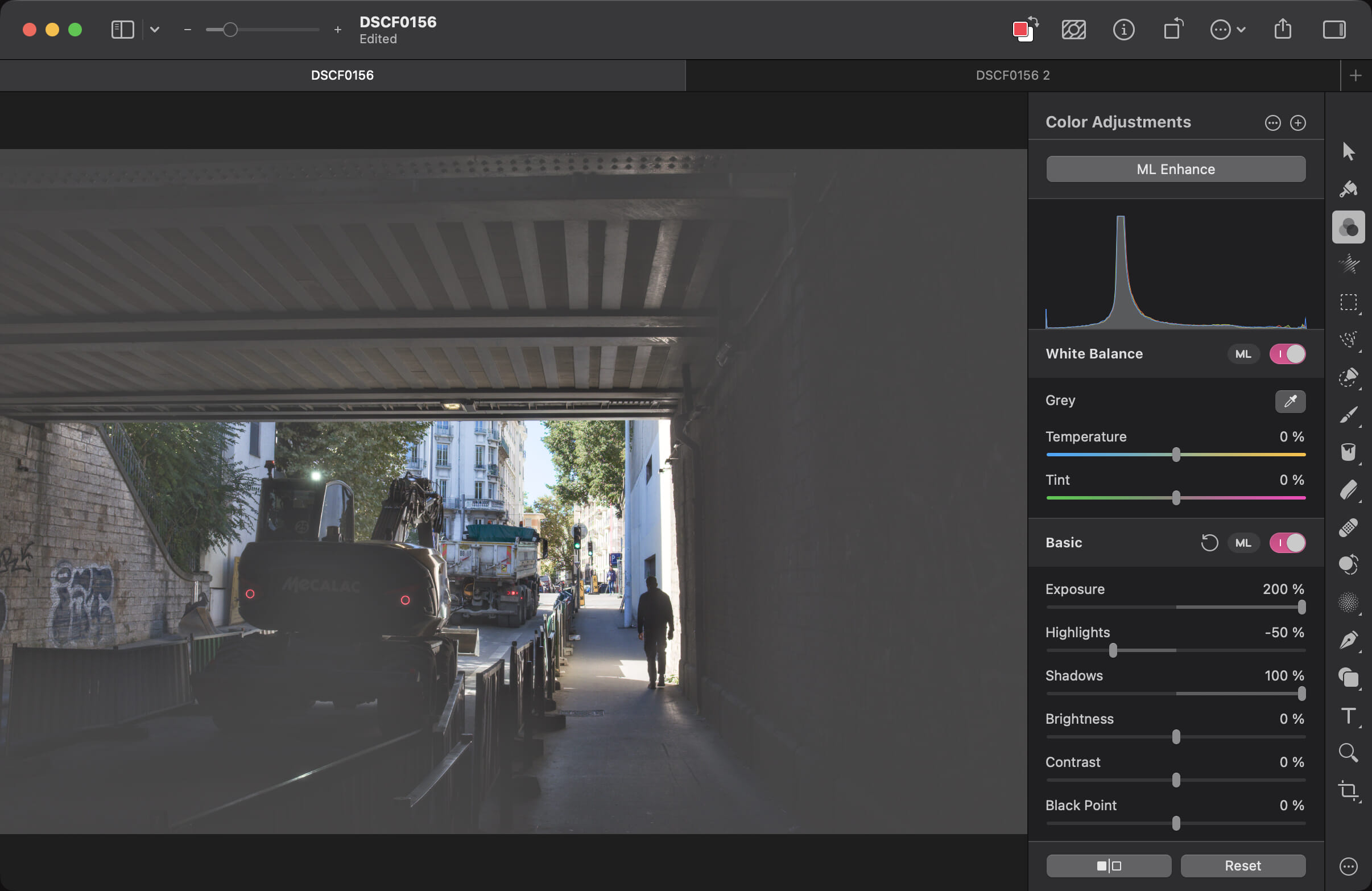
Between what Fabrizio said and this test, I’m now more confident that linear DNGs do retain the original RAW’s dynamic range, while a 16-bit TIFF doesn’t. The 16-bit TIFF seems to have more leeway than a 8-bit JPEG, but is still more limited than the DNG.

When a shot is correctly exposed or corrected to have good exposure before exporting to a 16-bit TIFF, then it does look like you can push around the exposure of the 16-bit TIFF by +/- 1 stop in other editing software, but can’t go much further than that.

What do you think? What’s your experience with those formats?
1 Like

Maybe I’m wrong, but it looks like Pixelmator didn’t apply gamma correction to the Linear DNG. Did you try to compare the TIFF and DNG in PhotoLab, Capture One, and/or Lightroom?
Can you share the RAW?

2 Likes

I don’t have a Capture One or Lightroom license.

Here is the result for those same exported files opened in PhotoLab, and raising those crushed shadows quite a bit:

Linear DNG:

16-bit TIFF:

I also tried in Affinity v3 and in Nitro, but Nitro was pretty bad at raising the shadows so that wasn’t too useful, and Affinity didn’t offer the same exposure and tone tools for DNGs and TIFFs so I can’t really compare there.

And here are the exported Linear DNG and 16-bit TIFF:

https://files.fvsch.com/share/DSCF0156-exports-linear-dng-and-16bit-tiff.zip

My main question is whether the two formats have the same dynamic range, or if 16-bit TIFF clips the dynamic range somewhat.

Nice approach!
There could be an issue with Pixelmator here, as they look in LrC like this:

Frankly, the TIFF looks somewhat more appealing to me in very limited areas.
But the difference is not worth 10x fold the file size, especially in somewhat backup scenarios of “just to be on the safe side” not deleted pictures.

To me they are practically the same. To see differences you would have to “measure” the very same spots.

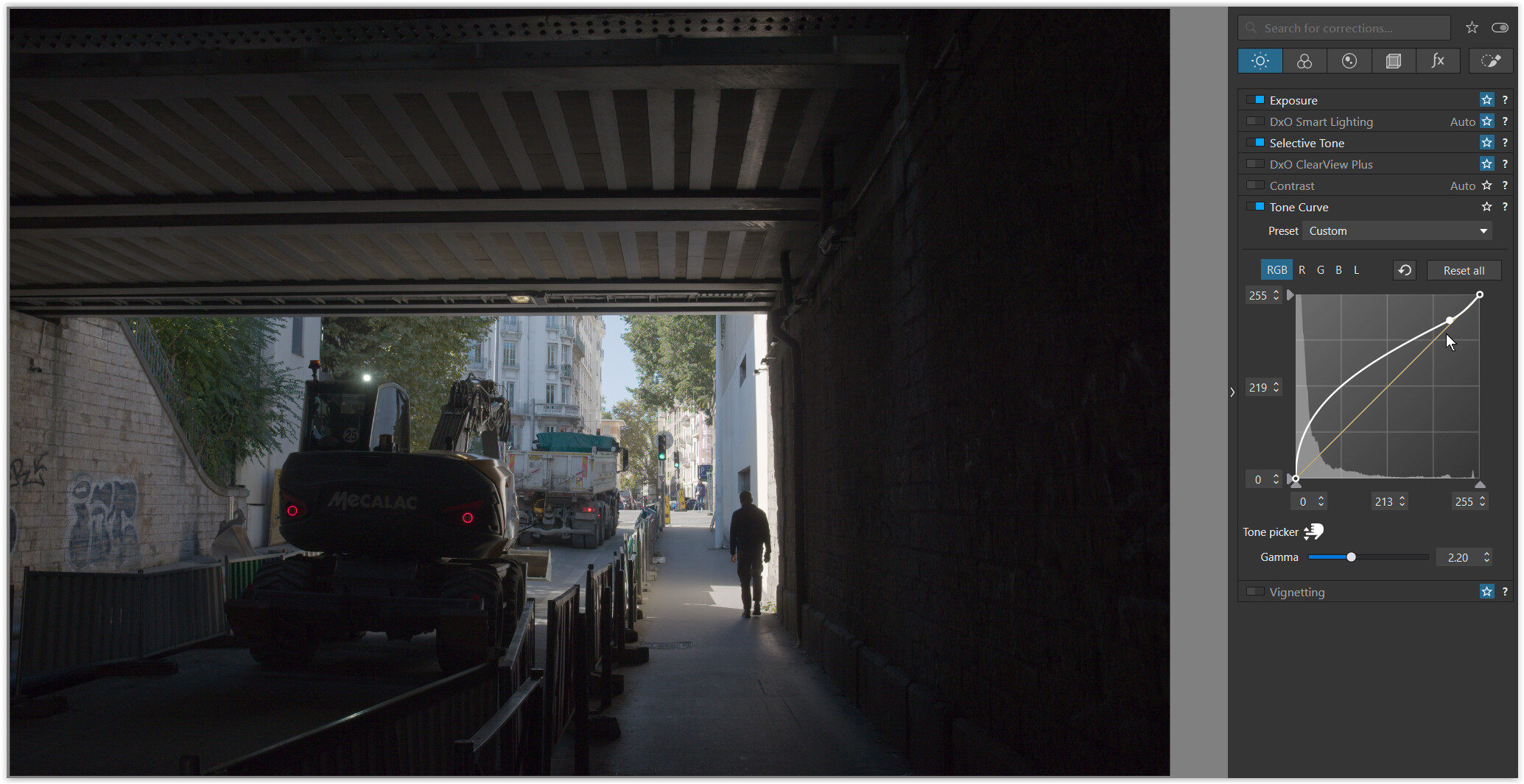
Note – I only used the Tone curve

  • Gamma set here to 2.2
  • Lights set to 219/213 to keep them better under control
1 Like

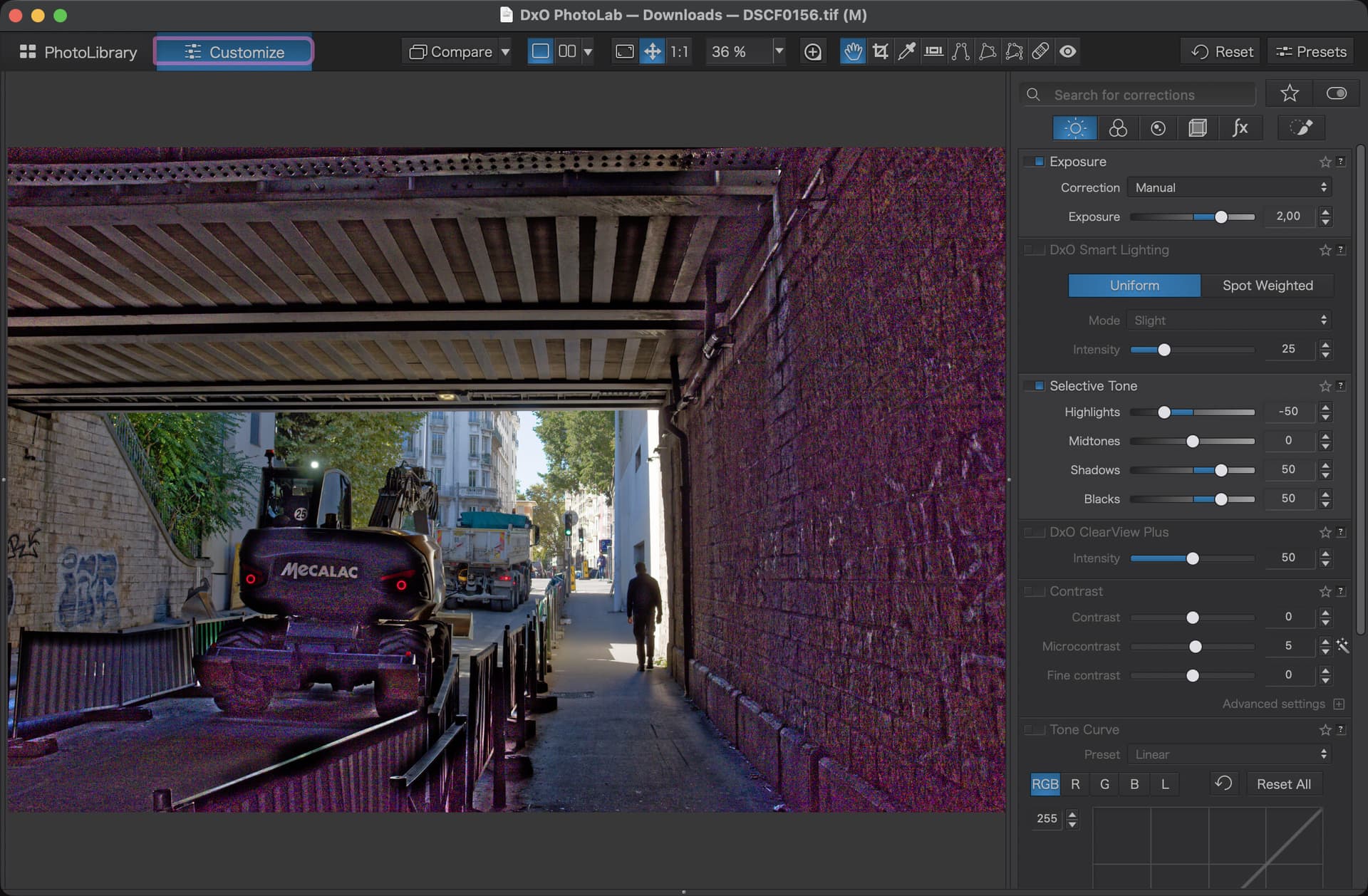
@Wolfgang & @pas.pective: my concern here is not how these look without corrections or with relatively minor corrections, but what data can be retrieved from each file in the extremes of the dynamic range. That’s why I pushed the very underexposed shadows +4 stops or more, to the point where things break in both Pixelmator Pro and PhotoLab.

When recovering those very dark shadows/blacks starts breaking, it breaks significantly more with the TIFF than with the linear DNG, which suggests that the linear DNG conserved more of the RAW’s dynamic range. But I don’t know if that’s revealing something about the actual data in those files, or if it could be an artifact of the ways that these software handle TIFF files.

To be clear, those files look like what @pas.pective showed when opened in Photomator Pro, PhotoLab, Affinity, Nitro, etc. The differences only show up when pushing the exposure/shadows/etc. to their limits.

Other relevant stress tests could be RAWs with recoverable data in:

  1. Very underexposed shots or areas of shots
  2. Very overexposed shots or areas of shots
  3. Very saturated and/or clipping colors

And I should have compared the original RAW vs the linear DNG vs 16-bit TIFF.

Interesting tests and results. Unfortunately, any software has the potential to impart some treatment when viewing a file, often depending on the inputs. For this kind of testing, the more basic the better, I think.

TIFF is certainly old and has its issues. I’ve mentioned here before that it’s not only DNGs which can be problematic in some applications. The only difference with TIFF is that it has been around long enough that most software settled on the same limited set of options and so they seem compatible everywhere. I can attest it was not always this way. I’m sure with the right tools you can still break them.

For instance, TIFF allows 8- or 16-bit, but it also allowed other bit depths. I think early “computer fax software” would store 1-bit TIFFs because faxes were 1-bit natively. Then there was ZIP or LZW compression. I think there were other variations not often used.

DNG has taken that and added more complexity including yet more compression types like JPEG-XL lossy, which I believe it what DxO are using. JPEG-XL itself has a myriad of variations.

And then you add the complexity of colour spaces.

1 Like

Yes and no. It’s based on TIFF/EP which is a subset of TIFF, so it doesn’t inherit the full complexity of TIFF’s many extensions and its complex support matrix. It does add its own documented features, which is in one way better than TIFF for being clearly specified, but in other way it is an extra support burden since software have to implement support for those features (including JPEG XL in 2023’s DNG 1.7).

I do think it’s fair to say that, in practice, Baseline TIFF and the most common TIFF extensions will have broader support than DNG (especially the more recent DNG 1.7), for the foreseeable future. And betting on wide support for DNG 1.7 in a few years or in a decade (for archival and long-lived work) is a bit of a gamble.

Indeed, DNG 1.7 introduces JPEG XL compression, and DxO is using that with a quantization pass first: Découvrez comment l’approche innovante de DxO divise par quatre la taille des fichiers DNG sans compromettre la qualité d’image - DxO

I was a bit puzzled by their claim (indirectly in some PureRAW reviews I watched) that they were doing something specific to DxO with that format. In my mind it was just DNG 1.7 with JXL compression, and it is. According to that page, their claim to innovation is the lossy quantization they perform first, which is possible in the DNG specification but not done by other software that would just take a linear DNG with lossless data and compress it using lossy JXL.

Mostly lossless and lossy which are 2 separate codecs (one developed by Cloudinary and the other by Google). And each codec uses a bunch of techniques, but that should be abstracted away by the JPEG XL decoder library (the reference libjxl or the in-progress jxl-rs). So in practice I’m not sure those variations actually add complexity for supporting the format, given that the complexity is abstracted away by the decoding library (unlike all the documented and undocumented variations of TIFF).

It supports way more than just simple compressed image data. For example, image tiling, monchrome/RGB/CMYK and alpha/depth data, and even animation.

It was intended to replace ALL of the existing formats. TIFF, JPEG, PNG, ANG, GIF and others.

See https://forum.dxo.com/t/compressed-dng-brought-to-pl9-but-with-a-bug/54494/21
As mentioned there, it’s not a new (obvious) idea. Maybe the devil is in tiny details – careful choice of first 36 quantization levels (out of 1024), if you look close enough.

Thank you for providing the link to your test files. I had a little more luck with Nitro than you did. In response to your main question, I did not see any real differences in detail retention in the darkest or brightest regions of the test files. Opening linear DNGs in Nitro, however, does enable additional adjustment controls not available for TIFF images. These include Boost, Blacks, Whites, and Boost Shadows. In the case of Apple ProRaw files (a specialized linear DNG) an additional Tone Map slider is enabled. This enables precise control of local tone mapping which for me is the most important global adjustment in editing ProRaw files.

Could you send me the raw file (publicly or via private message) so I can experiment with it? Then I can see how much I can lighten the shadows using PL’s noise reduction.

In my test, I stopped the shadow brightening as soon as the noise became too intense. After all, a noisy image is undesirable.

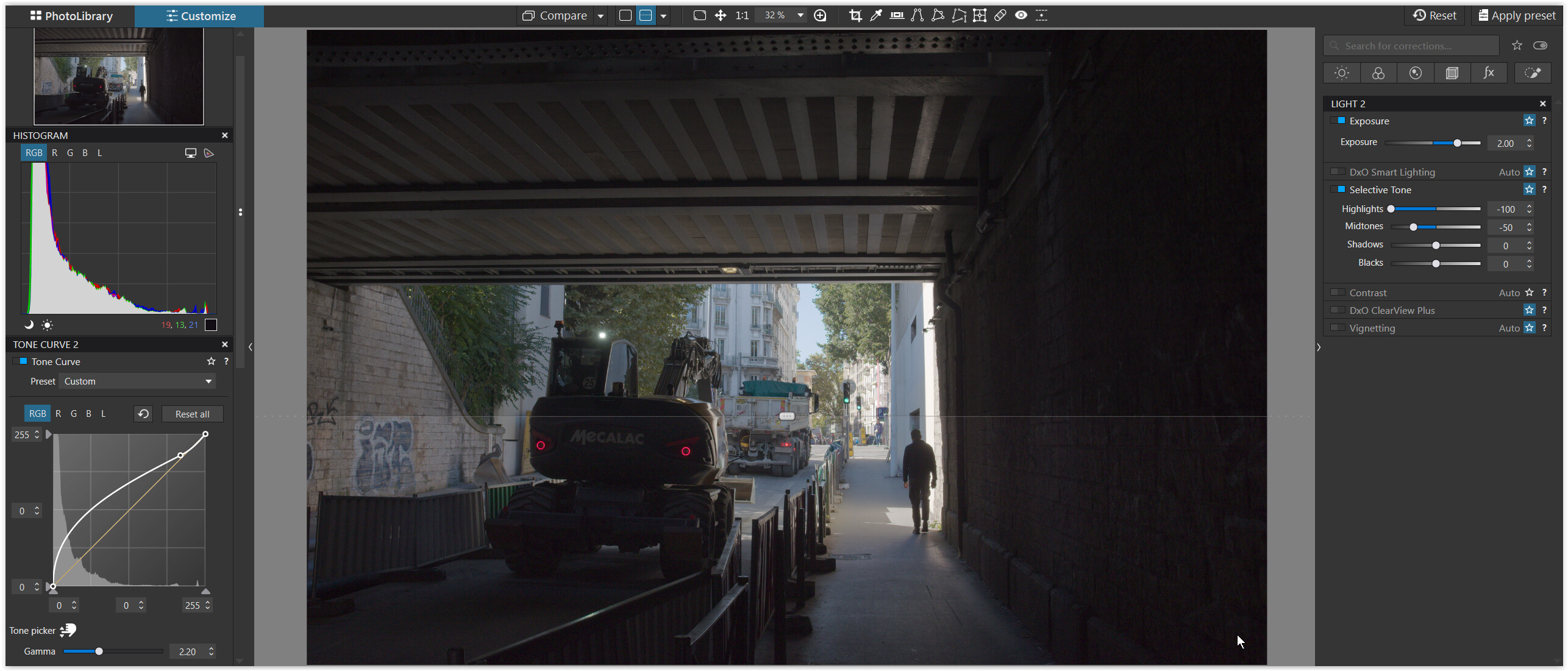
top part with the Tone curve only


bottom part with Exposure +2.00 and Selective tone added
( shown with associated Histogram, → Picker and Tone curve )

Sure, I’ve linked it above but here’s the link again:
https://files.fvsch.com/share/DSCF0156-exports-linear-dng-and-16bit-tiff.zip

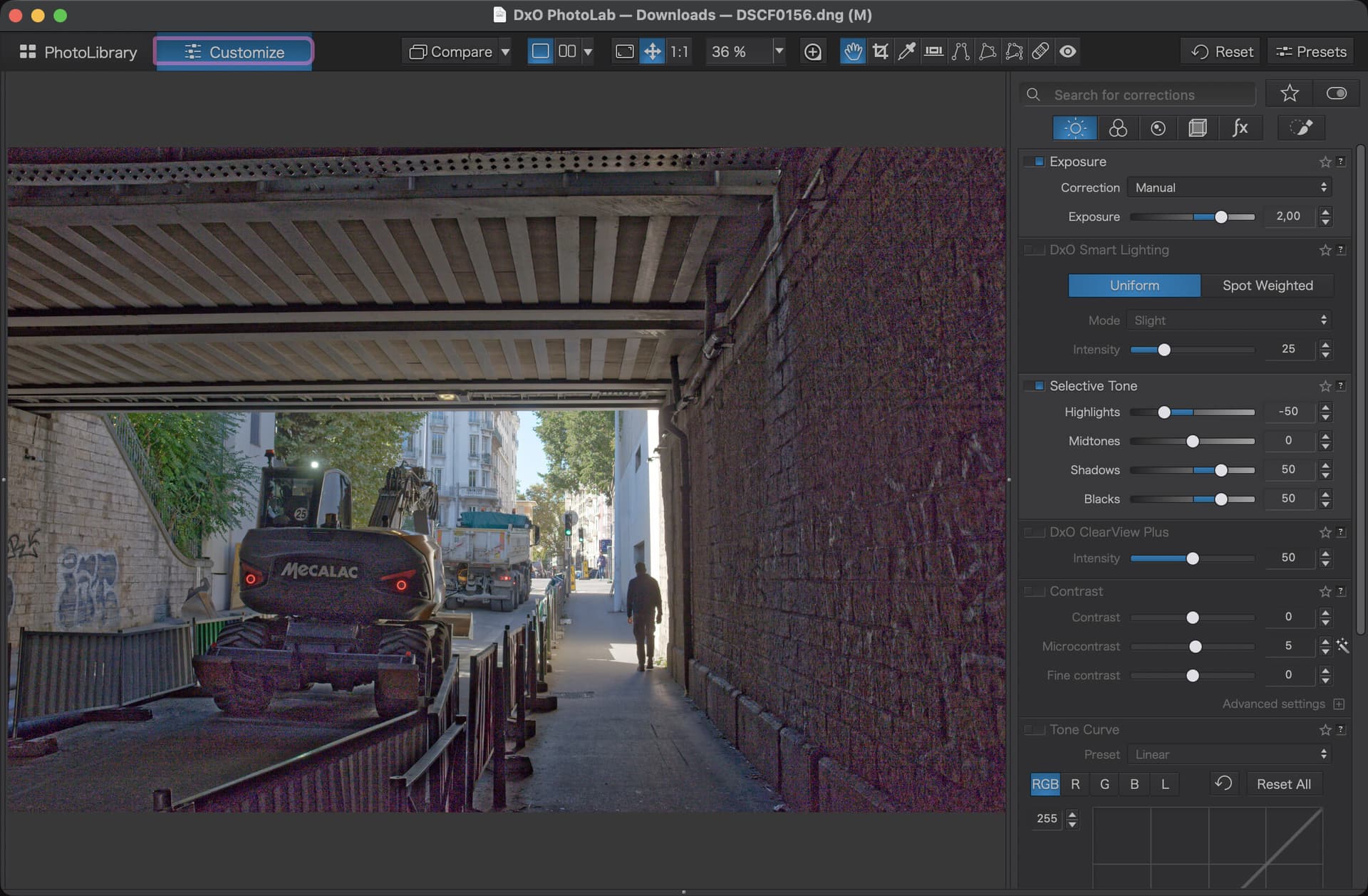
I’ve fixed some of the purple issues in the shadows by switching the denoising algorithm from DeepPrime 3 to DeepPrime XD3, the first one interpreted the color noise as a lot of purple but the second one is more realistic.

Testing again in PhotoLab, using the exposure and tone tools on the shadows seems to give bad results at some extremes with the TIFF, but not the DNG. The tone curve seems less prone to those issues. So it looks like the dynamic range differences I was seeing might be a limitation of how PhotoLab handles TIFF images.

With the “new” files
plus my Tone curve setting plus Exposure +2 plus Selective tone -100/-50/0/0

  • the new TIFF appears somewhat darker
  • the new DNG has less noise

Could I have the original raw file from your Fuji camera please ?

  • want to check noise reduction (only possible with the raw file)
  • and variations of “Tone lifting”
1 Like

Sure: https://files.fvsch.com/share/DSCF0156-original.zip

Compared the Raw, DNG, and TIFF in PL9 by applying standard tonal tools to lift the shadows under the bridge while minimizing the effects on the properly exposed town scene..

Sequence used.:
Applied DxO’s optical corrections only preset to the RAW file. No other adjustments and "standard Denoise.
Exported a compressed DNG
Exported a 16-bit TIFF using DxO Wide Gamut color space to ensure as much compatibility as possible for processing in PL. Tried with/without preserve color toggle.

Reference points were the “Mecalac” brand on the loader for lifting darks, while keeping the red taillight on the dump truck, green traffic light, and grayish sides of the buildings reasonably close to baseline (unaffected). Used the histogram as a numerical reference.

Applied the same tonal adjustments to all four images, comparing the results to the RAW file as the "standard.

Smart lighting using the “Mecalac” area as the “spot weighted” target.
Adjusted the tone curve in various ways to lift shadows.
Raised exposure +2 to +4 Stops.
Tried various combinations.

Conclusions.
The DNG performed essentially the same as the RAW file (to my eye) for all adjustments. (same DR as RAW)
The TIFF files became flat by comparision and more difficult to adjust. (less DR than RAW)
Smart lighting worked better than expected and had the least affect on the “brights”.

Experiment yourself to decide what works best for you. I don’t know if these same comparisons hold true in other applications such as Affinity or LR./PS.

There may be other ways to test for DR.

2 Likes

Alright, based on my testing and everyone’s feedback, my current conclusions are that a 16-bit TIFF and a Linear DNG can give reasonably close results:

  1. The biggest difference is in the color space handling. The linear DNG still contains scene-referred data, while a 16-bit TIFF will usually contain output-referred data. The impact of this difference can be mitigated by using a wide RGB color space such as DxO Wide Gamut or ProPhoto RGB. In practice, whether it matters or not for archival or subsequent edits depends on how much you may need to work on the image’s colors. If the white balance in the RAW’s metadata is very off, and you export that as a 16-bit TIFF without fixing it first, even in DxO Wide Gamut or ProPhoto RGB it might make that TIFF hard to use; while the linear DNG will not have this issue.
  2. Dynamic range seemed well preserved in both the linear DNG and 16-bit TIFF. My tests with very dark shadows seemed to show some limits in the TIFF initially, but after more testing it looks like limitations in the software I was using. Most photo software I tested seem to treat TIFFs and DNGs differently, with most having some issues applying extreme Exposure or Shadows corrections to the TIFF. Tools like a Tone Curve seem to have more predictable results with both formats. And at least one program I tried handled TIFFs better than the linear DNG.
  3. For archival, a linear DNG with some compression (old JPEG lossless or newer DNG 1.7 JPEG XL lossless or lossy compression) will probably fare better than a 16-bit TIFF, and since the linear DNG remains closer to the original RAW than the TIFF when it comes to color space, the linear DNG probably makes more sense… provided your current and future software will handle the format well.
  4. As an intermediate format between different pieces of software, a 16-bit TIFF might have an advantage if the software you’re sending your image to handles TIFFs better than linear DNGs, especially if it’s software that works with output-referred RGB data only (and optionally forces you to use a “Develop” module to develop the linear DNG data into an output-referred RGB layer, like Photoshop and Affinity do, and Pixelmator Pro seems to do in a less obvious way).

PS: for these conclusions I had to read up on what “scene-referred” and “output-referred” (also called “display-referred”) data means, and I think I get it, but I’m a bit fuzzy on the details or the practical applications. Looks like keeping data “scene-referred” keeps your options more open for later editing, but I don’t know how true that would be in practice.

1 Like