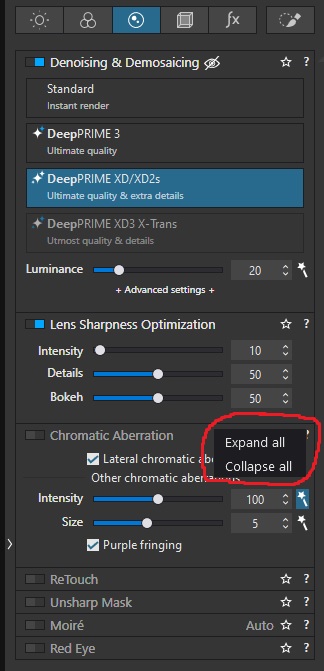
This could either be a constant setting in the main preferences menu, or a “Right Click > Collapse Inactive” option that sits alongside Expand All and Collapse All as denoted in the picture above.
For me, this would sit different from Lightroom’s “Solo Mode” in that all active tools would remain open, but any inactive tool would automatically collapse rather than remain visible.
I appreciate a custom Workspace can be created, showing only the tools I determine to use, but this is somewhat absolute. Sometimes I might want to dip into other tools, so keeping them on display is handy, but otherwise I want my workspace to be as clutter-free as possible.
I can see similar was discussed back around 2020 but that was 5 years ago, so I’d say it’s OK to give this idea some fresh air and see if it’ll fly.
On Mac, selecting a tool while holding the command key opens the selected tool and collapses all others. That is part of PhotoLab’s implementation of “Solo Mode”
No, that doesn’t match the suggestion proposed by the OP …
Using the Active Corrections button results in a list of ONLY those corrections that are active … with all other corrections being “hidden” - and all correction “category” headings being lost.
Suggestion by @Fineus is a very good one, I reckon … I have added my vote.
According to the letter of the suggestion. But I looked at the why.
You get more space back if you hide the inactive tools and for those odd occasions you might want some other tool, it’s just a click away to get them all back.
I think merely collapsing them is a) a very subtle difference and b) not something I’ve seen anywhere else, where it’s either solo mode or not.
Downside of “active corrections” is that it doesn’t allow to add tools through the search field which only finds things in what’s located in the sidebar.
My approach is to mark my favourites (which has the same downside) or to move unwanted tools into a new palette.
It looks similar - but @Fineus’s suggestion is much more refined … such that pallets are presented in exactly the way that we’re used to (unlike for “Active Corrections”) - but with only those sub-pallets with active settings being expanded.
Meanwhile, like @platypus, I use custom pallets and favourites to refine the layout.
That is true, hiding the tools entirely would min/max the available space to give me the most minimal setup.
But the reason I’d like to be able to merely minimise anything inactive automatically (or on selection from a right-click drop down) is that sometimes I’ll be feeling more creative and seeing a tool is a handy reminder it exists or I might be forgetful and - again - seeing a tool is a handy reminder it exists (and is inactive).
It’s a small difference but it would help in an ideal world.
In the meantime I can absolutely use a custom Workspace to remove tools I never ever use, which is slightly helpful, but I’d still relish a little more flexibility to keep the tools in sight, but minimised to take up as little space as possible when they’re not actually doing anything, without me having to manually expand/contract them to suit.
Have an option to have all tools minimised except the ones that have been modified. This will allow you to open any additional tool to make a change and to also adjust any tool you have modified without having to open it.