I have exactly the same experience with Capture One. 
You know about FastRawViewer? It was blindingly fast on my previous PC (and current laptop), let me flip, flip, flip through shots, cull the ones that were either unrecoverable (e.g. blown highlights) or I just didn’t want. Unwanted shots moved into a separate folder, so a reversible action. I think it was USD35. It made workflow with PL on my old box much less painful as I wasn’t using PL to cull shots, just edit and export.
Also, you know Micron is ending Crucial? I’d very much advise against buying Crucial memory simply because matching’s important for dual channel and you’ll end up like me with ‘orphan’ memory. If I ever need to go to 64GB, it’ll be twice as expensive as just getting a second set of matching Micron/Crucial sticks. I’ll probably never do that, but still…
I agree about these affiliates, but I don’t think it’s limited to DXO. It’s another topic, but we have to recognize that the web has become a real money pit, pushing people to do business with anything and everything.
I’m a bit of an older guy now, and I’ve learned (I’m still learning, it’s a never-ending process…) not to give in to impulse and to give things time, separating “le grain de l’ivrai” (the wheat from the chaff), as we say where I come from.
I’ve always been sceptical of slogans like “It’s revolutionary! It will change your life as a photographer!”.
As a Frenchie, believe me, I know how to define revolutionary. 
It’s up to us to take back control of our choices and stop '“ de prendre des vessies pour des lanternes!” (French proverb: to take something for what it is not).
What matters is to check how it works for us and not blindly obey the suggestions of people whose job it is to influence your choices in order to convince you, to persuade you to buy.
Especially as hobbyist, we’re in no hurry, I think so.
I couldn’t have put it better myself. I have just been adapting my Linus OS (dual boot machine). I struggled to get Irfanview to work. I have used this since 1998. Always found it great but I can’t get it to work properly in Zorin. So now I don’t have Irfanview. I gave it every chance but…….. So now I use another app to view jpgs and do a few small adjustments to them.
MS Office was such an amazing app. I used almost all of it albeit at a fairly rudimentary level. And gradually it morphed into a behemoth with so many bells a whistles that 99% of people would never use. Then came 365. Renting software! Linux has “forced” me to look elsewhere and Libre Office reminds me of MS Office 2000. Back when you could right click and insert a page break, those days.
So although I knew that I should change, I hadn’t. Linus has “forced” me to do that and it is one of the main benefits. It’s fast but far from perfect
Win10 is behaving offline and PL7 runs really well offline.
As far as affiliates are concerned. The instructional type videos are generally very good but…………… their “reviews” of new versions are corrupt at best.
I still use MS Office 2007 Professional and have never thought I needed anything else. There is a speciial file import/export package too necessary to install but I have no problem so far reading or exporting to other later versions yet stangely enough. Next year that software is 20 years and still pretty easy and straight forward to use.
Of couse the newer 365 or One Office are integrated with Copilot and Open AIt and would be nice to have but as long as this old 2007 software still works I see no need really.
I have, Word, Excel, PowerPoint, Access (databases), Publisher (flyers e.t.c.), Visio (flowcharts, mimdmaps e.t.c) and Project (planning) and doesn’t really lack anything since both Google Gemini and Google Lens, Chat GPT and Copilot is integrated with Windows 11 - yesterday I just by accident stumpled over a function in the Windows Photoviewer that let us compare a picture there with “motif look a likes“ Google Lens or Bing can find on the net. Especially Google Lens is very good for determning animal or plant species and landmarks. I use Google Lens quite a lot to help me remember landmarks and places I have taken pictures of but lost the names of since many years.
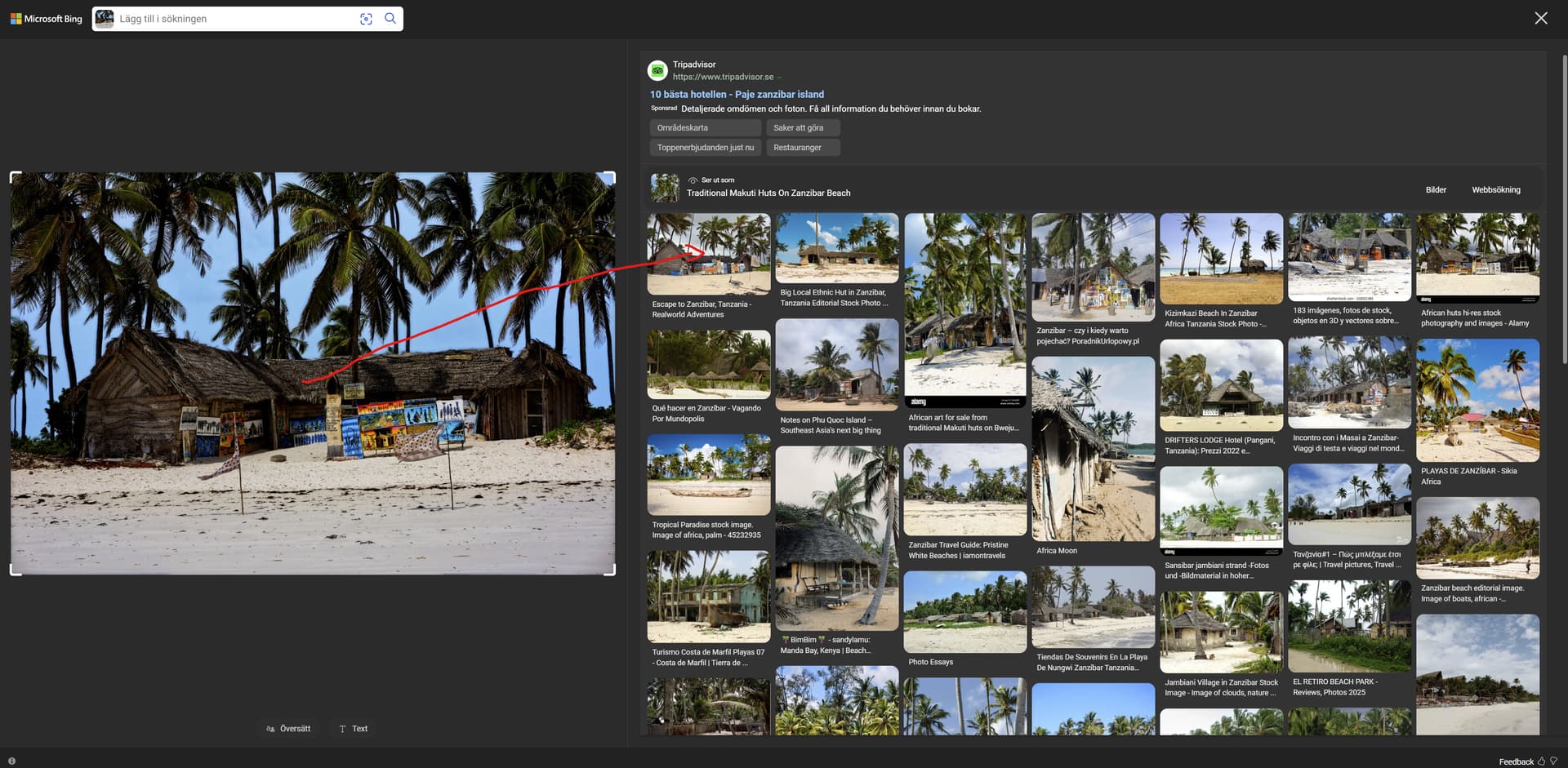
Leading also to a blog using that picture:
Escape to Zanzibar, Tanzania - Realworld Adventures
(Same motif but different Masai Art)
Google Lens wrote the picture was taken near Paje on Zanzibar and the real distance to Paje from this place is 3 km - that was pretty good I think.
I will never enter a prescription on Office and can’t either see myselt using a Linux OS which main feature would be to barr me from using all Wiondows industry standard applications - even photo softwares like Photolab, Imatch and XnView that are indespensable for me and many others here.
I have seen quite a few softwares stop working after hardware or OS upgrades during the years and some because they were not in synch with Windows software development guide lines. MS Office 2007 was made by Microsoft themselves which might be one of the reasobs it still works 2026.  It is still rock solid and never hangs or stops with any error messages. Sorry to say that hasn’t always been the case either for Photolab or iMatch but now finally even those are stable on my new computer and that is lovely.
Not PL (or PC or DxO) related, but there’s some evidence that people have always taken about 1 hour max to get to work (daily travel). True in Rome (on foot), Early Renaissance European cities (on foot) Later European Cities (horse drawn omnibus, then trams, then rail). True now as well. Ran across this when looking at historical city sizes. I’d guess we’ve always been about as lazy as we are now.
Whether it’s a question of laziness or stupidity, I’ll leave this up to you.
What makes me laugh is when people ask questions on forums or elsewhere that are blindingly obvious even to Blind Pugh. But someone taught me a good reply.
Someone says to you “I wonder how many Auckland FC players are actually Kiwis?”
Just reply and say “I know a good site for that”. Let them ask you what it is and then say “Get on your browser.” When they get there, go “W W W dot G O O G L E dot com”
It works 
I’m using an AMD RX9070XT graphics card, but I can’t use GPU acceleration in the latest version of DxO PhotoLab. I uninstalled and reinstalled the graphics card driver and program, but the problem persists. How can I fix this issue?
Hello! Will there be any benchmarks for DxO PureRAW 6.2 and later versions using the same graphics cards? Why don’t you provide file processing times in seconds for the maximum noise reduction mode (XD3)? For example, with my setup (13900K + RTX 4060 Ti), it takes 7.2–8.8 seconds to process a single 45 MP RAW photo. I’ve also heard that Macs work well with DxO, but there’s no data on just how good they are. This is especially important with the latest versions, since they’re more demanding in terms of hardware.
All the explanations are in the first message of the thread:
On the website Hardwareand.co, you can retrieve all the raw data, include the processing times.
Unfortunately, Apple’s GPUs scores cannot be integrated to the graph:
May this thread: Budget GPU for PL can add a bit of information. Only with one GPU type, but with DP3, DP3 XD, and also with (and without) various mask (AI and not AI and both) types. One place in there i mention GeekBench, GeekBench AI → i think the results from that benchmarks predict the performance (OpenCL, Onnx, etc.) just okay. Also in there a hint about Fuji raw’s, seems PL9 export them ‘faster’ than others.
Seems quite good performance. May useful information of the raw (camera body) type. And also the usage of Masks (non ai, ai , both) and parallel export count. As each does some impact on the export performance (but see the ‘budget CPU’)
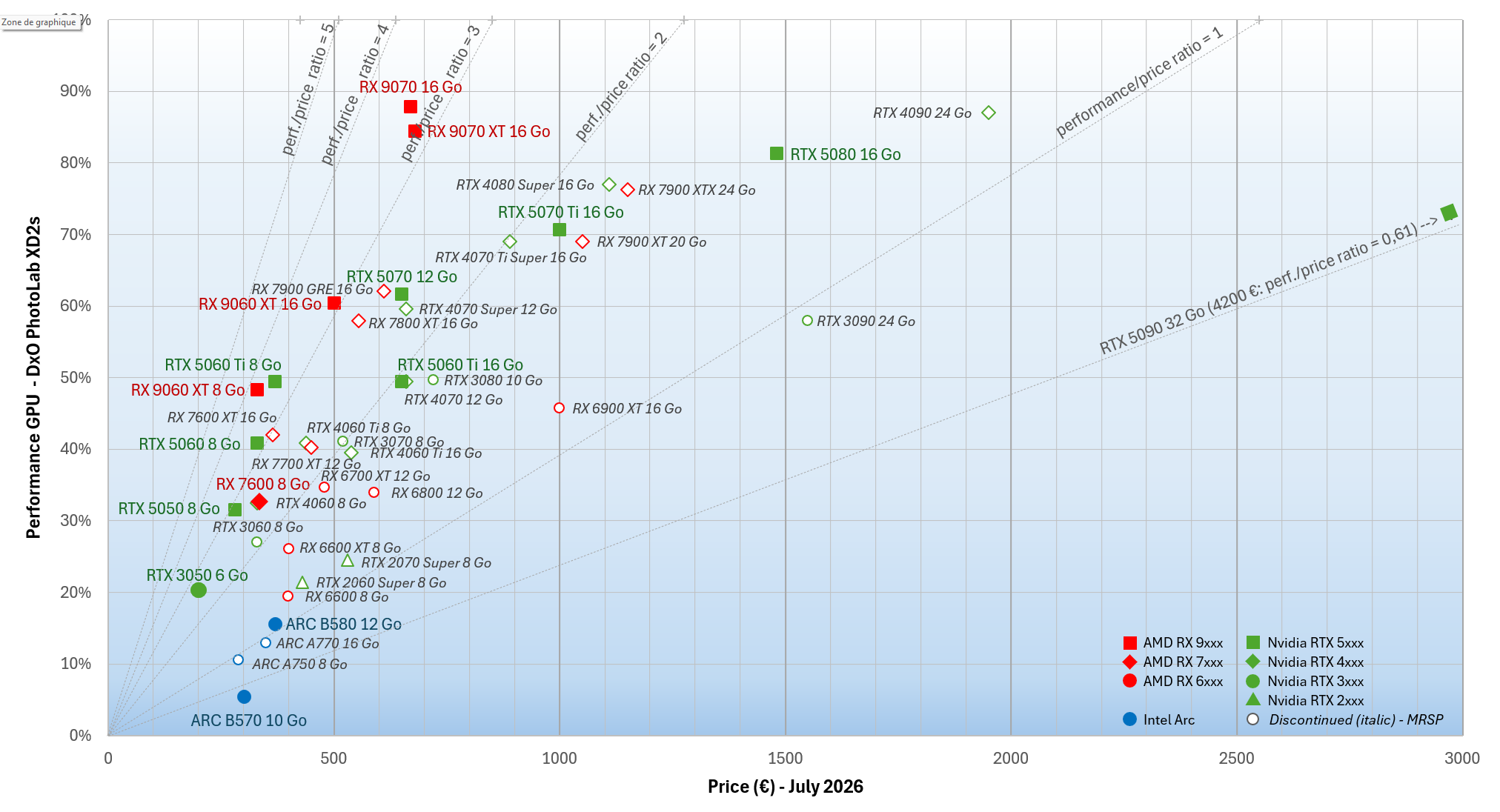
Latest update to the GPU comparison chart, for Summer 2026.
A lot has changed in a year.
PhotoLab 9 introduced AI masks, a feature that relies not only on raw GPU computing speed but also on its VRAM capacity. Meanwhile, AI noise reduction algorithms have evolved, moving from DeepPRIME and DeepPRIME XD2s to DeepPRIME 3 and DeepPRIME 3 XD.
With the introduction of AI masks, simple demosaicing speed is no longer sufficient to compare GPU “performance”. Furthermore, demosaicing times have varied significantly between PhotoLab 8 and PhotoLab 9. They now depend on the specific characteristics of each brand (AMD, Nvidia, Intel, Apple) and the optimization of their drivers (which are constantly evolving). It is no longer possible to combine test results obtained months apart.
Finally, one major factor cannot be ignored: the surge in GPU prices (at least €50 for 8GB of VRAM, and often €100 or even much more for models exceeding 8GB).
The most striking example is the Nvidia RTX 5090 32GB: its price dropped from €2,550 in June 2025 to €2,200 in September 2025, only to reach stratospheric heights a year later, climbing to €4,200, at a minimum!
So, how do you choose “your” ideal GPU?
The best budget-friendly upgrade option is the Nvidia RTX 5050 8GB: widely available and offering one-third of the RTX 5090’s performance for under €280, it is the most sensible affordable choice.
Around the €350 mark, you’ll find the Nvidia 5060 Ti 8GB and the AMD RX 9060 XT 8GB. Both already deliver half the performance of an RTX 5090 for less than a tenth of its current price!
Do you make heavy use of masks or AI models (or other AI apps and games) locally, or do you want to future-proof your setup? Aim for maximum VRAM capacity: 12GB, 16GB, or more. At this level, the entry point is around €500 with the AMD RX 9060 XT 16GB. For that price, you get 60% of the RTX 5090’s performance and are set for years to come.
Looking for top-tier performance without breaking the bank? The best choice remains the AMD RX 9070 XT 16GB. If you can find one for around €600–€630, buy it without hesitation. With over 85% of the RTX 5090’s performance and 16GB of VRAM, you won’t regret your choice.
Are you a die-hard fan of the Nvidia ecosystem with money to burn? Get ready to shell out over €1,000 for an RTX 5070 Ti 16GB or an RTX 5080 16GB.
Do you want to show the world your financial dominance and love for luxury by paying astronomical sums for every purchase? The RTX 5090 32GB is the card for you; however, avoid entry-level models under €4,500 and opt instead for the ultimate collector’s edition, featuring gold plating, gemstone inlays, and luxury brand stickers (price upon request). You deserve the best.
I agree!
I think, the Intel B570 (sure), and B580 (quite high change) not valid in the graph with PL9 and this times (drivers).
The graph is great! great job! Its represent performance / price, etc.
But one aspect may cant read out easy: the performance in seconds.
Example: x card for y price deliver like 5 sec export (DP3) export time, another card with double price may provide 3.8 sec. For some the 1.2sec difference its make sense, for some its not make real difference (no real practical value for the price difference).
That is precisely what it is impossible to provide directly.
The time required to process a photo depends on the resolution (in megapixels), the brand, the sensitivity setting, the processing applied, and the image itself. It is impossible to provide a processing time that applies to every camera.
Obviously, processing a 100-megapixel image takes longer than processing a 16-megapixel one. But is it strictly proportional? And for a given resolution, does it take the same amount of time for Fuji, Canon, Sony, and so on, regardless of the sensor generation?
That is why I chose to present the results as a percentage of the performance achieved by the best card on the market. Furthermore, performance is calculated based on a sample of 88 images covering various brands, generations, and camera types. It is therefore an average value, with all that implies.
Yes. All you describe is right and true. I totally agree. Your table / graph is great!
Its not about that its not okay.
In this ‘surge in GPU prices’ times, the information for what is ‘good enough’ (as you write: “So, how do you choose “your” ideal GPU?”) not easy to find out from this table / graph.
Yes, its seems impossible based on the points what you describe. Absolutely.
However, i wonder (idea) on something like find a benchmark, what more-or-less describe the PL performance → may Geekbench OpenCL and Geekbench AI (onnx?) can be starting point → they have a huge dataset for various cards / systems, as seems most of the users upload the results. PL user measure his existing card (with benchmark), and do some test his photos/raws → do the math → and PL user can ‘predict’ other GPU PL performance (to see GPU upgrade vs price).
Regarding that, I have something in the [Budget GPU for PL] thread → i make some test to get Megapixel / second ratios for various RAW (Camera body). Thanks for the idea! I think we get some answers. But see in details there:
So… not the RX 9070 non-XT 16GB?
I used your previous chart last November to pick the Rx9070 non-XT w 16GB DDR6. The chart positions look to be about the same - and thank you for having put that together. I read a smattering of French, nowhere fast enough to read French tech review sites on the regular, so I would have never seen it there.
I’m unclear what they’ve changed to make the ‘Go’ versions. From the sites I’ve read it seems to mean less memory, but that makes no sense when the product is ‘Go 16GB’(?)
In the chart, “Go” corresponds to “gigaoctet” in French, the equivalent of which is “GB” (for gigabyte).
Why do I prefer the RX 9070 XT to the RX 9070?
Because the RX 9070 XT’s performance is slightly superior to that of the RX 9070, both in games and other applications, and the price difference is very small. The RX 9070 XT is also easier to find than the RX 9070.
It figures that relative prices have changed. Last November, the XTs I could find were about USD80 more than the non-XTs and it seemed they were more in demand (both GPUs with 16GB GDDR6), but the non-XT Sapphire boards mostly came with cooler-running RAM (I’ve forgotten whether that was Hynix or Samsung) and I was trying to build a quiet PC and heat = fan noise.
As a sidenote, I’m using a BeQuiet tower with sound damping panels off and high-airflow panels in use (BQ ‘silent’ cases ship with both) and it is indeed very quiet.
Exactly. This review is Windows-centric, but a lot of serious (and hobbyist) photographers use Macs. I guess there are so many options for CPUs and cores and GPUs , et al. on the Windows platform that a comparison like this is necessary. But even if I still owned a Windows box, I doubt I could afford one of the high-end graphics cards.