First off all. Your automated help system won’t let me ask any question not in the pre baked fields. NOT THE BEST USER EXPERIANCE!
I’m Trying already more than a week to get help to activate my Photolab 8 (Elite) on my new laptop! And Probably i will get also problems to activate my other FilmPack, PureRaw and viewpoint!
Hi
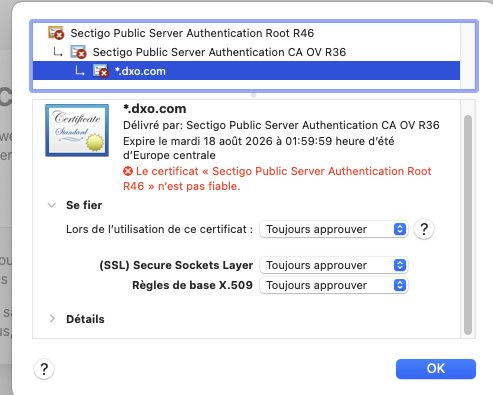
I have the same problem : cannot acess to dxo.com because a certificate unrecognized
Cannot dowload any optic module
I have sent a request on dxo support sinçe 4 days and wait …
Maybe there’s a bad caching server on your network path??
VPN problem?
Or Sectigo certificates are disallowed on your device?
New certificate was put on www.dxo.com on July 22.
On Win11 it works, TLSv1.3 is used. Some server certificate details:
Issued To
	Common Name (CN)	*.dxo.com
	Organization (O)	DxO Labs
	Organizational Unit (OU)	<Not Part Of Certificate>

Issued By
	Common Name (CN)	Sectigo Public Server Authentication CA OV R36
	Organization (O)	Sectigo Limited
	Organizational Unit (OU)	<Not Part Of Certificate>

Validity Period
	Issued On	Tuesday, July 22, 2025 at 2:00:00 AM
	Expires On	Tuesday, August 18, 2026 at 1:59:59 AM
Hi and thank you
I have a certificate problem from sectigo
but, it only happens on my Mac, my iPad and my iPhone
I can connect dxo.com with the iPhone of my wife, with wifi and 4g
very bizarre !!!
I have tried to delete “host” files, clear safari cache … nothing change
Nicolas
Hi
thank you VERY VERY MUCH for your help
I could resolve the problem of downloading optic modules and update PL and access normally to all dox.com website
The problem was the missing certificate sectigo R46
I connected to sectigo and downloaded this certificate
after downloading, I have opened the keychain (trousseau) app on my Mac
and click on “import” a the top of the screen
import succes
test Photolab succes
test safari success
I don(t understand why this certificate was missing, but now, it works
to day, I have no feedback from the teem duo support …
so, I will send a message to the support to informe the problem is resolved
That sounds a bit worrying indeed and perhaps worth investigating with Apple support or on some Mac users forum. Your trusted root certificates list looks outdated (OS patching problem ??), so you may have problems with few other sites too. Maybe it’s a “well known” issue for Macs? Anyway, good to hear positive feedback.
EDIT: Note that root certificates do get revoked if they were compromised, but it doesn’t look to be the case here.
today after installing sectigo R46 that was missing, I have no problem with any website. so, the problem is completely solved on my Mac
before encountering this problem, I had updated osx with Ventura 13.7.7
after, I seem that this certificate have been deleted during this os update ?
(I cannot install newer os because my Mac is from 2017, and works perfectly)
thank you
Nicolas
I could resolve the problem of downloading optic modules and update PL and access normally to all dox.com website
The problem was the missing certificate sectigo R46
I connected to sectigo and downloaded this certificate
after downloading, I have opened the keychain (trousseau) app on my Mac
and click on “import” a the top of the screen
import succes
test Photolab succes
test safari success
I don(t understand why this certificate was missing, but now, it works
to day, I have no feedback from the teem duo support …
so, I will send a message to the support to informe the problem is resolved