How do I activate the Nik Collection 8 panel in Adobe Photoshop 2025? All I see in Photoshop are the Nik Collection filters.
Have you checked in Nik 8 preferences in the plugin menu ?
Nik Collection is not in the Photoshop plugin menu.
Have you installed Phtoshop before NC8 ?
Some users first installed NC8 and had problems.
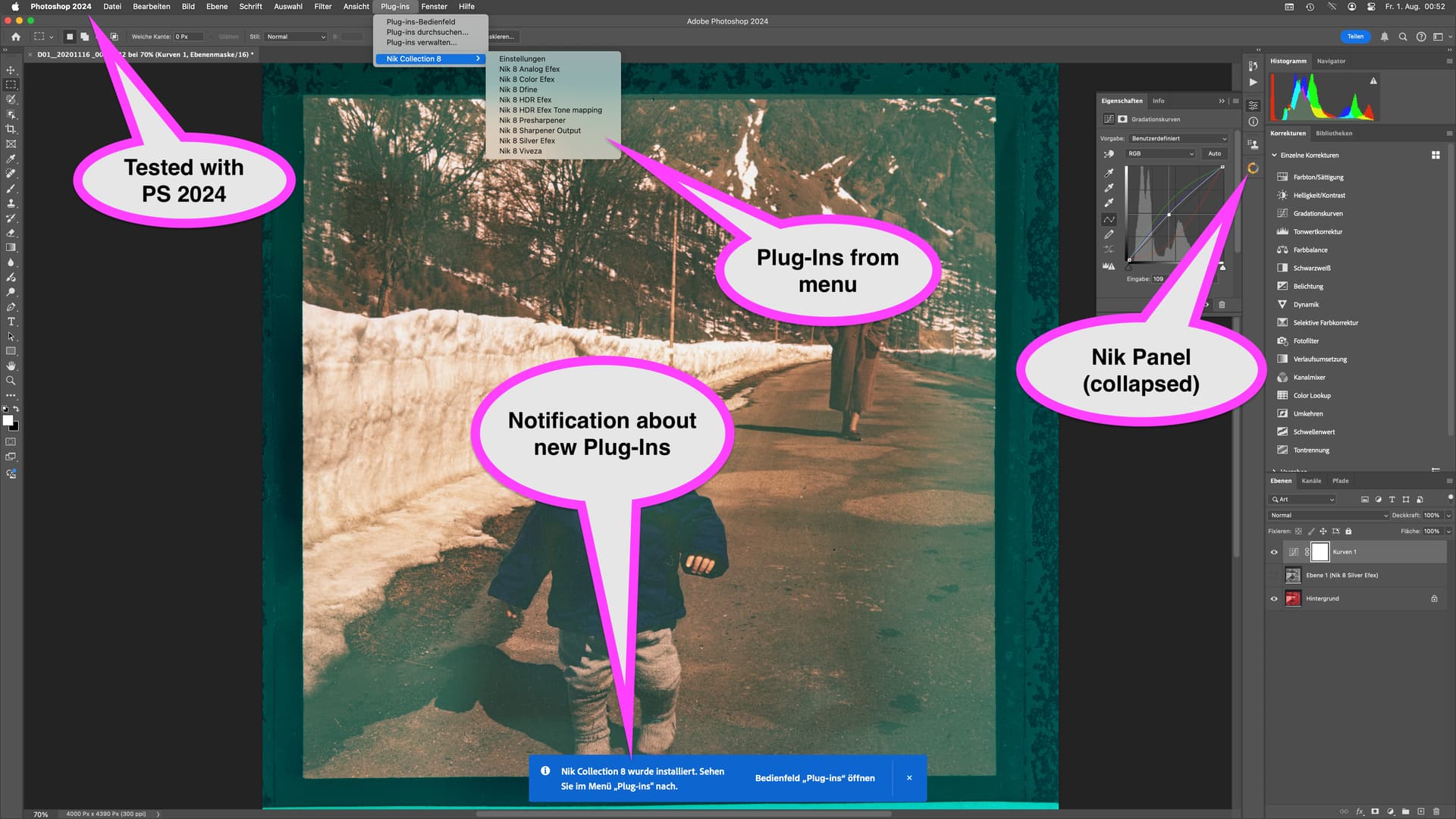
Downloaded the trial and installed it to get this (as expected):
5k iMac 2019, 8 core, 40GB Ram, 2TB SSD, Radeon Pro 580X 8 GB.
What exactly are you looking for, @FrancisM ?
Can you see it / point it out in the user manual?
https://userguides.dxo.com/nikcollection/en/workflow-with-adobe-photoshop/
Did I not clearly state that I do not see the “Nik Panel” in Photoshop 2025, that I only see filters, what you call “Plug-Ins from menu”?
I installed Nik Collection 8 twice. Photoshop 2025 was already installed. I read the documentation in the link you provided - it does not discuss installation problems.


You did, but what is that panel? Do you mean the window that was floating over Photoshop with earlier versions of the Nik Collection? I know that you can’t capture a screenshot from something absent and that is why I directed you to the user guide.
My take is that Nik can be used from Photoshop via different ways (menu, panel, context menu) but there seems to be something that is missing, which might be caused by a change of design of the Nik UI or an issue that I cannot yet help to check with the info you gave.
If the effect only exists with Photoshop 2025, I can’t help because I’m with PS 2024 and don’t plan to update PS just yet because of a plugin that works with 2024 but doesn’t work quite well yet with PS 2025.
What I read from the OP is, that Nik8 seems to work, but has a different interface. If this is not what you mean, I might help if you could describe your issue with more words. (Use deepl to translate your text if you’re familiar in a language other than English)
I have exactly the same problem, PC with Wndows 11.
NC8 installed after PS2025. NC8 appears in the filters menu but nothing appears in the plug-ins menu.
I’ve also uninstalled/reinstalled NC8, without result.
Need help…
At the beginning of the installation of the NIK Collection you were ask to install the plugins/filters for Photoshop, Lightroom and other matching software that found on your computer. Does you mark the appropriate entries?
Do you install Nik with another Windows account (like an Adminsitrator) as you work later with Photoshop?
Take a look into the folder “C:\Program Files\Common Files\Adobe\Plug-Ins\CC\DxO3\Nik Collection 8” if there are the appropriate subfolders “Nik 8…” with links to .8li files in the Nik collection program folder inside.
Try to reset the preferences of Photoshop using the steps described here:
https://helpx.adobe.com/photoshop/using/preferences.html#reset-preferences
It’s recommended to backup your settings before resetting the preferences.
See here: https://helpx.adobe.com/photoshop/using/preferences.html#backup-photoshop-preferences
I have no Nik collection sub-menu in the Photoshop Plugins menu. I’ve installed twice.
No one has asked these questions, so I assume they are not relevant:
Do I need to be logged in to Adobe Creative Cloud to be enable installation of the Nik Collection panels?
Do I need to uninstall previous versions on Nik Collection? I have 6, 7 and 8 installed.
Not that I know of. I’ve installed and removed several versions of the Niks and they came up in LrC and PS almost every time - on Mac.
Judging from other interactions with DxO support, you might at least want to try to uninstall (all versions of Nik) and re-install the one version you want to use. It might be beneficial to restart the PC (I’m guessing) in between steps. Uninstallers often leave a lot of leftovers on one’s drive. As does DxO’s own Nik Cleanup tool.
I advise that you quit PS and LrC before you install Nik. Maybe disable security while installing. Newer versions of apps and OSs tend to tighten security which might be a contribution to your issue.
I uninstalled all three versions of Nik Collection that I had: 6, 7, and 8. I restarted the Mac, then reinstalled Nik Collection 8. In Adobe Photoshop 2025, I can see the Nik Collection 8 sub-menu in the Filter menu. I CANNOT see the Nik Collection 8 sub-menu in the Plugins menu.
I installed the demo version of Nik Collection 8 on a different Apple MacBook Pro with the same chip and macOS, and the same version of Adobe Photoshop. On this computer I see both the Nik Collection 8 sub-menu in the Filter menu, and the Nik Collection 8 sub-menu in the Plugins menu.
As far as I can tell, I used all the correct terminology when specifying parts of the Adobe Photoshop window.
Additionally, I verified that the files were successfully installed, based on this Adobe document: Adobe Help / Photoshop / Photoshop plug-ins troubleshooting / Locate plug-in folders
@FrancisM , looks like you did the right things.
You could try to copy the DxO3 folder
from /Library/Application\ Support/Adobe/Plug-Ins/CC/DxO3
to   /Applications/Adobe\ Photoshop\ 2024/Plug-ins/
If that doesn’t work, move the “Nik Collection 8” folder up one Level
Note: I never had to fix this in PS, but these are the things I’d try.
I have exactly the sames issue. Did you eventually manage to get a solution ?
Just today (2025-08-22), I finally have the Nik Collection 8 plugins working in Adobe Photoshop 2025 (26.7), on my Apple MacBook Pro M1 with macOS Sequoia 15.6.
I uninstalled Nik Collection 8.
I downloaded and used an app to find files and folders that relate to previous versions of Nik Collection. The recommended app to find files and folders in the user and hard drive Library folders is EasyFind, which is freeware provided by what looks to be a safe and reputable software company: Devon Technologies / Needful Things: Freeware.
I searched for “nik6”, “nik7”, “nik8” and “Nik Collection”. I CAREFULLY deleted all the found folders and files that have something to do with Nik. Assuming it contained the licence code (nikcollection8.key) I did not touch the contents of folder ~/Library/Application Support/DxO/Licenses.
I restarted my Mac.
I reinstalled Nik Collection 8.
I restarted my Mac.
I started Adobe Photoshop and checked for Menu > Plugins and the Nik Collection Panels are available to me.
I hope this helps.
Did you or anyone else resolve this problem for Windows 11 with Adobe Photoshop Beta?
I see the Merge to Nik 8 HDR Efex menu under Automate, but the Palette option never shows up. The palette itself never shows up either.
The Palette and HDR merge appear in the same spot, so this is something unique to the 8 palette:
C:\Program Files\Adobe\Adobe Photoshop (Beta)\Plug-ins\Nik Collection 8 Palette\Nik Collection 8 Palette.8li.lnk points to:
C:\Program Files\DxO\Nik Collection 8\bin\plugins\Nik Collection 8 Palette.8li
C:\Program Files\Adobe\Adobe Photoshop (Beta)\Plug-ins\Nik Collection 8 Palette\Nik8HDRMerge.8li.lnk points to:
C:\Program Files\DxO\Nik Collection 8\bin\plugins\Nik8HDRMerge.8li
It seems like something is preventing it to run, but it appears to be signed:
Verified:       Signed
Signing date:   1:41 PM 10/26/2025
Publisher:      DxO Labs S.A.S.
Company:        DxO
Description:    Nik Collection 8 Palette
Product:        Nik Collection 8 Palette
Prod version:   8.2.0
File version:   8.2.0.2
MachineType:    64-bit
SignerCertificate: 8193BF956AF2EB8B416A1F5F244C70A60517EB47
Status: Valid
Path: Nik Collection 8 Palette.8li
It the registry the location data never gets updated so it seems it never actually runs, whereas on 7 you see the lastSTposition and lastSTscreenName values.
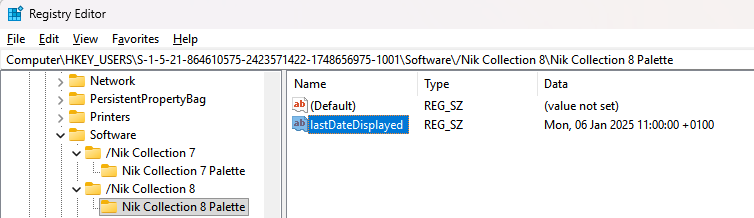
What is shown in the Platypus screen shot (above) is from a Mac computer.
I have the same issue as the original poster (impossible to get NC8 to install into the Ps (beta) Plugins menu so that I can use the NC8 panel docked to my Ps toolbar and use the new interchangeable masking features). I work on Win 11.
I have tried all the usual methods for running the NC8 installer. Then was advised by someone in DxO/Nik Support to uninstall both Ps and the NC8 I had installed and then re-install but to do so by installing NC8 1st then Ps. Well, that doesn’t work because the 1st thing the installer asks is for the user to ID the host(s) NC8 should run in and if it’s not visible, add it.
Nothing I’ve tried has worked. All my drivers are up-to-date. My Win 11 system(s) exceed the tech spec requirements by quite a bit. Clearly something (at least on the Windows side of the equation) is not working as it’s supposed to. It suggests a coding issue if users are experiencing this more broadly (which I’ve also seen posts about on Reddit…).
I can open NC8 via the Ps Filters menu. But then, just like the OP stated, I get a message box that says, “Sorry, pal, you can’t use the new sexy features unless you’re working with the NC8 Plugin Panel”. Which is not being installed and not visible. ie, we do not see (at least on my Win 11 system) the same screen snip the Mac person attached above with all the magenta speech bubbles. I’ve been using Ps for 13 yrs. I know where to look for plugins. My Plugins menu (when expanded) is empty. No NC8.
Does anyone know (ideally a developer from DxO/Nik) if there is an NC8 folder and/or files that were installed into Adobe Ps that can be copied (would need to know the Win 11 file path as well as the specific folder name and/or files/file extension types) and pasted into the Adobe Ps plugins folder (would need to know the Win 11 file path for where to paste) to make the NC8 appear in the Ps Plugins menu as it is supposed to?
If so, I will handle that process manually (if it will work) in order to get NC8 into the Ps Plugins menu since the installer isn’t placing the assets there. And, if that will finally provide access to the new interchangeable masking features.
p.s. I have no prior releases or versions of Nik products on the Win PC where I’m having the issue. They were never installed into that PC (where I run Ps beta - not Ps commercial rel.).
Thx!
I was just told that Nik Collection 8 will not work with Ps beta in terms of the Plugins panel approach.
NC8 certainly can be launched from the Ps beta Filters menu. But the new interchangeable masks feature can’t be used with that (I got a pop-up message to that effect when I tried).