You must have a RAW photo selected to use it, I think.
It’s about camera’s “native colorspace”.
Creating profiles doesn’t require a plug-in in PhotoLab Elite.
However, to create a profile, you must be in the DxO Wide Gamut color space (not Classic).
Thank you Gerarto, that was it – it had slipped out of Wide Gamut.
To illustrate the benefits of DCP profiles based on a color chart, here’s an example:
An exhibition (Paris Photo Show 2023 - Jean Christophe Béchet) with very colorful backgrounds: blue, red, and yellow (not visible here). Under these conditions, it’s very difficult to achieve accurate color rendering.
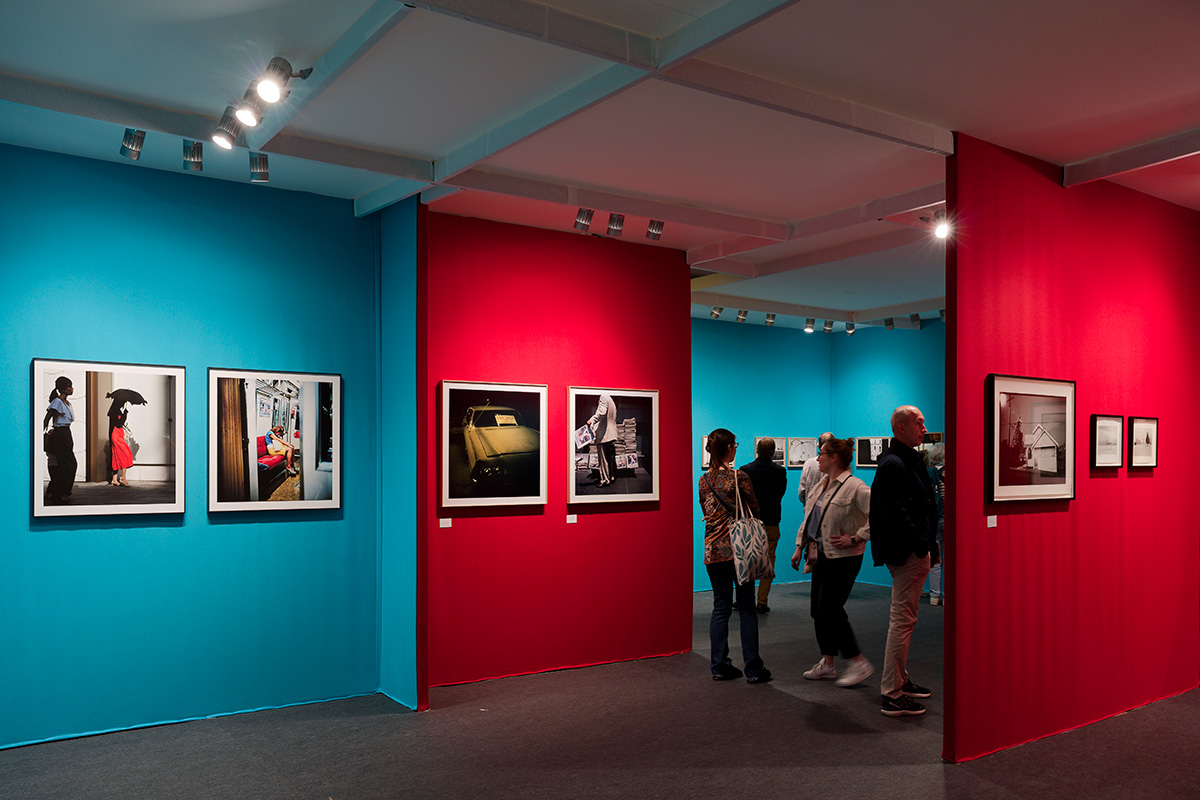
The chart allows you to reproduce the correct colors and save time in post-processing: 30 seconds to take a photo of the chart, 30 seconds to create the profile in PhotoLab…
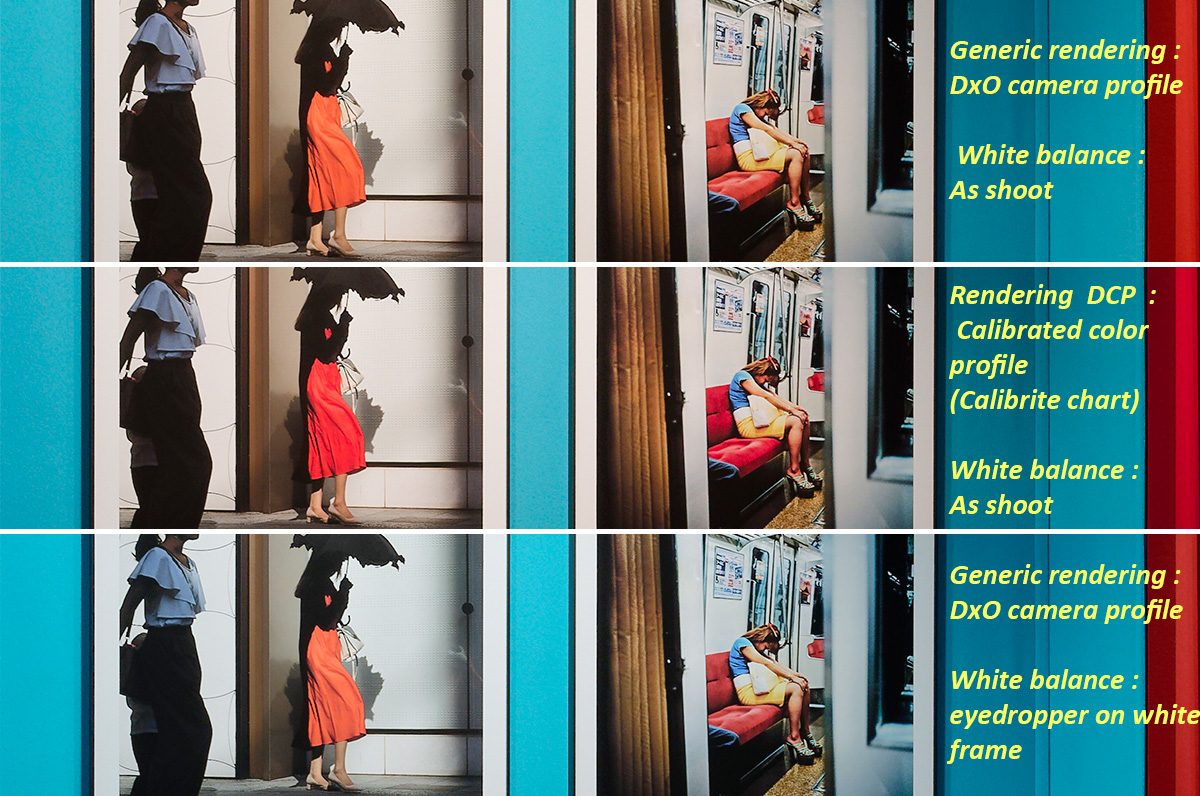
And which one is the right one?
George
Of course, the version with the color profile calibrated by the chart! (middle)
The dress on the left and the subway seat on the right were red, not orange… Even if it’s less spectacular, the other colors are also much more accurate.
I had the same problem with a picture of a new year dive in the sea. People where wearing orange hats. The same difference as your red dress and seat. Caused by by wide gamut and color rendering inactive. Legacy gamut was ok. That difference is most visible with red I noticed.
The pictures in that exhibition are direct illuminated by 3 spots. So if one wants to gain the right color of the images one should measure the color temperature of these lights in some way.
I still don’t know what a camera color profile is. From what I read it’s just a collection of post edits to gain a pleasant color. And different for different subjects.
George
A camera profile should render defined colours
- as close as possible to what they look without further technical means
- in accordance to what they should look like to transport an intention.
In-camera styles mostly aim for effect rather than fidelity. Additionally, a style that aims for fidelity can be included, e.g. Canon’s “Faithful” picture style used with scenes captured in 5200K light.
Note: The .dcp profiles we create in PhotoLab are meant to compensate the lighting of an individual capture rather than to provide a camera profile.
@RexBlock I don’t believe many advertised claims without personal experience; but I can always hope it works.
Some illuminants vary over time, place, and direction. Think of indoor sports with a mixture of “spiky” lights, evening daylight, and reflections from the floor, usually in colors which are also “spiky” (in terms of spectral characteristics). You may even have two colors different to your eye but which are mapped to the same color by CFA, so no digital transforms will help. I’m happy if I can get pleasing skin tones and forget about the rest.
But for more stable situations, if you have chance to shoot the color-checker, it might prove useful (unless you are unlucky). The dcp ColorMatrix lets you “move” in six dimensions (the other three go for white point normalization), while white balance corrections are two-dimensional. Both are linear in nature, which also makes things theoretically far from perfect, but humans can adapt to some extent.
Some links you’ll perhaps find interesting.
On the following link, Figure 10 shows color-checker corrected graffiti raws, which to my brain look less interesting than accompanying jpegs from the camera (but maybe they got the description wrong  ): https://pmc.ncbi.nlm.nih.gov/articles/PMC10974499/
Some short general articles Maybe @George will like them.
https://www.spiedigitallibrary.org/journals/optical-engineering/volume-59/issue-11/110801/Color-conversion-matrices-in-digital-cameras-a-tutorial/10.1117/1.OE.59.11.110801.full
DNG Specification 1.7.1, page 100, “MAPPING CAMERA COLOR SPACE TO CIE XYZ SPACE” (rather badly written). Tries to explain ColorMatrix, which DxO produces as color profile in dcp profile.
BTW, Maybe DxO could provide a camera calibration tool, e.g. in a form of a triangle with movable vertices, representing “camera primaries”. Imho, the Channel Tool is somewhat awkward and it can easily produce unpleasant results.