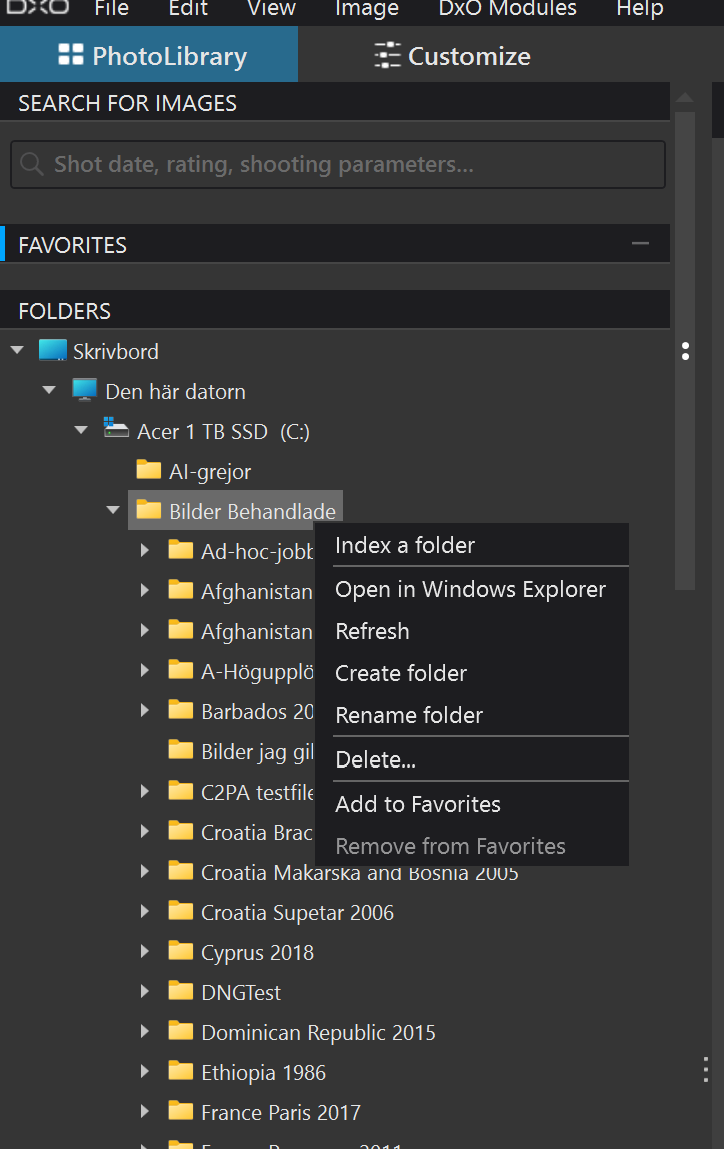
With PhotoLab, files needn’t be imported explicitly, it does it automatically whenever you select a folder in PhotoLab’s browser. All image files (and related sidecars) are imported in the background, whether you want those images in your database or not.
Also, (re) indexing a folder imports all images+sidecar’s informations,
and if there are subfolders, PhotoLab imports the full tree’s image related content.
No, I don’t. I could use PureRAW, but the level of tuning it offers is just too crude imo. That is why I use PhotoLab. In PL, I can fine-tune the levels of lens sharpness and denoising, while PR and its on/off ways of tuning often delivers output that looks either over-sharpened or too soft for me. I know that pureRAW serves others well.
Indeed there are, had a look at a few and tested PM for a while before deciding to stick to Lr and its architecture that allows plugins, the functionalities of which are absent in all other apps I looked at.
There are many ways to compose a system as e.g. best-of-breed, best value for money, cheapest etc. and I do enjoy wasting a few features of PL that I don’t need…as a price for getting what I want.
I did the same a long time ago.
Went from Aperture to C1 - got annoyed - and went DxO and ended up with PL in combination with PhotoSupreme as my DAM. They work very well together.
PSu might not be the simplest DAM but it’s very powerful, scriptable and available both in single user and server based multi user platforms. And it doesn’t do subscriptions.
1 Like
Stenis
(Sten-Åke Sändh (Sony, Win 11, PL 6, CO 16, PM Plus 6, XnView))
25
They more than dubbled the price on the perpetual licenses for PhotoMechanic since I bought it four years ago but that is not really why I migrated to iMatch. iMatch is still cheaper for a perpetual than PM was four years ago!
The real reason is that iMatch is a more modern (uses XMP-metadata all through instead of the old ITPC like most RAW-converters use too), more versatil and in total a far more effective program than PM as I use them. The main draw back is that all management of Description- and Keyword-texts are totally manual in PhotoMechanic (I’m not one that can benefit from textreplacement technique like sports photographers ). In iMatch that is taken care of with AI. Even the Map-service in PM is very much more limited than in iMatch that is open for external AI- and Geoposition-API-services both free and commercial. iMatch even have a Face Detection-system that is integrated with the AI-texting. All these things makes iMatch’s workflows as a whole far more efficient than PhotoMechanic is I use them and I have hard to see any development improvements shall happen in PM soon.
In fact there has been extremely little of improvements in PM and that has caused themsomexsort of economic panic that have forced them to go sucscriptipn since they haven 't been able to launch a single upgrade in more than five years. Yes, we got a lot of bug fixes all the time but close to none new features.
The exception was in the very last version, where they finally fixed a severe integration problem between PM and Capture One Photolab that they fixed (on my initiative with Kirk Baker in fact) with Photolab four years ago.
When selecting a set of pictures in PM and trying to open them with Photolab several problems occured:
Firstly just one of the selection was passed to C1.
secondly they were opened as a project in C1 while more useful as an External Search in Photolab or sometimes even the Import-function was opened which is a pretty ineffective way to handle an ad hoc search.
Stenis
(Sten-Åke Sändh (Sony, Win 11, PL 6, CO 16, PM Plus 6, XnView))
26
I think I looked at PhotoSupreme too but from what I know it could just generate keywords then and not descriptions but from what I read in a Chat-GPT research it can now so that might be a good alternative too.
Stenis
(Sten-Åke Sändh (Sony, Win 11, PL 6, CO 16, PM Plus 6, XnView))
27
That isn’t really an “import” as we know it from C1 or LR when you open or reopen a folder in PL. What happens is a rendering or rerendering of the previews and maybe a synch of the metadata if it has been updated since last time externally and a synch with the database and there are ways to more or less completely avoid wait states by opening a selection made in an external source like a file viewer or a DAM with a destination of Photolab.
I usually look at it as implicit vs. explicit import. All apps with a database need to add some data to that database after all. And yes, PL doesn’t take some extra user time for it. Sadly, PL has no means to fix a database against consequences of changing things outside of PL and thats why I don’t like PL’s uncontrollable ingestion of whatever it deems palatable. I used to take care to not harm PL’s catalog (that’s what it actually is) but got annoyed by it over the years. Nowadays, I trash the DB-files regularly, but not as often as our esteemed colleague from Melbourne, Australia who always starts PL with a clean slate.
Implicit vs. explicit import…is some kind of splitting hairs, but I usually take care to not recite marketing material in cases where I think I know better
I’m on Windows, started with PL7.1, my DB is over 1.5GB now. with 100,000+ Items, and I’ve changed things outside of PL few times. Never trashed my DB because there was no reason to do that. There are probably quite many “orphans” in my DB but since it works, I don’t touch it. From time to time I get some slowdowns but these happen only if Windows decides to reindex and do its own cleanups in the background.
Frankly speaking, I don’t understand these complains which are repeated so frequently.
Stenis
(Sten-Åke Sändh (Sony, Win 11, PL 6, CO 16, PM Plus 6, XnView))
30
I usually don´t having any problems with the database. If it should get out of synch I just right click my top folder and index all my folders and files once more. In half an hour I´m on track again. Of course I will lose my External Import history and my Projects but I can live with that. It is for sure a primitive sort of database fix but it works.
…by simply adding anything in the archive thathasn’t been seen yet. Orphans are left, so nothing gets fixed.
As long as one doesn’t use PhotoLab’s search, the DB can be ignored and retained as an all-containing cache (no previews though).
Removing Orphans: Impossible, we can’t delete missing files. That’s logical, but it doesn’t make sense. All it took was an option to “remove item from the database”.
Not holding my breath.
Stenis
(Sten-Åke Sändh (Sony, Win 11, PL 6, CO 16, PM Plus 6, XnView))
32
No you start with deleting the database and then index.
Then you will get a new database created by the system.
I have done that a number of times when I decide to synk my different systems.
When it comes to the metadata the XMP in the files are the masters and nothing else.