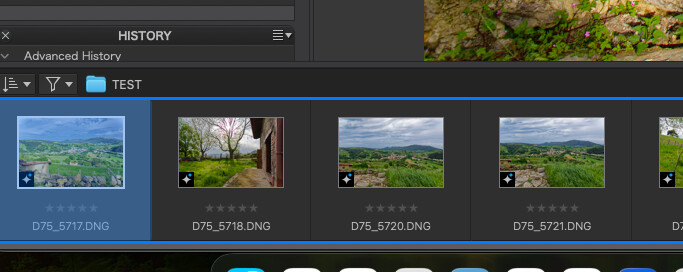
Sometimes when I use the arrow keys to navigate in the filmstrip, this blue border pops up. Doesn’t appear if using the mouse to select. Since I’m new to PL9, I’m not sure of what it is or what it signifies. I’m having other issues with the filmstrip’s behavior (in which a support request has been created), so I’m suspicious of the blue border.
<< errata >> Nevermind. It’s a focus indicator of some sort. Only appears when the keyboard is used to navigate. It’s quirky in that it doesn’t always appear right away.
I’m still with the belief that PL9.10 is not fully ready for prime time, at least not on Apple Silicon.
PL9.10
Mac OS Tahoe 26.5.2, Mac Mini M2 Pro
mwsilvers
(Mark - New Jersey, USA, Win10, RTX 4060, PL9, FP8, VP5, Nikon Zf )
2
The blue borders appear around one or more selected images for a number of actions. It will also indicate the current image being edited.
Cannot say I’ve seen the blue frame around several images, but the blue background in your D75_5717.DNG thumbnail indicates stacking on my Mac. Might take look at stacking options - especially the auto-stacking options. Try removing all stacking, if any exists.
Running PL9.10.0 build 53 on MacBook Pro M4max, Tahoe 26.6 (yesterday’s update).
To me, it looks like an OS-level accessibility selection. For instance, it is possible to fully navigate the fields and buttons on a web page using only the keyboard. There will be a setting somewhere that enables it — quite possibly a keyboard shortcut you are accidentally engaging.
You were absolutely correct. Somehow ‘Full Keyboard Access’ was turned on in Settings (macOS). Turning this off, SOLVED ALL MY PROBLEMS. This one and all the other posts I made about high-strangeness in the filmstrip and wrong photos being selected.