I can see there’s a section of the forum for NIK Collection questions, but want to direct this entirely at PhotoLab users.
I just came across the NIK Collection and thought I’d give the trial a go.
So far there seems to be some overlap with what PhotoLab already provides: filters, ways to sharpen your image, ways to remove noise…
My question is: Is there anything in the NIK Collection that is a fantastic addition to what PhotoLab can do, or does it just present different ways of doing the same things? Does anyone consider it a cornerstone of their editing process? How does it help?
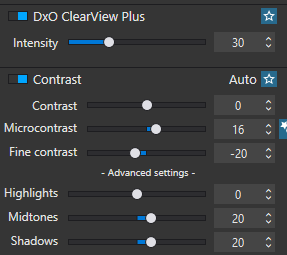
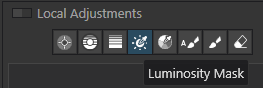
(With FilmPack etc. the benefits are obvious e.g. fine contrast control, Luma mask control etc. all within PhotoLab itself, but with NIK it’s a little different).
That’s been my immediate take-away when editing in PL and having to export to NIK.
First PL outputs a large TIFF file. This takes some time.
Then whatever NIK plugin has to load.
Then I can work on any edits.
I was hoping everything could be done within PL and without the need for a new large file being created. Weighing it up so far, the extra time and file-size footprints are too large to justify NIK as a net benefit.
Not really … Color Efex Pro can often provide a bit more “pop” to images, and Silver Efex does a good job with B&W … but other Nik tools are mostly redundant (IMO).
Some see value in Nik Collection as standalone apps and plugins for Adobe apps.
If one never cared about NC, I see no reason to start caring about it now.
→ As a Long-Time-User of PL, I can do without NC
If I had to say something “positive” I’d say that NC is a post-processor of images exported by PL. One-way-style for sure, but those who love NC can profit from PL.
→ Long-Time-Users of NC can profit from PL
Nik SEP and CEP have some special sliders affecting local contrast and texture. The difference might be quite subtle, but I wish they were implemented directly in PL.
Otherwise it may help you learn B&W, Split Toning, etc., with a rich set of examples to start with. What puts me off is lack of sidecars in Nik, having to save my edits as a preset. It’s also less ergonomic for me than PL. I use it only for special cases to get a unique mood. Probably I could get something similar with PL+FP but the devil sits often in the details.
My workflow with Nik is to export from PL RGB TIFF (16-bit to be safe), then switch mentally and work on a small group of exported TIFFs in Nik (I don’t use the Nik button in PL). Sometimes I use Capture One for Face Retouching on PL exports, before using Nik. The TIFFs are huge but I don’t care since I do it rather rarely. Sometimes you may get away with JPEGs or 8-bit TIFFs as intermediates, but I prefer to approximate as a last step. My input is mostly high ISO.
I’ve used NIK from day one, including U-point in the old Nikon Capture software, and so there is a soft spot there. But I use it rarely now. Moreover, DxO shows no inclination to move beyond RGB-only, not even linear DNG, so it’s also a technical dodo in my view.
I’ve always kept my DxO and addons up to date. And I can honestly say that in all the years of owning them (including NIK), I have probably used NIK only a handful of times. Mostly when I need Silver Efex. I probably used Analog Efex once, Color Efex maybe 4 times and Viveza around a dozen. I really need to stop myself from buying addons I rarely use. I use Filmpack a lot more than I do NIK.
I use NIK along with PL for most every image. I use Color Effex, Viveza, and sometimes Silver Effex. I used to use NIK for noise control back when I used Photoshop.
I do not have Film Pack as I do not desire to try to create images based on older film types. I am learning more about Film Pack in a PL tutorial course I am taking, so I may see some advantages to it as I work through the course. I have not see anything that inspires me yet to fork out the cash for it. I am wondering if Film Pack has u-point technology (or in combination with PL) so that you can select a preset and then apply it to only local areas? Probably so?
I have not used PL’s local adjustments much this far. Perhaps once I learn more about how to use it (I am still new to PL) I may have less use for NIK.
Photographers talk about having a certain “style” or “look” they use regularly for their art. I guess that may be how I use NIK. I have used certain combinations of NIK filters to achieve a certain “style” in my photos–so it is my go-to tool of choice.
Anyway, I used NIK for a dozen or so years, and cannot see moving from it at this time.
The HDR module in the NIK Collection is the only thing I found of any use. I tried the other modules but never thought they provided me with anything that I wanted in a photo editor but the HDR stuff was pretty good.
I do a lot of HDR photography but found myself unwilling to spend the extra money for Nik upgrades and now use an external HDR app for that. I no longer use the Nik stuff.
I like and use NIK and have no porblems with speed at all. In fact it’s done befre I knw it. I will select say 50 photos and click on the Deep Prime jur before the Fuji one. Just like that, all done.
I know that isn’t NIK bu I have the same responses with NIK time wise.
I think a lot of what people are balming PL for is in fact their machine and not PL. I use a Mac M4 Max with 48GB unified memory.
I have never saved in TIFF only in JPEG. My Raw files are 130mb each and give me no issues. I do make sure when I choose to export that info so in JPEG.
The only use I ever found for the Nik Collection is the ability to do exposure blending to create an HDR image. It does a decent job at that, although other software I have does an equally good job. The only reason I even use that is because it is integrated into PL which makes it easy to use.
Nothing else in the collection is of any use to me and even though I use the HDR functionality a fair amount the collection is not important enough to upgrade unless I have to. My current version is perhaps 3 or 4 versions old and I am not sure I will upgrade if it no longer works.