So I’ve downloaded the trial version 9 on my PC.
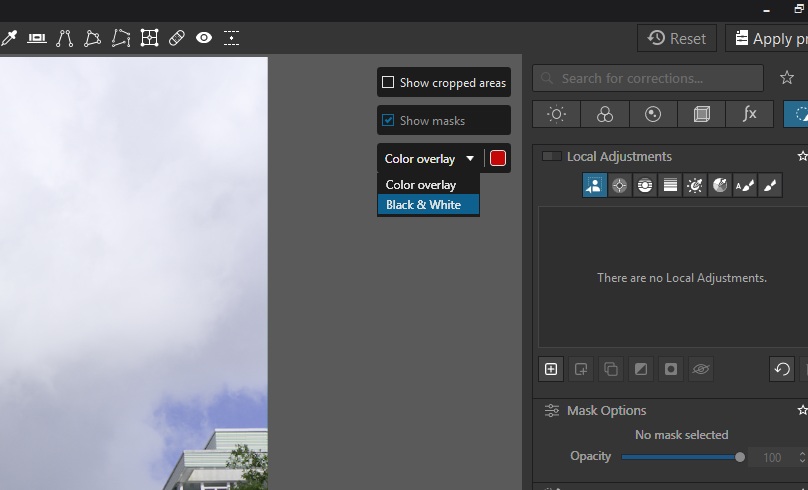
I’m watching the video about local adjustments @ 1:14 he mentions how the “black and white mode” is really useful. Splendid. On his UI that mode is selected at the bottom of his screen. But that’s not an option on mine, so - mild irritation - out of date video.
But I’ll easily find it in the well-0designed UI, right?
Yeah, not so much. Under MASK OPTIOPNS apacitity, croma, luma and diffusion.
Bugger.
But, I’m a grown-up, so - heh - I’l’l just read the (effing) manual, right?
So in the app Help > DxO Photolab user guide. BAM!
So I find “black and white mask view” and it tells me that it’s ideal for checking … effectiveness. Great! How comforting! Except THERE’S NOTHING WHATSOEVER ABOUT HOW TO FIND IT.
But, y;'know, the world’s not perfect. We press on. So. FInd the chapter on control points and read it, right? Nah - not so much. There’s no mention of the black and white thing in that section. Odd, beucase it IS mentioned elsewhere - just not how to find it.
So, what then?
Best I can guess (and guessing is SO MUCH fun when learning, right?) is that black and white is now gone. Use the other sliders. AND the manul left mention of it in by mistake AND the video is out of date so - learn how to use it from the manual and forget the video. AND since that’s out of date the others probably are also, so - forget them all.
And I’m supposed to be impressed by this?
Or even anything except fugging annoyed by such incompetence?
OK + wade in. I’,m just waiting to be told that I’m angry for no reason as what I’m looking for was right in front of my face.
Thanks Sigi for your comment, but, as Fineus said - it doesn’t matter, the deficiency still stands. If the video and/ordocumentation is not for PC users, then it shoudl say so, and there should be versions for PC users.
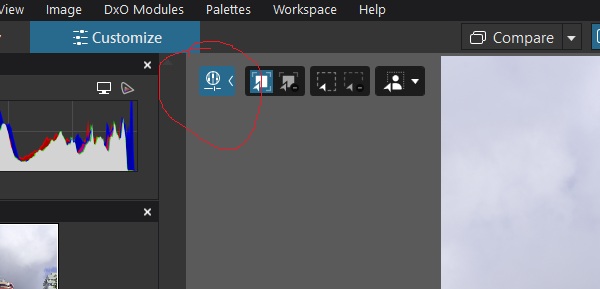
Thanks, but my UI looks nothing like yours. and hovering the mouse on the screen only shows the help panel which explains keyboard sortcuts - none of which are for “black and white”. Perhaps you’re on a Mac?
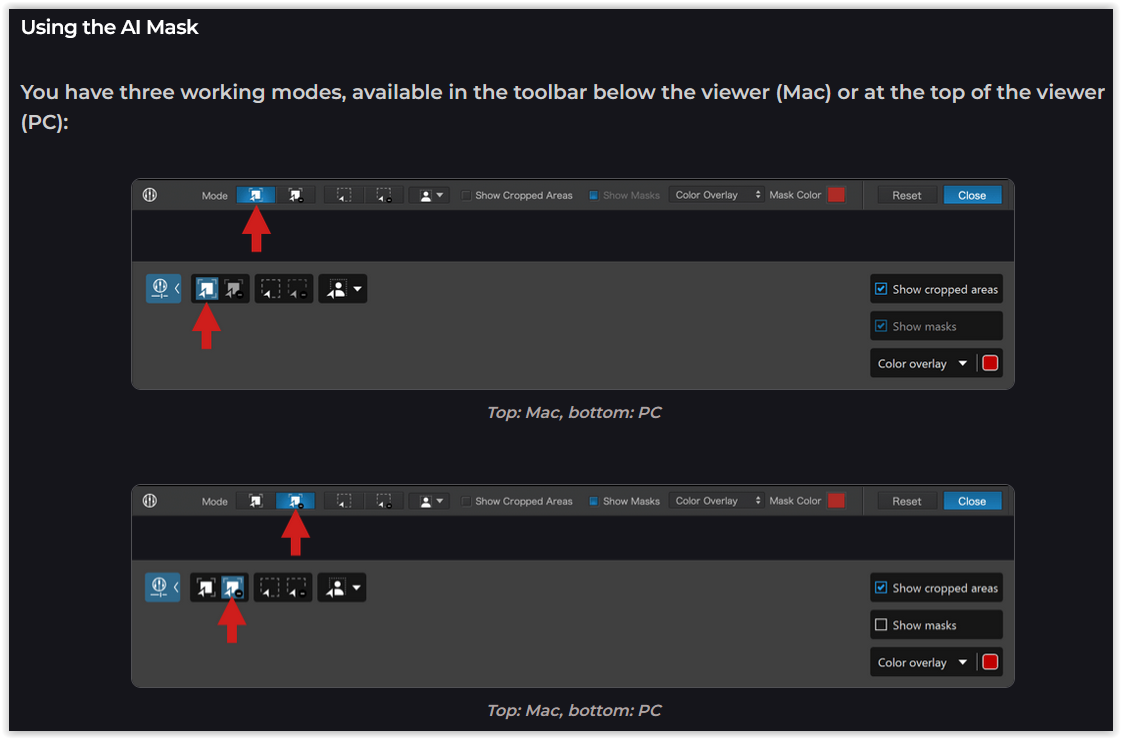
The narrow strip at the top of the graphic shows the Mac version, which appears below the PL preview – and which you most likely saw in the (unknown) video,
while the wider strip shows the PC version, which appears as an overlay.
What you’ve experienced is one of the user-interface differences between Mac & Win versions of PhotoLab. The maker/presenter of the video should have pointed that out.
Here’s a good demo that you might like to watch instead.
Thanks LVS - I see that in the help page. but what I can’t see is what that has to do with my query, which relates to cotrol points.
The point of my post was partly to highlight that the video is worthless (giving opportunity to be proved wrong) and that the documentation is unhelpful in learning how to use control points wiht the Black and White feature which the video demonstrates. You’ve shown that there IS a black and white setting for someting I’m not trying to do. Well, OK - but how does that help me?
So how am I angry for no reason? You agree that the presenter should have pointed out that he was showing the Mac version of the UI. Isn’t that worthy of irritation? This is what they do. It’s not some weird special case - it’s half the planet or more, using PCs.
You are right to be irritated, absolutely. What they need to do, rather than try to show both Mac and PC in their demo, is to make the software consistent between the two platforms like nearly every other company out there does.
DxO is not known for being absolutely thorough – except for lens/camera correction and noise removal – and for better or worse, the community here, including myself, takes that as a “given” now. Believe me, most of us have tried countless support discussions with DxO, but they remain stubborn. So you either take it or leave it. Or like me, use it as a “side” piece of software (I use Capture One primarily).
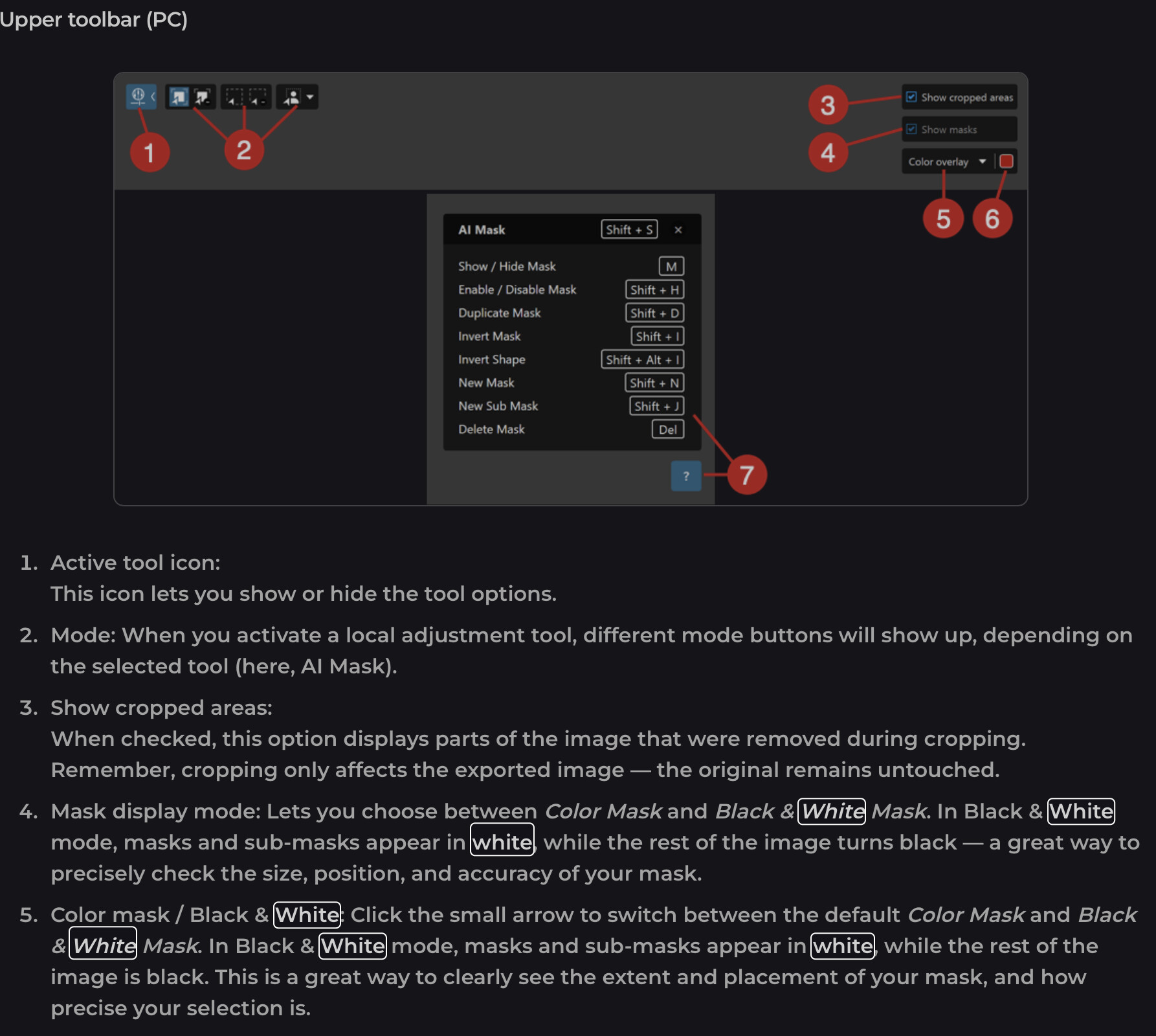
Regarding the issue you’re having with the Black & White feature, go to this link of the PL9 manual and then scroll down to where it says “Upper toolbar (PC)” and the instructions for going into the Black & White mode for control points, etc., should be there.
If you’re interested in PhotoLab, invest your energy in trying it out to get to know the app. And if you have any questions, come here. The community is willing to help.
But starting with “I already hate it” won’t get you anywhere.
In your original post you complained that the User Interface was different from what was seen in the video and that you could not find how to activate the Black/White mode for the masks.
I sent you a link and an image of where to find that function on a PC.
Further, the link contains numerous examples of the differences in the interface between Mac and PC so you could use that information when watching videos where only the Mac interface was shown.
I provided the information that you requested, now to your response to mine:
“The point of my post was partly to highlight that the video is worthless (giving opportunity to be proved wrong) and that the documentation is unhelpful in learning how to use control points with the Black and White feature which the video demonstrates. You’ve shown that there IS a black and white setting for something I’m not trying to do. Well, OK - but how does that help me?”
Now you tell me that the Black and White setting is not something that you were trying to do, I’m sorry but that was the core part of your post, how am I supposed to know that was not the information you were looking for.
You seem very unhappy with PhotoLab, and dissatisfied with my attempts to help. I cannot help you with either of these problems.
DXO will only allow me one post per day, which is why I’m late responding. So I’ll respond to all the others in this one post.
Wolfgang, thanks. From the responses here, I guess I must be wrong, but I can’t see it. I don’t see what you see. And for me, eperimenting a lot is the very worst way to learn anything. I should be able to drink it in, effortlessly. not need to try a bunch of stuff until something works and over time osmose how to do things. For me, this tool is just a means to an end, and the overhead of using it should be as small as possible.
As for your suggestion that I “experiment a lot” - well, in my view, that’s the wrong answer. That;s not how to design or support a product - it places the burden on the customer, and not on the UI and documentation designers, and actually - no thanks. I used to manage software design rollout and support for a global company, and I’d have been strung up for that attitude - and rightly so.
LVS thanks. I didn’t say I wasn’t interested in black and white. I was saything that there is a black and wehite setting in another workflow which is not the workflow I was trying to use. I’m sorry for the confusion I have caused.
Unchdxolly thanks. Based on your comments and my experiences with the product, I’m gone to On1. Even trying to read the manual, because i reject cookies, every single page-turn means misery keeping the cookie monster out of my face. So - actually - that tells me a lot about the company ethos. And - yeah - nah - no thanks.
John-W thanks, I agree that the video guy should have mentioned the Mac UI but I totally disagreee that I’m complaining for no reason - after all - you pointed out exasctly the reason I was complaining.