Allow module-based corrections for Linear DNG files

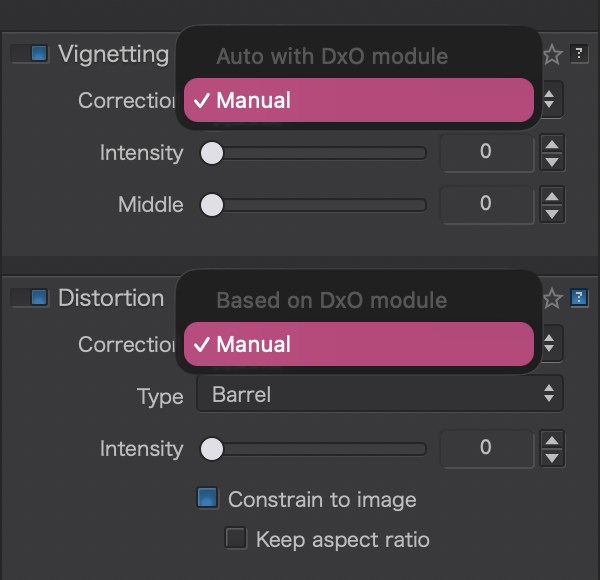
When opening a Linear DNG file, PhotoLab disables corrections based on DxO modules: Vignetting, Lens Sharpness Optimization, and Distortion. You can still do manual corrections for Vignetting and Distortion, but nothing automatic based on DxO modules.

I would love it if PhotoLab could still offer those features for Linear DNG files when the camera and lens are recognized.

My use case is that I’m considering converting some old photographs from the original RAWs to Linear DNGs using the new compressed format introduced in PhotoLab 9.6, to save some space for archiving. I would like to export my images to compressed DNGs and bake in some corrections such as DeepPrime XD3 and Lens Sharpness Optimization, but would prefer to not apply Vignetting and Distortion corrections. Whether I want to keep the original vignette and/or distortion or not is a creative choice and I want to keep my options open.

My understanding is that there might be two reasons for why those features get disabled for Linear DNGs:

  1. They may require access to the color filter array (CFA) data. (I don’t think that’s true for at least Vignetting and Distortion, but who knows.)
  2. More likely: DxO doesn’t want users to double-correct, for instance if you exported the Linear DNG file from PureRAW or from PhotoLab and already applied those corrections, and PhotoLab offers them again, you could end up with bad results.

I think the second issue — if that’s indeed the motivation for this restriction — could be mitigated with a warning, and by requiring users to apply those corrections manually rather than as part of one of the default presets.

Writing here I’ hadn’t seen this post. :slight_smile:

.

I understand your desire to save storage space, but consider this:

With a “HiFi compressed” DNG file, you’re currently still dependent on DxO software,
whereas e.g. the (large) TIFF output format is universally compatible.
Instead of limiting yourself now to noise reduction, but retaining other corrections, simply apply PL to your raw files, work with space-saving virtual copies and then export only the currently important images in your desired output format. – That’s the least effort and you still save archival space.

( While I do printing, for which I still use PS with custom layout, etc., I even keep the finished version into which I’ve invested so much work. )

I would NOT recommend converting original raw photos to DNG just to possibly save space. I doubt the DNG files would be much smaller than your raw files. I believe Canon compress their raw files already (lossless) and they are quite small relative to pixel count.

If you compare raw files to DNG files, the raw file has been de-bayered producing an image with vastly larger data per pixel than a pixel in a raw file. A raw file has an array of red, green and blue pixels which are converted to single pixels with red, green and blue values for each pixel (probably double the data).

As an example for a 10mp raw file with 14 bits per pixel you will have 10 million numbers consisting of 14 bits each.

Now if you convert that to a 16bit DNG file you will have 10 million numbers considering of 3 X 16 bits each. This would be compressed but I don’t believe to less than you original raw file.

I hope that explanation helps clarify the difference between your raw files and DNG files produced by PL9.

1 Like

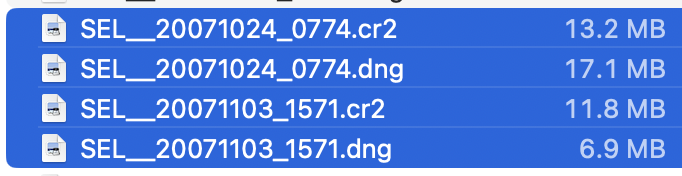
To test, I exported the 60 test images I mostly use to HiFi DNG and found that space saving was about 10-15 % … but some files got bigger too. Whether linear DNG saves space or not seems to be coincidental - with Canon RAW files.

Downside of the HiFi DNGs is that they are lossy, and while differences are hard to tell, they do exist. Hence, if losing info is acceptable to save space, trashing a few additional files might be more effective.

My recommendation: KEEP YOUR ORIGINAL FILES

1 Like

Whether Linear DNG files are good for saving space is orthogonal to this feature request, it’s just one use case I had in mind for Linear DNG files without baked optical corrections.

I don’t want to derail this feature request by making this entire thread about Linear DNG file sizes. So I’ll just answer this topic once, then leave it at that.

Yes, it is true that demosaicing generates more data, making it a bad idea for space savings—in theory.

But, in practice, it really depends on compression. Linear DNGs with JPEG XL compression, especially with lossy compression, can be competitive if you have:

  • Uncompressed RAW files (though converting to non-linear DNGs with old-school LJPEG-1992 compression would already save some space).
  • Compressed RAW files that use some inefficient lossless compression (camera manufacturers optimize for low battery usage and clearing buffers fast, not for ideally small file sizes).
  • Compressed RAW files with pretty good lossless compression… that still gets beaten by the lossy compressed linear DNG.

I have files from 3 generations of cameras that each match one of these conditions. For the first 2, converting to non-linear DNG with LJPEG-1992 compression is already a small win. Though if I had the tools to convert to non-linear DNG 1.7 with lossless JPEG XL compression or even lossy JXL compression, that would save a lot of space. Sadly, I haven’t found a tool that does that (no, Adobe DNG Converter is too limited), so I can’t even test the resulting files for compatibility in RAW editing software.

The last scenario is my X-T5, which produces lossless compressed files that clock in at roughly 1.1MB per megapixel (beating DNG LJPEG-1992 compression, clocking in at around 1.3MB per megapixel). Meanwhile, linear DNGs produced by PhotoLab 9.6 are around 0.75MB per megapixel, and lossy linear DNGs from Adobe are around 0.25MB per megapixel.

In an ideal world, I would be able to convert proprietary RAW files to non-linear DNG in DNG 1.7 with JPEG XL compression. But I don’t know a tool that does that, nor do I know how well RAW editing software would support it (or not at all). It might be doable with Adobe DNG Converter’s command-line interface (it’s not possible with the UI), but I haven’t tried it yet.

Anyway, back to this feature request: given that the compressed linear DNGs produced by PhotoLab 9.6 and PureRAW 6 are pretty good, it would be great if opening them in PhotoLab did not block access to DxO module corrections.

Yes, and splitting a possible one-step process into two looks strange to me too.

But:

  • If your files aren’t supported (by DxO), I’d leave them as is in order to prevent doing something that cannot be reversed, no matter if space is saved or not.
  • If your files are supported, you can easily correct them and save linear DNGs as intended by DxO. And if you set PL to add black fillers, you’ll not waste a single bit.

Looking at how DxO supports gear, I’d not expect any module based stuff, specially not for any old (unsupported) gear. DxO’s strive for technical excellence is holding back anything that looks like niche input coming from anything else than DxO or, possibly, Adobe. Everything not from DxO means that DxO has to catch up to it.

Nevertheless, DxO has come up with surprises and maybe this FQ will make it.