Windows version doesn't see mac changes

@Martijn_KL, @platypus and @lrmigrant Is it worth adding the code to make changes to the Backup utility?

The code to handle the backups above the ‘Start Backup’ button already exists and “seems” to work, is it worth adding the code behind the new fields I have added.

Hopefully the mismatch will be resolved soon but could it continue for the rest of the PL8 releases? The utility is written in PureBasic and could be released as a compiled .exe and/or as a .pb file.

The former could then be run on a Windows PC the latter needs the PureBasic compiler which offers an extended trial for all programs of less than 800 lines.

The current version is 260 lines and the new code would add a bit to that. It should be possible to change the code to work on the Mac, for which there is also a PureBasic compiler available but I have no access to a Mac.

RSVP

Utility / DOP Fix: I propose that you

  • Add a third version fix column for the number at the end of the dop file
  • Make the “inner” version changes to applicable entries to catch VCs and
  • Make sure that version changes are applied in relation to the proper blocks.
    Note: The last version entry very often matches *.0, but not always.

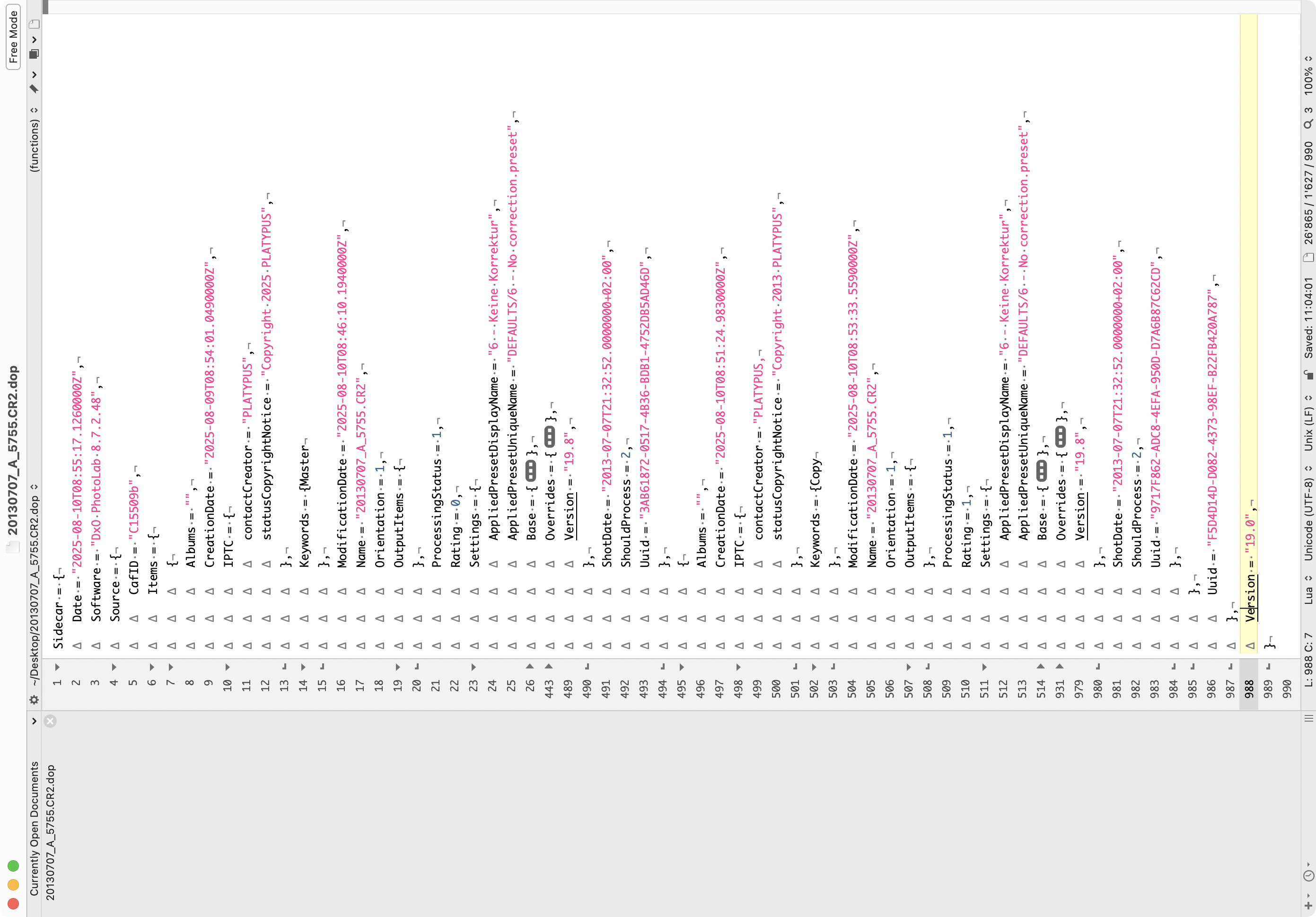
Partially collapsed view of a dop file holding the recipes for a master and a VC.

@platypus That was my intention

I had considered that and will add to the mock up and then the final version of the code.

Currently my intention would be that the program has little judgement, i.e. the last ‘Version’ would be reserved for just that item and my initial intention was that only exact matches would be changed, regardless of whether they are 19.0 or whatever what the user enters in that field will be matched and the new value inserted in its place.

It would be possible to include a wildcard!?

I have also decided that there will be a ‘Start fix’ command button.

What I haven’t decided is whether the change should be in situ or to another location, probably an option for either of both!? The other location can then be used as a “dry run”.

No more forum for today, we are off to meet up with our youngest sons family to hand over birthday presents to our youngest granddaughter, who was 7 on Friday!

I do understand that, but then you risk to replace one issue by another one.

Alternatively, I’d try to reduce the version numbers significant part by one, e.g. 19 to 18. Or subtract 1.0 from whatever the version number is (real numbers, if you can do it, that might also cover your wildcard question. Please note that the last version number changes less frequently than the inner version number. Subtracting 1.0 might be rough, but sufficient.

We’ll then see how pedantic DPL on Win is with the ingestion of the recipes.

If this automatically fixes the lines that needs editing, I would probably use this.

@platypus The original idea was a complete replacement of the stated original field by a new value. I see the merit of your suggestion but all such alternatives need to be enumerated and then coded in such a way that the user can select the most appropriate, e.g. using a drop down list like this one perhaps (but with the appropriate alternatives, these are for a complete PhotoLab backup)

However, I would like to keep it simple, initially, just to develop the basic code as a proof of concept. But if you can define a set of alternatives I could look at then I can see how they can be presented to the user in an unambiguous way.

@Martijn_KL That is the intention but the code would be built to run on the Windows side of the divide, unless someone can convert it for the Mac!?

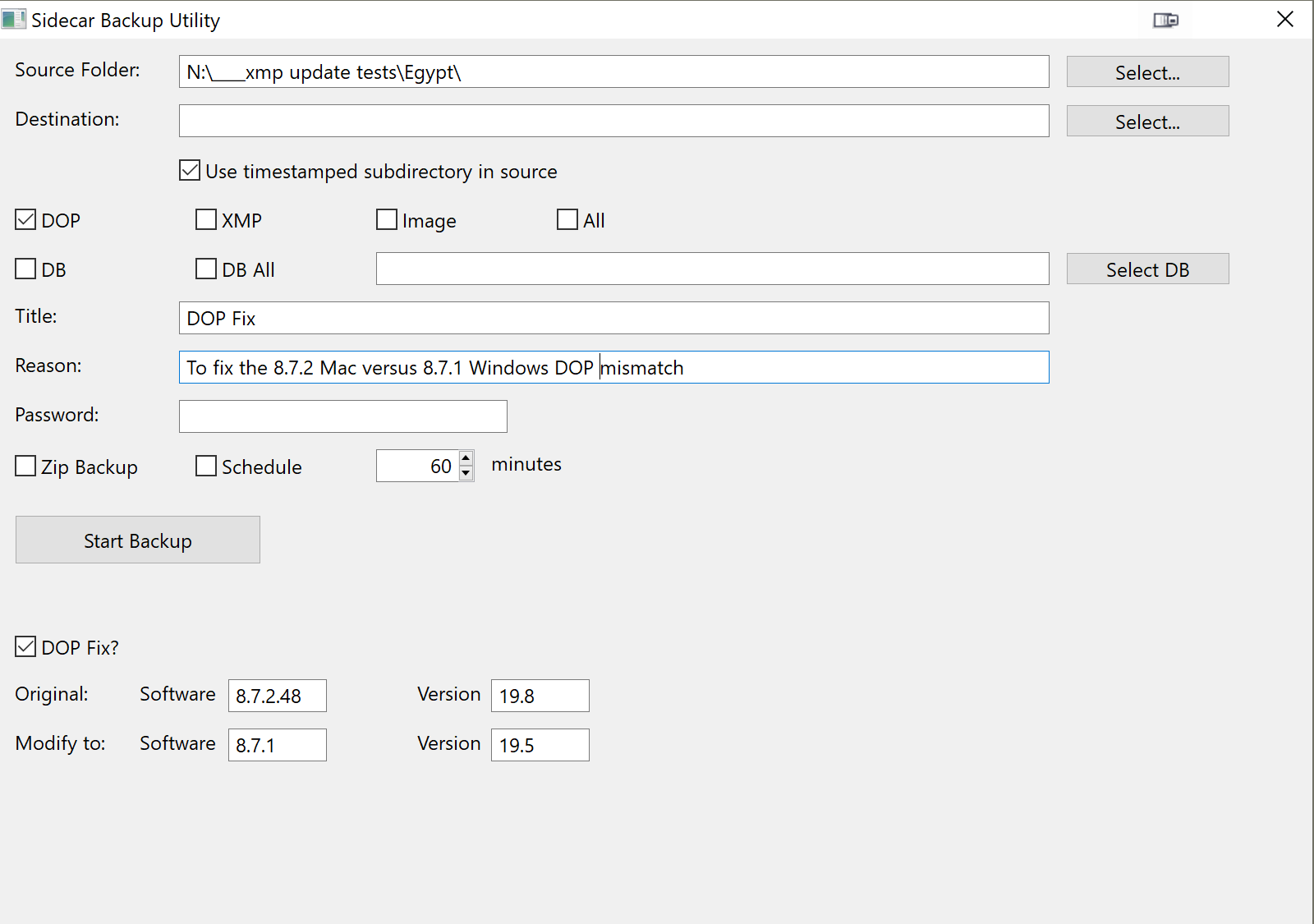
The latest screen “design” for the fix part is

But the more I look at it the more I feel that it should be independent of the backup code, i.e. as a separate fix program, but using the current DOP copy code to protect the original DOPs.

The biggest difference is that the existing copy program only deals with files but the fix program must go through each DOP, line by line to locate the chosen line(s), apply the fix(es) and continue until all the DOP has been read and then write the file back, to either its original location or to the ‘Fix Destination’, as required.

But the first version will be the “Frankenstein” design I am showing, or close to it, and I will then decide whether to split them into two programs, which I increasingly believe is the best strategy?

.dop files are text files, no matter if written on a Mac or on Windows.

If the app can find something like “version = M.D” and can do M:=M-1, then you should be good to go (on with programming and testing) :wink:

If ever I want to use a .dop from a newer version, I copy the dop file (for fallback) and “downgrade” the version number manually (e.g. from 16.x to 15.x). That’s it, it usually works.

Maybe I could do something with Automator or some scripting, but I need a version mod too rarely to bother.

@platypus I will see how easy it is to add your suggestion to the UI.

As for the frequency of use I have opened a directory in a new release and effectively made the DOPs useless for use with earlier releases so being able to change an entire directory in one go has some appeal and appears to be necessary for users of both system types when DxO create a release mismatch.

The interface is looking more like the backup interface at every iteration. It would be possible to use just one main screen with a simple function switch but that risks a user doing the wrong thing at the wrong time with the wrong set of data?

and the ‘Title’ field might well make its way back in.

My intention for testing is to use the Backup function to make a backup including the image, DOP and xmp sidecars and then use that new copy to apply an ‘in situ’ ‘DOP’ fix. I can then open that directory in PhotoLab and can repeat the exercise any number of times, keeping the previous results intact, i.e. an audit trail of failures.

…also useful if one has upgraded hastily and needs to fall back…

…nice idea…if backup of PL N can be restored to PL N-x :grimacing:
BTW. Forcing sidecar updates can be done easily on Mac. It was discussed quite a while ago (set cell value in the BD to initiate “unattended” updates).

@platypus, @lrmigrant, @Martijn_KL Sorry it has taken this long and is not finished yet and I have run into a problem!

So the screen currently looks like this

and and the PureBasic source is 597 lines and that will increase for just the fix basic functions, all the backup code is already in place and working.

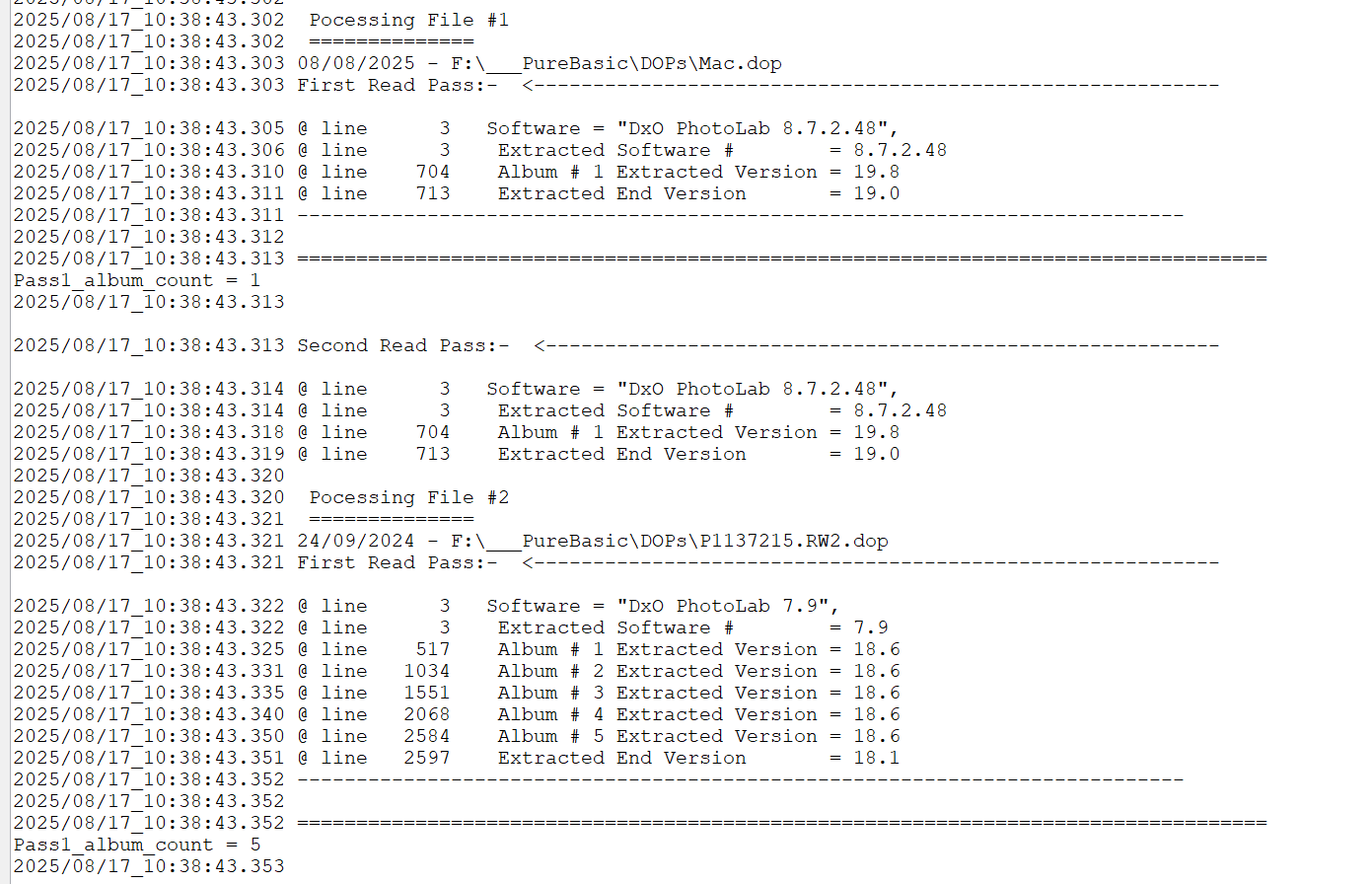
I have modified my DOP analysis program, removed big chunks of code and it currently produces this

and the source file is currently 831 lines long!

So, while there is some common code, the combined logic will be well over 800 lines long and I still need to add the code to change the field values and write out the amended DOP!

As a licensed user I can compile a program of any size and distribute it as an .exe, the potential issues are

  1. Lack of “Transparency”, i.e. the users need to trust that there is no “malicious” code, either deliberate (which there won’t be) or accidental (which I cannot absolutely guarantee!?). I can deliver the source file alongside the compiled file but there is no way for a user to verify that they produce the same results is the file size exceeds 800 lines.
  2. No obvious path to a Mac version

I believe that the DOP analysis part of the process does not require the 2 pass coding necessary to use the ‘Completion Date’ logic required to sort “Albums” into sequence for Mac DOPs. A “fix” does not require knowledge of which is the [M]aster and which is a VC.

So with that removed I now have 540 lines of code to give

2025/08/17_11:40:59.949  Processing File #1
2025/08/17_11:40:59.949  ==============
2025/08/17_11:40:59.950 08/08/2025 - F:\___PureBasic\DOPs\Mac.dop
2025/08/17_11:40:59.951 @ line      3   Software = "DxO PhotoLab 8.7.2.48",
2025/08/17_11:40:59.953 @ line      3    Extracted Software #        = 8.7.2.48
2025/08/17_11:40:59.959 @ line    704    Album # 1 Extracted Version = 19.8
2025/08/17_11:40:59.959 @ line    713    Extracted End Version       = 19.0
2025/08/17_11:40:59.960 ==================================================================================
2025/08/17_11:40:59.960  
2025/08/17_11:40:59.960  Processing File #2
2025/08/17_11:40:59.961  ==============
2025/08/17_11:40:59.962 24/09/2024 - F:\___PureBasic\DOPs\P1137215.RW2.dop
2025/08/17_11:40:59.962 @ line      3   Software = "DxO PhotoLab 7.9",
2025/08/17_11:40:59.963 @ line      3    Extracted Software #        = 7.9
2025/08/17_11:40:59.967 @ line    517    Album # 1 Extracted Version = 18.6
2025/08/17_11:40:59.970 @ line   1034    Album # 2 Extracted Version = 18.6
2025/08/17_11:40:59.974 @ line   1551    Album # 3 Extracted Version = 18.6
2025/08/17_11:40:59.978 @ line   2068    Album # 4 Extracted Version = 18.6
2025/08/17_11:40:59.983 @ line   2584    Album # 5 Extracted Version = 18.6
2025/08/17_11:40:59.983 @ line   2597    Extracted End Version       = 18.1
2025/08/17_11:40:59.984 ==================================================================================
2025/08/17_11:40:59.984  
2025/08/17_11:40:59.984  Processing File #3
2025/08/17_11:40:59.985  ==============
2025/08/17_11:40:59.985 13/08/2025 - F:\___PureBasic\DOPs\P1140023.RW2.dop
2025/08/17_11:40:59.986 @ line      3   Software = "DxO PhotoLab 8.7.1",
2025/08/17_11:40:59.986 @ line      3    Extracted Software #        = 8.7.1
2025/08/17_11:40:59.989 @ line    495    Album # 1 Extracted Version = 19.5
2025/08/17_11:40:59.990 @ line    508    Extracted End Version       = 19.0
2025/08/17_11:40:59.990 ==================================================================================
2025/08/17_11:40:59.990  
2025/08/17_11:40:59.990  Processing File #4
2025/08/17_11:40:59.991  ==============
2025/08/17_11:40:59.991 13/08/2025 - F:\___PureBasic\DOPs\WinMac.RW2.dop
2025/08/17_11:40:59.992 @ line      3   Software = "DxO PhotoLab 8.7.1",
2025/08/17_11:40:59.993 @ line      3    Extracted Software #        = 8.7.1
2025/08/17_11:40:59.998 @ line    811    Album # 1 Extracted Version = 19.5
2025/08/17_11:41:00.003 @ line   1623    Album # 2 Extracted Version = 19.5
2025/08/17_11:41:00.004 @ line   1636    Extracted End Version       = 19.0
2025/08/17_11:41:00.004 ==================================================================================
2025/08/17_11:41:00.005 ++++++++++++++++++++++++++++++++++++++++++++++++++

Getting better but still some way off.

I will add the “Fix” logic to the analysis version first and my proposal is

  1. If the original field is “Blank” then the Fix value will automatically be substituted.
  2. If the original field has a value that will be compared with the original value in the table and the replacement (Fix) will only take place if they are the same.
  3. If the replacement value start with a +, e.g. +0.2 then the original value will be aligned on the “.” and the value added to the original to determine the “fix” value.
    If it is “-0.2” the value will be subtracted to determine the new field value.
    If the field length of the fix is shorter that the original the additional original field elements will be omitted, e.g. 8.7.2.48 would become 8.7.1 if the fix input was -0.0.1

The options for proceeding are

  1. Retain the full logic shown earlier, i.e. the Backup and the Fixup in one application, which will likely exceed 800 lines.
  2. Split the logic and create a new fixup version which will certainly be smaller than item 1 but might exceed 800 lines.
  3. Use the new version of the analysis program to include a “crude” screen data entry providing just the Log field with “Original” and “Fix” fields which might be lower than 800 lines
  4. Implement 3 but with only the “Version” field fix, which appears to be the right one anyway.

My plan is to proceed with 3 for now and then see what 4 looks like and then make decisions about 2 and 1 thereafter.

Sorry but back to gardening today.
The latest update for windows & mac just fixed this issue! :slight_smile: