I would love to keep it simple and just use Apple’s Finder, but sadly Apple doesn’t support Fuji’s compressed RAF files, so I had to find something else when I moved from Capture 1 to PhotoLab, and Digikam works for me.
I purchased this, and it works like a charm:
Now I can view my Fuijfilm compressed RAFs in the Finder as though they were any other.
Thanks for that, I’ll take a look.
1 Like
Excellent app. It also supports lossless compressed RAFs…at least it does for my X-H2S and X-H1.
Whoops, I had a typo. Meant to say “compressed RAFs.”
Neither of these is a reliable backup. If you accidentally delete a photo and don’t realise that, it’ll be gone from everywhere. In as little as 30 days in the case of Photos. A lot longer for Time Machine, but it will eventually.
That’s a valid point but not one that I have encountered before in decades of shooting and cataloging images. So for me Photos remains as reliable and simple as I need it to be.
iCloud for backup is every bit as reliable as any other kind of online backup. That being said, my old school sensibilities keep me from relying on a single-source backup for my invaluable photos.
Along with iCloud, I use Super Duper (Carbon Copy Cloner is another excellent app) to make a backup of my drives every 30 days. One backup for my media drive (where my old Aperture files and my Z8 RAW images reside), and one for my system drive (where the Photos library resides).
The Super Duper backup of my system drive is also a bootable clone, which I used to test to confirm it was bootable, but I’ve never had a Mac crash on me since Apple released it’s UNIX-based macOS in March 2001 so I stopped.
Those SSD backup drives live in my go bag, ready to flee. I’m retired but I used to also keep a set of backups in my locker at work. Like I said, old school.
For my Z8 images I keep everything on the camera card too, until pressed to delete them. Yet another backup.
Likewise. In addition to iCloud I have an SSD hard drive with everything on my computer that I back up to fairly regularly.
I also make large prints of my favorite images and photo books of vacations and family stuff. I get 4x5s printed of general family stuff and keep them in real photo albums that my grown kids and grandkids love to look at. Really old school there.
1 Like
Do you not buy car insurance because you’ve never crashed a car?
I’d like to think I would never be so silly as to delete photos, but I did. I managed to lose 3 months of photos and did not discover this until many, many years later. Long after the backups had aged out any copies. I got fortunate in that I had an old computer backup I had used to migrate to a new computer and hadn’t got around to reformatting it.
If you don’t mind losing your photos, do’n’t worry about it. If you do mind, I strongly suggest an archiving system. I wrote about mine here — see the Archiving section.
Oh, it’s reliable. It will reliably delete any photos from your backup that you delete the originals of. See my previous reply.
Even a clone is subject to the same limitation if you let it delete files (which most people do in my experience).
Point taken but a little hyperbolic.
I do understand that just because I’ve never accidentally deleted an important image in 30 years doesn’t mean it can’t happen. And I think it is important for people to understand your point about iCloud and Time Machine. But, having never done that in 30 years is not just a happy accident either. I am careful. Maybe more careful than some people? 
And I too have working older computers with duplicates of older images on them.
The other thing is, if a bullet proof back up system is complex and involves multiple apps I’m not going to keep up with it. At one point I did have a fairly robust back up system with file syncing apps etc and I got tired of fooling with it.
Hyperbolic? Maybe. But it was in response to “I have iCloud backups” which is patently not what iCloud is.
I’m careful, too. I think I lost those photos in a move between Aperture and Lightroom in one direction or the other. That was a fastidious operation. Not fastidious enough, I guess.
As for lots of apps, I did spend a little time setting things up, but I updated my archives today just by opening Terminal and using the up arrow to recall the commands as I ran them last time. Occasionally I will change a year or month name on them. I’d argue that’s certainly no more effort than fetching a backup drive, launching CCC or Super Duper, and setting off a clone. I had an automation I could use but it required some upkeep and the up arrow is usually quick anyway.
I could have just used an app like Transmit to update the cloud archive, but I actually found it more fiddly and less reliable. The scripts were written with the help of ChatGPT.
I use fastrawviever to cull and import photos works really well
How’s this for old school - I still have my 27” iMac that I used from 2014 until last year. It contains all my iPhoto, Photos, and Aperture libraries. I turned off its network stack. Every once in a while I turn it on to make sure it works, and momentarily shed a tear at what was Aperture.
I also retain numerous old spinning HDDs with various backups of my photo and iTunes libraries. They get spun up once a year for old time’s sake too.
In my book, if it’s not backed up 3 times it doesn’t exist.
2 Likes
Have you looked at Nitro by the old author of Aperture?
Personally, I can’t get my head around the screen layout, with the long column of single line tools.
PL might be rubbish as a DAM, but then I have alternatives and much prefer just loading images from my DAM to work on in PL.
Thank you for that recommendation. Yes I did, last fall when I started the project of scanning all the Family Kodachromes, which renewed my interest in photography. I needed new kit across the board. I can’t remember why I rejected Nitro and landed on PL - it might have been my longstanding admiration of the Nik Collection which I have used since before it’s Google days, that sealed the deal.
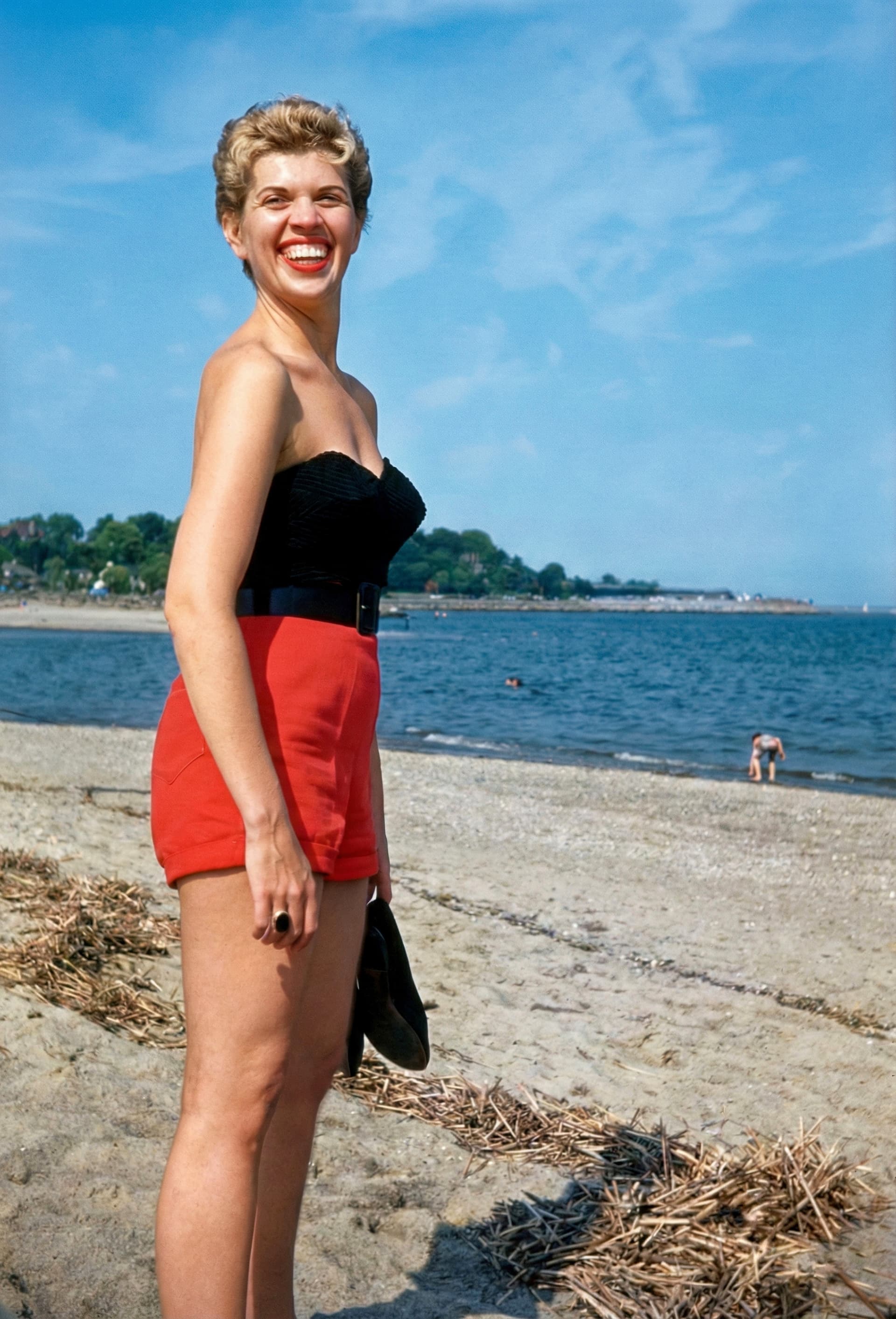
Here’s one of my restorations; it’s of my mother, taken in the late 1950s by my dad and his Argus C3 on Ektachrome. Despite extensive fungal damage I think it turned out well.
PS my mother just turned 93 and is doing well.
1 Like