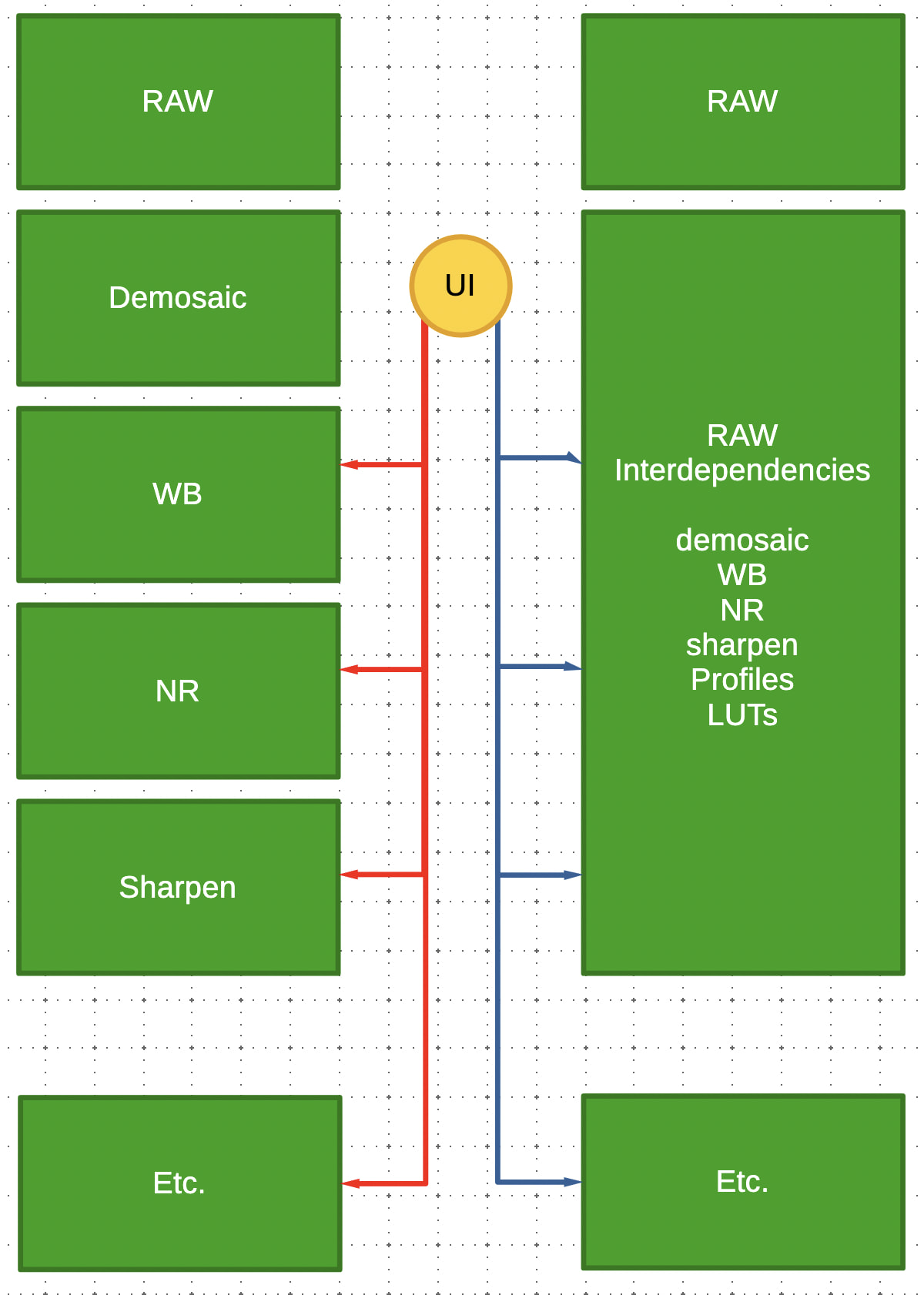
I speculate about the possible logic of keeping together a few things…and in case of denoising and lens sharpness, the only reason might be that both act in unison during demosaicing. It seems to be a big melting pot into which DxO has thrown many things, all while keeping them separate in the UI. Like so:
Left: How it looks and what we therefore suppose
Right: What it might actually be
The same UI (yellow) can feed parameters into the pipeline in both ways. The pipeline on the right simply preprocesses the interdependent parameters in a way that improves the outcome compared to what we’d get from the LH pipeline. If demosaicing can be mixed with NR, other functionality might also contribute to an improved result.
The right side seems to be the right process since DxO said all those functions (or about) are AI and happen at demosaicing level. And it seems the last one added to this AI process is chromatic aberrations. Unless several AI models act in sequence. But they couldn’t so say it happens at demosaicing level (I base my assumptions on a belief in what DxO says, although it cannot be entirely ruled out that they might stretch the truth a little to keep their trade secrets under wraps).
But in any case, I can’t see why it would be impossible to isolate each parameter and reapply them individually or in groups chosen by the user, since this would take place at the level of the small orange circle (UI) and would be applied in the correct place, regardless of the organisational structure.
Those are only values entered at the interface level.
Oh, we can do it, at least it looks like it on UI level and with WB. Behind the scenes, other things happen and some of them manifest themselves occasionally.
I’m hard pressed to say that current observations hint at issues or not and I’m fairly sure that we’ll never read the truth (it’s a philosophical concept anyways) , be it here or somewhere else. You said it: trade secrets.
If field 1 allows to enter decimal values from 0 to 1 (a slider), and field 2 allow to enter integer values from 0 to 5 (a list), what’s the difference if i enter any of this value manually with a partial preset recall ?
How the result could be different or how could that not work ?
In both cases I do absolutly the same thing. I put values I want in each field and both fields have the values I want which are the same in both cases : manually or with partial preset recall.
And then the process runs the same result. Regardless of the organisational structure of the process. Knowing the process is irrelevant here.
How can this logic be defeated ?
Are you an AI ? Am I training you
These partial presets are either completely buggy or utterly poorly designed and do not fulfil their intended function in any way.
It is completly and very easily possible to isolate any value and store it in a partial preset to be recalled at the right place.
Unless the lost in code syndrome has struck.
And as some suggested, there could be fixed partial presets and incremental partial presets (with the need here to clamp the values by themself if they exceed the limits of the range).
We’ve now established some tools rely on others to effectively work. They can’t be isolated (like my denoising and lens sharpness problem) because they need a value from another tool to work effectively.
So I guess we end up at two possible situations:
One:
I want to implement a partial preset of White Balance and there’s already a value for Color Rendering (because one was selected manually, or part of another preset applied to that image). My White Balance partial preset reads this value and applies the WB as expected.
Two
I want to implement a partial preset of White Balance and there’s no value for Color Rendering, but one is needed.
PhotoLab either then:
Fails to load the White Balance partial preset at all - my partial preset doesn’t work.
Implements the White Balance preset but with a default Color Rendering selection stored elsewhere, not necessarily the one I want. This means my image could change dramatically and need “fixing”. If I applied this preset at the end of a project to many images, I’d have to go back individually and and fix them all, or “select all” and apply the same change to all of them.
Implements the White Balance preset but with a Color Rendering value stored in the Partial Preset “as default” - but not one I selected - putting me in the same position as above - and needing to potentially fix things.
During the creation of a Partial Preset it’s not made clear what tools rely on other tools, or may change their values (overwriting existing edits if you made them!)
So where you might think “I’ll just create a Partial Preset to change White Balance” you’re actually opening a can of worms - potentially overwriting changes and having unseen consequences for your image.
In other words: I’d be very hesitant to try and use Partial Presets right now.
This is what I do not understand. Why would one be needed for partial preset .
My terminology might be a little imprecise since English isn’t my native language, so please try to understand what I say or ask me for clarifications. (For example I used register in a post above and I know this is not the right terms).
BASE CONCEPT :
In an ideal world, for a software like photolab, there is a screen interface with fields for entering values stored in variables. And when all these variables are set, the process is triggered and reads values stored in them as it runs. Then when modifying one value in one of these variable photolab triggers the process or parts of the process again.
The input interface and the processing parts should be clearly defined, unless the code is really convoluted and interface and process are intertwined in a jumble, (could this be the case ???).
And partial preset should act at this level : they should change values in those variables.
SO WHAT SHOULD HAPPEN :
I will only talk about WB and Color rendering but this should be the same for any setting.
When you select a raw file for the first time in the customize tab, even if you have selected “No correction” in preferences for auto apply preset for raw image, the image is demosaiced and you can see it’s preview.
So this imply that all needed variables are set at starting point, and even if a needed tool (as color rendering) is disabled, either its variable is set with default value, or is not initialized but triggers the default value anyway (we’ll see which one for color rendering below). We can see these values in corresponding interface fields (unless when tool is disabled and either uses default value or is not needed).
And so when WB variable value only is manually modified, it works. Even at starting point. No need to modify color rendering.
If partial preset updates WB variable, it should work consistently whatever the color rendering is, since as you can verify, when you manually modify color rendering field the WB value does not change (at least on PL8 - my PL10 trial is over), so regardless of the of the color rendering value, the WB variable value is consistent, it does not have to be re-evaluated.
So the question is : how those partial presets are implemented ? The simplest and more obvious way (just a set of value to inject into existing variables), or something messy where the code is really convoluted ?
MORE ABOUT COLOR RENDERING :
Why isn’t it the one already defined ? If that’s not the case, it makes no sense.
And if color rendering is disabled, photolab already has a default one set which is generic rendering / neutral colors. This can be verified : put this setting and activate/deactivate color rendering, nothing changes (at least in PL8 for my camera D850 - even if it is not the same for other cameras there’s one anyway, but I don’t think there is such inconsistency).
(And same for WB, which is “as shot”).
CONCLUSION :
Those partial presets needs a rewrite to fulfill their function. And I can’t accept how it works can be a deliberate design choice (already heard that for not fully efficient functions - AI sky mask ?). Unless design which does not work can be a choice.
No need for caution…we’re still talking about non-destructive PhotoLab.
Here is where it gets interesting. If you open the preset after having created or edited it in PL, you can see if additional tools are listed in the preset. Supposing that they are needed, we’d have to test if they are applied. I’ll try something…
After a complete flush and re-installing PL versions 8, 9 and 10, I tested a new partial WB-only preset again and it worked as expected. Partial preset: created from a copy of “No Correction” manually edited. Did the manual edit from two different presets and both worked as expected. Nevertheless, when I edit the preset in PL, CR and LA get selected, but aren’t stored this time.
Judging from the varying issues I had while editing, WB (and possibly others) can be used solo as partial presets…if edited outside of PL. THis takes some getting used to though.
Not only that, but unrealised destruction of image edits too. If you’re working with a batch of 200 photos, you might not catch that something got overwritten or changed until it’s too late.
That’s simply unacceptable. We can’t be doubting the process.
That’s exactly what tipped me off to the problem in the first place. My Partial Preset was only supposed to turn DeNoise and LSO on, but the whole image was visibly and dramatically changing. It turned out that despite not being selected my preset also contained references (and therefore changes) to my Contrast settings too.
When I applied the Partial Preset, it overwrote any existing Contrast settings on my shot.
How to reproduce it? Can you share ALL the details and exact sequence of events?
I also tried to reproduce some other preset “issues” in posts above and failed in each case – could not get anything unexpected.
Increase in contrast mentioned above is probably due to enabling camera native profile with Intensity=100, which is somewhat contrasty. If not set, something like Neutral profile is used, corresponding to the above Intensity=0, at least for my cameras, as already mentioned by @JoPoV .
I’m on PL10.1/Win11 25H2, desktop RTX4070, 32GB RAM, with the following possibly related PL settings:
Save settings in sidecar file (.dop) automatically: ON
Load settings in sidecar file (.dop) automatically: ON
Auto-apply Presets, for both RAW and RGB: “6 - No correction”
Automatically apply camera rendering when available: ON
Automatically apply in-camera aspect ratio when available: ON
Enable high quality preview: ON
Enable DeepPRIME rendering: ON
Huge cache, under-utilized
I very rarely use presets supplied by PL and prefer few of my own. My initial presets are almost “global”. They all set the Rendering, and some other settings, but they don’t change White Balance, Crop, Horizon, Perspective, or Volume Deformation – useful if I want to change quasi-global settings on top of already done customizations. I have also presets which change only few parameters, like HSL, split toning, etc., keeping anything else unchanged. Note that presets can also inactivate some settings but change their defaults when just enabled, can be useful e.g. for ClearVisionPlus. And no serious problems with large directories – used up to 4,000 45mpx raws for initial auto-imports. About 99% of my edits are for Nikon D700, D4, D780, Z8 cameras, 14-bit raws with lossless compression. My PL10 DB is slightly over 1 GB now.
apply the predefined “No Correction” preset to the master and the VC
export the master and the VC with the same export settings
compare.
I’m currently trying to find out if Photoshop is not showing the combined image correctly. If that’d be the case, some of my tests would have been done in vain.
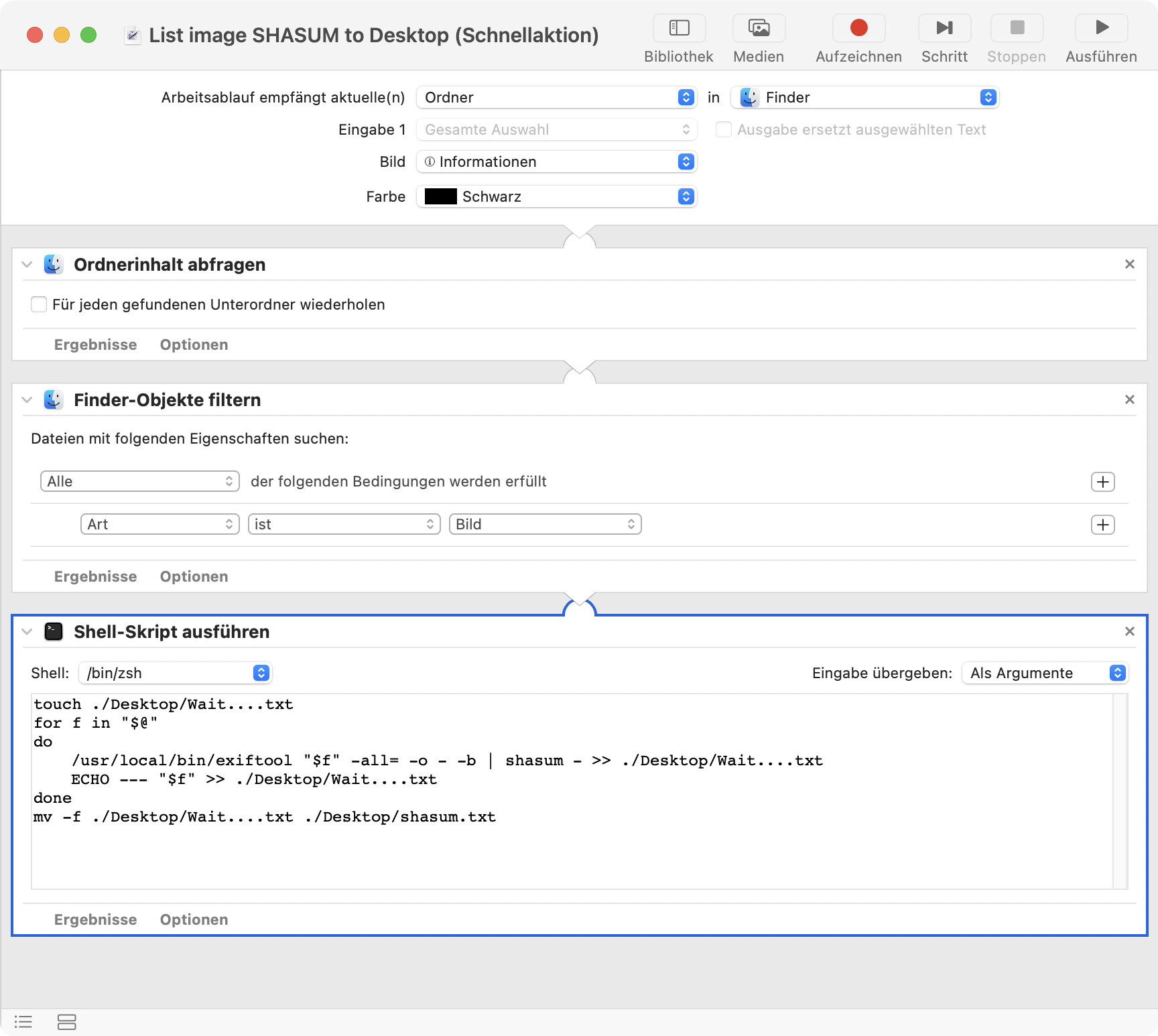
Instead of a VC, I took one image, made 7 copies and will check again. The copies are identical, confirmed by calculating the SHA checksum of each copy
I found a page showing a way to check files based on image data and comparing the exported files with this reveals that the images are identical indeed.
Sorry for pouring oil in a fire. PS seems to have lost the precision to compare as it used to do.
Lessons learned:
PS cannot be used to reliably compare images.
ExifTool can do it with the information given on the page I linked to above.
Export of copies of an image processed by PL in the same way are identical
(files are different though because metadata differ)
Careful whom you trust: goes for PS and ExifTool in this thread…
(and myself in this eerie case )
Repeated your steps for original and VC and still got identical results.
Used exiftool to get the offset of the first DQT table, skipped preceding bytes (which contain expected differences in creation date and filename in XMP metadata). Compared what remained as binary files. Cygwin Unix tools were used. No differences found. Debunked
EDIT: Tested also using ‘exiftool filename.jpg -all= -o - -b’ and fc/b. Much easier indeed, thanks for that.
How many time for photolab to discover it ? How many time when you open it in a new session as already discovered and with corrections applied ? What are specs of the drive you store them on ?
Auto apply preset for raw images : no correction probably helps a lot for the discover phase. I always set here some basic (optical corrections + denoise since I do lot of high iso shots). And PL10 allows then to have up to deepprimeXD3 in full preview with smooth interaction - no more need for loupe for global preview - so this won’t change.
Perhaps my patience isn’t as strong as yours ? I’m used to using softwares that responds quickly during the “setting - working” phase.
DxO Support is looking into this. They have the files (raw, tiff, dop) and the link to this thread. This looks like a tough nut to crack…and I’ll write again, once DxO has answered.

 )