Saving single panel preset (Partial Preset)

For an old topic, but since I now have been playing a bit with partial presets, I kinda get the original topic starter a bit.

When you use the preset-panel (and right click) to find the ‘hidden’ option ‘to create an empty preset’, it’s very handy when you only want a few modules turned on in the preset.

But… if you go that route, all the current edits you made are suddenly reset back to default! So, when you make edits in a few modules and think ‘I want this in a preset’, you have to redo those edits when making a partial preset.

The other way is indeed to create a preset from current settings, but then everything is enabled in the preset, and you need to edit the preset to turn things off you don’t want to apply. It’s a bit annoying, yes, but also not the worst.

But a simple improvement would be if you start to edit an empty preset and you ‘include a module’, that the module will use the settings that were active in the image. Or create another entry that is named ‘create partial preset’ that has all current settings included, but just starts with all modules ‘off in the preset’ so you can easily choose what to enable. And while you’re at it, do not include that button just in a right-click menu somewhere, but make it a real button in the preset-editor-panel so people can actually find it :).
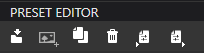
The “official way” to create a preset is via the “PRESET EDITOR” … assuming you have PL Elite.
image

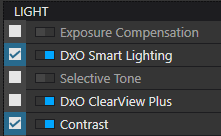
Then, if you un-check any correction-type that you do not wish to include in the resulting preset, you will have created a partial-preset … Otherwise, if you leave all correction-types ticked/checked then you will create a (full) preset.

For example, a preset created like this would be a partial-preset;
image

  • with corrections adjusted for Smart Lighting & Contrast - - but not for Exposure Comp, etc

Apologies for the several-year-old bump, but, I’ve been experimenting with Partial Presets today using this method (e.g. what’s present in PL Elite, not sure if it’s now “the standard”).

Anyway, it has bugs.

I wanted to create a Partial Preset that applies ONLY PL De-noising (DeepPRIME 3 in this case) and Lens Sharpness Optimisation.

Nothing else.

  • I followed the advice and got the preset to save showing only the above two tools as active or selected in any way, shape, or form. Everything else is off.
  • I tried testing it with existing edits to an image and - hallelujah - the changes to the above two tools applied themselves.

BUT…

Something else was happening to the image too. Contrast changed dramatically and I can see the entire histogram shifting.

SO…

I opened up the Partial Preset in notepad to see if anything stood out. Remember that only two tools are selected in this preset.

It turns out that PhotoLab saves a whole load of information about multiple tools in presets, even when those tools are deactivated in PhotoLab itself.

I’ve not had a chance to dig through and understand exactly which lines were affecting my image and I imagine that if I did, I MIGHT be able to isolate what’s causing it and remove it from the Partial Preset.

But for now, this seems broken from a user perspective. It doesn’t work. I’m going to have to “hack” Notepad to try and get it to work, or just give up and accept that PhotoLab can’t apply Partial Presets.

Try this: make a copy of “No Corrections” and edit it with notepad. Check the “active = true/false” lines and set de-noising and Sharpness to “true”, delete the other items, save and test the preset.

Worked without side-effect on my Mac.

the preset looks like this here:

Preset = {
	Settings = {
		Base = {
			AnalogFilmInvertImage = false,
			AnalogFilmToneCurveBluePoints = {
				0,
				0,
				1,
				1,
			},
			AnalogFilmToneCurveGreenPoints = {
				0,
				0,
				1,
				1,
			},
			AnalogFilmToneCurveMasterPoints = {
				0,
				0,
				1,
				1,
			},
			AnalogFilmToneCurveRedPoints = {
				0,
				0,
				1,
				1,
			},
			BlurActive = true,
			BlurActiveAuto = false,
			BlurDetails = 50,
			BlurIntensity = 100,
			BlurSmoothTransitions = 50,
			GridWarpingActive = false,
			GridWarpingGrids = {
				InputGrid = {
				},
				OutputGrid = {
				},
				PointsPerColumn = 0,
				PointsPerRow = 0,
			},
			HighlightToningDisableDesaturation = true,
			KeystoningKeepOriginalSize = false,
			LowlightToningDisableDesaturation = true,
			NoiseActive = true,
			NoiseChrominance = 100,
			NoiseChrominanceAuto = true,
			NoiseCrossTalkAuto = true,
			NoiseCrossTalkIntensity = 30,
			NoiseDeadPixelAuto = true,
			NoiseDeadPixelIntensity = 0,
			NoiseDetailsPreservation = 0,
			NoiseLuminance = 40,
			NoiseLuminanceAuto = true,
			NoiseLuminanceContrast = 75,
			NoiseLuminanceContrastAuto = true,
			NoiseRemovalMethod = "standard",
		},
		Version = "21.0",
	},
	Version = "21.0",
}

Note how some items are left in the preset. They don’t have a checkbox for disabling in a partial preset in PL’s UI. Bug or feature?

I’m not exactly sure what each setting does (I’d need to have a bit of a look), but it looks like the ‘Partial Preset’ tool hasn’t been updated to include new tools added to PhotoLab.

:+1:

Custom presets never change with updates. If you want new tools in them, you’d have to add them yourself or redo the preset - with the new items - from scratch.

BTW, presets and .dop sidecars are fairly similar (on Mac) and can be edited. This might go away though, other apps have started to write sidecars in ways that aren’t simply text or structured text. If DxO follows that trend, we’d be stuck in the app’s UI and its properties aka difficult to see/read.

you mean that AnalogFilmTone for example is there since partial preset exists (there were only full presets at one point, wasn’t there ?) ?

Maybe not …

For those cases, where you don’t want the associated settings to have any affect - simply delete those lines altogether.

  • Anything not in a preset will not be applied - that’s what makes it a “Partial” preset

PhotoLab Essential was made to only create full presets.

That’s what I’ve found frustrating.

I have PL Elite but even with tools completely disabled in a preset, using the interface that PL comes with, it still writes erroneous settings to the preset file when you save.

If we call DeNoise “Tool A” and Lens Sharpness Optimisation “Tool B”, I’d expect to see this info in my saved Preset:

  • [Any necessary formatting text]
  • Settings for Tool A
  • Settings for Tool B

But instead what I seem to get is this, even when only Tool A and Tool B are enabled in PhotoLab Elite’s preset editor.

  • [Any necessary formatting text]
  • Settings for Tool A
  • Settings for Tool B
  • Random info for Tool C, Tool D, Tool E, Tool F…

It doesn’t seem to tidy itself up and - in some cases - it even seems to include info I specifically told it not to include.

Here’s what I get if I start with an unedited image, create a brand new preset, disable ALL tools and then save the preset:

Preset = {
Settings = {
Base = {
ContrastEnhancementHighlightIntensity = 0,
ContrastEnhancementLowlightIntensity = 0,
HistogramActive = false,
ContrastEnhancementMidlightIntensity = 0,
ContrastEnhancementGlobalIntensity = 0,
AnalogFilmToneCurveMasterPoints = {
0,
0,
1,
1,
}
,
AnalogFilmToneCurveRedPoints = {
0,
0,
1,
1,
}
,
ContrastEnhancementActive = false,
SuperSharpnessActive = false,
SuperSharpnessBxuValue = 8,
AnalogFilmToneCurveBluePoints = {
0,
0,
1,
1,
}
,
AnalogFilmToneCurveGreenPoints = {
0,
0,
1,
1,
}
,
AnalogFilmInvertImage = false,
AnalogFilmActive = false,
}
,
Overrides = {
}
,
Version = "21.0",
}
,
Version = "11.0",
}

On the basis most things there are tools, I tried removing everything but the top and end lines:

Preset = {
Settings = {
Base = {


Overrides = {
}
,
Version = "21.0",
}
,
Version = "11.0",
}

It doesn’t load.

I’ve just tried going section-by-section and adding bits from my first example back in, to see when it would start working. It didn’t work until I added every section back in. It needs something in there besides what’s at the top and bottom in order to consider itself a “functioning preset”.

UPDATE:

Further testing has allowed me to create a functioning preset with one quirk:

It must enable the contrast tool.

Removing the line seems to stop it from working all together BUT if I let it enable contrast (which I would do anyway) it doesn’t have to actually overwrite anything.

This might actually provide a useful baseline “blank” preset which truly has nothing else enabled. More testing required…

I would never have imagined that such an old and simple tool could contain a bug (and let’s not suggest for a moment that this was intentional by design ! Unless, of course, you want to make a complete mockery of the analysts who worked on it). It’s simply a set of settings to be saved and then re-imported into the software ! How can’t this work properly ?

What state is the software’s code in ?
The tools for transferring settings are already less than very basic (the presets, which are impossible to organise simply and efficiently and call fast – unless you only have a handful of them – which is why I don’t use them even though they’d be very useful to me (partial presets for specific actions)), and the copy-and-paste between images with that window that takes 10,000 clicks to select what you need. And now it appears one of them does not work !
Another downside for those who have large volumes to process. But not just for them !

Checking partial preset behaviour, I came across the following.

Intention: Create a partial preset that only changes white balance, not for the specific image that follows, but as a general preset. Watch for the things happening in the docks.

Image: Evening scene under artificial lighting. Default Preset = “No Correction”

Image with the intended WB only preset, tool status as expected ( = okay)

BUT: When I edited the preset in PL and then made it a partial preset, I found that “Colour Rendering” had been included in the partial preset

Deleting the Colour Rendering section in the preset made the preset ineffective.

Well … WB and CR seem to be interlinked and WB cannot work, unless CR is part of the preset. While this can make sense from a technical point of view, I still find it to be irritating because this “handcuff” is only visible during editing and hidden under normal conditions.

I wonder if I ran in to the same issues when I was trying to alter DeNoising and LSO - somehow contrast is also involved?

Like @JoPoV says, this is weird and not-very-welcome behaviour from the Presets tool and it significantly handicaps how we can quickly get an image to a usable state with any degree of micro-control.

Say I wanted to create a dozen Partial Presets with different micro-contrast settings.

Right now it seems my only hope of doing this reliably is to create a dozen different global presets (with all my other changes baked in too).

If I then wanted a dozen more Partial Presets for the HSL tool, I’d have to create another dozen global presets.

Really we should be at a point where a Partial Preset can be made for almost every single tool (perhaps not cropping/perspective shifts etc.) but we should be able to save and load these specifically to the tool in question.

This functionality is actually preset in PL10 for the first time with the new Color Grading tool, so there is hope:

Possible, but it takes some experimentation to find out.

From a “technical” point of view, it’s well possible or necessary that a few tools need each other, but this is not apparent in the UI. I think that the WB story above is one such example and I don’t exclude that others might be found.

I’ve asked DxO Support for feedback on this.

Indeed it seems that some “new” tools are designed more efficiently : curve tool too has customisable and nameable presets. The list would benefit from the ability to open and close nameable “tabs - lines - whatever”, as the tool offers a wide range of options and the list can be long, but the basic concept is already in place.

What technical point of view ? It is possible to modify these settings independently within the interface, so why would a technical constraint prevent them from being saved and loaded independently ? No excuse for this too.

Same as above : why wouldn’t it possible to just keep the fields needed since they can be modified independently, it is simply a matter of retrieving the data contained in different memory registers and saving it and reloading it. These independent registers exist, as they are visible in the interface and can be set independantly.

Are developers completly lost in this code ?

Let’s hope they will understand how important this point is, that they’ll put it at the top of their to-do list and that they’ll do more than just apply a quick fix or two where the problem is most serious.

But as i said in an other topic, maybe first step is a complete interface rewrite with a new framework, which would give them great flexibility (does not seem to be the case at all !), multi platform uniformity (that’s not the case), along with lot new possibilities.

Let’s hope this lengthy and necessary task for the future (present ?) has already begun.

They need to catch up in the UX race. Fast. All we talk about is part of it.

Lot of tools are of high quality, keep this road. Please allow us to use them efficiently now.

@JoPoV , I suspect that WB and colour rendering are both acting during demosaicing and through multipliers and profiles used during the transformation from the RGGB to the RGB pixels. Denoising is added into that transformation too.

If we accept that each stage of transformation adds and/or amplifies errors, the number of transformations must be kept low and done in a way that does not amplify those errors more than what is mathematically unavoidable.

Transforming a RAW mosaic includes interpolations and if these are well combined with other operations, results can be better than if each step were simply done one after the other. DxO’s RAW development skills (and success) rely on paying attention to such details. In general, one wants to do all mathematically exact calculations before anything that has the chance to add errors.

WB has to. And probably color rendering.

But what is the relation between this and the ability to record and reload existing independant parameters ? This would always give a result which can be set manually without preset ?

And if the need is to combine WB and Color rendering, no problem for the user to create a partial preset which combine both (when/if partial presets works properly).

Exactly. The thing we got here is that editing a WB-only preset shows that CR is also involved while this is not shown in PL’s UI while using the preset. But it takes two steps to find out. we have to re-edit the WB-Only preset to see that CR is also included.

We can also open the preset with a text editor to find this and more “concubines” to the targeted tool.

I don’t understand what you’re saying (sorry english is not my native langage and sometime the finer points escape me) : Do you think partial presets are ok as they work now because they are designed to keep some parameter relations intact ?

If so, I don’t think so since @Fineus can’t isolate denoising and lens sharpness optimisation alone.