PureRaw v5 clearly inferior compared to v4

You’ll get a refund only if you are using PureRAW 5 in the trial mode – on one computer only. Once you activate the PureRAW 5 license, or install it on a second computer, you will not be able to get a refund, and you will be in breach of the EULA if you continue to use PureRAW4. DXO will not budge on that issue.

The only alternative is to buy the PureRAW 5 as a license (costs $40 more) and have DXO void your previous PureRAW 5 license and restore the full license to PureRAW 4.

I’m not talking about the DeepPrime-3 algorithm. I’m talking about DeepPrime-XD2s in PR4 vs. DeepPrime-XD2s in PR5.

After playing around for hours, I found some settings that give comparable results.

The settings in PR4/DP-XD2s:
luminance 50,
details 50,
lens sharpness “standard”,

correspond with these settings in PR5/DP-XD2s:
luminance 50,
details 75,
lens sharpness “custom” value 120.

But really, why do I have to spend hours and hours to find that out?
Spending money to get a software that only just returns comparable results?

Martin

3 Likes

I think the interface for PureRAW 5 is much better, but it (with the wonky new defaults) indicate to me that DXO decided to change the target users.

When you watch the YouTube folks who released their videos on 15 April, they seem to be the type that does more one-at-a-time processing. But if you shoot between 300 and 1000 frames in a day, even when you narrow that down a lot, you’d be looking for something that handles batches.

My decision was to pop the extra $40 for a new (non-upgrade) PureRAW 5 license, and also keep the PureRAW 4 license alive – which sounds a bit silly.

But there was no reason (other than technical arrogance) for DXO to offer consecutive versions where an “identical” process yields different results.

Sidebar – in one high ISO night shot I was able to get DeepPRIME3 to act very much like PureRAW 4’s DeepPRIME XD2, which could be saved as a preset.

Actually just joined the Forum to post the same thing - I’m still somewhat new to photography, and was surprised that pureRAW 5 didnt’ give me as “exciting” reveals as pureRAW 4 did. They both definitely clear out the noise, but new new version seems to smooth out the details, as opposed to the detail extraction that makes so many people love DxO PureRAW.
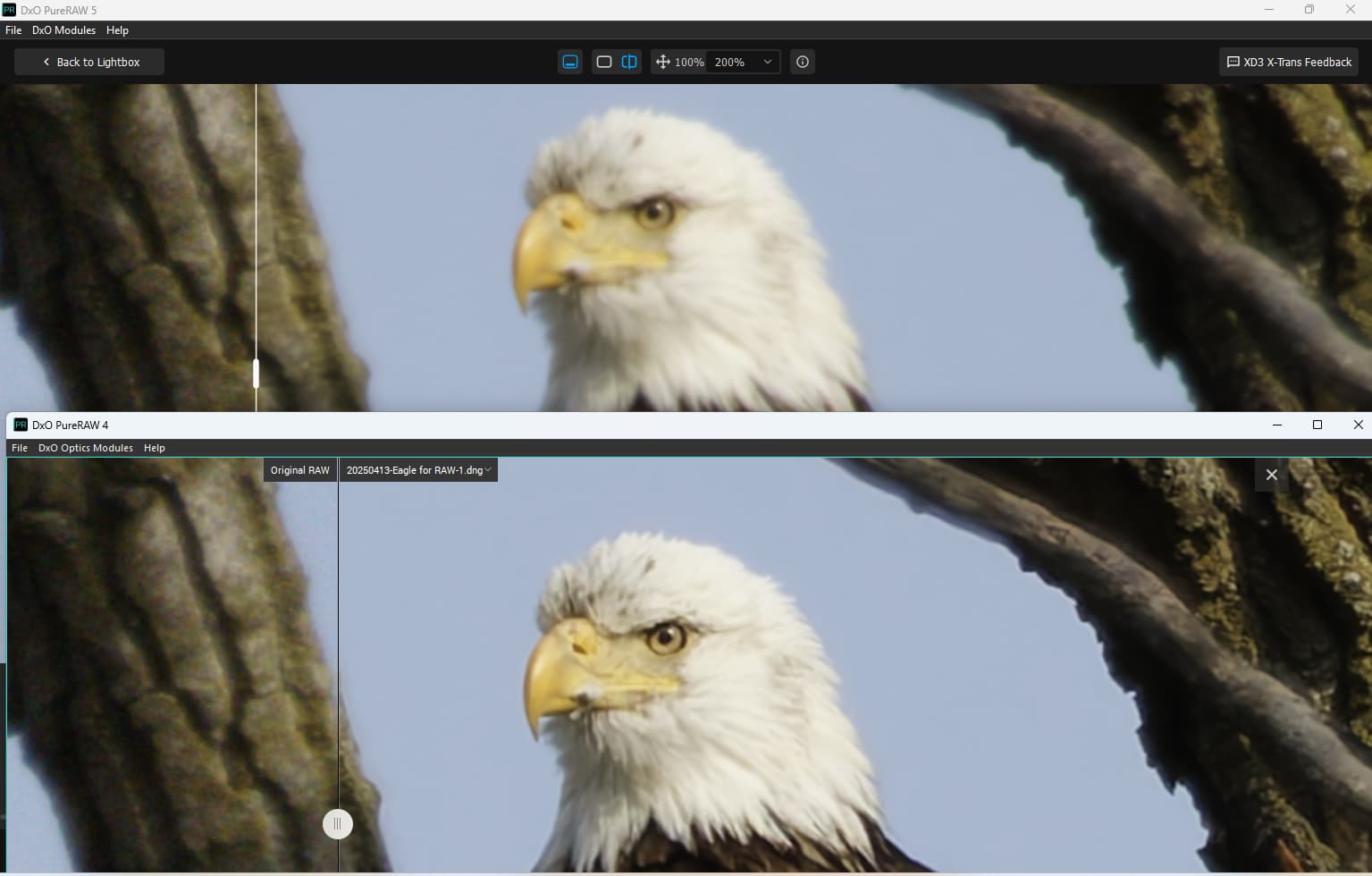
Put them next to each other, and it’s clear that 4 gives much more detail. Although like some said, it could be due to my settings. (Both are on default settings)
Here’s a screenshot: (5 on top, 4 on bottom)

Found that PR5 sharpening just fails to engage until I close and reload.

Obviously, the PR4 result is sharper. Maybe you can get similar results by turning the Details slider to >=75 and the Sharpness to 120.

Here are some more results:
The PR4 and PR5 algorithms “XD2s” take exactly the same time, 55s vs. 55s.

Then I compared PR4/DeepPrime vs. PR5/DeepPrime-3 (settings lum. 50, details 50, sharpness “standard” vs. 50-80-“standard”).
The resulting images are almost 100% identical on pixel level. Both take exactly the same time, 37s vs. 37s.

So after a detailed comparison, my conclusion is:
There is absolutely nothing new in PureRaw5 (except from the sharpness slider).
The “XD2s” algorithm is identical, it’s also 100% equally fast (on my machine).
The “new” DeepPrime-3 algorithm gives identical results, and is also 100% equally fast.

Question:
What did I spend the money on?

2 Likes

On my end XD3 is still noticably faster. Windows desktop with a Ryzen 7 5800X and a RTX 4060 (non-TI, 8GB model).
And so far it looks like PureRAW 5 is really just about the new interface, masks and the XD3 model, which is specifically noted to be faster, with XD2s being the same as before but with better fine details than XD3.
So you now have the choice between sharpness and details (XD2s) and speed with still decent processing (XD3). To me that still makes it a worthwile upgrade from V4.

We’ve had discussion of both the processing times and the comparative qualities between PureRAW 4 and 5. Following are comparisons I made of just the speeds. I used six of the seven sample RAW files provided by DXO. (I didn’t include the one RAF file because I wasn’t sure how the X-Trans processing would impact the group total times.)

Prior to this, I fiddled with the DeepPRIME3 controls and found I could get fairly close to PureRAW 4’s DeepPRIME XD2s/XD results. Soon I’ll be doing some night work in Ashland, OR to get some files for the dark end of things. I’ve shot there in the past with other cameras.

PureRAW 4 and PureRAW 5 comparison performed with the following software:
– PureRAW 4 Version 4.9.0, Build 63, 23 APR 25
– PureRAW 5 Version 5.0.1, Build 983, 24 APR 25

System:
CPU: Intel Core i7 9700KF @ 3.60 Ghz (no on-chip graphics)
Memory: 64 GB DDR4
Graphics: AMD Radeon RX 6600, 8GB
Storage: Crucial - P3 Plus 4TB Internal SSD PCIe Gen 4 x4 NVMe, 65% utilization

Processing information and times:
– Batch of 6 of the 7 DXO sample RAW files (excludes X-Trans RAF file)
– Processed files saved as DNG

PureRAW4:
– DeepPRIME XD2s/XD (1): 01:13
– DeepPRIME (2): 00:53
– PRIME (3): 02:43 (significant cooling fan speed increase)
– High Quality (4): 00:55

Pure RAW 5:
– DeepPRIME XD2s/XD (5): 01:11
– DeepPRIME 3 (6): 00:50

(1) Luminance = 40, Force Details = 1 (Default)
(2) Luminance = 40, Force Details = 1 (Default)
(3) Sliders 40, 50, 100, 24, & 30 (Default)
(4) Sliders 40, 50, 100, 24, & 30 (Default)

(5) Luminance = 40, Force Details = 1 (Default)
(6) Luminance = 40, Force Details = 1 (Default)
3 Likes

Thanks for sharing. His conclusions make sense.

One takeaway from all of this is the incompetence of DXO’s marketing.

1 Like

But look at Intel - marketing has thrown a spanner in the works of the engineers. It would be best if the engineers themselves promoted their products …

That would be even worse – But it may be the case now. The engineers put out a product and say “This is great”, add a few sliders, and call it done. Can anyone detect the several market groups for both PureRAW5 as and upgrade and as a new purchase?

It’s disappointing to hear that PureRaw v5 didn’t meet your expectations compared to v4. Sometimes software updates come with changes that may not align with our specific needs. Have you tried reaching out to the support team to share your feedback? They might offer insights or future updates that could improve your experience. Alternatively, if v4 meets your needs, sticking with it might be the best option for now.

I’m in contact with DXO support. They are V E R Y slow, but at least they answer. They didn’t offer a solution so far, but at least they asked me to provide detailed samples incl. the RAW files to reproduce the problem.

Regarding V4:
I’m in the nice situation to be able to use v4 and v5 in parallel, because I upgraded vom v3 to v5 and got v4 as a “gift”. (So yes, I stick with v4).
Most of the other users cannot use v4 anymore according to DXO’s terms and conditions.

Strong agreement with you and the many others who have found PureRAW5 to be inferior is most respects to PureRAW4.Can’t imagine what DxO is thinking when it attempts to get customers to pay upgrade fees for a product that at best is no better than what we already have purchased, but I doubt that their plan will benefit users.

I’m having disappointing results also while testing PureRaw v5. I currently use v4 with my Fuji X100vi. On contacting support they initially responded stating “the difference you’re seeing between PR4 and PR5, can happen depending on how each version interprets the X-Trans RAW files. PureRAW 5 introduces newer processing which can sometimes produce a different look” before going to state that my “Fujifilm X100VI is fully supported up to the latest versions”.

However further questioning resulted in a clarification that “DeepPRIME XD3 X-Trans engine does not yet support Fujifilm’s 5th-generation X-Trans RAW files.”. Therefore I think I will hold off purchasing an upgrade until the issue is resolved.

While I don’t have/use PR … see the readme file

.
correction (screenshot deleted – had quoted from PR 5.0 )

From the same release notes, PR5.3 section:

DeepPRIME XD3 X-Trans for Fujifilm X-Trans sensors is now out of beta and available in its final version for all X-Trans sensors FujiFilm cameras (including the 5th generation).

@Wlodek

Yes true! Went to far down the list (PR 5.0) :slight_smile:

And now it is the same like with PL 9
grafik