There seem to be a lot of problems with PL9. If AI masks are the main novelty, then I stick with PL8 for another year. I never found masking very limiting, and PL8 is very stable. None of the other new features are interesting for my workflow.
I would say the auto-brush is a fantastic change for the better. But I appreciate on its own it is not worth the upgrade price.
3 Likes
I have a similar configuration, W11, Intel Core i7-9700, GTX 1600TI, 256mb M2 SSD & 2TB hard drive. I also have a MacBook Air M1, 16 GB/1TB, latest ios version.
Paid for the upgrade before checking system requirements, so, I’m sort of pleased that PhotoLab 9 works on both my configs. It’s slow, but, AI selection of items (birds and bugs) and ability to duplicate the mask and invert it to add blur and slightly reduce exposure of the background while slightly enhancing the primary subject is worth the hassle. It does concern me that loading photos is SO MUCH SLOWER than PL8. Like maybe 6x to 8x longer to load photos before doing any processing. This is just strange!
Just to say that iOS is for iPhones. Macs run macOS.
Sorry - my MacBook Air is running macOS Tahoe 26.0.1
Yep, I experience similar timing on very decently specced computer (8 cores, 128 GB of ram, top of the line m2 nvme ssd drive, 2x RTX 4070 with 12gb of vram each, I know Photolab can only utilize single GPU).
A lot of that timing is simpt not acceptable, especially on a computer with that specs.
On my pretty powerful laptop, situation is similar.
1 Like
Photolab has evolved; you don’t have enough ram. Go 32 gb and most of your performance problems will go away. I was running 16 and it crashed often. I bought an M2 Macbook pro w/ 32gb ram and it’s been blue skies and green grass ever since. Photolab will not run on 10-year-old machines w/ 8 or even 16gb ram. Yes, it will load, but it will not perform efficiently.
2 Likes
Thank you so much for really trying to make DXO work the way it should!
You do have some valid point. However, if DXO said that PL9 should work properly on the recommended specification hardware, then it should.
I have 32gb and still find it lags at times. It is older RAM though. My whole system is ~10 years old.
Here are the recommended specs for Macs:
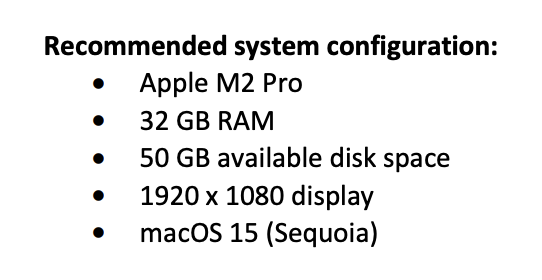
The spec for disk space actually should be more than 50gb. PL uses disk space for ram on occasion and more is better.
1 Like
Or perhaps they should increase the system requirements to a level that works.
As I have written before it took Capture One sometime too to fix their performance problems and is not at all just a matter on the VRAM-size but also about bandwidth and parallell processing performance - and probably even about a few bugs that has to be fixed.
Even in Phils example this is not at all just about the size of RAM.
1 Like
I have an almost identical set up to you. I’m experiencing the same issues. With even just a couple of AI masks it lags so badly making any other adjustment that it is essentially unusable to me. I also ran into an issue where the preview image would not display correctly (the colours were off). Turns out that I had to switch from Apple Neural Engine to CPU. I’m not sure if that made the lag worse, but I suspect it did as, although the colour displays correctly, even basic contrast corrections can take 3-5 seconds (even with hi res preview turned off). I was looking to ditch Lightroom (again, like you, I have ZERO delays with LRC), but I may need to rethink until I have a newer machine. Although, I will trial On1, too, when the new version lands later this month. A shame, because I can see how good PL could be, but it’s just not useable for me with my current setup. So, I doubt I’ll extend past the trial period unless there’s some serious tweaks to allow it to run better on my barely 4 year old machine.
1 Like
Hi there.
Huge amounts of photos in a single folder can be challenging.
You can tweak the cache size in PL Settings under Advanced.
I believe the default is 1000MB. Increase that some and see what happens.
I must be lucky or I use it different. My M2 Pro w/16gb of RAM runs it fine. I probably use it more like ACR in my work flow since I do all my heavy lifting with masks and adjustment layers in PS.
I’m on an old M1 Mac mini 16/1TB and it runs very smooth too.
A couple of external TB3 m2 drives for local storage.
Otherwise I do everything over 1Gbit network to my M1 macOS Server running PhotoSupreme as DAM.
1 Like
Very true, my Mac setup is essentially the same. Software (rendering, lowest quality) becomes unusable when you apply AI mask for subject . Yes, less of an issue with “hovering mask”. BUT: I would like to use the subject mask for PRESETS. The same works on Lightroom without the slightest issues. Obviously, the “hovering mask” cannot serve that purpose. I am very disappointed, upgraded exactly due to that possibility - and due to the X-Trans Deepprime, which is really good. Unfortunately, I have not sufficiently tested presets with subject mask before purchasing.
Definitively NOT a computer resources issue. While PL9 is doing its “rendering thing” with subject mask, I can normally work with other apps, e.g. ai masking with Lightroom. It just doesn’t use the resources properly. Increase the max. cache is to no avail.
Present solution: Just apply preset, export as dng (export takes not much more time than the rendering), and do the finetuning of the edit in another app.
Did you upgrade from PL 7? PL 8 already has the xtrans DeepPrime.
Yes, upgraded from PL7 to PL9. DeepPrime X-Trans (also in PureRaw) didn’t support X-Trans Sensors of the 5th generation, before PL9 was released. It is really great that you can now apply separate adjustments of DeepPrime for a masked area (e.g. stronger or weaker lens sharpness), and include AI masks in presets. If only the rendering and the app in general became not this painfully slow and laggy if you do that, even though lowest quality preview rendering is selected… Regards.
I upgraded, anyone want to but mine? Basically PL9 has great features that you can use if you spend £5000 upgrading your Motherboard, CPU and GPU. Otherwise you can just use the features that were available in PL7.
1 Like