JPG XL / JPX support

I simply grabbed the library to build this automation to save me some space. I’m not at my Mac at the moment, but from memory the reduction was modest but worth it for large collections of images.

The conversion from JPEG to JPEG-XL is lossless. It is producing pixel-for-pixel identical images. The relationship between either of them and the original source is not the point.

I’m not using it to store full quality images, just to save space on images that were already JPEGs.

The original JPEGs are not lossless, however.

Actually, it kind of is the point if you are a photographer. That’s why we need the original export format to be JPEG XL instead of having to convert it ourselves. Or AVIF, or whatever is truly highest quality for each given desired export size.

So why not test this yourself? As I noted in your recent AVIF thread, LR can export both jxl and avif from RAWs. If you don’t have LR, you can download the mobile version for free. Test at both ends of the quality spectrum, high for advanced photography purposes, low for web use.

I did test it out for myself in that other thread, using a lossless export into PNG = lossless master photo. Then converting that identical, lossless input photo into both formats, so that neither format would have any possible unfair advantage depending on the quality of the software support for it.

On default settings, the image quality was the same, but the JPEG XL file was over 2.0 MB while the AVIF file was under 500 KB. So when equalizing quality for both formats, the file size of the JPEG XL file was about 4x worse.

Optimizing the JPEG XL file to match the same file size as the AVIF, the quality of the JPEG XL file looked horrible (I had to lower the quality parameter all the way down to 25% in order to get the same file size). So when equalizing file size for both formats, the quality of the JPEG XL file was about 10x worse.

I did test it out myself, and provided the lossless master photo, and the results for it all.

So why not test this yourself?

This is a great point though, I did not try the second half of this, low for web use.

I only tried testing at the high quality end of the spectrum, because that is my need, for a better output option for my master photos than antiquated 8-bit JPEG files, or massive, outdated TIFF files, or massive DNG RAW files (which aren’t really an “output” at all, but still RAW files).

If you truly are interested, I am willing to do a more in-depth test.

But you have to promise to either

a) abide by the results of my test if I do that, or
b) if you disagree with my results, then you have to do a test of your own and provide all your source files and commands used to produce the output, just as I did in my post already.

I’m not the least bit interested in what you choose to do next. I gave you some advice, take it or leave it.

Then I won’t waste my time. Thanks for being honest.

I already followed your advice, by the way, to do my own test, except for testing at the low end of the spectrum which I have no interest in.

I did a perfectly scientific test at the high end of the spectrum for highest quality photography, which you already chose to ignore.

I would love to see some others testing these formats out, though, and I admire the work of @zkarj and the others who have done research of their own into a new format for PhotoLab to add as a higher quality export option than just 8-bit JPEG.

Some option is badly, badly needed. Massive TIFF files and massive DNG RAW files are the only other options now besides ancient 8-bit JPEGs, for exporting my photography in PhotoLab.

PhotoLab is so much better in so many ways than Lightroom, On1, Luminar, and other options I have tried.

It’s just a sad shame that all the quality like the XD2s algorithm, and deep, powerful color quality, can only be exported into 8-bit JPEGs for the forever future to use.

My clients can’t jump back onto my computer 50 years later and re-export my files, and I definitely can’t give them TIFFs or DNGs, either. They couldn’t use those practically in a gallery or on their computers.

But if PhotoLab could offer it, then I could give them AVIFs already, since there is 94%+ support for that by computers already.

And if JPEG XL proves to be as good or better, although it does not seem to be so far, I am all for that as another option as well.

Whatever is truly the best is what I want.

Interesting opinion. I have a very old Win 10 box, it has a lowly third gen Core i5 CPU, a mere 8 GB RAM and a similarly lowly GTX 1050Ti graphics card. Despite this, it handles TIFFs exported from PL7 without any problems. It also opens and edits those TIFFs without problem in Affinity Photo 2.

The size of the TIFFs is not a problem either, storage is cheap. My main data drive is a 10 TB HDD drive.

Of course I’m only an amateur so perhaps that’s why using TIFFs is no hassle.

How many photographers give their clients TIFFs for regular daily photoshoots, like senior pictures, or even wedding photos? Just curious. For me in 27 years of professional photography, I have delivered a TIFF probably less than 10 times.

It’s like pulling teeth to even get my clients to download master photos in regular JPEG format. They always want galleries and don’t even seem to comprehend the idea of downloading a file, even if I offer the ability to load it on the screen with a download button and they can just then hold their finger on it and save to photos.

The director of design for a big local university doesn’t even have a local storage drive by the IT cloud policy.

Size of TIFFs would be an issue, I think personally.

Do you really think that’s lossless?

George

You are using a pronoun “that” to ask what is lossless, so it is unclear what you are asking.

The input PNG file is lossless.

Note: “lossless” here just means perfect representation of the image data as it existed from the photo in computer memory before being exported into the PNG file. It does not mean the photo has perfect sharpness from being in perfect focus, or perfect quality of color accuracy in white balance, etc.

However, neither program at default settings produces lossless output from the PNG.

The default settings are supposed to be “visually lossless” whatever that means, and comparable to each other, but definitely not lossless for either format on the default settings.

The only times JPEG XL does “lossless” encoding is when you explicitly tell it to, OR when it is used to convert an existing JPEG file to JPEG XL format. When it does this conversion from JPEG to JPEG XL, then by default it does not resample the image and recompress it over again, but changes the encoding format into the more efficient and modern JPEG XL format.

The JPEG XL format is more efficient at encoding the original JPEG data because, for example, it supports compression tiles bigger than 8x8 pixels, eliminating a lot of needless storage space when there is a lot of redundancy or similarities between the structure of the 8x8 tiles of the original JPEG encoding.

I just did a lossless test of JPEG XL vs. AVIF on a 741 KB lossless crop of a photo exported into lossless PNG format, that I took at the NCAA March Madness men’s basketball tournament working for a participating conference, and the JPEG XL lossless output at 100% quality is 424 KB, and the AVIF lossless output is 291 KB.

There’s not as big of a difference in the file size when both are set to true lossless output, rather than the default of visually lossless output, but there is still a rather big advantage for AVIF.

I’m not going to attach the photo this time because people have only attacked me when attaching previous examples, saying things like I have given up my photo rights by showing an example, or you must only do low quality web photos because that’s all png is for (which only proves they are ignorant, since png supplies a true lossless input photo to fairly compare both methods), etc.

The worst of all was the one “not the least bit interested in what you choose to do” after offering kindly and respectfully to do a test that someone literally asked me to do.

Don’t shoot the messenger. Just try it out for yourself.

Here is an interesting link I found from a very credible source.

https://storage.googleapis.com/demos.webmproject.org/webp/cmp/2025_05_22/index.html#ref=JPEG+XL+e1&WebP+m4+4%3A2%3A0-bpp_ranges=on&matcher_ssim=off&matcher_ssimulacra2=0.01

At first I voted for this feature request, because the JPEG XL website sounded fantastic and claimed to be the best, but after looking at the facts, I am removing my vote.

I believe AVIF support should be prioritized, not JPEG XL support.

AVIF is so much better at decoding efficiency, image quality, and file size, while supporting resolutions of over 2 billion x 2 billion pixels. That’s more than four billion gigapixels of resolution.

That’s without even equalizing the encoding time. When encoding time is equalized, then AVIF files are 2.2x smaller, and over 4x faster to decode.

Here are the details, with links and screenshots. Please read them for yourself, and feel free to do your own research.

For the purposes of “replacing JPEG”, which was my stated goal, it doesn’t matter. What does matter is that a second conversion is often lossless. E.g. convert TIFF/PNG/whatever to JPEG, then convert that JPEG to JPEG again and you lose yet more information. The JPEG-XL library explicitly supports retaining exactly the same image output in less space than the JPEG. Thus, lossless, and yes it matters if you have JPEGs already.

If your goal is a storage format that takes less space and you care about absolute quality, then you’re stuck with lossless formats. Some will fare better than others. These days, there are many “features” in these formats, not just a bunch of pixels.

I was going to say PNG is only 8-bit, so would be lossy, but a quick check shows it does support 16-bit colour. However, it is a VERY old format, so it’s not surprising it doesn’t perform well on compression.

What’s the goal here? PhotoLab is a non-destructive editor. If you have the original RAW and DOP file, you don’t need a TIFF or JPEG or equivalent to last for ever? Are you trying to save the space of a RAW file by keeping only a smaller version of the “developed” file? In this case, what is the ultimate quality supposed to achieve for you? I can’t imagine further processing would work out too well, compared to starting from the RAW+DOP again. All honest questions, not criticism.

Many believed BetaMax should have won because it was “the best”, but VHS was what we got. The same could be said for many systems of the last 40+ years. The reason JPEG survives today is because, beyond the timeframe in which it was great, it has remained good enough and, most importantly, popular.

There are really only two ways DxO can go with this (excepting completely ignoring new formats).

  1. Choose a horse. Be that AVIF or JPEG-XL or something else.
  2. Offer wide support.

Personally, notwithstanding any difficulties (technical or legal/financial), I think they should take option 2. There’s no reason PhotoLab couldn’t output a 1-bit TIFF or even a GIF. Same, they could offer AVIF and JPEG-XL. Once the export pipeline has composed an RGB image of appropriate dimensions, the format is just a matter of conversion. I don’t believe anything would need to change in the pipeline. Just what gets bolted on the end.

For your purposes, could you not:
a) decide on the format you prefer
b) export from PhotoLab to a (giant) DNG or TIFF
c) add automation to perform the conversion using an external tool
Those are great points! And thank you for being much more thoughtful and respectful than most! I appreciate you!!

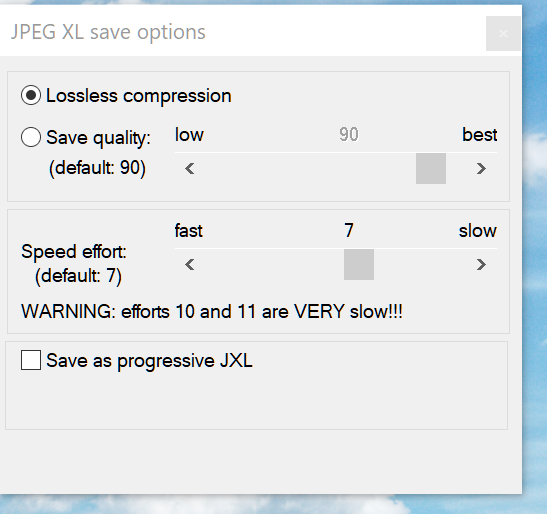
I installed the latest version of IrfanView, that also deals with jpeg xl. When writing an image to disk as .jxl you get a check box.

The resulting jxl image is different from the original jpeg. When it was lossless that shouldn’t be so.

Is that possible without decoding the jpg? And how do you do this?

George