This type of things may do some “opposite” → Some people may think: “They put resources for Linux version and not ot the product improvements”…
I wondering, what aspect is “far better” than Windows?
Linux and Open Source is created and sustained by technically knowledgeable folks who want to do things their own way. Very few get much of a financial reward. They make software that they themselves want to use. And they don’t care much about, or need, a user-friendly interface. Linux is not looking for customers. People trying to adopt Linux and Linux-based apps with an apparent attitude of entitlement are in for a surprise when they find out that the open source community does not want them. For more background, see Linux is NOT Windows
It’s similar to the usability of cars. A few decades ago, a car’s controls were self-explanatory and easy to learn. Today, there are a bunch of useless “convenience” features that require AI to remain usable for the average driver. There are exceptions, of course, but that’s how I would view most of it.
Linux and Windows are similarly complex; Windows derives its success from hiding its complexity.
I support this post. Windows became an OS where human don’t have full control of and many switched to Linux. I hope we will be able to see a Linux version at some point in a near future.
Indeed. But DxO can’t even produce the exact same functionality on mac and PC (this is a photolab specific “feature” : be different). This tells a lot on how it is developed.
So linux …
How to tell us you haven’t used Linux lately without telling us you haven’t used Linux lately. The latest Fedora and Ubuntu are very user friendly. There’s less rubbish in them so it’s easier to get to work.
It’s nice not to even face the distractions of recent macOS (GNOME, Fedora 41-44 in active use). There’s two major windowing systems across leading Linux distributions: KDE and GNOME Windows refugees may prefer KDE as it has a lot more boxes and menus and start menus. I’m a minimalist so GNOME is my own choice.
What’s missing perhaps for Linux is the manual. With high quality AI widely available (no programs, needed just a web browser), we all have living manuals for whatever OS we choose to run.
Alec, it is not just a question about the OS user friendliness - It is also about the unuserfriendliness of the application management. I´m not impressed and there seems to be a lot to wish around that in the Linux-world.
I use the Open Source Open WebUI-application to handle all my AI-models - both local and cloud-based commercial ones (through their API-intefaces). It is very userfriendly and great once it is installed and configured BUT before getting there I had to run numerous MS DOS like batchfiles through the Windows CMD-line interface that is like getting back to MS-DOS 3.2 from the last years of the nineteennineties. The same goes for the Docker-interface. That is not a joke either!
Often simple command line prompts are the best way to handle customisation. CLI instructions act directly on the files system and OS and give immediate feedback.
The same applies to macOS. Time to take the training wheels off, Stenis. Or live in a digital prison with glass walls, where the guards watch you eat, piddle, poop, fornicate at all times. That’s modern Windows, and macOS is not far behind.
That said, most Linux apps can be installed via the Software app, either as flatpak (isolated container) or RPM (into the OS).
What is missing on Linux are polished advanced applications like PhotoLab which is exactly why so many of us are clamouring for it. PhotoLab is literally the main reason I have to keep some macOS computers for now. Email used to be an issue (MailMate is the most capable mail client in the world for high volume IMAP mailers) but Hylka has arrived to the rescue.
Just recently the amazing (again Scandinavian), Acoustica was ported over to Fedora by its publishers.
There is a path for commercial software on Linux (target Debian GNOME, which brings Ubuntu, CentOS, Fedora, RedHat, AlmaLinux, Mint along with it, which are the main market for media software: basically follow the Blackmagic DaVinci Resolve lead), but DxO management would prefer to waste our money on huge advertising programs than get free publicity by being the first major commercial RAW developer to reach Linux.
@gserim
Yes, and I rememeber when I was working as a Product Manager for Microsoft and Windows programs at the biggest IT-product distributor in Sweden in the early nineties when Windows was pre Windows 3 that was the first version that had a proper memory manager that opened access to all the physical memory in the computers.
The MS Works and Word was still MS DOS-applications like WordPerfect. Only Excel had been available for Windows when Word for Windows was released. Both Word and WordPerfect used so many and complicated combinations of function-keys that they had have a plastic frame around the function-keys. Some functions demanded that you pressed three buttons simultaneously! That kind of interface was very demanding but very efficient for those professionals that mastered it - like typists.
Then came the mouse and it got very much easier to handle the application when alla the menues in all applications had the same basic layout.
To the left File and Edit to the right Window and Help

Do you think it is a coincidence that even Photolab still cherishes the old Microsoft Windows standard?
Ironically it was Microsoft themselves that broke that standrad when they invented the “Ribbons” that can be seen in for example the old Office 2007 Suite I still use without the slightest problems in Windows 11.
In the ArtCraft clone of Word they seem to be back a bit more to the original ideas.
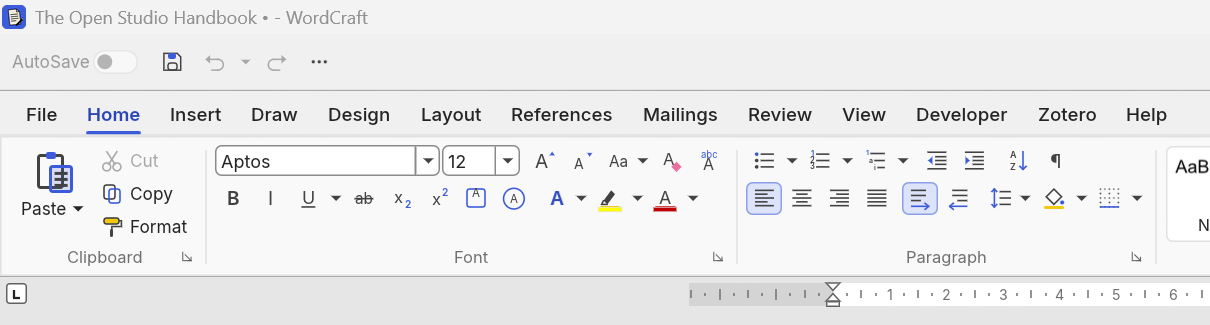
These interface standards has been very important when it comes to making the programs more intuitive and simple to learn. The backside was that the introduction of the mouse made the productivity over all to drop significantly.
Also handling of files and applications got much simples in all OS with graphical interfaces. Microsoft also introduces so callled “Wizards” that coulkd handle “processes” that normally demanded the user to carry out a series of commands in a specific sequence. Even that was a reaction of the old problems with having to press a lot of different keys at once because that was very hard for many to rememnber by heart.
Another thing was that the interface later was about the same despite you used it on a laptop, a workstation, a telephone or datacenter-server with 32 processors. That was NOT the case with other OS-systems. The difference to UNIX-systems and Novelle Netware and their commandline interfaces was fundamental.
Mac was never really for servers despite Apple tried. Novelle Netware was just for servers. The closest was IBM OS/2 but it never took off since Microsoft refused to port their industry standard application to OS/2. Without them it slowly died.
So even LINUX will benefit from a more friendly interface even for desktops. There is nothing that prevents us from using command line commands in Windows servers or even desktops and laptopos still today but that should not be demanded in the first case of ordinary users for example just for installing and configuring applications.
If the LINUX-world want to get more momentum and get more widely adopted which is a must for getting people to develop or port industry standard applications for it it has to get more user friendly. Just now there seems to be a hype when Adobe and Microsoft together with Auto-CAD applications get clones to LINUX by Claude AI. But what will happen then?? What will there be to clone of new software when no software company will produced any new software they just can´t sell anymore. Has somebody a reasonable answer to that?
If the answer is that we won´t need any software anymore since it is just to ask AI to do the job then we will all end up paying the AI-cloud instead and when the software companies are dead
Yesterday when I created 10 slides about
I just uploaded the 10 pictures to Open AI and asked it to make an illustrated “Horror” slideshow and make it downloadable in PDF-format. When I saw the result and wanted to change just a few things I asked Open AI to make it downloadable in PowerPoint-format instead - and it did in just a few minutes.
I needed nor PowerPoint or Acrobat (the version you subsribe for) to produce those files - just to read them. What will happen when there will be no more Adobe Cloud-applications? Is the answer that we just don´t need them anymore - or what? Will the world not need any standard applications any more?
My point is that I stil need these applications to be able to read what AI has produced for me wether it is a Photoshop, Word or PowerPoint or an ArtCraft clone of them. It is still really hard to govern the AI-services by just prompting and that is why correections are far better handled after AI has converted say a flat book cover picture to one split up in layers and opened in Photoshop or PowerPoint in my case.
I had expressed a similar wish in another thread: a local agent generated by DXO that I can prompt to perform a task and then interactively refine the result. This would also solve the UI issues some users are experiencing. However, users would lose detailed knowledge of the editor. This could mean that users would no longer provide detailed suggestions for improving the editor. Today, most users describe their problems and requests based on their experience using the editor. That would no longer be the case.
Seems to be where it’s all headed. Apple just added a bunch of AI hooks into its Apple Creator Studio, including this for its presentation app:
“Keynote introduces support for Keynote Interchange Format (.keyx), an open JSON-based bundle file format designed to be readable and accessible to external tools, developer workflows, and AI agents.”
Has anyone tried LightCraft on Linux?
My prediction is ArtCraft is going to supercharge Linux as a windows replacement with their new Adobe and MS replacement apps.
OK, I’ll bite…
Do the ArtCraft apps fully/completely/totally support Visual Basic for Applications? If not, the millions of business that have critical systems that exploit VBA in MS Office are never going to switch to ArtCraft, which would kinda of take the wind out of the sails of this supercharging of Linux as an alternative to Windows.
AI Agent interface and the ability to run external scripts are provided as an alternative.
Can’t see how that could replace native VBA support. It certainly wouldn’t work for the sort of stuff I did with VBA in Excel and Word when I was working.
Use macOS. That works just fine.
So does Windows, for me anyway.
You so often say that. Are you bound to this brand ? (No need to respond).