I went to the Preferences, and the default preset for both RAW and RGB is “1 - DxO Standard”. My understanding is that this is corrections for the camera and lens. Should I change this to “no corrections”?
Tonight’s image will be darker. This one is too light I’m sure. I thought it was supposed to be light, to preserve the highlights?
Was “handheld”, with camera resting on a railing for support. Tonight I will use the tripod.
Yes, it’s my own balcony, and I can leave the camera outside.
It’s a 90mm lens - things are much further away than they appear in my captured image.
Aperture - f/4 I would think would be fine, with the lens set to infinity. I will check what the book tells me for depth of field, but the closest boats are between 1/8 and 1/4 mile, and Miami is more like 3 miles away. According to my camera, the closest things to me are in focus when I set the camera/lens to infinity.
Way after sunset, things get black and boring.
If it’s a decent sunset, I’ll try tonight. Every so often I get spectacular sunsets, with a red/orange/yellow sky, but not lately. 
What is a “m43 sensor”?
Ah yes - you fell for that one as well did you? 
Resetting doesn’t remove all adjustments, it takes the image back to the preset that was selected in the preferences.
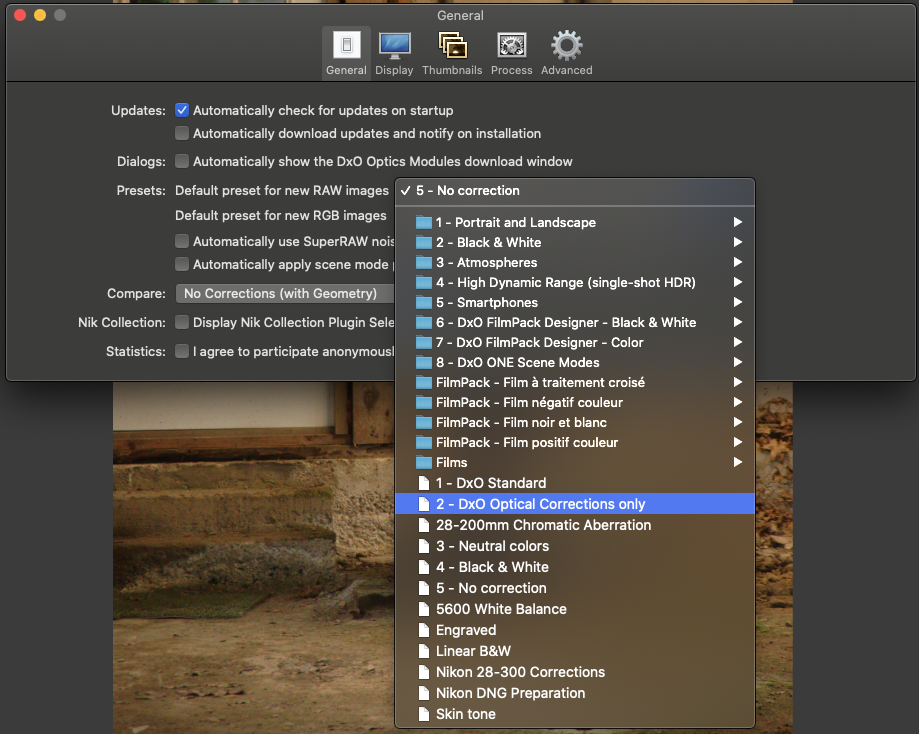
Since there is a DxO module for your camera/lens, I would suggest you set the default to 2 - DxO Optical Corrections only for RAW and 5 - No correction for RGB. Standard does all sorts of “automagic” stuff, some of which you more than likely don’t want.
That’s slightly frustrating at times - it doesn’t, unless it gets a mention in the history.
Don’t forget, a preset isn’t anything magical, it is simply a bunch of adjustments that are all applied at the same time. If you want to see what has been done to an image, simply click on the little button on the top right of the right-hand palette…
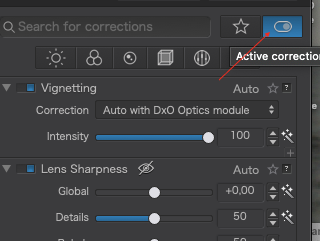
… that will show only the adjustments that have been used. Click again to go back to the full palette.
Ombre(s) simply means shadow(s)
Remember what I said about correct exposure?
- manual mode
- set the exposure compensation to +2
- spot meter the brightest part of the scene
That way, the brightest highlight will not get over-exposed but it will be brighter than the 18% grey the meter wants to make it
Don’t wait for too much contrast. Even with the ETTR method, there are limits to what your sensor can cope with.
Be aware that, as the dew falls during the evening, the lens can fog over.
Micro 4/3. It’s a sort of compact camera sensor. Yours is a full frame one
M43 sensor is about 1/4 of a FF sensor in mm2. See this link
Crop 2 sensor so my 15mm f1.7 can be seen as 30mm f2.8 in FF ( i think, not sure about the aperture)
Because of the distance i think. Not much light is crossing over at 3miles.
I use an app on my phone which helps me show and calculate, DoF positions, shuttertimes and such.
Photographers companion. So you can workout your setup in that with numbers and graphics.
If you have touchscreen lcd you could use function :focus and exposure on tapped with your finger on point" to use @johanna’s methode.
Enjoy your evening.
When I export a raw file with edits to a DNG in PhotoLab 4 the resulting DNG file can not be reset to look like the original raw file.
Mark
Perhaps this image is not a good example to post here.
Mark
In this case, the Leica produces DNG files for its RAW format (as do Pentax cameras). What Mike is posting is the original file, not an exported copy.
Thanks. I saw that after I posted.
Mark
I thought I knew what I was doing - that was my first mistake.
I have now gone to Preferences, and set RAW to “#2 - Optical Corrections Only”. I also set RGB to “No correction”.
I think it is very un-wise to have that “RESET” button up on top. Yes, I fell for it. They should change that label to something that won’t trick people like me to think it really did RESET the image. They could argue it is fine, the way it is, but as far as I’m concerned, it is misleading. At a minimum, they could configure it to open a window explaining what it does, if I hover my cursor over it. The actual wording could be what you wrote "takes the image back to the preset that was selected in the preferences."
Maybe I’m losing my mind, or maybe I have this mixed up with something else, but I’m remembering that there were to choices for the "DxO Standard Preset, a basic version, and a more complicated version with more settings. Now I can only find DxO Standard. Maybe my memory is worse than I already think it is?
The very first entry in the History box at the left should be "Image imported using the XYZ Preset. Apparently there is no way for me to find out what I used? You wrote “That’s slightly frustrating at times”. I agree. Very frustrating. DxO should fix this, so newcomers like me can see the entire “history”.
That little button you mentioned at the top right - first when you hover over it, a better message should be displayed than simply “Active Corrections”. Maybe it could say “these are all the corrections currently applied to your image”.
I remember you wrote that I should go to the metered exposure, and give it two more stops of exposure, and I did that. I forgot that you wanted me to use spot metering on the brightest part of the image. My fault.
Thanks. I’m getting somewhere with all this, but I’m far from being “competent” with PL4.
Oh, and from now on I will copy the DNG image to post here before I ever open PL4. Then it will really be a “from the camera” DNG image.
Actually, it always was and always will be a “from the camera” DNG image. The only thing that changes that is if you open it in PhotoLab when a .dop file with the same name is in the same folder 
You’re correct, not a lot of light reaching me. I did download the pro version of Photographer’s Companion, but naturally there was no mention of Leica or my Nikon Df. So I set it to my Nikon D750 with my 50mm f/1.8 lens. Now I’ve got to figure out how the app works!
My “learning” time today will be spent on a DxO Webinar, playing at 1pm Eastern Standard Time: Tips from a Pro: Fixing Low-Light Landscape Photos with DxO PhotoLab 4 & Nik Collection".
I was under the impression that the DNG file remains untouched, and any/all modifications go into the sidecar file. I guess I was wrong. Is there any way to re-set the DNG file to the state it was in, when it first was imported?
Thanks - Good to know this. PhotoMechanic Plus can ingest images to two locations. I think I better start using that, and create a “backup” area, in case I want access to the original file. I’ll put that on a separate drive.
Presets are not in a dop file. So if you want to “view” the original raw file you must use “no corrections” as preset.
George
Wow! that sounds complicated
You were under the right impression. The DNG file is sacrosanct. It never gets touched, it is only the adjustments, saved in the .dop file that make it look different.
Try this
- take a virgin DNG file
- look at it in Preview or any other software.
- edit it in PhotoLab
- close PhotoLab
- look at it again in Preview or any other software
There will be absolutely no change. You can look at the “modified” date stamp on the file and find it is exactly the same as the “created” date stamp.
This is a total waste of time and effort. DxO themselves say that the whole process is non-destructive and they are right.
I have edited the heck out of this file over the past couple of years :
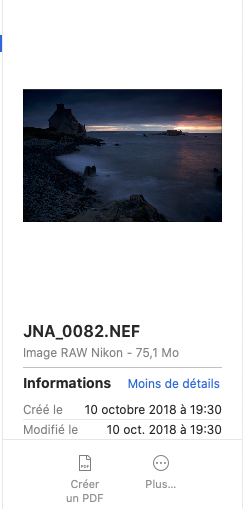
Notice that the two date stamps are identical - it has never been touched.
That’s what I thought, but what did George mean when he posted "Presets are not in a dop file. So if you want to “view” the original raw file you must use “no corrections” as preset.
If the presets are not saved in the DNG file, and if they’re not saved in the DOP file, where are they?
I suspect I’m mis-understanding what George meant. But surely, the presets are saved someplace??
You still have 45 minutes to sign up, if you wish to:
I believe what he is saying is that you won’t find the “name” of the preset in the .dop file. You will only find the adjustments that make up the preset. Like a said a while ago, a preset is just a collection of adjustments, all done at the same time.
Set preferences to b/w. Open a new image, it will be b/w. Close pl and search for that dop file. The preferences are stored in the database.
Don’t forget to set the preferences back again.
Open these images again, still b/w.
George
What I indicated in my earlier post appears to be the case for DNG files created during export from a cameras native raw files edited in Photolab 4. I cannot speak to what happens if the camera itself creates DNG files.
When I edit my Canon camera’s .cr2 raw files in PL4 and export them as DNG files with all corrections, I cannot reset the resulting DNG file to look like the original unedited raw file.
Mark
That makes more sense than what I thought he meant.
So, now I’ve got a dng image stored in PL4, which never gets modified, and a DOP file which keeps track of everything that was ever done to the DNG. That’s what I expected, before I got confused. So, speaking of confusion, suppose I create a few “virtual copies” of a single DNG image. Do all of these get saved in a single DOP file?
Finally, is the DOP file readable by humans, or is it all computer code? If I ever wanted to, could I print it/them out, and have a printed record of everything I had done to the file?