Hi everyone. I’m Tony from Pathfinder Prototyping, and I’m the developer of DxO PhotoLab Complete, a Stream Deck plugin for PhotoLab. I’ve answered questions about it in a few feature request threads, so I wanted one place where people can find it and ask about it.
What it does:
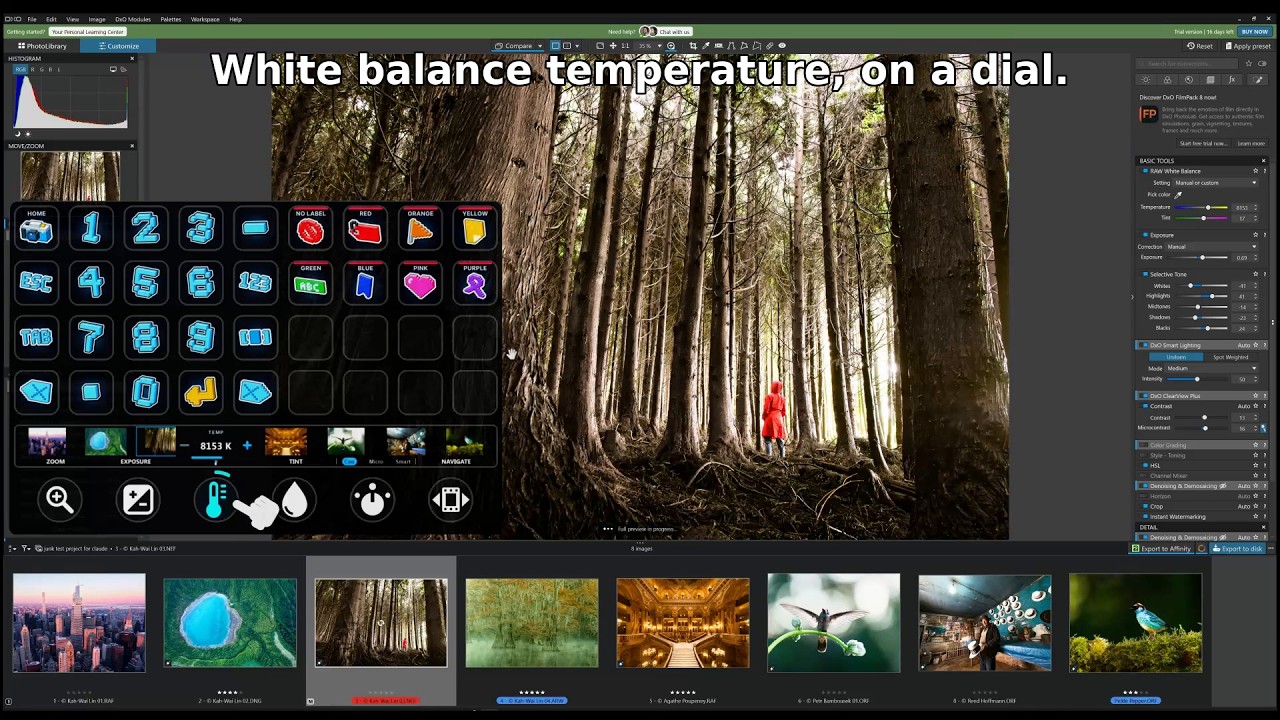
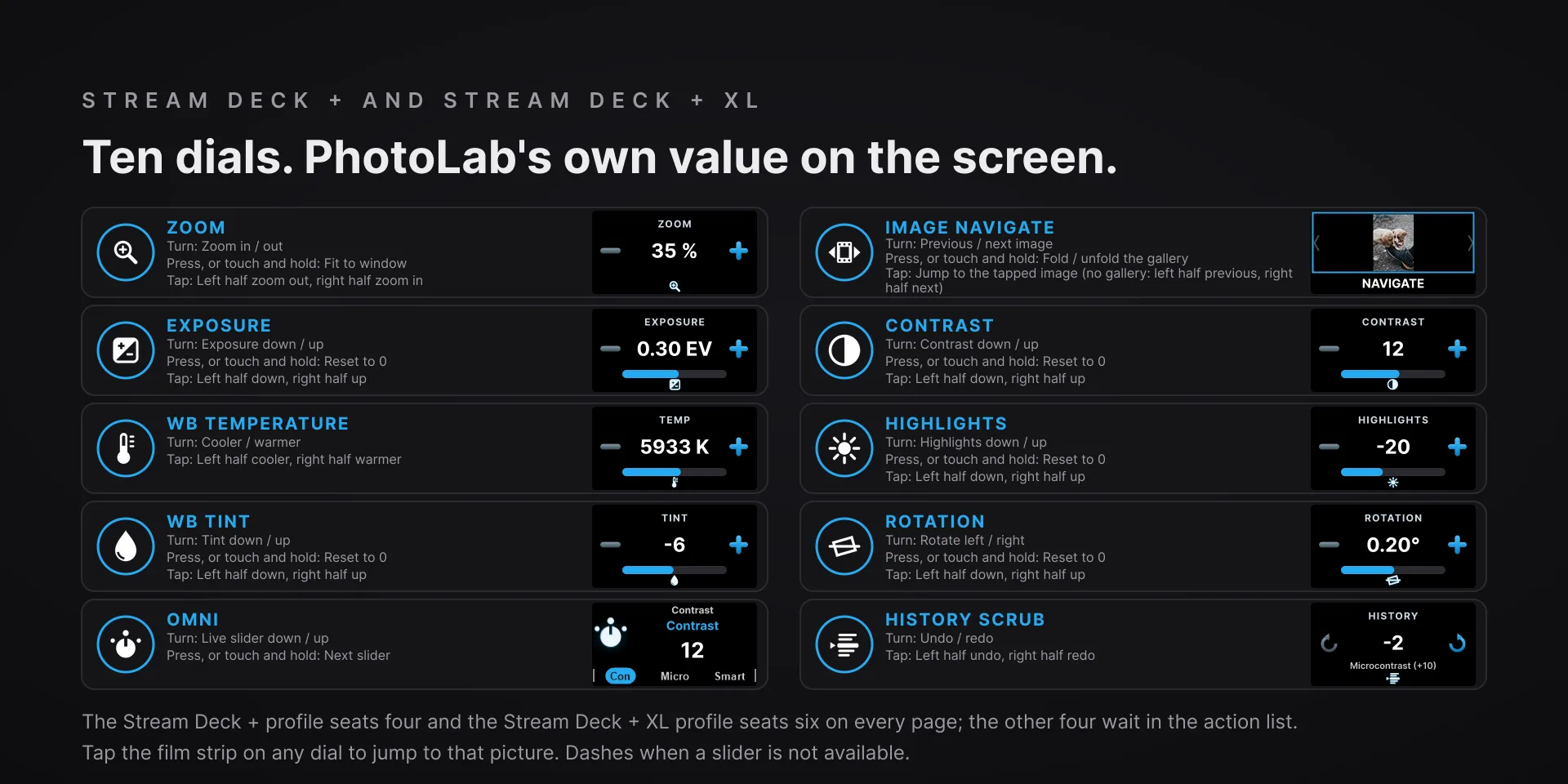
On a Stream Deck +, the dials turn Exposure, Temperature, Tint, Contrast, Highlights and Horizon directly, and the live value shows on the dial’s screen. Press a dial to reset it.
One dial can hold more sliders that you choose.
The dials also work on mask sliders in Local Adjustments.
You can scroll the film strip and step through History with a dial.
Keys light up from what PhotoLab is doing, like clipping warnings.
More than a hundred PhotoLab shortcuts on keys.
It runs on Windows and Mac with English-language PhotoLab, tested on 10.1.
I’m not a photographer myself. I built this because PhotoLab users kept asking for a faster way to move sliders, and photographers who use it every day have helped me test it and shape it. Some customers have told me it’s changed how they edit, which means a lot. The goal is simple: save you time at the desk, so you can spend more of it on whatever you love doing.
I plan to stick around here, answer questions and keep developing it. If something doesn’t fit the way you edit, or there’s a slider you want on a dial, post it here and I’ll take a look. You can find it by searching DxO PhotoLab Complete on the Elgato Marketplace.
Hi Keith, yes, it works on the Stream Deck + XL. It installs its own + XL profile, so you get the keys and the dials, with PhotoLab’s live values showing on the touch strip. I use a + XL myself while I build it.
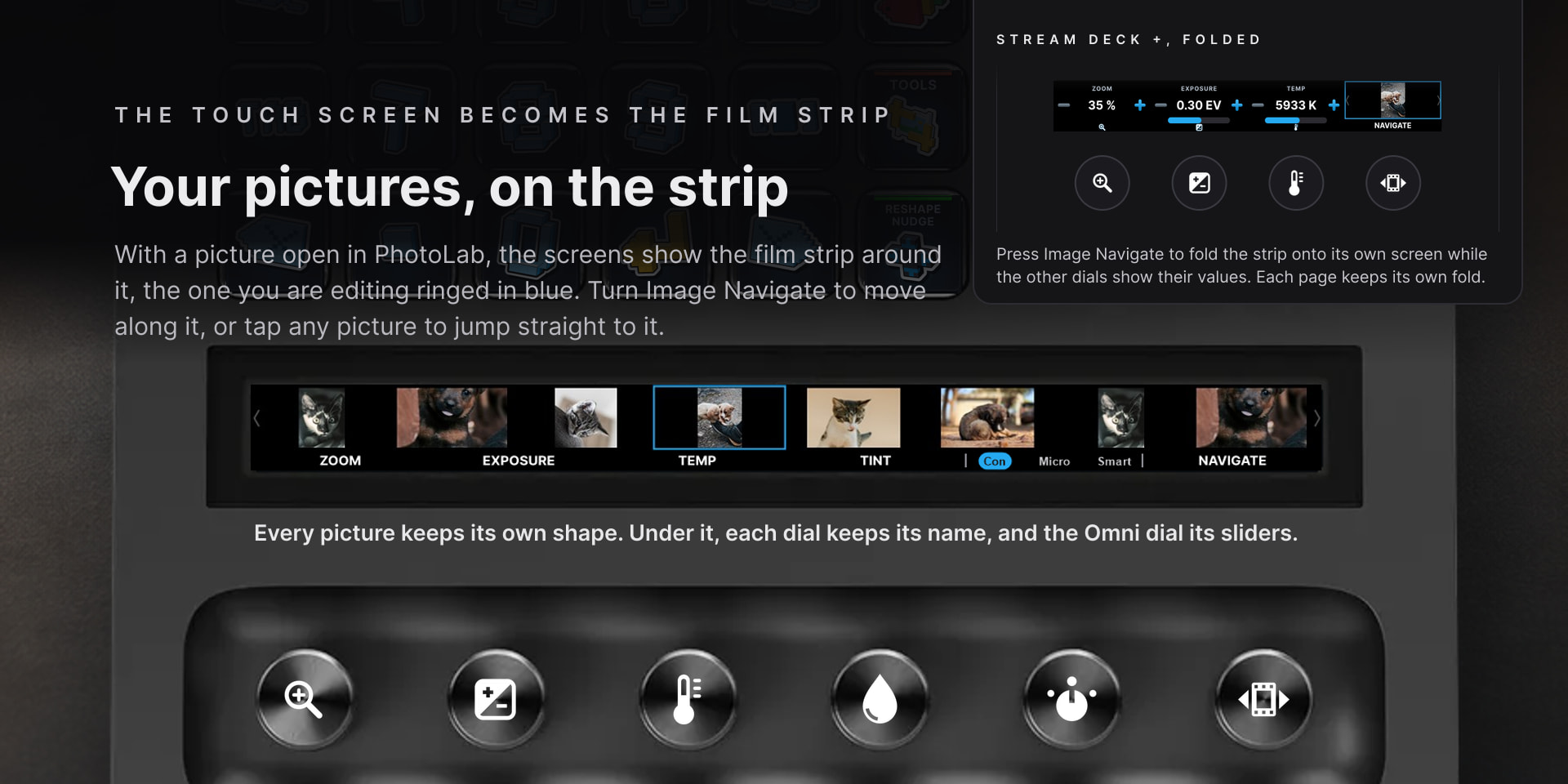
On the + XL the touch strip also turns into your film strip, so you can see your pictures and move through them with a dial or a tap. Here’s a short demo:
One thing to know: I’ve built and tested it on PhotoLab 10.1 and 10.2, and I see PL9 in your signature, so I can’t promise everything works on 9. If you give it a try there, let me know how it goes.
Hi Ian, good question. Neither one has dials, so you get the keys side of it.
On the 15-key Stream Deck, the profile opens on a Home page with a key for each of the 13 categories, and each category key opens a page of those shortcuts. That covers all 111 commands, plus a number pad page. The keys that light up from PhotoLab, like the clipping warnings, work there too.
On the Neo, the profile puts 15 of the most-used commands across two pages: previous and next image, compare, undo and redo, pick and reject, export, the two clipping warnings, crop, copy and paste edits, and zoom to 100% and fit. The touch points flip between the pages. I don’t own a Neo myself, so if anything looks off on it, let me know.
On either one you can also drag any of the 111 commands onto whichever key you like in the Stream Deck app. The slider dials and the film strip on the touch screen need a Stream Deck + or + XL.
The direct copy is already on 4.0, with the HSL colour dials and the mask tools opening straight away, while the Marketplace catches up. Your key covers three activations, so a reinstall or a second computer is fine. If you have any questions about checkout or which Stream Deck to get, just ask here.
I bought the original StreamDeck Plus for Danvinci Resolve. I then bought the StreamDeck Plus XL and it is vastly superior because you can have so many more functions on a single page due to the large number of buttons available.
@hejmickey Keith covered it well. The short version: you need a Stream Deck + or + XL for the dials, since the sliders live there. The + XL gives you more keys per page, so less paging. Keys alone work on any Stream Deck, but you’d lose the main point of the plugin.
@JoPoV Fair, I’m new here because I came to support what I built. Happy to answer anyone’s questions.
I’ve used external controllers for a long time starting with Midi controllers like the Arturia Beatstep with 17 dials and 16 (32 with shift) buttons. I use Capture One and they provide keyboard shortcuts for virtually everything. How useful the dials are largely depend on the programs support re keyboard shortcuts or an API.
Unfortunately with DXO they are not that generous with keyboard shortcuts. C1’s Speed Edit where you hold down a key and scroll the mouse wheel to adjust a slider works very well and I wonder if you can emulate this? Is that what the Omni dial does? Out of interest, as there are no keyboard shortcuts to move the sliders can I ask how you achieve this? Holding down a button and scrolling the mouse would greatly enhance functionality to those of us with no dials available on a Stream Deck and be particularly suitable for the Stream Deck XL.
Some feedback if it’s useful. My experience with DXO has been that sliders in the Local Adjustment tab are used the most, simply because the other sliders are Global and are set at the start of image editing and then everything else is done locally. That may be a personal observation as I am old school and it is the way we worked in the darkroom. Once you had established your base exposure it was all down to waving bits of cardboard under the enlarger lens. Support for the Local Adjustment tab (Whites/Highlights/Midtones/Shadows/Blacks) would be one of my priorities.
Overall I actually found the buttons to be the most useful (I didn’t really need dials with C1) as buttons avoided a lot of mousing around the screen eg turning on/off the clipping indicators requires mousing to the top left of the screen and hitting a small target.
These are my personal ramblings but it might be helpful to you and the community if people indicated what functions they thought would most benefit from support. The only caveat is that many people aren’t aware/utilise keyboard shortcuts as without an external controller with labelled buttons it’s simply too much work to remember the key strokes required. For example for me, DXO is a parametric editor, not a pixel editor, and therefore a history panel is redundant. You go back in history and lose everything you did after that point. The whole idea of a parametric editor is that if the if a setting is too high or low you simply adjust that setting. Therefore eg a dial dedicated to history scrub is just wasted. Repeat personal, but that’s why eliciting community feedback could be beneficial. I’m all for hardware support with editors , really helps with/prevent RSI and you get to use your left (or right) hand in the editing.
If more interest is expressed on the forum DXO might just do their bit to help improve functionality.



 Support for the Local Adjustment tab (Whites/Highlights/Midtones/Shadows/Blacks) would be one of my priorities.
